


 Chuyển đổi video Ultimate
 Trình ghi màn hình
 Sửa chữa video
 Tải xuống an toàn
Phương pháp không thách thức về cách xóa Logo iSkysoft khỏi video
iSkysoft là một ứng dụng tuyệt vời với nhiều tính năng hữu ích, giúp nó nổi bật so với các ứng dụng khác. Đây là một ứng dụng đơn giản cho phép bạn chuyển đổi định dạng video sang định dạng khác và thực hiện một số chỉnh sửa video cơ bản. Tuy nhiên, điểm đáng tiếc nhất của phần mềm này là sau khi sử dụng, bạn sẽ có một hình mờ iSkysoft rất lớn trên video. Việc có một hình mờ/logo lớn trên video khiến trải nghiệm xem không hề dễ chịu. May mắn thay, có những ứng dụng đáng tin cậy mà bạn có thể dùng để xóa các đối tượng gây khó chịu như logo/hình mờ iSkysoft. Nếu bạn muốn biết những cách tốt nhất để xóa logo iSkysoft khỏi video của mình, bạn nhất định phải đọc bài viết này.

Phần 1: Xóa Logo iSkysoft khỏi Video trên Desktop
Logo iSkysoft trên màn hình thực sự rất khó chịu, đặc biệt là khi bạn đang xem những video yêu thích. Nhưng bạn không cần phải lo lắng nữa. Bạn có thể loại bỏ logo đó bằng Video Converter Ultimate. Phần mềm đáng tin cậy này có thể giúp bạn xóa logo iSkysoft khỏi video theo hai cách đơn giản: công cụ Video Watermark Remover (Xóa hình mờ video) và công cụ Video Cropper (Cắt video). Với những công cụ này, bạn có thể dễ dàng xóa logo iSkysoft khỏi video. Nếu logo iSkysoft nằm ở góc video, khuyến nghị bạn dùng công cụ Video Cropper. Còn nếu logo được đặt ở giữa video, bạn có thể dùng công cụ Video Watermark Remover. Bằng cách này, bạn có thể xem các bộ phim hoặc video yêu thích mà không còn bị logo làm phiền.
Hơn nữa, bên cạnh việc xóa hình mờ khỏi video của bạn, Video Converter Ultimate còn có nhiều tính năng hơn. Nó có trình tăng cường video, hợp nhất video, trình cắt xén, tông đơ, công cụ quay vòng, trình chuyển đổi, v.v. Ngoài ra, một trong những chức năng chính của ứng dụng này là chuyển đổi các định dạng tệp video khác nhau. Người dùng không chuyên nghiệp cũng có thể sử dụng ứng dụng này vì nó có giao diện đơn giản. Nếu bạn muốn tìm hiểu cách xóa logo iSkysoft khỏi video của mình, chúng tôi sẽ chỉ cho bạn hai cách dễ dàng mà ứng dụng này cung cấp.
Sử dụng Video Watermark Remover
Bước 1: Trước tiên, bạn phải tải Video Converter Ultimate về máy tính để sử dụng phần mềm tuyệt vời này. Sau khi tải xong, hãy làm theo quy trình cài đặt và khởi chạy ứng dụng.
Tải xuống miễn phí cho Windows 7 trở lên. Tải xuống an toàn.
Tải xuống miễn phí cho MacOS 10.7 trở lên. Tải xuống an toàn.
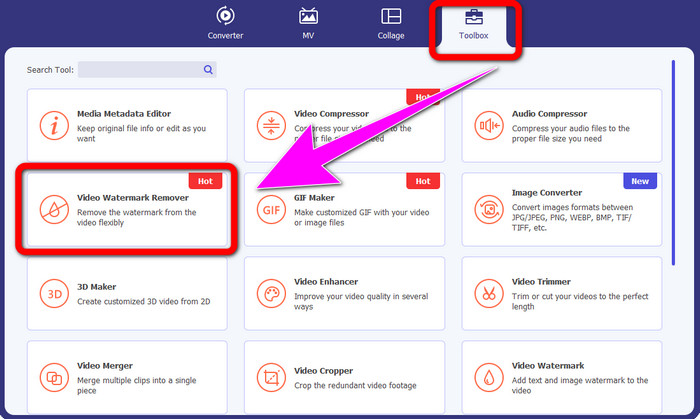
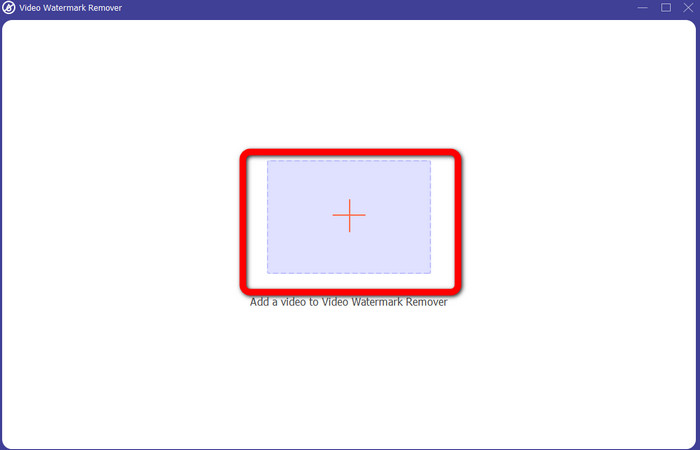
Bước 2: Khi đã mở phần mềm, hãy chuyển đến bảng Toolbox (Hộp công cụ) và chọn công cụ Video Watermark Remover. Sẽ có một giao diện khác xuất hiện trên màn hình của bạn.
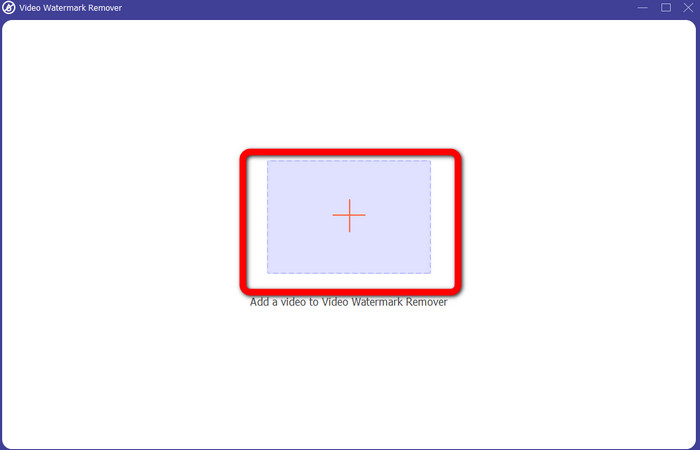
Bước 3: Khi thấy giao diện mới, hãy nhấp vào biểu tượng dấu cộng và thêm video có logo iSkysoft mà bạn muốn xóa.
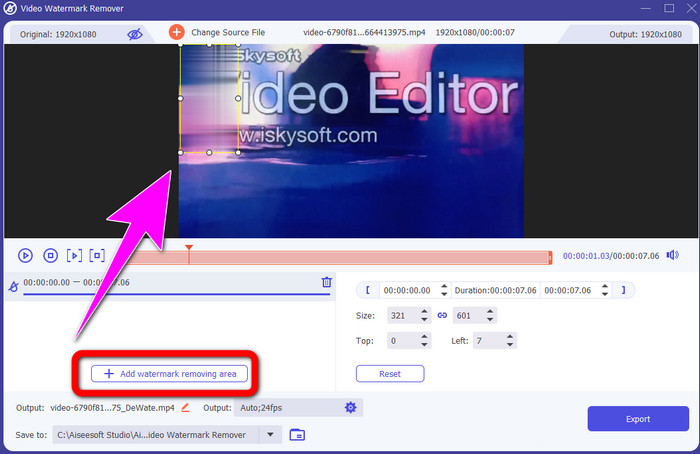
Bước 4: Tiếp theo, nhấn nút Add Watermark Removing Area (Thêm vùng xóa hình mờ). Di chuyển khung trên video và che lên logo iSkysoft.
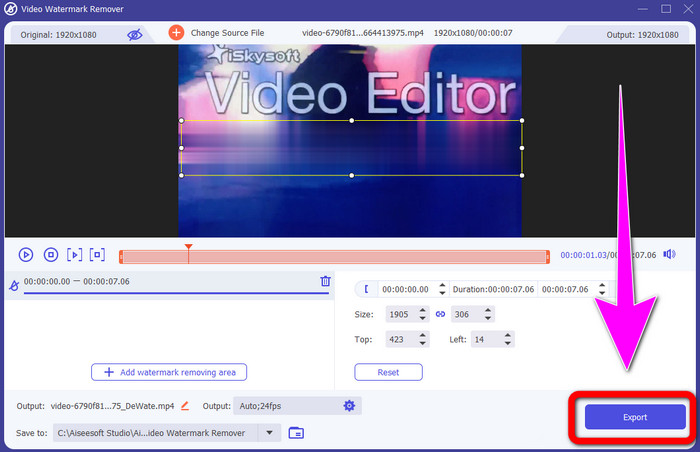
Bước 5: Cuối cùng, nhấp nút Export để lưu video hoàn chỉnh.
Sử dụng Trình cắt video
Trong phần này, chúng tôi sẽ hướng dẫn bạn cách xóa logo iSkysoft khỏi video của bạn bằng công cụ Video Cropper.
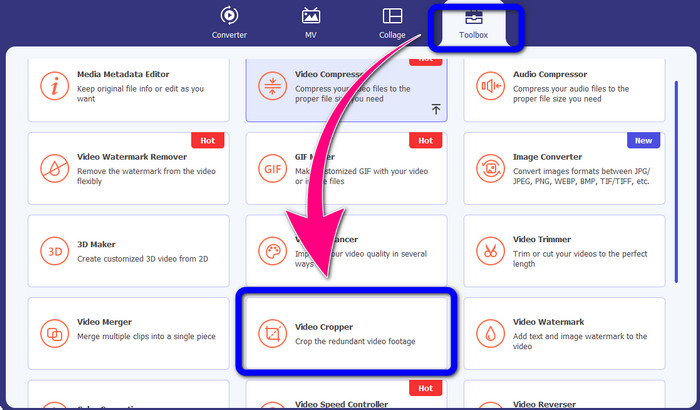
Bước 1: Chạy ứng dụng trên máy tính. Trong bảng Toolbox, bạn cần nhấp vào công cụ Video Cropper. Giống như công cụ phía trên, sẽ có một giao diện khác xuất hiện trên màn hình của bạn.
Bước 2: Nhấp nút có biểu tượng Dấu cộng để nhập video có logo iSkysoft.
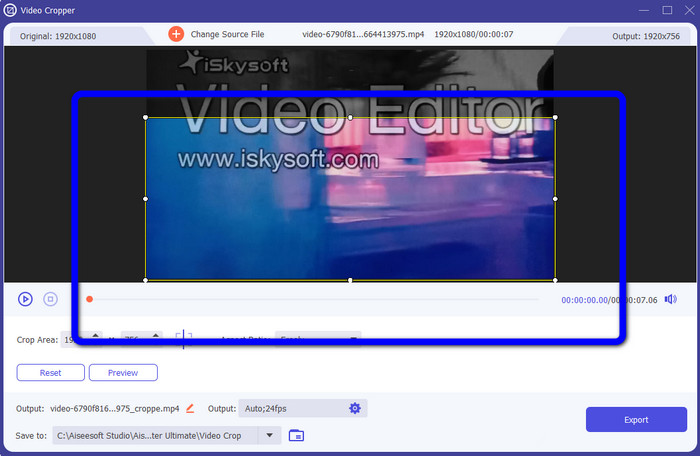
Bước 3: Ở bước này, bạn có thể cắt video để xóa logo iSkysoft khỏi video. Hãy dùng chuột để kéo các cạnh khung video.
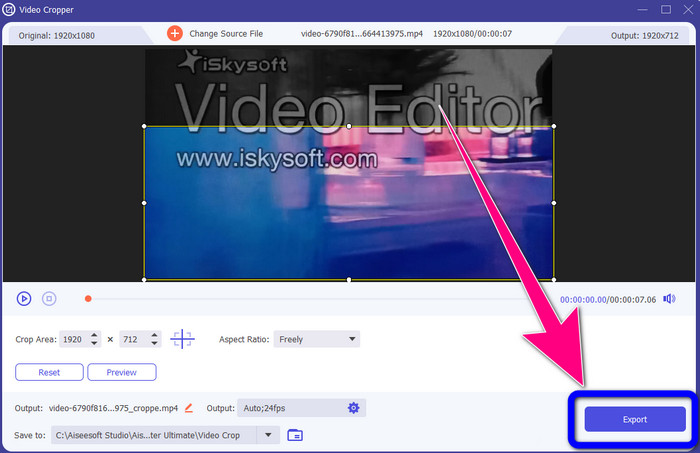
Bước 4: Ở bước cuối cùng, nhấp nút Export và lưu kết quả ra máy tính.
Phần 2: Cách Xóa Logo iSkysoft khỏi Video Trực tuyến
Sử dụng HitPaw
Bạn cũng có thể xóa logo iSkysoft trực tuyến. Một trong những công cụ tốt nhất bạn có thể dùng là HitPaw. Ứng dụng online này có thể xóa logo khỏi video một cách dễ dàng. Bạn có thể dùng cả trên máy tính lẫn trực tuyến, rất tiện lợi cho mọi người. Ngoài ra, HitPaw an toàn khi sử dụng. Nó đảm bảo video được chỉnh sửa và xem bởi chính bạn. Thêm nữa, bạn không phải lo lắng về giới hạn của phần mềm này: không bị giới hạn trong việc xóa logo khỏi video. Bạn cũng không cần mua ứng dụng vì nó miễn phí. Tuy nhiên, nếu bạn xóa logo hoặc bất kỳ
các yếu tố không cần thiết từ video của bạn, bạn phải đợi lâu hơn một chút. Ứng dụng này có quy trình gỡ bỏ chậm, gây tốn thời gian cho người dùng. Ngoài ra, nó phụ thuộc vào kết nối internet của bạn. Nó sẽ hoạt động tốt nếu bạn có kết nối nhanh. Tuy nhiên, nếu bạn có kết nối chậm, thì sẽ có một số độ trễ. Thực hiện theo các bước đơn giản dưới đây để loại bỏ logo iSkysoft khỏi video của bạn.
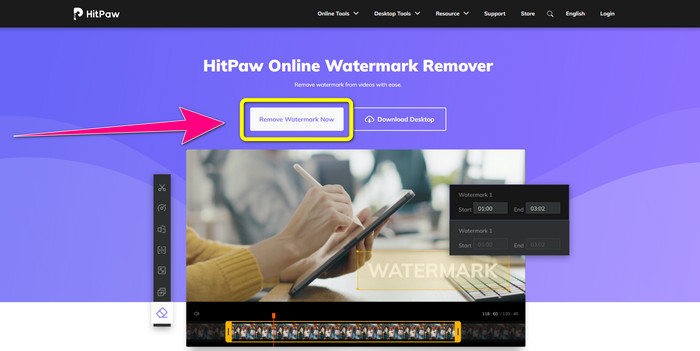
Bước 1: Truy cập trang web HitPaw. Nhấp nút Remove Watermark Now - Choose File để chèn video có logo iSkysoft mà bạn muốn loại bỏ.
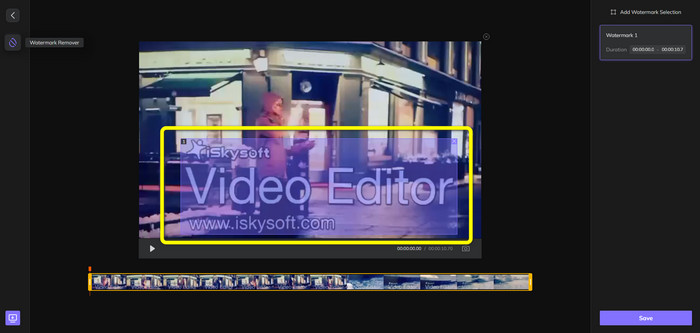
Bước 2: Sau khi đã thêm tệp video, một khung màu xanh sẽ xuất hiện trên màn hình. Hãy dùng khung này để che logo iSkysoft. Bạn có thể thay đổi kích thước khung.
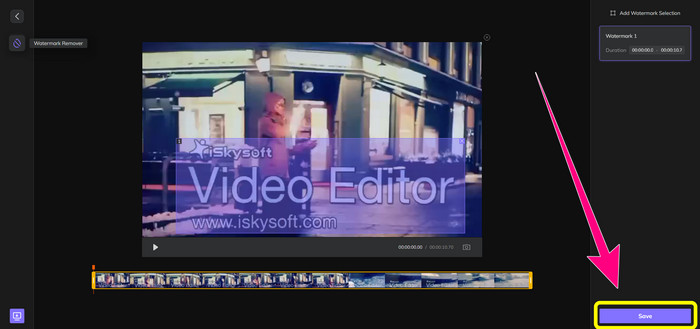
Bước 3: Khi đã che xong logo iSkysoft trên video, hãy nhấp nút Save. Chờ quá trình xóa hoàn tất rồi lưu video.
Sử dụng Video Watermark Remover Trực tuyến
Một công cụ trực tuyến khác mà bạn có thể dùng là Video Watermark Remover Online. Với ứng dụng này, bạn có thể xóa logo iSkysoft khỏi video. Đây cũng là phần mềm dễ sử dụng, rất phù hợp với người không chuyên. Bạn cũng có thể xóa mọi chi tiết gây khó chịu khỏi video mà không làm giảm chất lượng. Tuy nhiên, khi dùng bản miễn phí, việc xóa logo bị giới hạn. Bạn chỉ có thể xóa logo hoặc hình mờ khỏi tối đa 5 video. Bạn phải mua gói đăng ký nếu muốn xử lý nhiều video hơn bằng Video Watermark Remover Online. Ngoài ra, bạn không thể lưu kết quả sang định dạng khác, chỉ có thể lưu cùng định dạng gốc, điều này không được hay cho lắm. Cuối cùng, tốc độ xử lý tệp khá chậm. Hãy làm theo các hướng dẫn đơn giản dưới đây để xóa logo iSkysoft khỏi video.
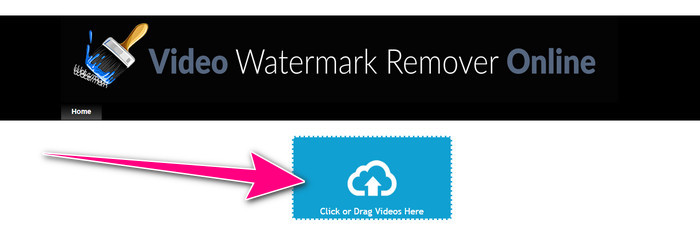
Bước 1: Truy cập trang web Video Watermark Remover Online. Chọn nút Click or Drag Videos Here để nhập video có logo iSkysoft mà bạn muốn xóa.
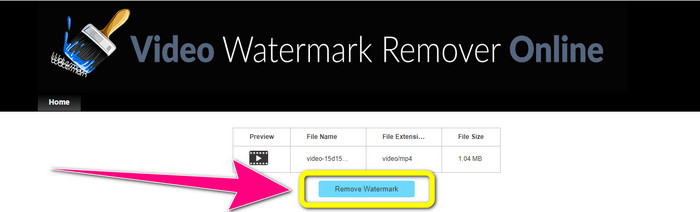
Bước 2: Tiếp theo, nhấp nút Remove Watermark và chờ quá trình xóa hoàn tất.
Có liên quan:
Cách nhanh nhất để xóa logo khỏi video trong Adobe Premiere Pro
Cách xóa logo khỏi video bằng Windows Movie Maker
Phần 3: Các câu hỏi thường gặp về Xóa Logo iSkysoft
Bạn có thể xóa logo khỏi ảnh không?
Có, bạn có thể dùng FVC Free Watermark Remover để xóa logo khỏi hình ảnh một cách dễ dàng và nhanh chóng.
Là loại bỏ watermark bất hợp pháp?
Theo Đạo luật Bản quyền Hoa Kỳ, mục 1202, việc xóa hình mờ mà không có sự cho phép của chủ sở hữu là bất hợp pháp.
Làm cách nào để xóa logo miễn phí?
Bạn có thể sử dụng bản dùng thử miễn phí của Video Converter Ultimate để xóa miễn phí logo khỏi video của mình.
Phần kết luận
Bài viết này đã giới thiệu những phương pháp hiệu quả để xóa logo iSkysoft khỏi video bằng các công cụ trên máy tính và trực tuyến. Nhưng nếu bạn muốn tìm một trình xóa logo xuất sắc để sử dụng lâu dài, bạn có thể tải Video Converter Ultimate. Ứng dụng này mang lại tốc độ xóa nhanh và dễ tiếp cận với mọi người dùng.
-
 8 công cụ xóa hình mờ video nổi bật trực tuyến và ngoại tuyến
 Nếu bạn đang tìm kiếm phần mềm xóa hình mờ video miễn phí tốt nhất mà bạn có thể sử dụng trên điện thoại Windows, Mac, iPhone và Android, thì bài viết này là dành cho bạn
-
 Các phương pháp hay nhất về cách xóa hình mờ có thể bit khỏi video
 Bài viết này sẽ cho bạn thấy một công cụ xóa hình mờ có thể cắn được đáng tin cậy và tuyệt vời nhất. Những ứng dụng tuyệt vời này sẽ giúp bạn giải quyết vấn đề này
-
 Các thủ tục dễ học để xóa biểu trưng khỏi video
 Bạn đang tìm kiếm công cụ xóa logo video tốt nhất và dễ dàng? Sau đó, bài viết này là tốt cho bạn. Tận dụng cơ hội để tìm hiểu về cách xóa biểu trưng khỏi video.
