


 Chuyển đổi video Ultimate
 Trình ghi màn hình
 Sửa chữa video
Trong bài đánh giá chi tiết về 5 ứng dụng bộ khuếch đại âm thanh có thể truy cập hàng đầu
Tất cả mọi người trong cả vũ trụ đều yêu âm nhạc, dù đó là nhạc pop, metal, rock, jazz, v.v. Tuy nhiên, không phải tất cả loa đều mang lại chất lượng âm thanh đủ tuyệt vời để khiến ta nổi da gà. Thêm nữa, mua các bộ khuếch đại âm thanh có thể tốn hơn cả trăm đô la, hoặc tệ hơn là hơn một nghìn đô. Như vậy thì quá đắt phải không? Nhưng chúng ta có thể tránh tốn quá nhiều tiền nếu thử dùng những bộ khuếch đại tốt nhất hiện có trên mọi nền tảng. Và bây giờ, nếu bạn muốn dùng một ứng dụng khuếch đại âm thanh thì hãy xem danh sách dưới đây, những lựa chọn có giá thấp hơn nhiều so với mức nói trên nhưng vẫn mang lại khả năng khuếch đại tuyệt vời.

Phần 1. Bộ khuếch đại âm thanh hiện tượng khả dụng trên PC & Mac
Nếu bạn muốn có hiệu ứng âm thanh 8D hoặc 16D mà không phải chi nhiều tiền cho thiết bị khuếch đại âm thanh, thì hãy thử dùng Video Converter Ultimate. Khác với các thiết bị khuếch đại, với công cụ này bạn sẽ tốn ít chi phí hơn, không cần lắp đặt rườm rà hay phải đọc một cuốn hướng dẫn dày để biết cách sử dụng. Bên cạnh đó, phần mềm dành cho máy tính này còn rất mạnh trong việc cải thiện video, âm thanh, GIF và nhiều định dạng khác. Mặc dù đây là công cụ trả phí, nhưng vẫn rất đáng dùng vì dễ thao tác, lại cung cấp các tính năng nâng cao mà bạn có thể áp dụng dễ dàng cho video và âm thanh. Vậy nên, nếu bạn muốn biết cách dùng phần mềm này thì nhất định phải làm theo các bước hướng dẫn dưới đây.
Các bước sử dụng chức năng Tăng Âm Lượng (Volume Booster) của Video Converter Ultimate:
Bước 1. Trước tiên, hãy tải phần mềm về ổ đĩa trên PC hoặc Mac. Sau đó cài đặt lên máy tính và thực hiện thiết lập cơ bản một cách thủ công (rất đơn giản).
Tải xuống miễn phí cho Windows 7 trở lên. Tải xuống an toàn.
Tải xuống miễn phí cho MacOS 10.7 trở lên. Tải xuống an toàn.
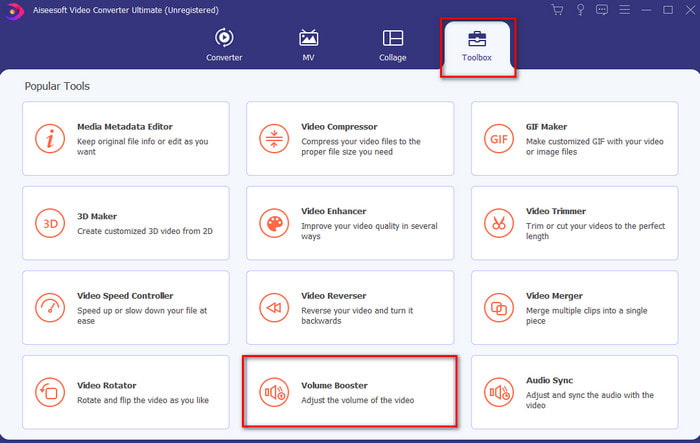
Bước 2. Trong mục Toolbox (Hộp công cụ), nhấp vào Volume Booster (Tăng âm lượng).
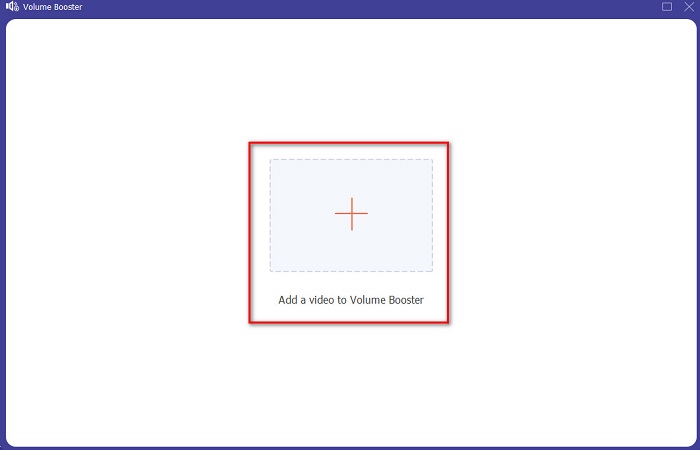
Bước 3. Nhấp nút dấu + để chọn tệp mà bạn muốn khuếch đại âm thanh. Sau đó nhấn Open (Mở) để tiếp tục.
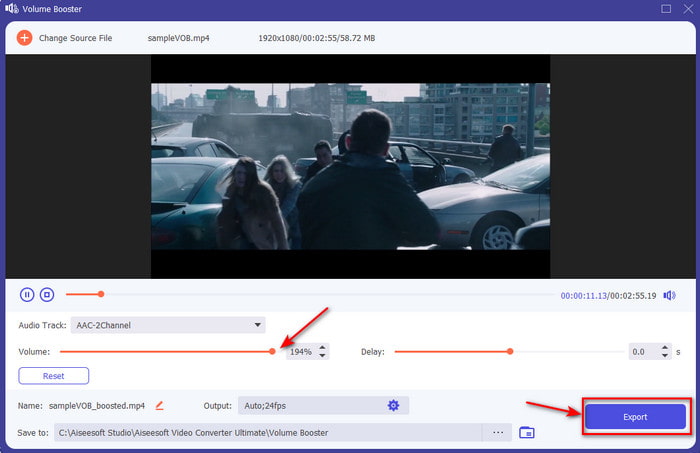
Bước 4. Trong giao diện hiện ra, bạn có thể kéo thanh trượt âm lượng để làm cho âm thanh to và rõ hơn. Khi đã điều chỉnh âm thanh xong, hãy nhấp Export (Xuất).
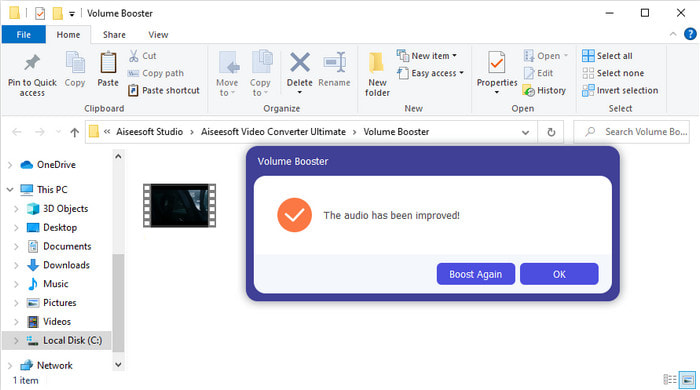
Bước 5. Đợi vài giây để quá trình hoàn tất, khi xong sẽ có cửa sổ trình quản lý tệp hiện lên trên màn hình với tệp mà bạn đã khuếch đại. Nhấp vào tệp để nghe thử.
Ưu điểm
- Phần mềm này rất dễ sử dụng và có thể làm cho âm thanh của bạn trở nên đặc sắc.
- Hiệu suất của phần mềm được đánh giá rất cao bởi khách hàng của nó.
- Nó có sẵn và dễ dàng tải xuống trên PC và Mac.
Nhược điểm
- Phần mềm này không hỗ trợ thiết bị di động.
- Công cụ này được trả phí nhưng nó không phải là quá đắt so với các công cụ máy tính để bàn khác.
Có liên quan:
Cách khắc phục lỗi trễ tiếng trong VLC
Phần 2. 4 của Ứng dụng Bộ khuếch đại âm thanh tốt nhất hiện có trên điện thoại di động iOS và Android
1. Tăng âm lượng - Bộ khuếch đại âm thanh 4+ (iOS)
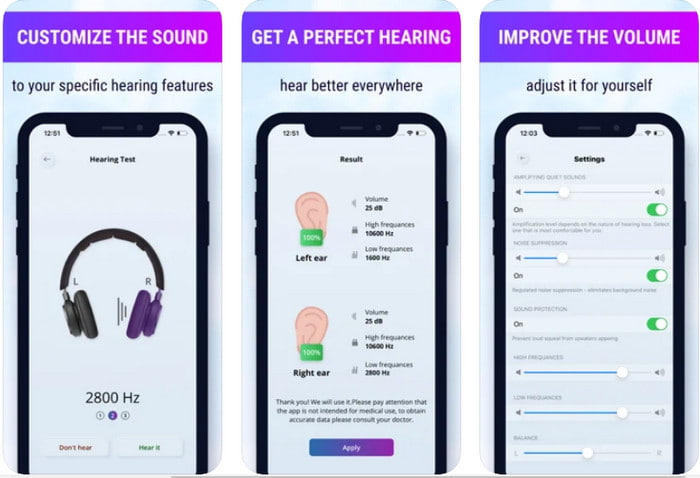
Người dùng iOS có thể dễ dàng tải Volume Boost- Sound Amplifier 4+ miễn phí. Ứng dụng này có thể khuếch đại âm thanh một cách dễ dàng, gần như không gặp rắc rối nhờ chế độ tự động điều chỉnh, nhưng bạn cũng có thể can thiệp thủ công. Hơn nữa, ứng dụng này dùng rất tốt như một bộ khuếch đại âm thanh, tuy nhiên nó không hoạt động với loa Bluetooth và tai nghe không dây (air buds hoặc AirPods). Ngoài ra, bạn có thể sẽ gặp khá nhiều lỗi văng ứng dụng và quảng cáo khó tránh khi mở app. Mặc dù ứng dụng được tải miễn phí, nhưng bạn cần mua trong ứng dụng (in-app purchase) nếu muốn loại bỏ quảng cáo và mở khóa các chức năng khác.
Ưu điểm
- Tải xuống miễn phí trên mọi thiết bị iOS.
- Dễ dàng khuếch đại âm thanh của loa lên đến 30db.
- Giao diện và thiết lập trực quan.
Nhược điểm
- Ứng dụng này vẫn gặp rất nhiều sự cố, treo máy và lỗi.
- Rất nhiều quảng cáo cần tránh.
2. Extra Volume Booster - loa âm thanh lớn (Android)
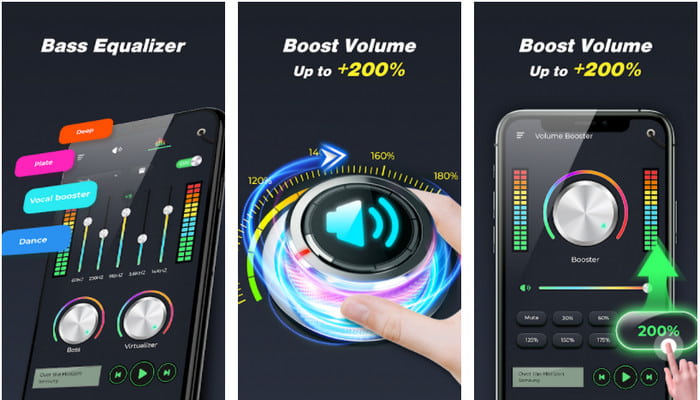
Nếu người dùng iOS có ứng dụng khuếch đại âm thanh cho điện thoại thì người dùng Android cũng nên có thứ tương tự như Extra Volume Booster. Hơn nữa, đã có rất nhiều người dùng hài lòng với hiệu năng của ứng dụng này vì nó khuếch đại và tăng âm lượng rất tốt. Tuy nhiên, khi bạn mở ứng dụng, tất cả âm thanh phát ra từ điện thoại như nhạc chuông cuộc gọi, báo thức, thông báo, v.v. đều sẽ được khuếch đại. Điều này có nghĩa là nó không có cài đặt tách riêng cho từng loại âm thanh. Dù là công cụ miễn phí, nhưng nó vẫn được xem là tốt hơn một số ứng dụng trả phí khác trên Android, thậm chí cả trên iOS. Tuy vậy, nếu bạn tăng âm lượng lên mức 200% thì hãy chuẩn bị tinh thần là loa trong máy hoặc loa Bluetooth có thể bị rè hoặc hỏng nếu không chịu được mức âm lượng 200% này.
Ưu điểm
- Phiên bản đơn giản của bộ khuếch đại bạn có thể tải xuống trên các thiết bị Android.
- Mặc dù giao diện ứng dụng không nhiều nhưng nó rất tuyệt.
- Tăng cường và khuếch đại khác nhau có sẵn trong ứng dụng này.
Nhược điểm
- Có thể gặp vô số quảng cáo trong khi sử dụng ứng dụng.
- Trong khi sử dụng công cụ này, có khả năng CPU hoặc điện thoại bị nóng lên.
3. Tăng cường loa: Tăng âm lượng & Bộ khuếch đại âm thanh 3D (Android)
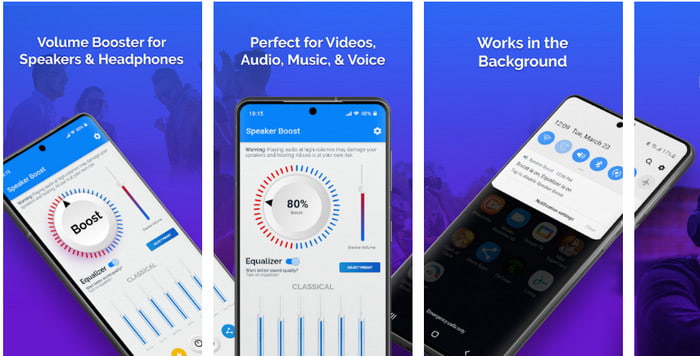
Một ứng dụng Android khác mà bạn có thể dùng để tạo hiệu ứng âm thanh vòm (surround) rất tốt là Speaker Boost. Tương tự Extra Volume Booster, ứng dụng này rất trực quan và dễ dùng ngay cả khi bạn chưa có kinh nghiệm. Bạn cũng có thể tải ứng dụng miễn phí, nhưng sẽ có các gói mua trong ứng dụng mà có thể bạn sẽ muốn sở hữu, chẳng hạn như loại bỏ quảng cáo gây phiền và một số tiện ích khác. Tuy công cụ này nhìn chung khá ổn để sử dụng, nhưng việc mua các gói trong ứng dụng sẽ khiến bạn tốn khá nhiều tiền hơn so với các phần mềm khác trong danh sách này. Một vấn đề khác khiến nhiều người dùng lo ngại là ứng dụng vẫn hoạt động phía sau trình chặn quảng cáo, và có khả năng đây là phần mềm gián điệp (spyware).
Ưu điểm
- Tại chỗ để tăng cường âm thanh một cách dễ dàng nhưng vẫn mạnh mẽ để sử dụng.
- Tải xuống công cụ miễn phí mà không gặp bất kỳ rắc rối nào khi khuếch đại âm thanh.
- Thực hiện ghi đè thủ công trên bộ cân bằng.
Nhược điểm
- Công cụ này chưa hoàn thiện về cơ bản có nghĩa là nó đang trong quá trình thử nghiệm.
- Khi bạn tăng âm thanh, bạn sẽ nghe thấy một số biến dạng.
4. Boom: Bass Booster & Equalizer 4+ (iOS)
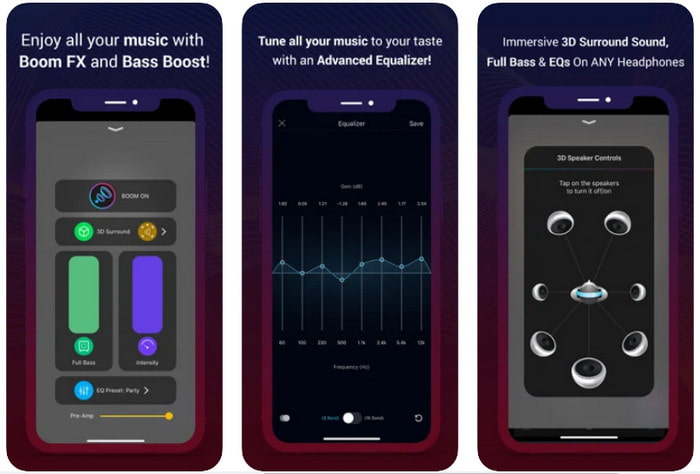
Nếu bạn đang tìm một ứng dụng khuếch đại âm thanh nâng cao thì Boom: Bass Booster là lựa chọn đáng cân nhắc. Tuy nhiên, ứng dụng này chỉ có trên thiết bị iOS và bạn sẽ không tìm thấy nó trên thiết bị Android. Cho đến nay, công cụ này đã nhận được nhiều lời khen từ người dùng, nhưng vẫn có một số định dạng không được hỗ trợ để khuếch đại. Ngoài ra, khi sử dụng ứng dụng, bạn nên chuẩn bị tinh thần gặp phải vài lỗi và hiện tượng văng ứng dụng. Hơn nữa, ứng dụng có thể gây hiểu nhầm cho người dùng mới. Mặc dù hiệu năng nhìn chung khá ổn, ứng dụng vẫn cần được cải thiện thêm để trở nên tốt hơn.
Ưu điểm
- Một số tính năng nâng cao có sẵn tại đây.
- Bộ khuếch đại di động bạn có thể sử dụng dễ dàng.
- Ứng dụng nhận được 4,1 sao trong số 5 sao.
Nhược điểm
- Không phải là sự lựa chọn tốt nhất cho người mới bắt đầu vì cấu trúc giao diện khó hiểu.
- Hầu hết các định dạng âm thanh không được hỗ trợ để khuếch đại với ứng dụng này.
- Các vấn đề về lỗi và sự chậm trễ vẫn đang xảy ra với ứng dụng.
Phần 3. Câu hỏi thường gặp về Bộ khuếch đại âm thanh
Db là gì?
Db có nghĩa là decibel và đây là đơn vị đo lường để thể hiện độ lớn hoặc công suất của sóng âm thanh. Ngoài ra, nhờ sự trợ giúp của decibel, chúng ta có thể dễ dàng xác định âm thanh mà chúng ta an toàn để nghe trong một thời gian dài. Và tất cả 85 decibel dưới đây đều rất an toàn để nghe.
Nhược điểm của âm thanh lớn là gì?
Một điều rất bình thường đối với chúng ta là khi chúng ta tiếp xúc với âm thanh lớn, thính giác có thể bị tổn hại. Nhưng bạn có biết rằng điều này có thể dẫn đến buồn nôn, đau đầu, căng thẳng, mệt mỏi và nhiều hơn nữa. Vì vậy, nếu bạn chuẩn bị sử dụng một chiếc amply thì hãy sử dụng nó một cách hợp lý và đừng lạm dụng nó để tránh những tác hại không thể tránh khỏi.
Tại sao tôi nghe thấy một số vết nứt trên loa của mình?
Vấn đề này là rất bình thường đối với các loa có hertz rất hạn chế có thể xử lý. Vì vậy, nếu bạn tăng âm thanh, hãy đảm bảo rằng loa có thể xử lý được. Và nếu bạn nghe thấy một số tiếng rắc thì bạn phải giảm âm thanh ngay lập tức. Tuy nhiên, nếu bạn nghe thấy một số vết nứt ngay cả khi bạn giảm âm thanh thì đã quá muộn.
Phần kết luận
Tất cả những ứng dụng và phần mềm được giới thiệu ở đây đều rất hữu ích khi dùng làm bộ khuếch đại âm thanh. Mặc dù các chương trình kể trên có vài điểm khác nhau, chức năng của chúng về cơ bản khá tương đồng. Tuy nhiên, nếu bạn đang tìm bộ khuếch đại âm thanh tốt nhất cho PC và Mac thì Video Converter Ultimate chính là ứng viên sáng giá. Bởi vì nó cung cấp những tính năng nâng cao tuyệt vời mà bạn vẫn có thể sử dụng rất dễ dàng. Vậy nên, nếu bạn còn băn khoăn không biết đây có phải là lựa chọn tốt nhất hay không, hãy tải nó về ổ đĩa máy tính và làm theo các bước đã hướng dẫn ở trên.
Tải xuống miễn phí cho Windows 7 trở lên. Tải xuống an toàn.
Tải xuống miễn phí cho MacOS 10.7 trở lên. Tải xuống an toàn.
-
 [Dễ dàng] Cách khắc phục lỗi không đồng bộ hóa âm thanh và video
 Giả sử bạn & #039; đang lên lịch phát trực tiếp cho ngày mai, nhưng khi bạn kiểm tra thiết lập của mình, âm thanh và video không đồng bộ. Đọc bài viết này để bạn hiểu thêm về mối quan tâm này.
-
 7 bước đơn giản về cách khắc phục các vấn đề về độ trễ âm thanh OBS [Đã giải quyết]
 Bạn có gặp khó khăn khi xem video clip của mình sau khi quay vì độ trễ âm thanh khi sử dụng OBS Studio? Đọc bài viết dưới đây để biết cách sửa lỗi âm thanh không đồng bộ hiệu quả.
-
 Cách thêm âm thanh và nhạc vào video miễn phí trên máy tính / điện thoại của bạn
 Bài viết này chỉ ra 4 cách dễ dàng để thêm âm thanh vào video miễn phí. Bất kể bạn muốn thêm bản âm thanh nào vào video của mình, bạn đều có thể nhận được kết quả hài lòng tại đây.
