


 Chuyển đổi video Ultimate
 Trình ghi màn hình
 Sửa chữa video
 Tải xuống an toàn
Sử dụng Công cụ quay video trực tuyến và nói lời tạm biệt với các video lộn ngược
Trong thời đại kỹ thuật số, nội dung video là một phần không thể thiếu trong cuộc sống của chúng ta. Video là một cách tuyệt vời để truyền tải thông điệp của bạn, cho dù bạn muốn ghi nhớ một khoảnh khắc đặc biệt hay tạo nội dung thú vị cho mạng xã hội hoặc doanh nghiệp của mình. Nhưng bạn có thể nhận thấy rằng các video của mình cần phải ở đúng vị trí vì chúng được quay sai vị trí hoặc vì chúng cần được lật theo chiều ngang hoặc chiều dọc.
Bài viết này sẽ giới thiệu cho bạn những trình xoay video online tốt nhất giúp bạn chỉnh lại hướng hiển thị của video theo ý muốn. Hãy tìm hiểu thêm bằng cách đọc hết bài viết này.

Phần 1. Công cụ quay video trực tuyến tốt nhất
1. XoayVideo của tôi
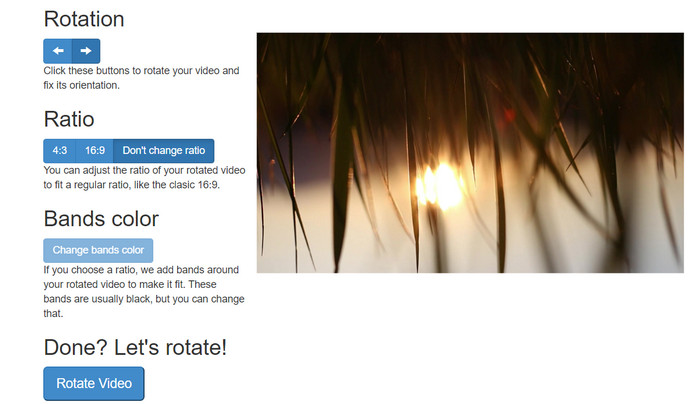
RotateMyVideo là một công cụ trực tuyến đơn giản và miễn phí cho phép bạn xoay và lật video của mình theo bất kỳ hướng nào mà không cần phần mềm đặc biệt. Công cụ này cho phép bạn xoay video 90 độ cùng một lúc và có giao diện đơn giản giúp quá trình này diễn ra nhanh chóng và dễ dàng. RotateMyVideo là một lựa chọn tốt nếu bạn cần xoay video vì lý do cá nhân hoặc doanh nghiệp. Nó có thể giúp bạn tiết kiệm thời gian và công sức.
Ưu điểm
- Xoay video trực tuyến miễn phí mà không tính phí ẩn.
- Hỗ trợ xoay theo gia số 90 độ.
- Lật video theo chiều ngang hoặc chiều dọc.
Nhược điểm
- Nó chỉ có thể xoay các video có kích thước dưới 500 MB.
- Quá trình chuyển đổi video có thể mất một chút thời gian.
- Giao diện người dùng có thể không hấp dẫn.
Các bước xoay video trực tuyến với RotateMyVideo:
Bước 1. Mở trình duyệt web và truy cập trang RotateMyVideo.
Bước 2. Nhấn nút Pick Video để tải lên video bạn muốn xoay.
Bước 3. Bây giờ, hãy chọn hướng xoay video bạn muốn bằng cách nhấp vào nút tương ứng. Bạn có thể xoay video sang trái hoặc sang phải, lật ngang hoặc lật dọc, hoặc giữ nguyên như ban đầu.
Bước 4. Nếu bạn đã hài lòng với video sau khi xoay, hãy nhấn nút Rotate video để lưu thay đổi.
2. Video
Clideo là một nền tảng chỉnh sửa video trực tuyến trực quan và đa năng, cung cấp nhiều công cụ mạnh mẽ để chỉnh sửa video, bao gồm cả xoay video. Ngoài ra, Clideo còn có các tính năng như cắt video, ghép video, thêm âm thanh và nhiều chức năng khác, khiến nó trở thành một công cụ chỉnh sửa video toàn diện. Khác với các phần mềm chỉnh sửa video khác, Clideo hoàn toàn dựa trên web, nghĩa là bạn không cần tải về hay cài đặt gì cả.
Ưu điểm
- Tải lên video từ nhiều nguồn khác nhau.
- Tương thích với nhiều định dạng video.
- Giao diện thân thiện với người dùng.
Nhược điểm
- Không phù hợp với nhu cầu chỉnh sửa video nâng cao.
- Phiên bản miễn phí có những hạn chế.
Các bước để chuyển đổi video dọc sang ngang trực tuyến:
Bước 1. Sử dụng trình duyệt web để truy cập trang Clideo. Sau đó, hiển thị tất cả công cụ từ trang chính.
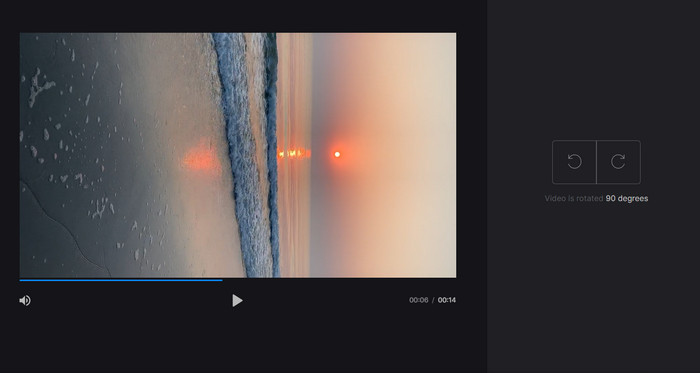
Bước 2. Bây giờ, chọn tùy chọn Rotate Video từ menu và nhấn Choose file để tải lên video bạn muốn xoay. Bạn cũng có thể kéo và thả tệp video vào trang web.
Bước 3. Nhấp nút Rotate ở bên phải trình phát video. Chọn hướng xoay mong muốn cho video bằng cách nhấp vào nút tương ứng. Bạn có thể xoay video theo chiều kim đồng hồ hoặc ngược chiều kim đồng hồ, lật ngang hoặc lật dọc.
3. Kẹp uốn
Flexclip là một công cụ chỉnh sửa video trực tuyến ấn tượng cho phép bạn tạo các video có giao diện chuyên nghiệp mà không gặp rắc rối. Một điều tốt nhất về Flexclip là thư viện mẫu phong phú mà bạn có thể sử dụng để bắt đầu quá trình chỉnh sửa video của mình. Nó cũng cung cấp một phiên bản miễn phí cho phép bạn tạo video có thời lượng tối đa một phút mà không có bất kỳ hình mờ nào.
Ưu điểm
- Thư viện mẫu phong phú.
- Cung cấp một loạt các tùy chọn tùy chỉnh.
Nhược điểm
- Giá có thể dốc đối với một số người dùng
- Hạn chế kiểm soát chất lượng video
Các bước về cách xoay video trực tuyến mà không có hình mờ bằng Flexclip:
Bước 1. Truy cập trang Flexclip, đăng ký một tài khoản miễn phí hoặc đăng nhập nếu bạn đã có. Sau khi đăng nhập, nhấn nút Start from Scratch.
Bước 2. Nhấn nút Upload để tải lên video bạn muốn xoay. Ngoài ra, bạn có thể kéo và thả tệp video vào trình chỉnh sửa.
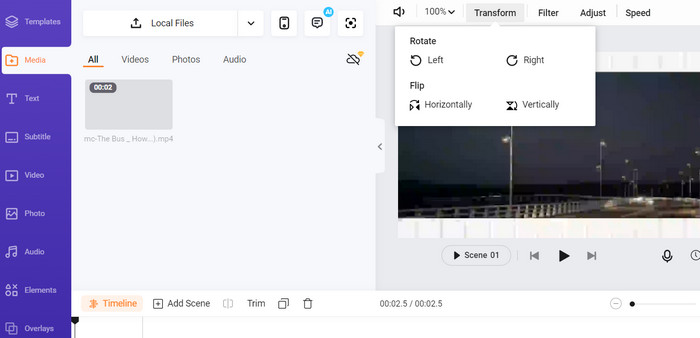
Bước 3. Khi video đã được tải lên, nhấn nút Transform ở thanh menu phía trên khung xem trước. Sử dụng các nút để xoay video theo chiều kim đồng hồ hoặc ngược chiều kim đồng hồ cho đến khi đạt được hướng như ý.
4. Kapwing
Đây là một công cụ trực tuyến miễn phí khác cho phép bạn xoay video. Tương tự, nó hỗ trợ xoay theo từng góc 90 độ và cũng cho phép bạn lật video. Bên cạnh đó, các tính năng nâng cao như thêm chữ, nhạc và hiệu ứng đặc biệt khiến nó trở thành một công cụ chỉnh sửa video toàn diện, còn giao diện thân thiện cùng thư viện lớn các công cụ và mẫu giúp nó trở thành lựa chọn tuyệt vời cho người mới bắt đầu.
Ưu điểm
- Chỉnh sửa video đa năng.
- Trực tuyến và dựa trên đám mây.
Nhược điểm
- Độ dài video hạn chế.
- Kích thước tập tin hạn chế.
Các bước xoay video online bằng Kapwing:
Bước 1. Truy cập trang Kapwing và đăng ký một tài khoản miễn phí hoặc đăng nhập nếu bạn đã có. Nhấn nút Start Editing để bắt đầu một dự án mới.
Bước 2. Nhấp nút Upload để tải lên video bạn muốn xoay.
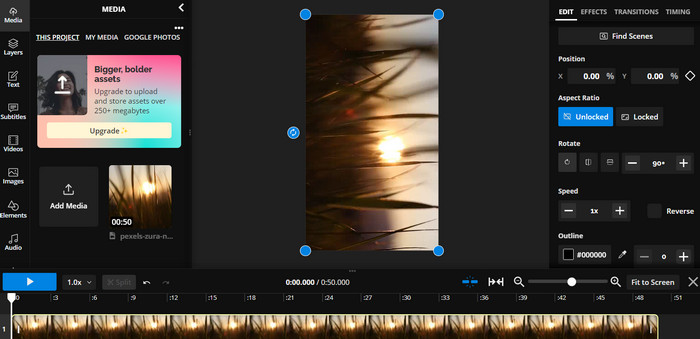
Bước 3. Tiếp theo, chọn tệp media trong timeline, các tùy chọn chỉnh sửa sẽ xuất hiện ở menu bên phải.
Bước 4. Chọn tùy chọn Rotate và chọn hướng bạn muốn xoay video. Nhập giá trị độ để xác định góc xoay. Sau đó là xong.
5. Trình cắt video trực tuyến
Đây là một công cụ trực tuyến miễn phí cho phép bạn xoay video của mình theo bất kỳ hướng nào. Bạn có thể tải video của mình lên rồi sử dụng công cụ xoay để điều chỉnh hướng của video.
Ưu điểm
- Nhanh chóng và hiệu quả.
- Sử dụng miễn phí.
Nhược điểm
- Cần có kết nối Internet.
- Mất chất lượng video.
Các bước xoay video trực tuyến bằng Online Video Cutter:
Bước 1. Truy cập trang chính thức của Online Video Cutter.
Bước 2. Nhấp nút Open file để tải lên video bạn muốn chỉnh sửa.
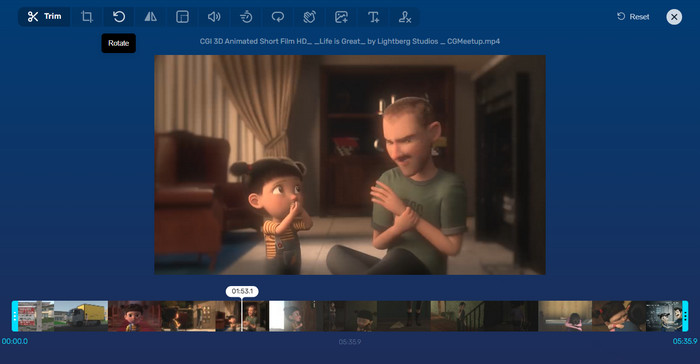
Bước 3. Khi video được nhập xong, bạn sẽ được chuyển đến giao diện chỉnh sửa của chương trình. Lúc này, hãy nhấn nút Rotate từ menu.
Bước 4. Nếu bạn hài lòng với cách video đã được xoay, hãy nhấn nút Save ở góc dưới bên phải.
Phần 2. Công cụ thay thế: Video Rotator Offline
FVC Video Converter Ultimate là một ứng dụng trên máy tính tương thích với Windows và Mac. Nó cho phép người dùng chuyển đổi và xoay video khi không có mạng. Hơn nữa, người dùng có thể xoay video theo chiều kim đồng hồ hoặc ngược chiều kim đồng hồ với góc 90, 180 hoặc 270 độ. Với nhiều công cụ chỉnh sửa video, bạn cũng có thể cắt, ghép, điều chỉnh thiết lập video và còn nhiều hơn thế. Hãy tìm hiểu cách trình xoay video này hoạt động.
Bước 1. Tải và cài đặt công cụ
Trước hết, hãy tải chương trình bằng cách tải xuống và cài đặt nó trên máy tính của bạn. Ngay sau đó, khởi chạy nó ngay lập tức.
Tải Miễn PhíDành cho Windows 7 trở lênTải xuống an toàn
Tải miễn phíDành cho MacOS 10.7 trở lênTải xuống an toàn
Bước 2. Tải video cần xoay lên
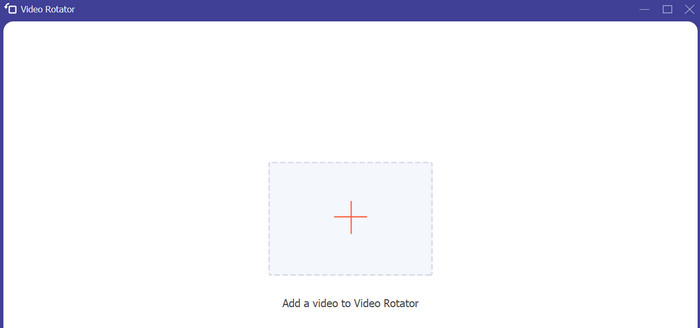
Tiếp theo, hãy chuyển đến thẻ Toolbox và mở tùy chọn Video Rotator của chương trình. Sau khi nhấp vào tùy chọn này, bạn sẽ được yêu cầu tải video lên. Bây giờ, hãy nhấn nút dấu Plus để chèn video bạn muốn.
Bước 3. Xoay video
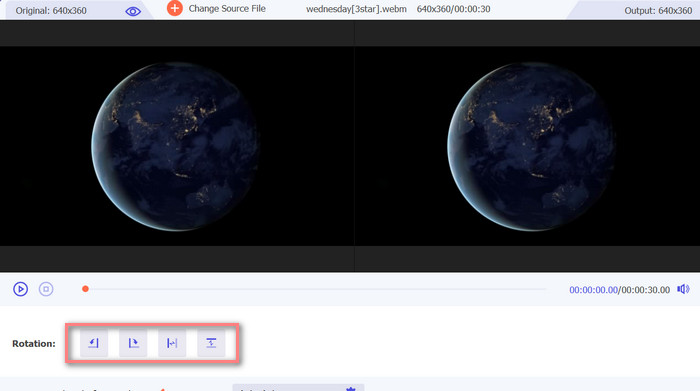
Tại thời điểm này, hãy đánh dấu vào nút xoay thích hợp để có được hướng video mong muốn của bạn. Bản xem trước là thời gian thực, vì vậy bạn có thể điều chỉnh nhanh chóng.
Bước 4. Lưu một bản video sau khi xoay
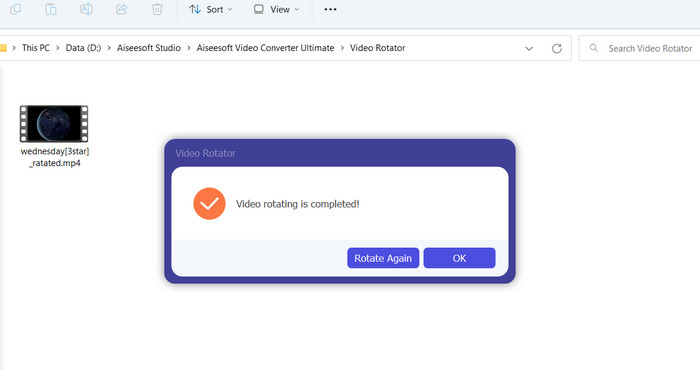
Cuối cùng, nhấn nút Export để lấy một bản sao video đã chỉnh sửa. Ngay sau đó, một thông báo sẽ xuất hiện và thư mục chứa video sẽ được mở lên.
Phần 3. Câu hỏi thường gặp về Công cụ quay video trực tuyến
Công cụ quay video trực tuyến có an toàn để sử dụng không?
Phần lớn các công cụ quay video trên internet đều an toàn để sử dụng. Để đảm bảo rằng dữ liệu và quyền riêng tư của bạn được bảo vệ, việc chọn một công cụ nổi tiếng và đáng tin cậy là điều cần thiết.
Tôi có thể xoay video trên điện thoại thông minh của mình không?
Có, nhiều công cụ quay video trực tuyến thân thiện với thiết bị di động và có thể được truy cập trên trình duyệt web trên điện thoại thông minh của bạn.
Có giới hạn nào khi sử dụng công cụ quay video trực tuyến không?
Có, một số công cụ quay video trực tuyến có thể có những hạn chế như hạn chế về kích thước tệp, khả năng chỉnh sửa hạn chế hoặc giảm chất lượng video.
Phần kết luận
Các trình xoay video online mang đến cách xoay video tiện lợi, dễ dùng mà không cần tải hoặc cài đặt phần mềm. Chúng có thể truy cập trên mọi thiết bị có kết nối internet và dùng được mọi lúc mọi nơi. Tuy nhiên, chúng có thể bị giới hạn về khả năng xử lý, chẳng hạn như giới hạn kích thước tệp và giảm chất lượng video. Vì vậy, chúng tôi đã giới thiệu thêm một giải pháp dùng offline để khắc phục những hạn chế này.
-
 [4 cách] Cách dễ dàng tăng tốc video trực tuyến của bạn
 Bạn có muốn tăng tốc độ một video trực tuyến? Đọc bài viết này để bạn biết thêm về việc tăng tốc video theo nhiều cách khác nhau có thể.
-
 Những cách tuyệt vời về cách cắt video trực tuyến một cách thuận tiện
 Cắt video là cách tốt nhất để tạo video nổi bật. Vì vậy, bài đăng này sẽ cung cấp cho bạn các phương pháp để cắt video trực tuyến một cách dễ dàng. Đọc để tìm hiểu thêm.
-
 Tạo GIF động đẹp nhất của bạn qua Trình tạo GIF trực tuyến [2023]
 Một bài đánh giá nhiều thông tin, về cách tạo ảnh GIF bằng cách sử dụng các nhà tạo ảnh GIF trực tuyến đơn giản này mà bạn đã gặp hoặc chưa tìm thấy trên web.
