


 Chuyển đổi video Ultimate
 Trình ghi màn hình
 Sửa chữa video
6 bộ điều khiển tốc độ video tốt nhất cho Windows / Mac / Android / iOS
Tăng hoặc giảm tốc độ phát video có thể tạo nên một hiệu ứng ảo diệu nếu bạn đã chán dùng các hiệu ứng thông thường. Kỹ thuật chỉnh sửa video này đơn giản nhưng rất hiệu quả. Khi bạn tìm kiếm trên internet, sẽ thấy có rất nhiều lựa chọn trình điều khiển tốc độ khác nhau trên thị trường, và chúng tôi hiểu rằng rất khó để chọn. Nhưng nếu bạn đọc bài viết này, chúng tôi sẽ đánh giá các ứng dụng điều khiển tốc độ mà bạn có thể dùng để thay đổi tốc độ phát lại. Bạn có hứng thú với các ứng dụng điều khiển tốc độ tốt nhất không? Nếu vậy, hãy tiếp tục tìm hiểu thêm về trình điều khiển tốc độ video hiện có trên các nền tảng của bạn.

Phần 1. 6 bộ điều khiển tốc độ video hàng đầu cho Windows, Mac, Chrome, iOS và Android
Top 1. Video Converter Ultimate (Windows và Mac)
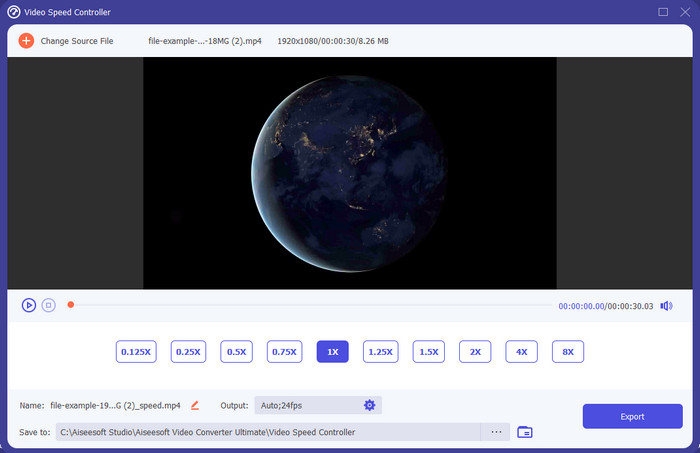
Bạn cần một trình điều khiển tốc độ video hiệu quả và mạnh mẽ để tăng hoặc giảm tốc độ video? Nếu vậy, Video Converter Ultimate chính là trợ thủ cho kiểu vấn đề này. Đây là công cụ dễ dùng nhất mà bạn có thể sử dụng để thay đổi tốc độ video một cách nhẹ nhàng, dù bạn cần tốc độ cao hay quay chậm. Dù bạn thay đổi tốc độ, chất lượng gốc của video vẫn được giữ nguyên, chỉ có chuyển động của video thay đổi vì bạn đã chỉnh tốc độ.
Ngoài ra, bạn có thể làm nhiều việc như chuyển đổi, hợp nhất, cắt và hơn thế nữa; về cơ bản, nó là một công cụ tất cả trong một. Bạn muốn biết những ưu đãi khác mà bạn có thể có với ứng dụng video tăng tốc này? Nếu vậy, hãy đọc các tính năng của công cụ để tìm hiểu thêm hoặc bạn có thể tải xuống phần mềm trên máy tính để bàn ngay bây giờ để thử nghiệm.

Chuyển đổi video Ultimate
5.689.200+ lượt tải xuống- Nó có thể thay đổi chính xác khung hình video lên hoặc xuống nhanh chóng ở bất kỳ định dạng video nào, chẳng hạn như MP4.
- Các tính năng và hiệu ứng chỉnh sửa video phong phú có sẵn.
- Nó linh hoạt trên tất cả các nền tảng như Windows hoặc macOS.
- Quá trình cực nhanh giúp bạn tải xuống hoặc xuất quá trình được thực hiện trong nháy mắt.
- Xuất hoặc tải xuống video bạn chỉnh sửa sẽ không có hình mờ.
Tải xuống miễn phí cho Windows 7 trở lên. Tải xuống an toàn.
Tải xuống miễn phí cho MacOS 10.7 trở lên. Tải xuống an toàn.
Ưu điểm
- Thay đổi khung hình trên mỗi khung hình của video ngay cả khi bạn là người chuyên nghiệp hay không.
- Các tùy chọn phát lại video dễ hiểu.
- Khả năng chia sẻ mạng xã hội vượt trội.
- Nó miễn phí để tải xuống, nhưng nó cung cấp mua hàng trong ứng dụng.
Nhược điểm
- Cần phải mua nếu bạn muốn có đầy đủ khả năng của công cụ.
Đầu trang 2. Clipchamp (Windows)
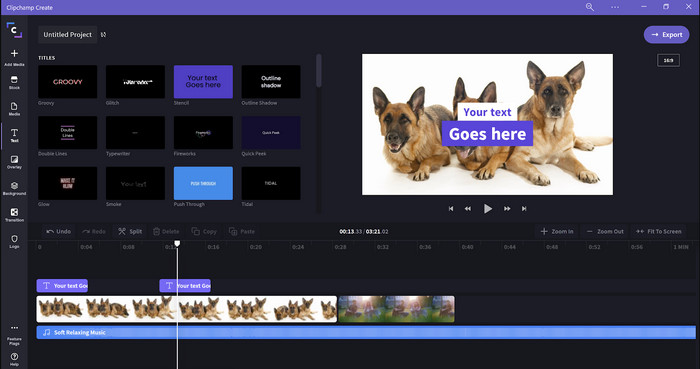
Clipchamp là một trình chỉnh tốc độ video bạn có thể dùng trên Windows. Công cụ này có đường cong học tập không quá dốc, nên nếu bạn mới bắt đầu chỉnh sửa, bạn có thể sẽ muốn thử. Nó cũng hỗ trợ nhiều tính năng mà bạn có thể cần. Tuy nhiên, một nhược điểm lớn của công cụ này là chất lượng video xuất ra. Bạn chỉ có thể xuất file ở chất lượng 480, vốn thấp hơn nhiều so với các công cụ miễn phí khác. Nếu muốn xuất ở 720 hoặc 1080, bạn phải đăng ký trả phí. Nhìn chung, công cụ này khá tốt, nhưng vẫn chưa thể bằng trình chỉnh sửa đầu tiên.
Ưu điểm
- GUI đơn giản và dễ sử dụng.
- Nó cung cấp các tính năng bổ sung để chỉnh sửa.
- Kiểm soát phát lại video dễ dàng.
Nhược điểm
- Đối với phiên bản miễn phí, kết quả cuối cùng là 480.
- Đôi khi công cụ trở nên không linh hoạt với nhiệm vụ.
Top 3. Bộ điều khiển tốc độ video (Chrome)

Muốn dùng một tiện ích mở rộng trình điều khiển tốc độ video trên Chrome? Vậy bạn có thể dùng Video Speed Controller. Công cụ này có sẵn trên mọi trình duyệt Chrome để tăng hoặc giảm tốc độ video bạn đang xem. Nó dễ dùng với mọi người và cũng an toàn khi truy cập vì là một tiện ích mở rộng của Chrome. Tuy nhiên, nếu bạn xuất video, tốc độ phát lại sẽ giữ nguyên mặc dù bạn đã thay đổi lúc xem. Bởi vì công cụ chỉ hoạt động với video bạn đang xem trên Chrome chứ không áp dụng ra bên ngoài. Thêm thông tin là một khi bạn đã tăng tốc video với tiện ích này, mọi video phát trên Chrome đều sẽ chạy ở cùng tốc độ đó.
Ưu điểm
- Bộ điều khiển tốc độ tại chỗ mà bạn có thể sử dụng trên Chrome.
- Có thể tua lại hoặc đặt lại tốc độ phát video trên Chrome một cách dễ dàng.
- Nó hỗ trợ lệnh phím ngắn.
Nhược điểm
- Bảng điều khiển video không hiển thị.
- Bạn không thể thay đổi tốc độ của video bên ngoài Chrome.
Top 4. Tăng tốc cho Safari (iOS và Mac)
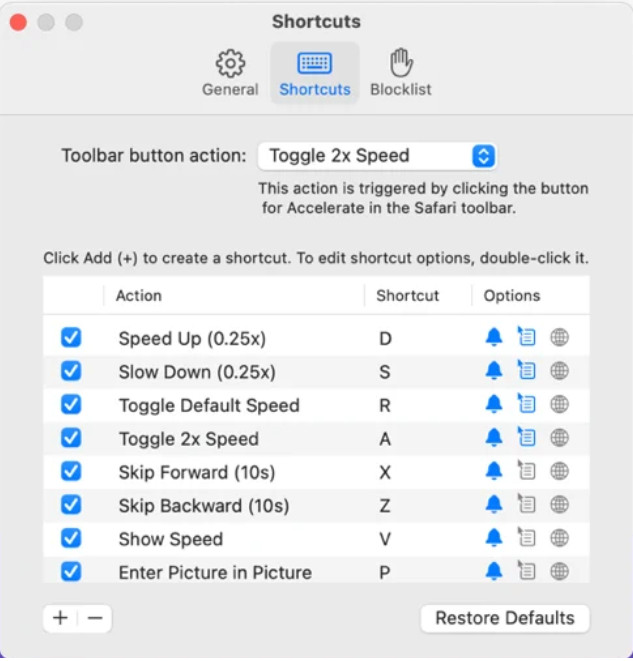
Cần một trình điều khiển tốc độ video trên Safari? Accelerate for Safari có sẵn trên mọi trình duyệt Safari của thiết bị Apple. Công cụ này có thể thay đổi tốc độ phát lại của mọi video HTML5 trên Safari. Tương tự tiện ích Chrome ở trên, nó chỉ giới hạn trên các thiết bị Apple. Vì vậy, nếu bạn là người dùng Apple, bạn có thể sẽ muốn sử dụng tiện ích điều khiển tốc độ này để tăng hoặc giảm tốc độ video. Ngoài ra, bạn có thể dùng các phím trên bàn phím để điều khiển công cụ thay đổi tốc độ phát video.
Ưu điểm
- Nó là an toàn để sử dụng trong tất cả Safari.
- Nó cũng hỗ trợ Picture-in-Picture và AirPlay.
- Các phím tắt có sẵn để kiểm soát công cụ.
Nhược điểm
- Nó không hỗ trợ một trình duyệt web khác ngoài Safari.
- Giới hạn đối với video HTML 5.
Top 5. Chậm Nhanh Chậm - Kiểm soát tốc độ video của bạn (iOS)
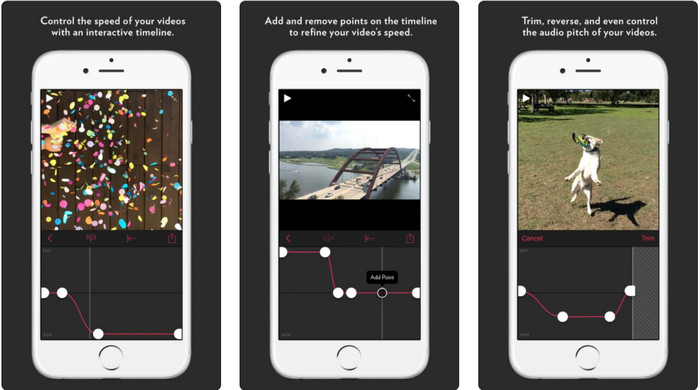
Với trình điều khiển tốc độ video trên iPhone, bạn có thể dùng Slow Fast Slow. Công cụ này giúp người dùng iOS thao tác tức thì với tốc độ phát lại video; nó hoạt động tốt nhất với các video quay chậm. Hơn nữa, nó có một timeline tương tác rất trực quan để điều chỉnh tốc độ. Nó cũng hỗ trợ các tính năng khác như thay đổi cao độ âm thanh theo tốc độ và đảo ngược clip. Tuy nhiên, công cụ này yêu cầu hệ điều hành iOS 10, nên bạn sẽ không dùng được nếu thiết bị không chạy iOS 10 trở lên.
Ưu điểm
- Nó hỗ trợ các tính năng khác cho video của bạn.
- Thân thiện với người dùng.
- Có thể làm chậm video lên đến tốc độ 1/16.
Nhược điểm
- Nó không hỗ trợ đầu ra 4k và lựa chọn FPS.
- Nó không hoạt động trên một số thiết bị iOS mới.
Top 6. Bộ điều khiển tốc độ video Pro (Android)
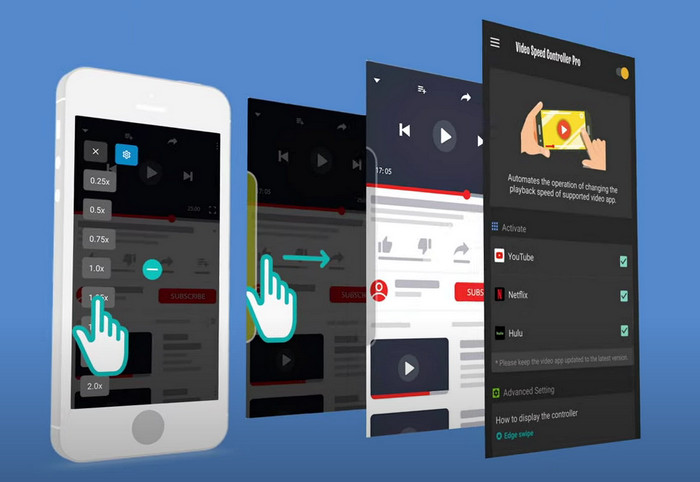
Nếu bạn cần một trình điều khiển tốc độ video trên Android, thì sao? Bạn có thể dùng Video Speed Controller Pro bằng cách cài đặt từ Play Store. Với công cụ này, bạn có thể tăng tốc bất kỳ video nào đang phát trên Android một cách dễ dàng. Hơn nữa, công cụ này hoạt động giống như một tiện ích điều khiển tốc độ trên Android. Tuy có thể tăng tốc video, nhưng tốc độ tối đa chỉ là 2x. Tuy vậy, nếu bạn chỉ cần tăng tốc khi xem video, bạn có thể dùng nó trên YouTube, Netflix và các nền tảng video khác trên Android.
Ưu điểm
- Nó rất dễ sử dụng.
- Công cụ tự nó là đúng.
- Một thanh menu có sẵn để hiển thị các tùy chọn khi bạn phát lại.
Nhược điểm
- Các tùy chọn về tốc độ phát lại bị hạn chế.
- Đôi khi nó không hoạt động tốt.
Phần 2. Biểu đồ so sánh
| Đặc trưng | Video Converter Ultimate (Windows và Mac) | Clipchamp (Windows) | Bộ điều khiển tốc độ video (Chrome) | Tăng tốc cho Safari (iOS và Mac) | Chậm nhanh Chậm - Kiểm soát tốc độ video của bạn (iOS) | Bộ điều khiển tốc độ video Pro (Android) |
| Kiểm soát tốc độ |  | | | | | |
| Đầu ra video chất lượng cao | |  | | | | |
| Các tính năng chỉnh sửa | | | | | | |
| Quy trình xuất siêu nhanh | | | | | | |
Phần 3. Câu hỏi thường gặp về Bộ điều khiển tốc độ video
Tại sao tôi cần sử dụng bộ điều khiển tốc độ?
Trong một số trường hợp, bạn sẽ cần xem video ở tốc độ cao hoặc chạy chậm lại. Một ví dụ tuyệt vời về việc xem video tăng tốc là kết thúc video bạn đang xem ngay lập tức hoặc tương tự. Tăng tốc video là một trợ giúp đắc lực cho những người dùng này. Trong khi chuyển động chậm, tính năng này thường được sử dụng để phát lại tức thì các môn thể thao tốc độ nhanh như đua xe, bóng rổ, bóng chuyền, v.v. Cho dù cả hai, bạn sẽ cần một bộ điều khiển tốc độ hiệu quả để ghi đè tốc độ bình thường theo nhu cầu của bạn theo cách thủ công.
Tôi có thể tăng tốc video trên Tiktok không?
Bạn hoàn toàn có thể quay video tăng tốc trong TikTok. Tuy nhiên, bạn không thể xem video trên TikTok ở chế độ tốc độ cao. Vì vậy, nếu bạn cần một công cụ tăng tốc phù hợp, hãy nhấp và đọc bài viết này để biết cách tăng tốc video trên TikTok.
Làm thế nào để làm chậm video?
Trái ngược với việc tăng tốc video, bạn có thể tạo hiệu ứng quay chậm (slow-motion) cho video với sự hỗ trợ của các trình chỉnh sửa hiện có trên thị trường. Nên dùng công cụ nào? Đừng lo, vì chúng tôi giới thiệu những phần mềm quay chậm tốt nhất mà bạn có thể dùng để tạo hiệu ứng slow-mo. Nếu cần tìm hiểu thêm, bạn có thể nhấp vào đường dẫn này.
Phần kết luận
Hôm nay, bạn đã nắm được rất nhiều thông tin về các ứng dụng trả phí và miễn phí để tăng tốc video trên nhiều nền tảng khác nhau. Các trình điều khiển tốc độ mang đến một bộ kỹ năng độc đáo để giúp nhiều nhóm người dùng tăng tốc video. Nếu đọc kỹ, chúng ta có thể thấy FVC Video Converter Ultimate cung cấp mọi thứ mà người dùng cần. Vì vậy, nếu bạn muốn tải công cụ tối ưu này về máy tính, hãy nhấp nút tải xuống và tận hưởng trọn vẹn trải nghiệm với công cụ.
-
 Cách tăng tốc độ video với 5 phần mềm hàng đầu hiện có [Windows / Mac / Linux]
 Bạn có muốn biết làm thế nào để tăng tốc độ video một cách dễ dàng? Sau đó, hãy đọc phần viết này khi chúng tôi giải thích cách tăng tốc hiệu quả trên Windows, Mac và Linux.
-
 Các cách dễ nhất về cách tăng tốc video trên thiết bị Android của bạn [2021]
 Bạn có biết rằng bạn có thể tăng tốc video trên Android của mình không? Vì vậy, nếu bạn muốn biết cách tăng tốc video trên điện thoại Android của mình thì hãy đọc bài viết này.
-
 Mẹo hay của năm 2021: Cách tăng tốc độ video trên iMovie
 Bạn của bạn đề nghị iMovie giúp bạn vấn đề về cách tăng tốc video bằng hệ điều hành iOS, nhưng bạn không biết phải làm thế nào? Xem thêm về điều này khi bạn đọc thêm thông qua bài viết này.
