


 视频转换大师
 屏幕录影大师
 视频修复
视频修复如何在 Adobe Premiere Pro 中同步音频和视频的简化教程
如果你是专业人士,那么你肯定已经使用过作为视频编辑软件、性能非常出色的 Adobe Premiere Pro。很多 Adobe 用户都非常喜爱这款软件,因为它能输出极佳的效果,让你乐于把成品加入到你的视频中。但你是否知道,其实你也可以用它来将音频与视频进行同步?如果你还不知道怎么做,那今天就算你幸运的一天。我们将带你亲自上手,学习如何轻松完成同步。现在,你不需要再去翻厚厚的说明书了,因为这篇文章会用最简单易懂的方式告诉你,如何在 Premiere 中同步音频,并介绍另一个同样高效、操作更简单的替代工具。

第 1 部分。如何在 Adobe Premiere Pro 中同步音频和视频
在开始之前,我们先简单介绍一下 Adobe Premiere Pro。正如上文所说,这款工具已经被大量热爱制作精彩视频的专业剪辑师广泛使用。不过,由于它提供了非常多的高级功能,对于新手来说,上手学习会花费很多时间。虽然学会如何使用它确实需要花一番功夫,但如果你有空闲时间,这个学习过程是非常值得的。此外,下面列出的步骤已经尽量简化,只要按照步骤操作,你就能轻松理解和掌握如何在 Premiere 中同步音频和视频。
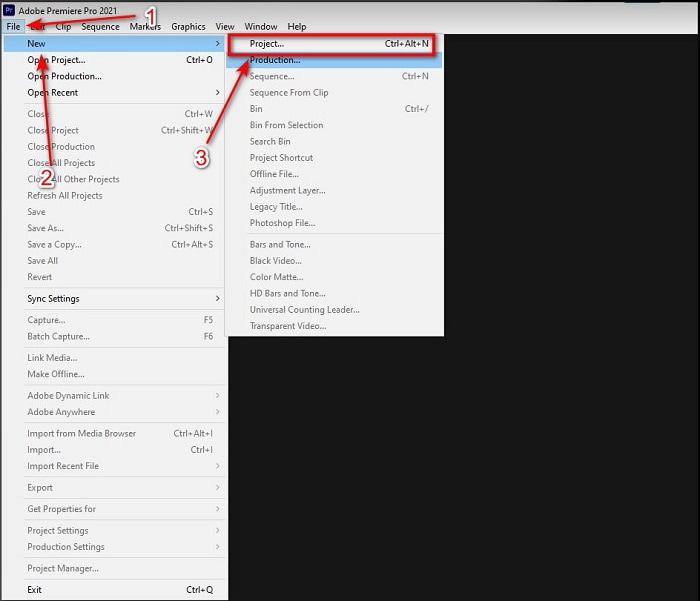
步骤 1. 首先,你需要先购买并将这款工具下载到电脑硬盘中。下载完成后启动软件。然后点击File(文件),在其下方选择New(新建),再点击Project(项目)继续操作,在弹出的新界面中点击OK(确定)。
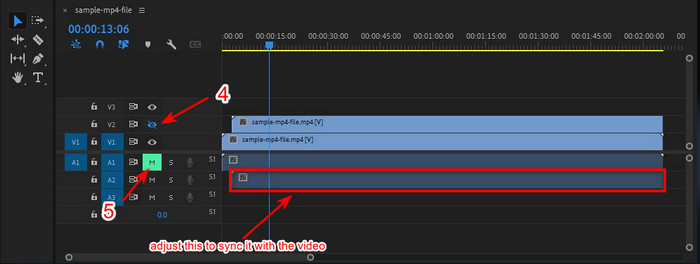
步骤 2. 将同一个视频和音频添加到Timeline(时间轴)中两次。然后点击第二个视频轨道的Toggle Track Output(切换轨道输出)按钮,并通过点击Mute Track(静音轨道)将第二个音轨静音。接着调整音频轨道,确保它能与视频精确同步。
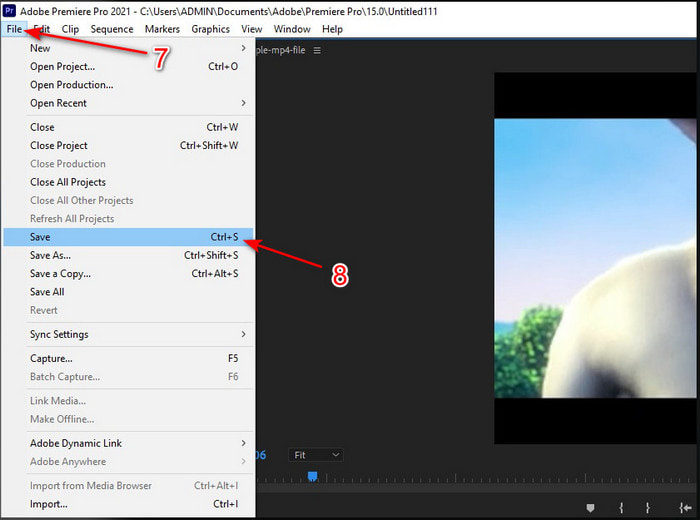
步骤 3. 再次点击上方的File(文件),找到Save(保存),将媒体文件导出并保存到你的电脑硬盘中。
优点
- 此工具提供高级编辑功能。
- 您可以下载顶级编辑器。
- 拥有专业输出的最佳选择。
缺点
- 对于没有编辑想法的初学者来说,这不是最佳选择。
- 与提供几乎相同功能的其他编辑器相比,该软件完全昂贵。
第 2 部分。 使用 Video Converter Ultimate 为初学者和专业人士同步音频的最简单方法
与 Adobe Premiere Pro 一样,这款出色的转换器同样能够输出高品质的视频,并提供高级编辑功能,让你爱不释手。但与 Premiere Pro 相比,它的操作要简单得多。Video Converter Ultimate 是许多喜欢制作视频的编辑者的好伙伴,能够用来编辑、增强、提亮、制作 GIF 等等。这款软件几乎能解决互联网上用户在视频方面遇到的各种问题,包括音画不同步。由于它极其易用,目前已经有超过上百万用户下载并爱上了它。所以,如果你想让操作更简单,与其费劲使用 Premiere Pro 来同步音频,不如试试这款软件。请按照下面的步骤操作。
使用 Video Converter Ultimate 同步音频和视频的步骤:
步骤 1. 在电脑上下载安装这款软件,选择对应的 PC 或 Mac 版本。安装完成后进行简单设置,然后点击Start Now(立即开始)继续。
步骤 2. 完成第一步后启动软件,进入Toolbox(工具箱)功能区,在下方点击Audio Sync(音频同步)。
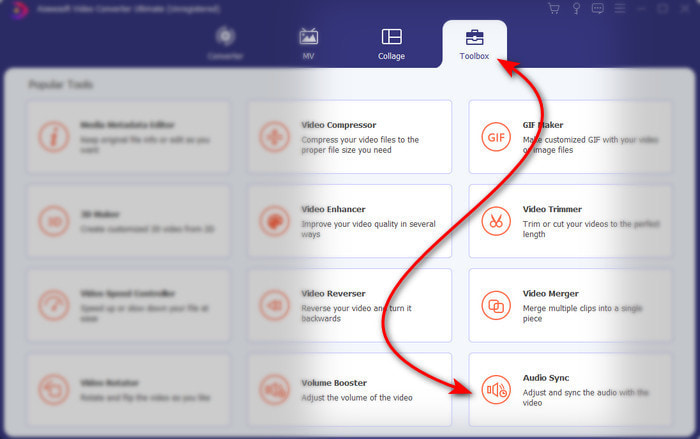
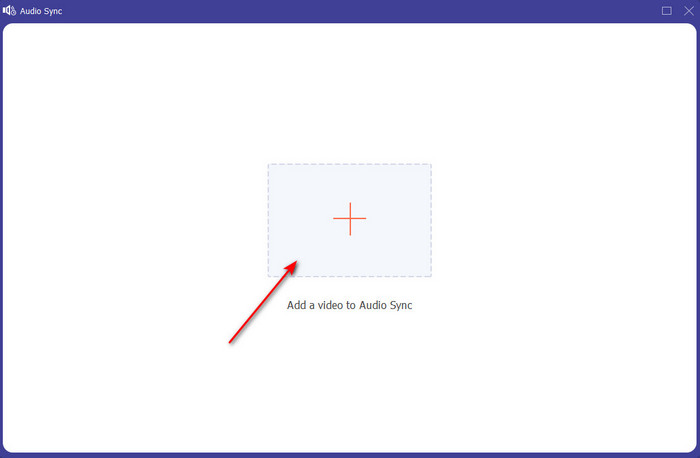
步骤 3. 点击 + 按钮,导入你想要进行同步的视频和音频文件。在文件夹中定位后点击Open(打开)继续。
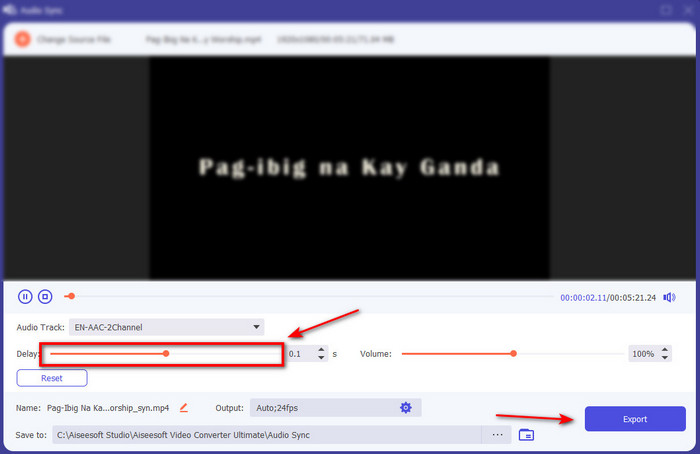
步骤 4. 为了让音频与视频同步,拖动Delay slider(延迟滑块)进行调整,使其与画面匹配。此外,你也可以通过调整音量滑块来提升音频音量。完成设置后,点击Export(导出)保存最终成品。
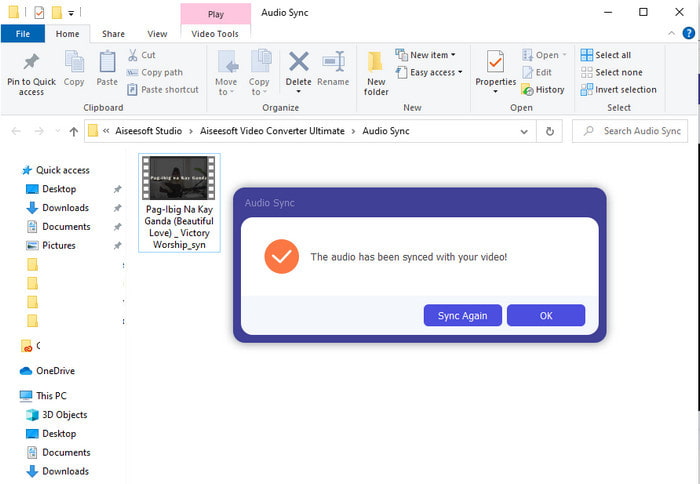
步骤 5. 导出完成后,将会自动弹出一个文件夹,其中就是你做好的音视频同步文件。点击文件即可观看、播放并享受音画同步的视频。
优点
- 让您的视频看起来非凡的最佳选择。
- 使用此工具时的整体体验确实是终极的,而且易于使用。
- 它适用于所有平台,无论是 PC 还是 Mac。
缺点
- 就像 Premiere pro 一样,这个工具是付费的,但比 Premiere pro 便宜得多。
- 需要先下载到您的驱动器中,然后才能访问它。
第 3 部分。有关 Premiere 中音频和视频同步的常见问题解答
我可以将 Premiere 用作屏幕录像机吗?
如果你想直接在 Premiere Pro 中录制屏幕,那你就要打消这个念头了,因为它并不支持这项功能。不过,我们可以告诉你几款'秘密武器'级的屏幕录像工具可供选择。如果你想了解可以在 PC、Mac、在线端、iOS 和 Android 上使用的5 大最佳屏幕录制工具,可以继续阅读相关内容。
Adobe Premiere Pro 是免费的吗?
实际上,是的,您可以免费下载此工具,但您只能试用 7 天访问此工具。因此,如果试用期已结束,那么您必须再次订阅 Adobe Premiere Pro 才能享受此 Premiere Pro 提供的全部编辑功能。
我可以使用其他网站下载 Premiere Pro 吗?
不可以,因为通过其他网站下载所有应用程序是违法的。此外,如果您使用其他网站下载 Premiere Pro,则它可能会携带间谍软件、病毒甚至更糟。因此,如果您想确保安全,请仅将软件下载到官方主要网站。
我可以购买 Adobe Premiere Pro 的终身访问权限吗?
虽然您可以购买 Adobe Premiere Pro 的每月访问权限,但您仍然无法购买终身访问权限。但是,您可以通过其他网站购买它,但是,这是非法的,并且您要下载的文件可能已损坏、带有病毒或者是骗局。因此,如果您想使用和购买 Adobe Premiere Pro,我们建议大家在其主网站上购买。
结论
阅读本文 5 分钟后,我们已经知道如何使用 Adobe Premiere pro 将音频同步到视频。但是,使用 Video Converter Ultimate 有一种更简单的同步方法。由于此工具在调整不同步视频和音频方面速度更快,同时具有最佳质量。所以现在,如果您有很多钱,那么请使用 Adobe Premiere Pro,但是如果您想在拥有相同功能的同时节省很多钱,那么您必须使用 Video Converter Ultimate。
-
 如何放慢视频速度:完美提示 [桌面/手机]
 您是否厌倦了寻找有助于降低在线视频速度的最佳工具?阅读这篇特别的文章,让您对下面列出的信息有所启发。
-
 视窗媒体播放器 |了解如何加速视频 [已证明]
 您想使用 Windows Media Player 减慢视频剪辑的速度,但遇到了如何操作的问题?本文非常适合阅读,并且可以启发您对如何使用 Windows Media Player 加速视频的观点。
-
 如何将慢动作视频更改为正常速度 [简单步骤]
 想知道如何还原从互联网下载或意外以慢动作录制的慢动作视频?了解如何在 Mac、Windows、iOS 和 Android 上将慢动作视频转换为正常速度。
