


 视频转换大师
 屏幕录影大师
 视频修复
视频修复易于访问的 XviD 转换器:如何将 XviD 文件转换为 MOV 格式
XviD file is the most known codec used to compete against DivX. Also, this codec uses the MPEG-4 ASP that contains features like b-frames, lumi masking, global and quarter pixel motion compensation, trellis quantization, custom quantization matrices, and H.263. And just by that, XviD became a more popular encoder than the DivX. Supposedly, you transfer a file that uses an XviD codec on your iOS. If the file does not play, don't be shocked because the codec doesn't support mobile devices like iOS and other devices. Although it looks unsolvable, there is always a solution to every problem; we provide a solution by converting the file under XviD to AVI format. If you want to know how to convert XviD files to MOV, then follow this article.

第 1 部分。 XviD 和 MOV 介绍
As we said earlier, your file can become smaller if you use the XviD to compress it without damaging its quality and decompress it quickly. Although Xvid is a non-proprietary compressor, this codec compatibility is limited to portable devices and especially editing. So, if you want to watch or edit the video with the XviD codec, it is a must to convert the file into MOV. Why MOV? Because this format can contain metadata, media files like audio, video, and text or subtitles. Not only that, this format can play videos on iOS devices and other devices as well. So now, to solve your problem on your XviD file, let's find out how to convert XviD to MOV with the help of this tool available below.
第 2 部分。 在 Windows 和 Mac 上将 XviD 转换为 MOV 的最佳转换器
FVC Video Converter Ultimate
Are you looking for the best XviD to MOV converter that can convert the file within a blink of an eye? Then FVC Video Converter Ultimate is the only tool you are looking for. Besides its 30x faster conversion provided to the customers, you can edit, merge, cut, and do more to your video to look more phenomenal than the other. Although the tool provides advanced features still, you won't need to build a supercomputer to download and use this tool.
除此之外,该软件还包括硬件加速和快速转换,让您的转换体验更快更好。现在,如果您想学习如何借助此工具将 Xvid 文件转换为 MOV,那么让我们继续下面的教程。
Steps on How to Convert Xvid to MOV with the FVC Video Converter Ultimate;
Step 1. This software is downloadable on any PC or Mac OS, so you will need to press the download button below. After downloading the software, click the file to install, do the setup real quick, and click Start Now to open the tool immediately.
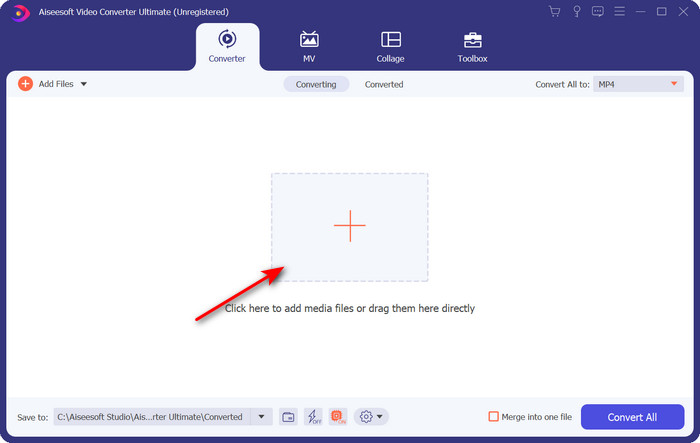
Step 2. To insert the .xvid file, you must click the + button, locate it on the folder, and click Open. However, if the .xvid file is more than two, we suggest that you drag and drop the files to the interface.
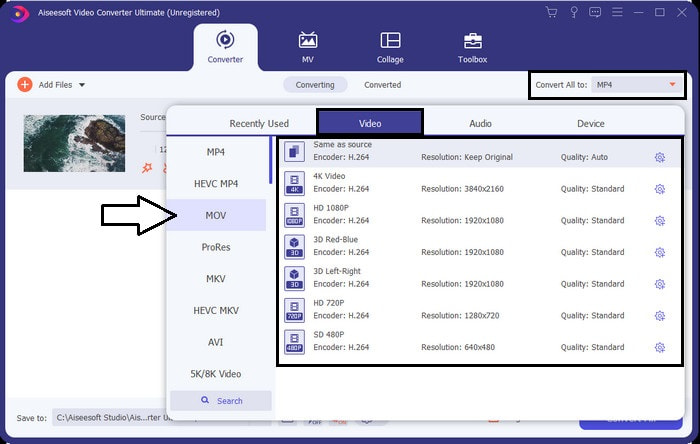
Step 3. Click the drop-down button at the upper right of the interface and locate the MOV format on the list.
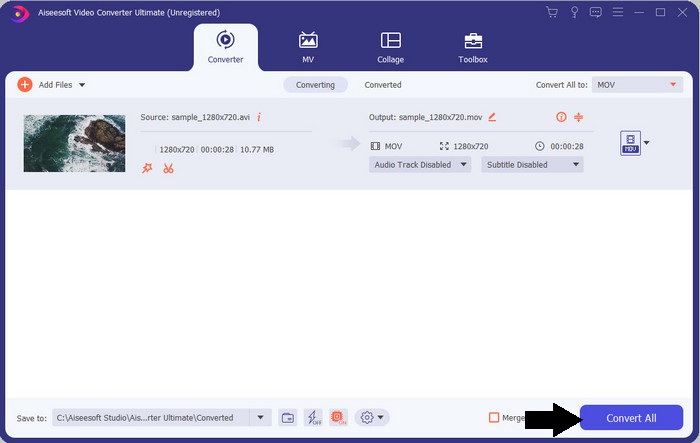
Step 4. Let's start transforming your XviD files to MOV by clicking Convert All.
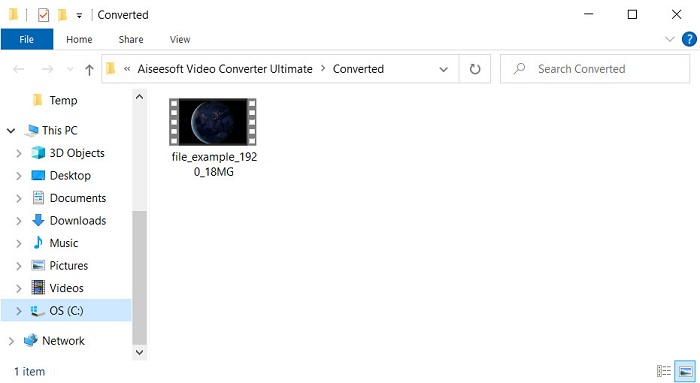
Step 5. Wait for a matter of seconds for the process to finish. A file folder will appear on your screen with the .mov file; click the file to play it on your local media player and enjoy.
第 3 部分。 将 Xvid 转换为 MOV 的最佳在线转换器
FVC 免费在线视频转换
Don't want to get in trouble downloading the software on your drive because your storage is full and you want to convert a single file online? FVC Free Video Converter Online is available in all web browsers. Converting the XviD file with the help of this tool will be done within a minute. Also, this tool doesn't need you to put your account to access it or even ads on the interface. This tool is the neatest online converter you can access on the web. However, you can't access this if you don't have an internet connection because this tool is network-dependent. Also, this tool supports a medium range of formats you can choose and use. Moreover, if you don't want to download a converter, you must use this XviD to MOV converter online.
Steps on How to Convert XviD Files to MOV Format Online with the Help of FVC Free Video Converter Online;
Step 1. To go to the main webpage of the online converter, you must click this link.
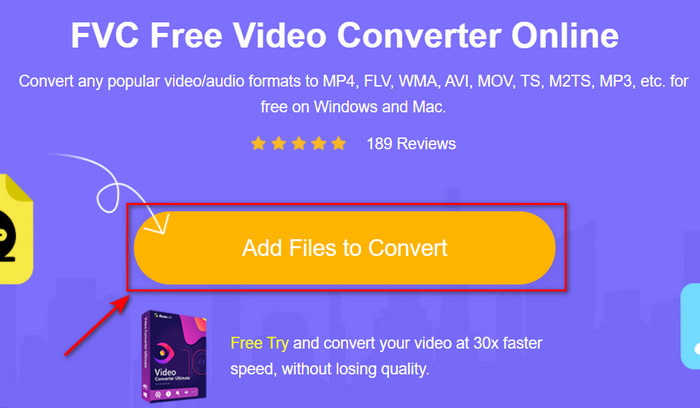
Step 2. Press Add Files to Convert to launch the tool, then a folder will show where you can find the XviD file you want to convert, and click Open to proceed.
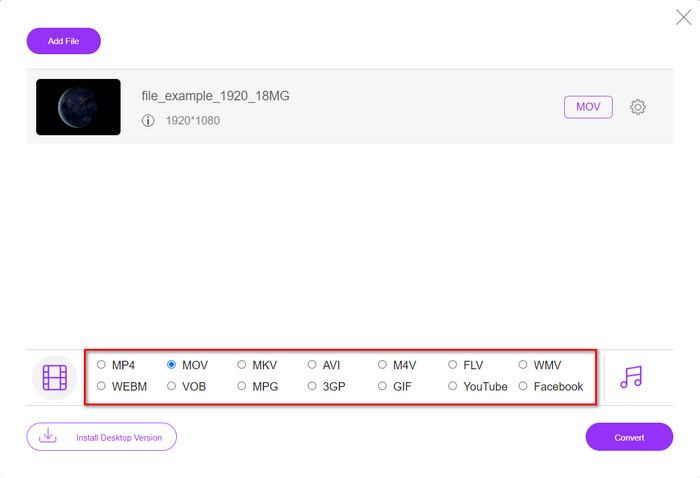
Step 3. A new interface will show after you insert the XviD file, choose the MOV format or the other format you want below.
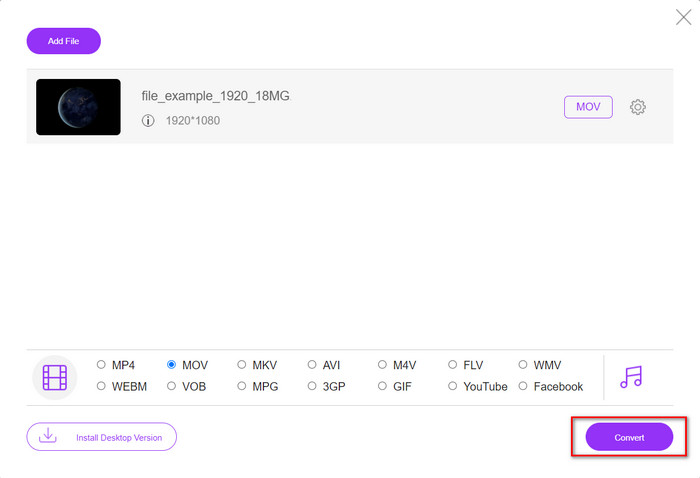
Step 4. To start the changing of format, click Convert.
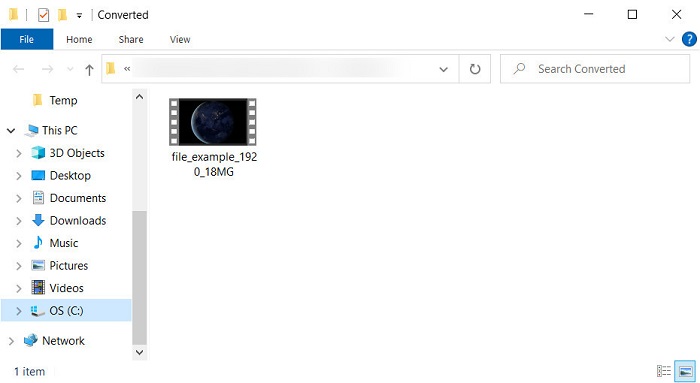
Step 5. Converting the file will take less of your time than the other online converter; after that, a folder will show with the converted file you've made.
第 4 部分。有关 XviD 到 MOV 转换的常见问题解答
我在哪里可以观看 XviD 视频?
You can use the VLC Media player to play the XviD files for you. If you don't want to download, use the Windows Media Player available in all Windows. For Mac users, use Quicktime. But if you want to watch a high-definition XviD video, read this article as we compile all the possible XviD players you can use to watch XviD files.
XviD 是否免费?
XviD 是免费的,任何想要使用和压缩文件以通过网络快速传输或节省一些空间的人都可以使用它。这一切都归功于 GPL 自由软件许可证,所以它是免费的。
为什么我不能编辑 XviD 视频?
您无法在此类编解码器下编辑视频的主要原因之一是它不受支持。在这种情况下,由于其复杂性,最小的视频编辑器仅支持这种类型的编解码器。因此,假设您要编辑此格式的视频,则必须先考虑对其进行转换。在这种情况下,必须有一个多功能转换器,可以将 XviD 文件转换为 MP4、AVI、MOV 等。然后在转换文件后,将其上传到编辑器上进行您喜欢的编辑。
结论
After reading this article, our knowledge about XviD expands, and now we can see the different perspectives of XviD. So now, if you want to save or play a video on your iOS device, you must convert the file first into MOV. As discussed earlier, these two mentioned converters perform well in converting the file into a MOV format. Although both tools look perfectly great, the speed and performance of the FVC Video Converter Ultimate are unrivaled and better than any desktop or web tool available. But if you want a free and safe conversion online, go with the FVC Free Video Converter Online.
-
 如何使用简单的步骤和工具将 AVI 转换为 MOV
 您想知道如何将 AVI 转换为可播放的 MOV 吗?您必须按照本文了解如何操作以及成功转换的提示。
-
 将 AVI 导入并转换为 iMovie 支持的格式 [2021]
 由于无法在 iMovie 上导入 AVI 文件而遇到问题?如果您阅读了这篇文章,那么您已经选择了解决此问题的正确方法。
-
 如何在Win / Mac上免费在线将TS转换为AVI / MKV / MOV / WMV
 想要将TS文件快速转换为AVI / MKV / MOV / WMV?本文介绍了在线和离线视频转换器以及完整的指南。也许您可以在这里获得最好的免费TS转换器。
