


 视频转换大师
 屏幕录影大师
 视频修复
视频修复您应该知道的将 TRP 转换为 FLV 的离线和在线工具
TRP is a file format for storing recorded television files. Because few players can handle this file type in its original version, you may need to convert your file to another format before viewing it. To support the conversion of TRP files to FLV files, you'll need to employ the right software tool. Luckily, doing this is much easier by using our software or its online counterpart that will cause you no inconvenience during the whole conversion process. Follow the steps that we will provide to convert your TRP videos to FLV format successfully.

第 1 部分。 将 TRP 转换为 FLV 的离线方法
A TRP file format is mostly uncommon to all video consumers and not frequently used by creators. With this fact, most software and online tools do not support this type of video file. That is why Video Converter Ultimate is one to consider in times of any need to convert videos from one format to another. This software can convert your TRP file to any format of your choice in one click.
此视频转换器工具提供高级编辑功能,并具有易于使用的图形界面,即使您没有技术知识或技能。借助此应用程序,您可以转换文件并受益于超快的转换时间和高质量的输出。在这里,我们为您提供了您必须遵循的简单步骤:
Step 1: Download the .exe file by clicking the Free Download button below according to what OS you are using. When you finish downloading, open it and start the installation process. Wait for it to finish installing, then launch the software.
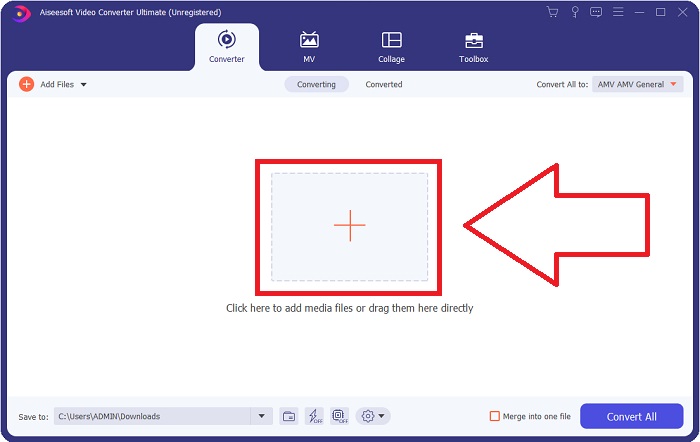
Step 2. An interface will appear once the software starts. From there, click the + button in the middle and begin importing the video file you wish to convert or just drag and drop the file.
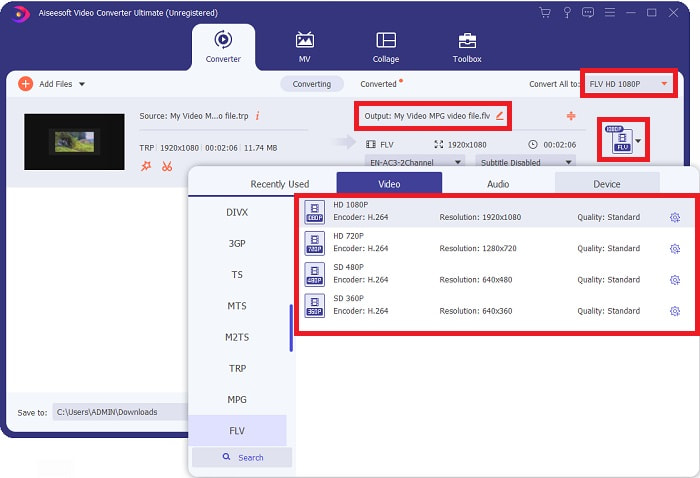
Step 3: You will see the current format of your video's current format on the right side of the file. To choose which format the video will be converted to, click on it, and all the available formats will appear. Look for FLV or just type it in the search bar. There are also video qualities on the right for you.
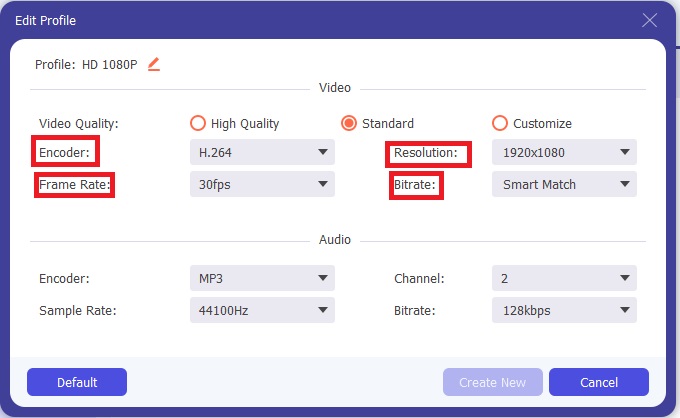
Step 4: For the additional functions we are talking about, click on the gear icon on the right of the video quality you chose, and another interface will appear. From there, you can edit a bunch of video and audio settings that suit your needs. Click the Create New button to keep the changes.
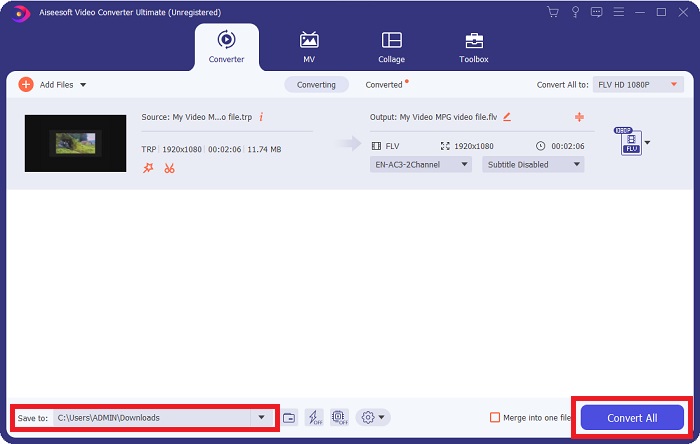
Step 5: Once you finish adjusting with all the editing, click the Convert All button on the bottom right corner of the interface to start the conversion process and wait for it to finish.
第 2 部分。 将 TRP 转换为 FLV 的在线方法
Converting video files is another thing to consider if you want to get the job done by visiting a web tool and not installing the full software. In this case, we also have the online counterpart of the software - FVC Free Video Converter Online. It still provides the additional options on the software but not all the features. However, it still does its purpose in a considerable amount of time needed to do so. To use this web tool, follow the steps below:
Step 1: Go to the converter properly by clicking this link. From there, you can start by downloading the launcher you need to import your files. Click the Add Files to Convert button in the middle of the page to begin the process.
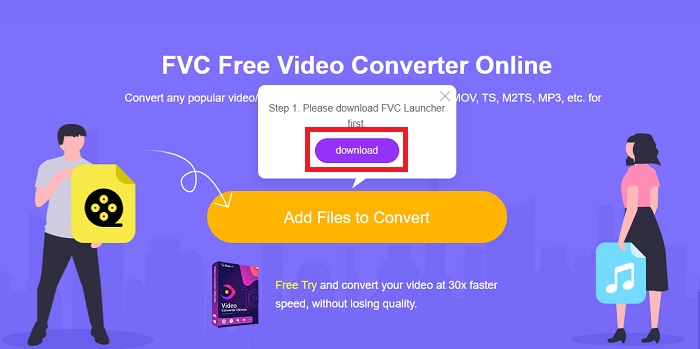
Step 2: Click the said button again and upload the video file you wish to convert. After you import a file, a new interface will appear that shows all the available formats for you to choose. In this case, select FLV.
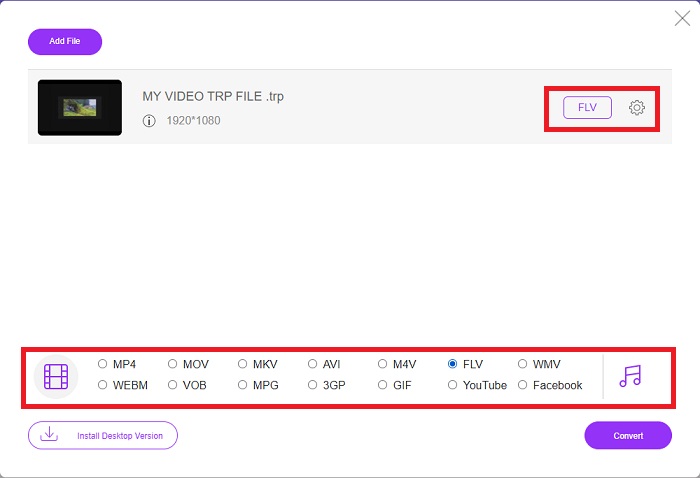
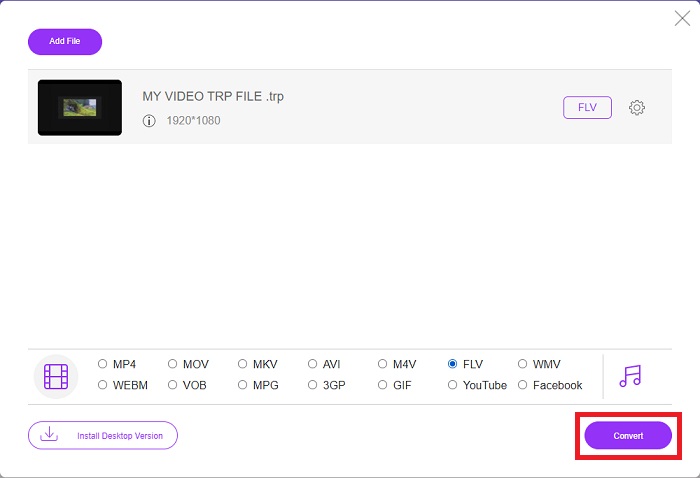
Step 3: For the additional options, just like in the software itself, click on the gear icon on the right. The video and audio settings will appear to further edit your video in terms of resolution, frame rate, and many more. Once done, click OK to save the changes. Finally, start the conversion process by clicking the Convert button in the lower right corner.
相关内容:
第 3 部分。 TRP 和 FLV 的扩展知识
要了解有关上述两种格式的更多信息,我们为您提供了简要信息以及两者的比较。
TRP 文件通常与 VideoLAN 的 VLC 相关联。 TRP 文件扩展名可以与包含高清电影的 MPEG-2 Part 1 一起收集。 TRP 文件可以包含和存储作为数字视频和音频通过数字视频广播网络、无线电频率或线性记录设备(如录像机)发送的数据包。多个音频和视频流以及纠错码都包含在一个 TRP 文件中。用户还可以在文件内容中包含元数据,例如捕获时间、相机 ID 和来源。
另一方面,扩展名为 .flv 的文件代表 Flash Video。 FLV 文件扩展名是指使用 Adobe Flash Player 或 Adobe Air 通过 Internet 发送的视频或音频文件。 Flash Video 长期以来一直是 Internet 上几乎所有嵌入式视频的主要视频格式,包括 YouTube、Hulu 和其他各种网站上的视频。另一方面,自 Adobe 正式停产以来,流媒体提供商和软件开发商已放弃 Flash,转而使用 HTML5 和其他格式。
| TRP | 轻型货车 | |
| 文件扩展名 | .trp | .flv |
| 开发者 | VideoLAN 项目组 | Adobe 系统公司 |
| 支持计划 | ◆ SMPlayer ◆ VLC 媒体播放器 ◆ 苹果 QuickTime 播放器 | ◆ 实时播放器 ◆ 苹果 QuickTime 播放器 ◆ 播放器 ◆ VLC 媒体播放器 |
第 4 部分。 有关 TRP 到 FLV 转换的常见问题解答
如何使用 VLC 打开 TRP 视频格式?
在您的计算机上安装 VLC 媒体播放器后,在您的硬盘上找到 TRP 视频文件并用鼠标右键选择它。从“打开方式”下拉菜单中选择“VLC 媒体播放器”。该程序启动后,系统将立即打开将从该程序播放的视频文件。
如何将 FLV 文件转换为 Windows Media Player?
您必须首先选择要转换的 FLV 文件。您可以选择 WMV 作为要将 FLV 文件转换为的格式。要转换您的 FLV 文件,请从下拉菜单中选择“转换”。
我可以在任何地方玩 TRP 吗?
如果您希望在任何设备或媒体播放器上或在任何地方播放 TRP 文件,建议选择将 TRP 转换为广为人知的 MP4、AVI、MOV、MKV、FLV、WMV 和其他格式。
结论
总体而言,Video Converter Ultimate 及其在线工具对应物是您正在寻找的工具,可在提供您需要的所有必要功能的同时完成整个转换过程。它不会造成任何不便,而且如果您在桌面上安装了该软件,则它可以在一天中的任何时间使用。您永远不会知道何时需要这样的转换器,因此我们建议您轻松使用该软件。
-
 如何在 Windows 和 Mac 上将 TRP 转换为 AVI 的最简单指南
 也许您不熟悉 TRP 视频格式,想知道如何将 TRP 转换为 AVI?进一步阅读本文以了解有关该问题的详细信息。
-
 3 个免费在线将 MTS 转换为 FLV 的解决方案
 想要将 MTS 转换为 FLV?这里有 3 个免费的 MTS 到 FLV 转换器软件,您可以尝试在 Mac OS X 和 Windows 10/8/7 上将 MTS 转换为 FLV。
-
 将 VOB 转换为 FLV 的最佳方法 [包括免费和在线]
 想要将 VOB 文件转换为 FLV 文件?您可以使用桌面或在线转换器轻松完成任务。阅读本指南并了解如何轻松快速地将 VOB 转换为 FLV。
