


 视频转换大师
 屏幕录影大师
 视频修复
视频修复在线和离线转换过程:SWF 到 WMV
SWF is a legacy file format created by Adobe for the Shockwave Flash player. Flash is no longer supported by many browsers, was never supported by iOS devices, and the SWF file format is seldom used these days due to performance and security problems. On the other hand, WMV is a set of video compression codecs created for early internet video streaming and physical media such as HD-DVD and Blu-Ray. Video in this file format is natively viewable on Windows devices, so you may wish to convert SWF files to WMV because Flash players are becoming more unsupported, and you can no longer play SWF files. Hence, we provide you with two options to convert your SWF to WMV.

第 1 部分。如何在 Windows 和 Mac 上轻松地将 SWF 转换为 WMV
Video Converter Ultimate is a multimedia converter that converts practically all major video and audio files to your desired output format. It can convert video files in batches, making it more potent than it seems. It does not stop at converting; it also enables users to modify their videos with the help of helpful editing tools. Furthermore, this video converter supports various formats, including the most widely used nowadays. More significantly, it converts at a faster rate than comparable software. To use this particular software, follow these simple steps:
Step 1: Click the Free Download button to download the .exe file you will need to install the software. Wait for it to finish, open it, and follow the installation process promptly. Click Start Now and launch the software.
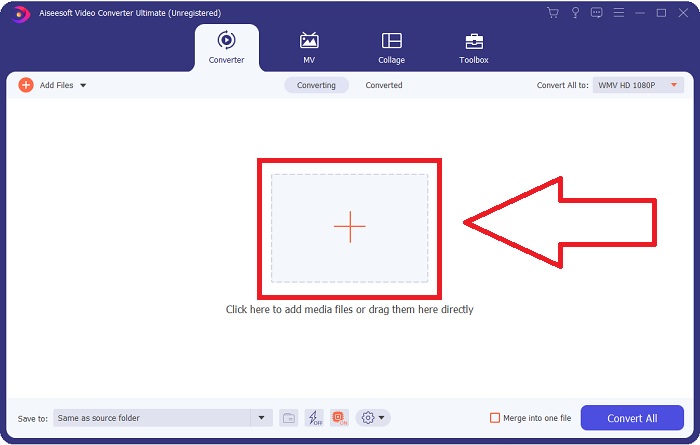
Step 2: Upload the video file you wish to convert by clicking the + button in the middle of the interface. Alternatively, drag the file from your desktop and drop it on the interface, and it will automatically import.
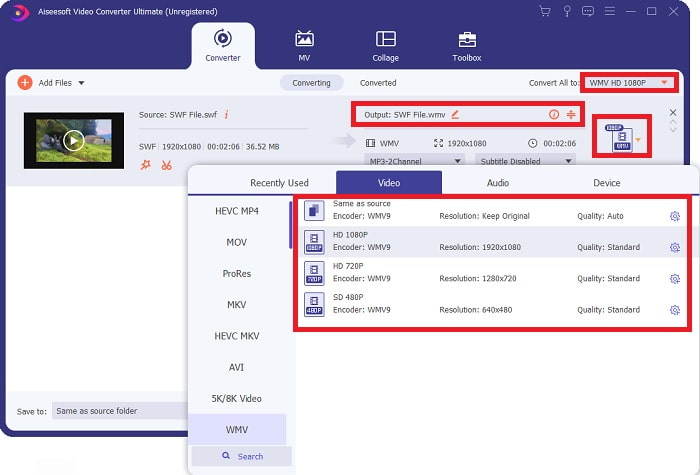
Step 3: Click the drop-down arrow on the right in which you will see the current format your video is in, and it will show you all the available formats to choose. In this case, scroll down and select WMV or just type it in the search bar. All video qualities are also available to choose from on the right panel.
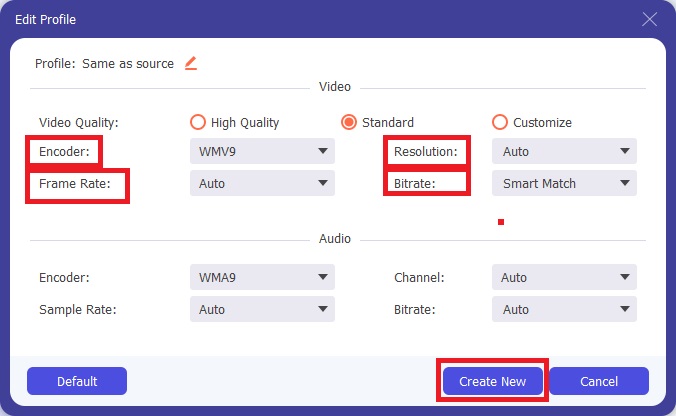
Step 4: To further edit your video, click on the gear icon on the right to show all the handy editing tools. From there, you can make all the necessary adjustments that best suit your needs. Just click the Create New button once you are finished.
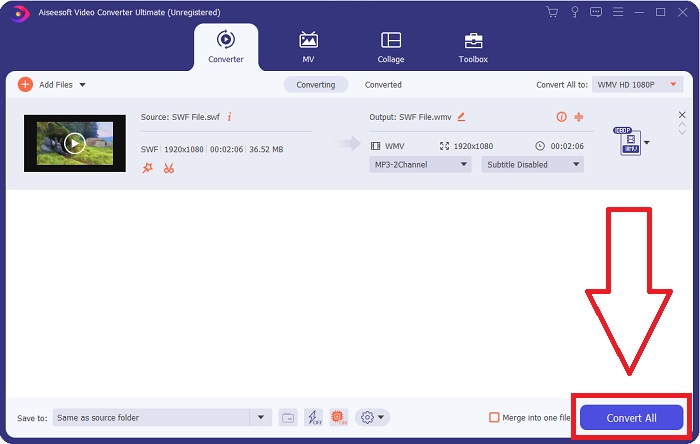
Step 5: Finish the conversion process by finally clicking the Convert All button on the window's bottom right corner and waiting for it to finish.
第 2 部分。 在线将 SWF 转换为 WMV 的另一个技巧
FVC Free Video Converter 始终免费,无需注册。一些免费的在线视频转换器会限制转换时间范围或文件大小。如果您已用完所有免费转换时间或文件太大,即使您很少转换视频,也需要购买计划。但是FVC Free Video Converter没有这样的限制,可以随时转换视频。
此外,此服务不需要注册即可转换更大的文件,不像大多数在线视频转换器需要注册才能转换大于 1GB 的视频。以下是使用此出色工具所需执行的步骤:
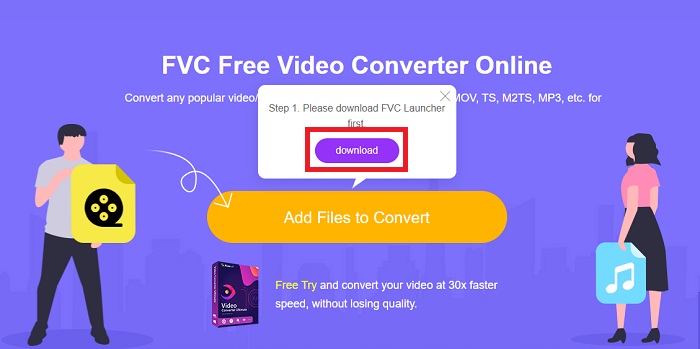
Step 1: To go to the website, click this link. Then, download the launcher quickly by clicking the Add Files to Convert button and waiting for it to finish.
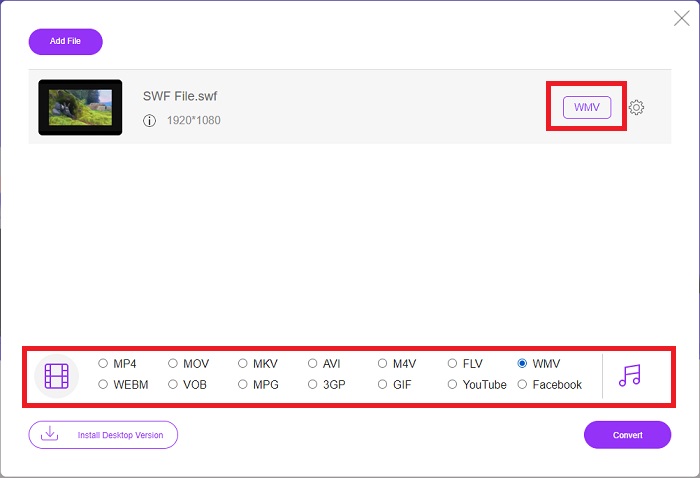
Step 2: Click the said button again, and this time, it will allow you to upload the video file you wish to convert. After that, select WMV among all the available formats.
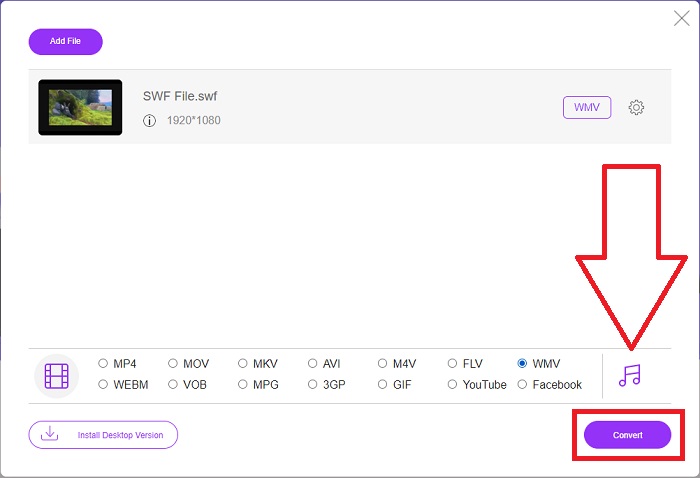
Step 3: You can still use handy editing tools like the software itself. Just click the gear icon, and it will show you all the adjustments you can make. To save the changes made, click OK and once you finish adjusting, click Convert to start the process.
相关内容:
第 3 部分。关于 SWF 和 WMV 格式的广泛知识
如果您想进一步了解这两种格式,请继续阅读本文。我们提供您可能需要的所有必要和基本信息作为背景信息。
Adobe 使用 SWF 文件格式来存储影片和基于矢量的动画。 Small Web Format 是缩写;但是,它也称为 ShockWave 格式。它通常用于通过互联网播放视频,尤其是基于浏览器的游戏。不幸的是,由于性能和安全问题,Adobe 表示将在 2020 年底停止支持 Flash 格式。
另一方面,WMV 文件是一种 Windows Media Video 文件,可以使用一种或多种 Microsoft 的视频压缩格式进行压缩。它是 Windows 中一种流行的视频存储格式,这就是某些第三方应用程序将其用于短动画等内容的原因。它旨在与 Windows Media Player 和 Movies & TV 等 Microsoft 媒体播放器配合使用。为了与数字版权管理 (DRM) 系统一起使用,WMV 文件可能会被加密。
| 小型网页格式 | 视窗媒体视频 | |
| 文件扩展名 | .swf | .wmv |
| 开发者 | Adobe 系统公司 | 微软 |
| 支持计划 | ◆ Adobe Flash Player ◆ Adobe Flash ◆ 专业抄送 ◆ GOM 播放器 ◆ Adobe Dreamweaver 2020 | ◆ VLC 媒体播放器 ◆ MPlayer ◆ 媒体播放器经典 ◆ 视窗媒体播放器 |
第 4 部分。有关转换 SWF 和 WMV 的常见问题解答
WMV 文件有什么用?
WMV 视频文件是在线或通过 HD DVD 和蓝光光盘销售视频材料的最佳格式。
SWF文件有什么用?
Flash 文件或 SWF 文件通常用于在 Internet 上有效分发多媒体信息。
可以编辑 SWF 文件吗?
Adobe Flash 是 Adobe 使用的一种文件格式。与其他多媒体文件不同,SWF 文件需要 Flash Player 插件才能在 Web 浏览器中查看。此外,用户不能直接编辑 SWF 文件。
结论
如果您是新手或只是视频转换的业余爱好者,FVC Video Converter Ultimate 是您的完美选择。您不会非常频繁地转换视频格式。它的优点,例如恒定的视频格式转换,与同类程序相比快速的视频文件转换,操作简单,支持各种格式等,帮助它成为最好的视频转换器。在视频转换方面,Video Converter Ultimate 及其在线同类产品是最可接受的选择。
-
 [2 解决方案] 如何轻松免费将 SWF 文件转换为 GIF 文件
 当您通过Flash软件导出GIF格式失败时,您可以先尝试将文件保存为SWF格式。然后,您可以从本文中学习 2 种将 SWF 转换为 GIF 文件的简单方法。
-
 顶级 5 最佳免费 SWF 到 AVI 转换器 [基于 Web 和桌面]
 您想知道如何将您的 SWF 文件转换为 AVI 格式吗?因此,如果没有,请阅读本文,因为我们提供了有关 SWF 问题转换的解决方案。
-
 [免费和简单] 用于将 SWF 转换为 MOV 的特殊工具
 您是否尝试过将 SWF 转换为 MOV,因为您无法编辑视频?谁是您的视频编辑器's 不兼容的罪魁祸首?继续阅读您的解决方案。
