


 视频转换大师
 屏幕录影大师
 视频修复
视频修复移动设备上用于不间断录制音频的 5 大录音机应用程序
选择一款录音应用其实并不难,尤其是当你清楚自己的参数要求或需要的功能时——无论你是新手还是老手。不过,并不是所有用户都知道自己真正需要哪些参数和功能。与其在网上翻很多文章或一个个录音软件去尝试,我们今天就给出一篇简单明了的评测,介绍几款可在 Android 或 iOS 上使用的优秀录音工具及其规格和功能。这里列出的应用要么可以下载,要么本身就预装在你的移动设备中。下面就来阅读这份经过验证的工具评测吧,不再多作拖延。

第 1 部分。iOS 设备上的最佳录音机应用程序
1.语音备忘录
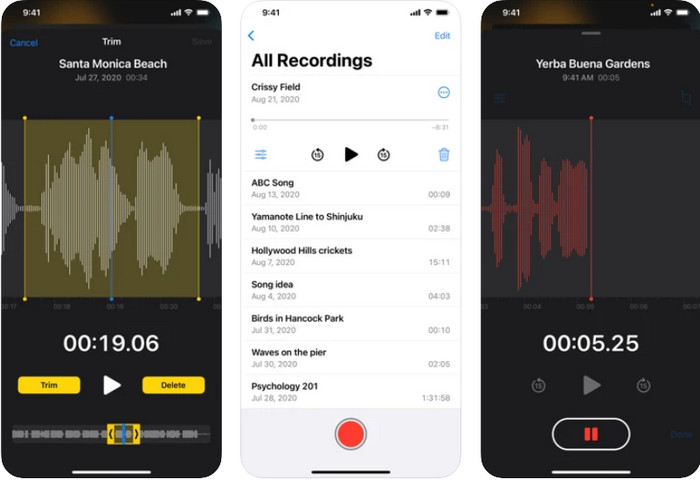
在 iOS 上最好用的录音应用之一就是语音备忘录(Voice Memos)。许多 iOS 用户喜欢用这款录音工具,因为只需轻点红色按钮就能快速、简单地开始录音。而且你无需额外下载,它在系统中已预装好,随时可以使用。虽然很多人把它当作个人录音机来用,但它只支持 AAC 格式。这种格式在苹果设备上表现很好,但由于比较新,将录音文件传到非苹果设备时,很可能会出现不支持的情况。
语音备忘录的功能特点
◆ 作为iOS 上的录音机应用程序,简单易用。
◆ 有效记录。
◆ 内置的录音库。
◆ 基本的编辑功能可用。
◆ 通过不同的选项将录音传输到其他 Apple 服务。
优点
- 它使用最好的音频格式之一,AAC。
- 预装在所有 iOS 设备中。
- 无恶意软件,使用安全。
缺点
- 不支持将录音传输和播放到其他非 Apple 服务。
- 它不支持电话录音。
2. Rev 录音机
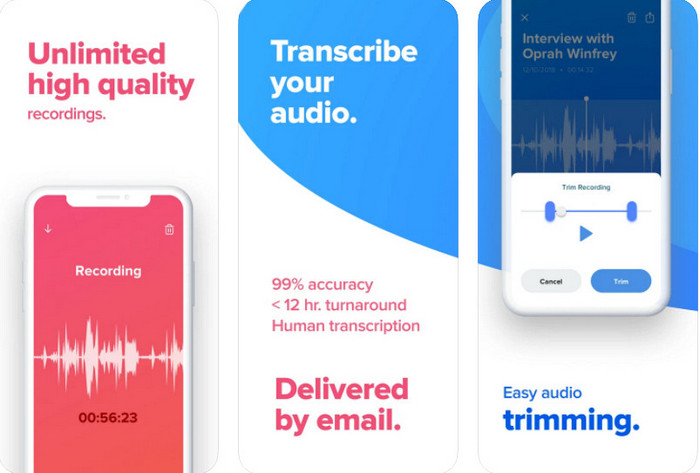
另一款可在 iPhone 和 iPad 上使用的录音应用是Rev Voice Recorder。与语音备忘录相比,这款工具在录音方面提供了更专业、更技术化的功能。它的一大亮点是:使用真人专业人员进行转写,而不是依靠机器人识别,转写准确率可达约 99%。但在使用前,你需要先在 iOS 设备上将它下载好。该工具本身可免费下载安装,不过一旦使用转写服务,就会根据使用情况向你的信用卡或其他支付方式直接收费。总的来说,如果你需要一款带人工转写功能的录音应用,那么这款工具是苹果设备的一个可选方案。
Rev Voice Recorder 的功能特点
◆ 高品质录音笔。
◆ 修剪录音中不必要的音频。
◆ 准确转录。
◆ 当呼叫和其他中断发生时,直观地停止。
优点
- 它是 iOS 上免费且可下载的录音机应用程序。
- 在您对应用发表评论后,开发者会立即做出回应。
- 这是一个专业的音频转录器。
缺点
- 与人工智能相比,人工转录的费用有点贵。
- 它不适用于某些更新的 iOS。
3. 水獭
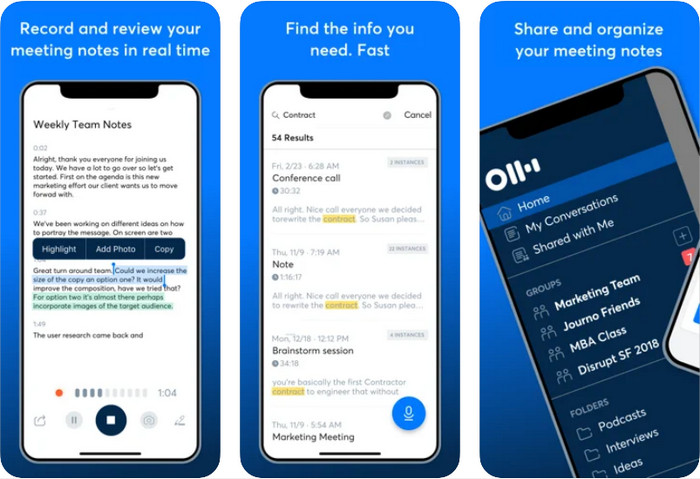
Otter 是一款可以帮助你在 iPad 和 iPhone 上实时录音的工具。它能在录音的同时,借助 AI 自动完成转写。它还支持共享会议记录、编辑内容、重点标记、整理以及导出等多种操作。不过,要想充分使用这些功能,你需要付费购买,免费版本只能用到部分基础功能。尽管它是一款功能强大的录音工具,但 Otter 的网页版整体表现往往优于 iOS 上的可下载应用。即便如此,如果你需要一款自带 AI 自动转写功能的录音器,Otter 仍然是一个不错的选择。
Otter 的功能特点
◆ 实时录制和转录音频。
◆ 组织您的导出并制作一些亮点。
◆ 它可以通过实时会议或会议自动记笔记。
◆ 录制后编辑音频。
优点
- 在您的 iOS 设备上免费下载。
- 简单而专业的工具。
- 它具有内置的协作记笔记功能。
缺点
- 需要购买才能使用专业工具。
- 编辑有时会出现故障。
第 2 部分。 Android 设备上的最佳录音机应用程序
1.简易录音机
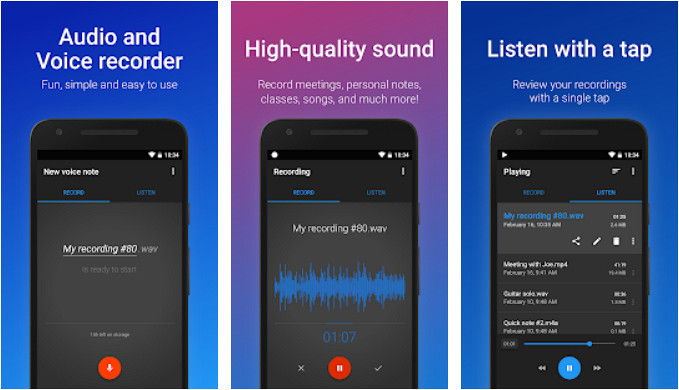
在 Android 平台上,最出色的录音应用之一是Easy Voice Recorder。正如其名,这款工具为众多 Android 用户提供了简单而高效的录音体验。此外,它还提供多种主题配色,可以在浅色、深色等不同风格之间切换,让界面更符合你的喜好。它也有专业版,可通过付费去除广告,并解锁更多高级功能。尽管它非常适合多种场景下的录音使用,但它无法在通话时进行录音。如果你的需求是录制电话通话,那这款工具就不是最佳选择。
Easy Voice Recorder 的功能特点
◆ 作为录音机使用非常直观。
◆ 支持多种音频输出格式供您选择。
◆ 在编辑模式下修剪掉不需要的录音。
◆ 简单的图形用户界面。
优点
- 它可以在您的 Android 上免费下载。
- 无忧无虑的录音机。
- 它支持通过短信传输录音。
缺点
- 它有很多广告。
- 如果您没有购买专业版,则无法使用我们提到的某些功能。
2.智能记录仪
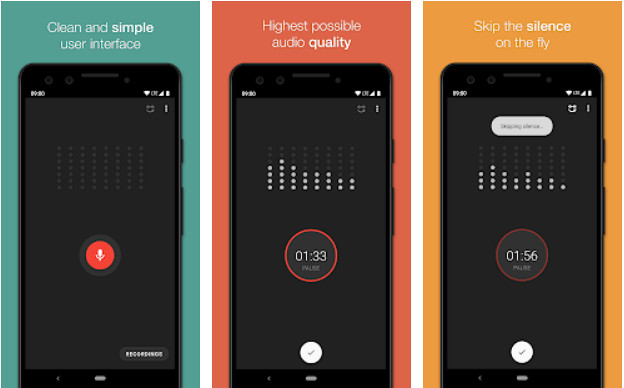
Smart Recorder 是一款可以在 Play 商店免费下载安装的录音应用。它和前面提到的应用一样,可以完成日常音频录制任务。只要你的手机空间足够,它就能持续不间断地录音,并输出高质量的音频。与部分 iOS 录音工具不同,它不提供将音频转写成文字的功能。另外,你也无法将最终录音直接保存到 SD 卡,因为它只支持保存到手机本地存储。不过,它提供了“跳过静音(skip silence)”模式,可以自动删除录音中的静音片段,从而缩短录音长度。
Smart Recorder 的功能特点
◆ 并发声音分析仪。
◆ 即使在后台也不会停止录制。
◆ 支持跳过静音模式。
◆ 内置录音库。
优点
- 免费且易于使用。
- GUI 很容易理解。
- Android 上的现场录音机应用程序。
缺点
- 它不支持编辑功能。
- 您不得更改录音名称或通过联系人传输录音。
奖励:适用于 Windows 和 Mac 的最佳录音机应用程序
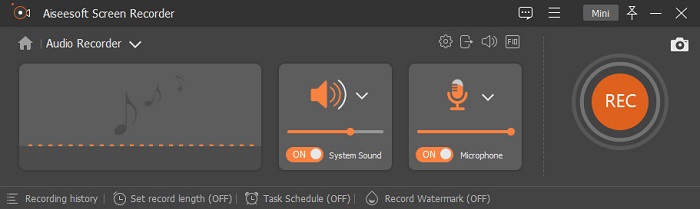
如果你需要一款能满足专业级音频录制需求的录音工具,FVC Screen Recorder 是一款可在桌面端使用的专业软件,支持 Windows 和 Mac 系统。与上面这些手机录音应用不同,这款工具内置了降噪功能和麦克风增强功能,可显著提升录音质量。借助它,无论是录音还是录屏都变得更加高效,即便是在通话或开会时,你也可以即时录下所有对话内容,并在之后随时回放。
除此之外,您还可以选择要使其与您正在使用的设备兼容的输出格式(如果您传输它)。到目前为止,如果您正在寻找 Windows 或 Mac 上的最佳录音应用程序,这是我们推荐的。
FVC Screen Recorder 的功能特点
◆ 同时录制系统声音和麦克风,没有任何限制。
◆ 可录制4k音频,拥有完全超高清的音频输出。
◆ 支持降噪和麦克风增强器,使录音效果更好。
◆ 内置录音库,按从新到旧正确排列。
◆ 如果您需要,它支持最好的屏幕录像机和游戏录像机。
◆ 其他高级功能也可用于体验一个全面的工具。
◆ 如果您不小心关闭了软件而忘记保存,可以恢复录音。
优点
- 它是顶级录音机中最好的录音机。
- 能够不受限制地通过桌面录制语音通话。
- 如果您的计算机驱动器上有足够的空间,它可以不间断地录制。
缺点
- 需要先购买才能使用。
- 它不支持移动设备。
第 3 部分。关于录音应用程序的常见问题解答
如何在手机上录制音频?
如果你是 Android 用户,可以直接打开系统自带的录音机,或者下载上文推荐的录音应用。点击红色按钮即可开始录音,录制完成后再点停止按钮,就能把录音保存到你的 Android 手机上。如果你是 iOS 用户,则可以使用语音备忘录进行录音。打开 iOS 上的'语音备忘录',点击红色按钮开始录制,录制一段时间后再次点击同一按钮即可停止。如果你想了解语音备忘录是否是 iOS 上最好的录音应用,可以点击链接查看更详细的介绍。
选择录音机的重要性是什么?
拥有录音机最重要的是创造一种更有效的方式来记录更容易的事情。您可以专注于对话并稍后查看,而不是将它们写下来。
录制的最佳音频输出格式是什么?
如果您是 Apple 用户,我们建议您使用 AAC,因为这种音频格式包含 Apple 设备上最好的音频格式,但兼容性较差。但是,如果您需要高质量的兼容性,MP3 可能是您的选择。
结论
最大的问题已经解决了;随着您花在阅读上的时间,您已经对应该使用哪种录音机应用程序有了答案。通过我们进行的测试,我们发现这里的录音机显示出巨大的录音潜力。但是,如果您需要最好的录音机,您不能在手机上使用它,但您可以在计算机上使用它,即 FVC 屏幕录像机。
-
 适用于 Windows 和 Mac 的 7 款最佳 AAC 录音机 [2025]
 了解什么是 AAC 以及您可以在 Mac 和 Windows 计算机上免费使用和下载的最受好评的 AAC 录音机。
-
 7 款适用于移动设备和计算机的流行 MP3 录音机
 探索与 Android、iPhone、Windows、Mac、Linux 等兼容的最受欢迎的 MP3 录音机列表。
-
 推荐用于移动设备和计算机的 AC3 录音机
 查看本文中的列表,了解如何使用 AC3 录音机获取音频的 AC3 文件格式。了解情况并与我们一起获得一些技术。
