


 视频转换大师
 屏幕录影大师
 视频修复
视频修复适用于 Windows/Mac/Android/iOS 的 6 个最佳视频速度控制器
如果你已经厌倦了一成不变的特效,试试给视频加速或减速,往往能创造出令人惊艳的视觉错觉。这种视频剪辑技巧简单却非常有效。网上有各种各样的视频变速工具,我们也知道很难抉择。不过,读完这篇文章后,你就能了解几款可以改变播放速度的变速应用。对最好的变速应用感兴趣吗?那就继续往下看,了解更多可在你各个平台上使用的视频变速器。

第 1 部分。适用于 Windows、Mac、Chrome、iOS 和 Android 的 6 大视频速度控制器
顶部 1. Video Converter Ultimate (Windows & Mac)
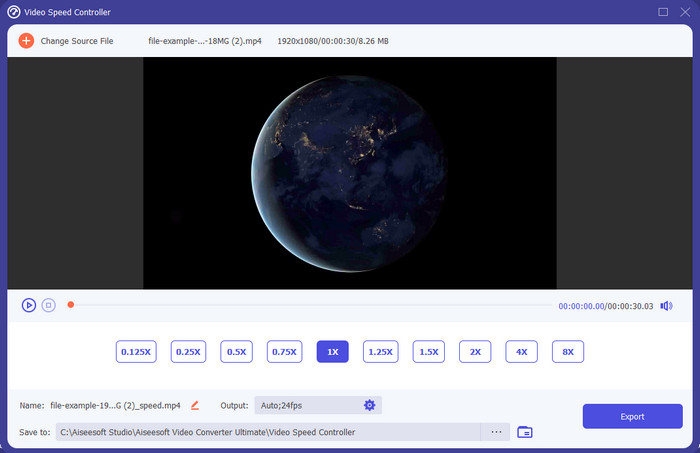
你是否需要一款在加速、减速视频方面都非常高效好用的视频变速器?那样的话,Video Converter Ultimate正是解决此类问题的利器。它是最易上手的工具之一,你可以毫不费力地调整视频速度,无论是需要大幅加速还是制作慢动作。即使你改变了播放速度,原始视频画质也不会受到影响,只是画面运动节奏改变了,因为你调节的是速度本身。
除此之外,你还可以做很多事情,比如转换、合并、剪切等等;基本上,它是一个多合一的工具。想知道这个加速视频应用程序可以提供的其他优惠吗?如果是这样,请阅读该工具的功能以了解更多信息,或者您可以立即在桌面上下载该软件进行测试。

视频转换大师
5,689,200+ 次下载- 它可以精确地快速改变任何视频格式的视频帧,例如 MP4。
- 提供丰富的视频编辑功能和效果。
- 它在 Windows 或 macOS 等所有平台上都很灵活。
- 超快的过程使您在眨眼之间完成下载或导出过程。
- 导出或下载您编辑的视频不会有水印。
优点
- 即使您是专业人士,也可以更改视频的每帧帧数。
- 易于理解的视频播放选项。
- 出色的社交媒体分享能力。
- 它可以免费下载,但它提供应用内购买。
缺点
- 如果您想拥有该工具的全部功能,则需要购买。
顶部 2. Clipchamp (Windows)
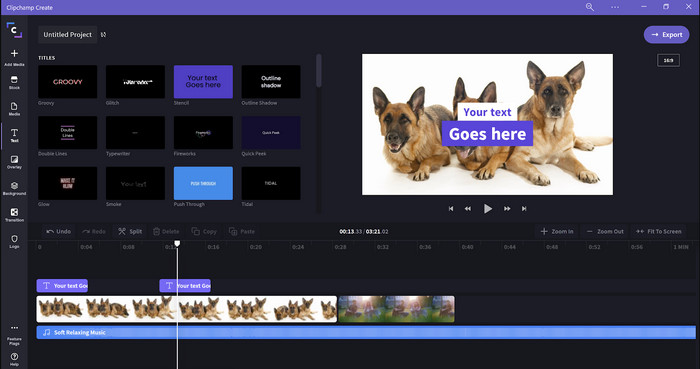
Clipchamp是一款可在 Windows 上使用的视频变速编辑器。它的学习曲线不陡,新手入门编辑时不妨试一试。它还支持多种你可能会用到的功能。不过,这个工具最大的缺点是输出视频的清晰度。免费版只能导出 480p 的视频质量,相比其他免费工具略显不足。如果你想导出 720p 或 1080p,则需要付费订阅。总体而言,这款工具不错,但与前面介绍的第一款编辑器相比,仍稍逊一筹。
优点
- 简单的 GUI 和易于使用。
- 它提供了额外的编辑功能。
- 轻松控制视频播放。
缺点
- 对于免费版,最终输出为 480。
- 有时,该工具在执行任务时变得不灵活。
顶部 3. 视频速度控制器 (Chrome)

想在 Chrome 上使用视频变速器扩展吗?那你可以试试Video Speed Controller。这个工具适用于任何 Chrome 浏览器,可以对你正在观看的视频进行加速或减速。它的使用门槛很低,人人都能轻松上手,而且作为 Chrome 扩展,安全性也有保障。但要注意的是,即使你改变了播放速度,若将视频导出,文件本身的播放速度仍保持不变。因为该扩展只对你当前在 Chrome 中观看的视频生效,对浏览器外的视频不起作用。另外,一旦你用这个扩展加快了播放速度,之后你在 Chrome 中播放的所有视频都会以同样的速度播放。
优点
- 您可以在 Chrome 上使用的点速度控制器。
- 能够轻松地倒带或重置 Chrome 上的视频播放速度。
- 它支持快捷键命令。
缺点
- 视频控制器面板不可见。
- 您无法在 Chrome 之外更改视频的速度。
顶部 4. Safari(iOS 和 Mac)加速
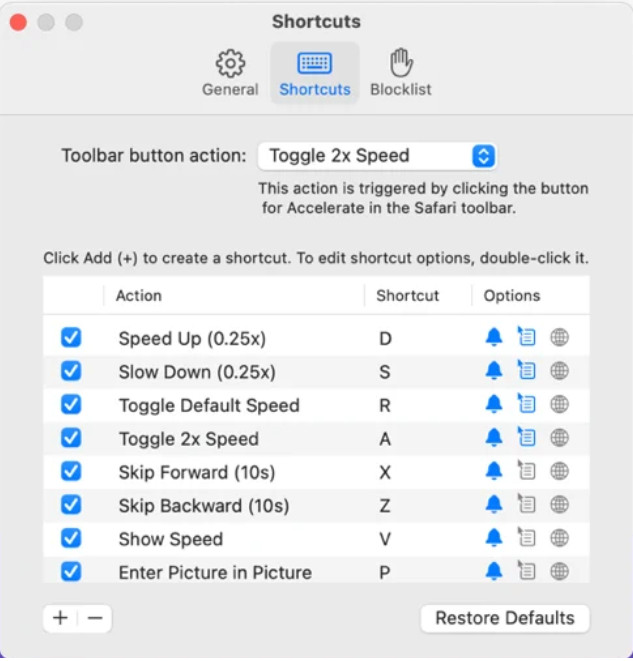
需要在 Safari 上使用视频变速器吗?Accelerate for Safari几乎在所有苹果设备的 Safari 浏览器上都可以使用。这个工具可以调整 Safari 中每个 HTML5 视频的播放速度。和上面提到的 Chrome 扩展类似,它也仅限于在苹果设备上的 Safari 中使用。所以,如果你是苹果用户,可以试试这款变速扩展来加快或者放慢视频播放。此外,你还可以通过键盘快捷键来控制工具,改变视频的播放速度。
优点
- 在所有 Safari 中使用都是安全的。
- 它还支持画中画和AirPlay。
- 快捷键可用于控制该工具。
缺点
- 它不支持除 Safari 之外的其他网络浏览器。
- 仅限于 HTML 5 视频。
Top 5. 慢 快 慢 - 控制视频的速度 (iOS)
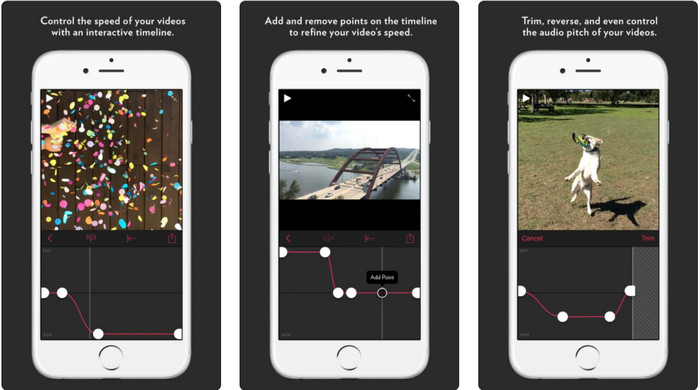
想在iPhone 上使用视频变速器,你可以选择Slow Fast Slow。这款工具能帮助 iOS 用户即时调整视频的播放速度,尤其适合制作慢动作效果。此外,它有非常直观、易操作的时间轴界面,便于精确调节速度,还支持变调、片段反转等功能。不过,这个工具需要 iOS 10 系统,如果你的系统版本低于 10,就无法使用。
优点
- 它支持您的视频的其他功能。
- 方便使用的。
- 可以将视频减慢到 1/16 速度。
缺点
- 它不支持 4k 输出和选择 FPS。
- 它不适用于某些新的 iOS 设备。
Top 6. Video Speed Controller Pro (Android)
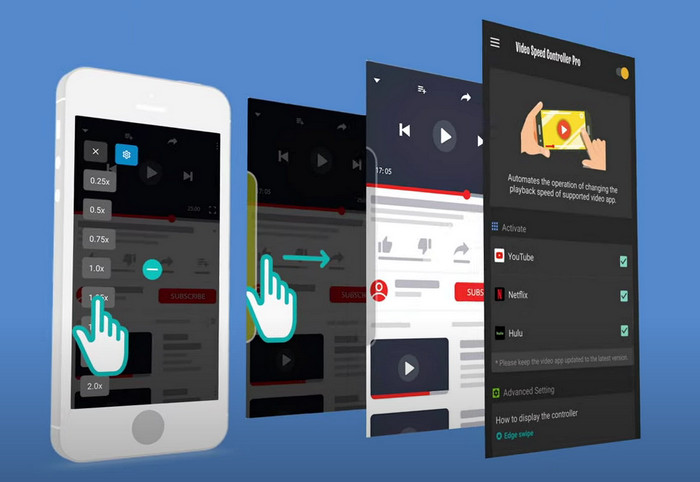
如果你需要在Android 上使用视频变速器,那么可以在 Play 商店安装Video Speed Controller Pro。借助这款工具,你可以轻松加速在 Android 手机上播放的任意视频。总体来说,它就像安卓端的视频变速扩展。虽然它能为视频加速,但最高只支持 2 倍速。不过,如果你只是想加快看视频的速度,它完全可以用于 YouTube、Netflix 以及安卓上的其他视频平台。
优点
- 使用简单。
- 该工具本身很重要。
- 菜单栏可用于显示播放选项。
缺点
- 播放速度的选项是有限的。
- 有时它不能很好地工作。
第 2 部分。 比较图表
| 特征 | Video Converter Ultimate (Windows & Mac) | Clipchamp (Windows) | 视频速度控制器(Chrome) | 为 Safari 加速(iOS 和 Mac) | 慢 快 慢 - 控制视频的速度 (iOS) | 视频速度控制器专业版 (Android) |
| 速度控制 |  | | | | | |
| 高质量视频输出 | |  | | | | |
| 编辑功能 | | | | | | |
| 超快速的导出过程 | | | | | | |
第 3 部分。有关视频速度控制器的常见问题解答
为什么我需要使用速度控制器?
在某些情况下,您需要以高速或慢速观看视频。观看加速视频的一个很好的例子是立即完成您正在观看的视频,等等。加速视频对这些用户有很大帮助。虽然是慢动作,但通常用于快速回放快节奏运动,如赛车、篮球、排球等。无论是两者,您都需要一个有效的速度控制器来手动覆盖正常速度以满足您的需求。
我可以加速 Tiktok 上的视频吗?
在 TikTok 里,你当然可以拍摄加速效果的视频。但目前你无法在 TikTok 内以更高速度观看别人的视频。如果你需要一款合适的加速工具来帮你解决这个问题,点击并阅读这篇文章,了解如何在 TikTok 上加速视频。
如何减慢视频速度?
与视频加速相反,你也可以借助市面上的各种编辑器为视频制作慢动作效果。那应该用哪款工具呢?别担心,我们已经为你挑选出几款最佳慢动作视频软件,帮助你轻松打造慢动作特效。如果你想了解更多,可点击这个链接。
结论
现在,你已经了解了在不同平台上用于加速视频的收费和免费应用。各类变速工具都为用户提供了不同的能力,帮助他们提高视频播放效率。仔细对比下来,我们会发现FVC Video Converter Ultimate几乎能满足用户的所有相关需求。如果你想在桌面端下载这款全能工具,可以点击下载按钮,尽情体验它带来的完整功能。
-
 如何使用可用的 5 大软件加速视频播放 [Windows/Mac/Linux]
 您想知道如何轻松加快视频速度吗?然后在我们解释如何在 Windows、Mac 和 Linux 上有效加速时阅读这篇文章。
-
 如何在 Android 设备上加速视频的最简单方法 [2021]
 您知道可以在 Android 上加速视频吗?因此,如果您想知道如何在 Android 手机上加快视频播放速度,请阅读这篇文章。
-
 2021 年的优秀提示:如何在 iMovie 上加速视频
 您的朋友建议 iMovie 来帮助您解决如何使用 iOS 操作系统加速视频的问题,但您不知道该怎么做?当您阅读本文的更多内容时,请查看更多相关信息。
