


 视频转换大师
 屏幕录影大师
 视频修复
视频修复如何轻松删除桌面、在线、iOS 和 Android 上的 TikTok 水印
TikTok 已经成为你可以在手机上下载的增长最快的视频分享应用之一。与 YouTube 不同,TikTok 通常是短视频,因此也正因为这一点,它迅速成为潮流,越来越多人使用这款应用。许多用户都会遇到一个问题:从 TikTok 下载视频时,总会带有水印。但你知道其实可以把它去掉吗?问题是该如何去除?如果你想知道如何去除 TikTok 水印,那就跟着我们一起完成这个教程来解决这个问题。

第 1 部分。 如何在 Windows 和 macOS 上轻松删除 TikTok 水印
需要一种有效的方法来去除 Tiktok 水印?好吧,Video Converter Ultimate 就在这里,随时准备为您提供帮助。该工具已经解决了数以千计的用户问题,包括去除水印。使用此工具,您可以轻松去除整个视频的水印和结尾水印。您是否怀疑该工具的功能?起初我们怀疑它,但经过彻底检查,我们发现这是去除下载的Tiktok视频水印的最有效方法。
所以现在,如果你和我们之前有同样的想法,你可以尝试阅读并按照下面的步骤,学习如何尽快摆脱 Tiktok 水印。在执行这些步骤之前,您需要先在计算机驱动器上下载和传输 Tiktok 视频。

FVC Video Converter Ultimate
5,689,200+ 次下载- 它是去除Tiktok上导出视频上的Tiktok水印的最佳工具。
- 它支持剪切、裁剪、合并、压缩等高级功能。
- 它支持多种格式上传和导出,如 MP4、MOV、MKV、AVI、MKV、FLV 等。
- 对于想要轻松的过程和专业的触感的初学者来说,它是最佳选择。
如何通过裁剪视频边缘去除抖音水印
步骤 1. 首先,点击下方提供的下载按钮,在电脑上下载安装该工具。根据你当前使用的平台进行选择;下载完成后即可安装,并在所有流程完成后启动该工具。
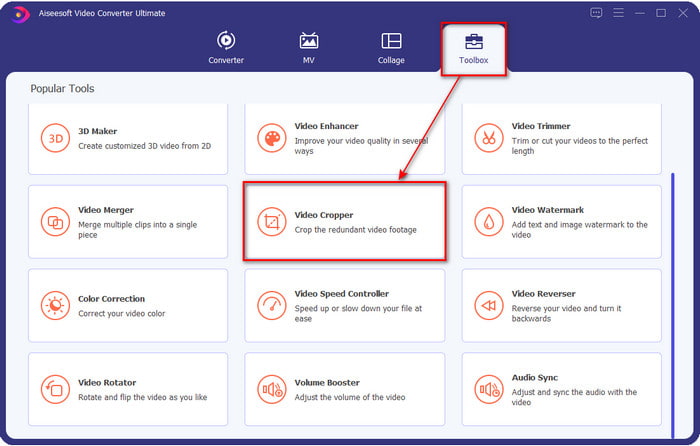
步骤 2. 在工具顶部区域先点击工具箱,然后点击视频裁剪。
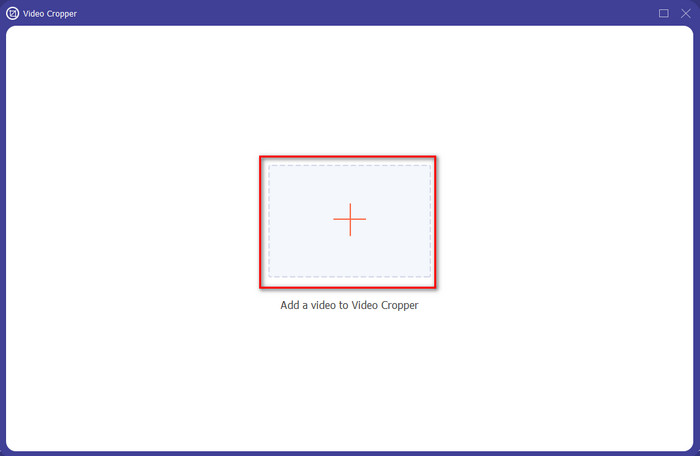
步骤 3. 点击“+”按钮,在新窗口中上传 TikTok 视频。在文件夹中找到视频后,点击打开,继续下一步。
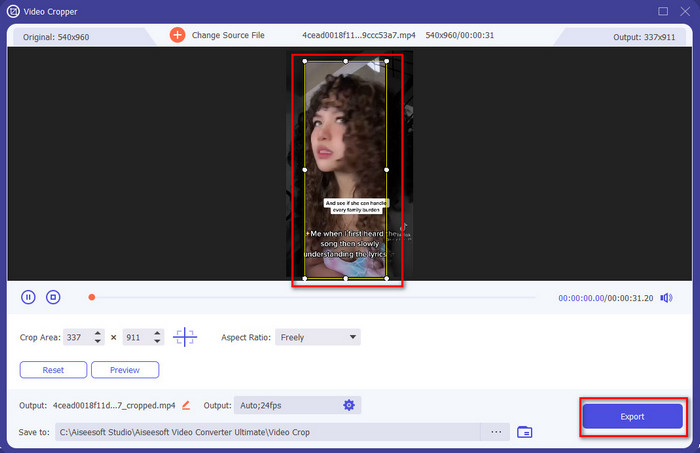
步骤 4. 通过拖动微小的点来调整裁剪框,并确保水印不在框内。完成后,点击导出,即可将无水印的 TikTok 视频下载到电脑上。
可选:通过剪切视频去除Tiktok视频的结束水印
一旦你通过裁剪去除了 Tiktok 视频侧面的水印,现在是时候通过切割视频的长度来去除视频末尾的水印了。此外,我们列出了此步骤以删除结束水印。让我们学习如何从 Tiktok 视频中去除水印,不会有更多延迟。
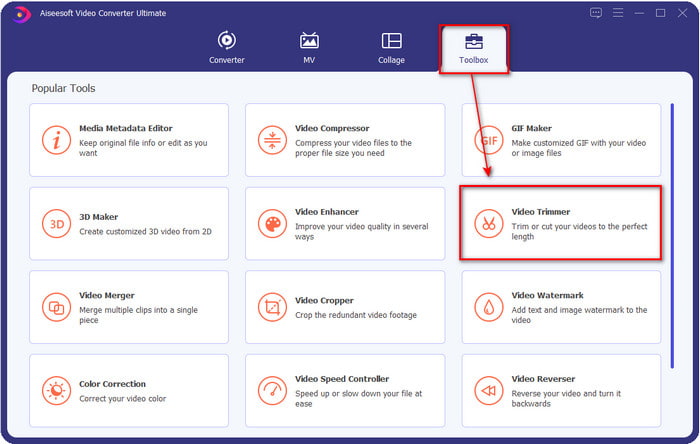
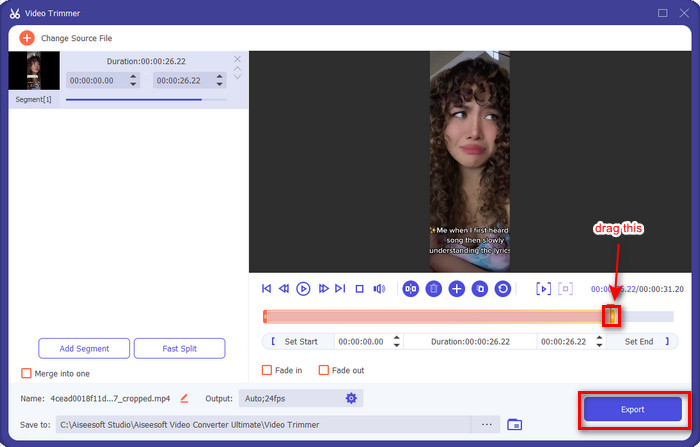
步骤 1. 在工具箱中点击视频剪辑。
步骤 2. 点击“+”按钮浏览文件;找到你之前已裁剪过的视频后,点击打开继续。
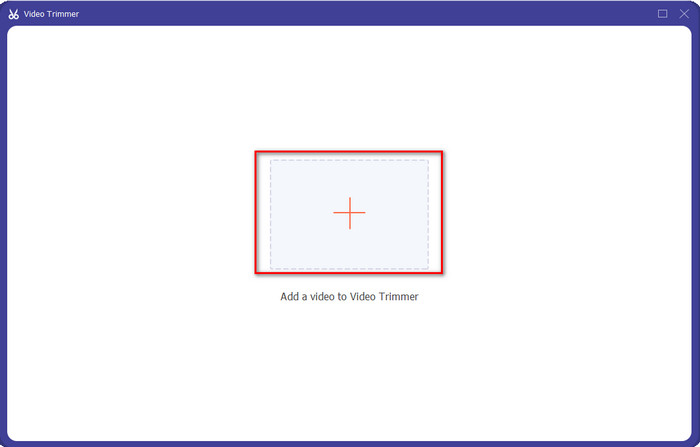
步骤 3. 拖动视频的播放入点和出点,剪掉结尾处带有水印的部分。然后点击导出按钮保存,视频结尾就不会再有水印了。这样,你就成功去除了结尾水印。
相关内容:
第 2 部分。 如何在 iPhone 和 Android 手机上删除 TikTok 徽标
使用 Android 内置裁剪器
如果您是 Android 用户,您可以使用手机内置的编辑器免费去除 Tiktok 水印。虽然它有一个内置的编辑器,但它支持的编辑功能是有限的。但是如果你想使用它,你可以先去你的画廊寻找Tiktok视频。此外,并非所有 Android 手机都具有这些功能,但您可以查看一下,如果有,请按照以下步骤操作。
步骤 1. 点击编辑,然后点击下一步。
步骤 2. 接着点击裁剪与旋转,选择给出的纵横比,然后按勾选继续。
步骤 3. 点击保存,将更改应用到最终成品。
使用 iOS 内置裁剪器。
与 Android 一样,您也可以使用 iOS 上的内置裁剪器并学习如何删除 iPhone 上的 TikTok 水印。首先,在您的 iOS 设备上下载 TikTok 视频并在您的照片上打开它。然后,按照以下步骤操作。
步骤 1. 点击“编辑”,然后点击裁剪图标。
步骤 2. 通过移动来调整裁剪框大小,使其符合你的需求。
步骤 3. 点击完成保存更改。
第 3 部分。 如何在 Web 上删除 TikTok 水印
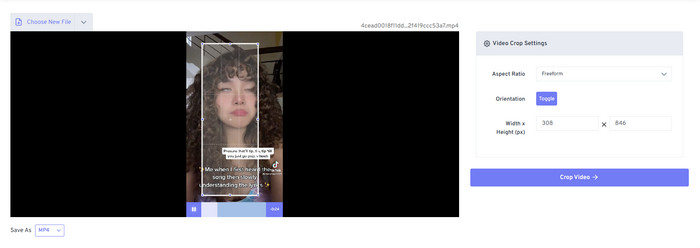
想用免费的在线方法来去除 TikTok 水印吗?如果是,你可以使用Free Video Convert – Video Cropper(免费视频转换–视频裁剪器)。正如其名,它是免费的,对所有用户都开放,你只需把带水印的区域裁掉即可。对于不想下载专业去水印软件、但又想去水印的用户来说,这款工具非常合适。不过,如果你的网络状况不佳,那就要预料到这个网页工具可能不是最佳选择。
步骤 1. 打开搜索引擎,搜索视频裁剪器并点击进入。
步骤 2. 点击选择文件,添加你想处理的 TikTok 视频。
步骤 3. 移动裁剪框,确保水印区域不在框内。然后点击裁剪视频并下载,将视频保存到你的硬盘。
部分 4. 关于删除 Tiktok 水印的常见问题
为什么会有抖音水印?
Tiktok 在他们导出的视频上添加了水印,以创建一种简单而有效的方式来向其他未使用过的用户推广该应用程序。这样一来,如果用户保存、发布到网上并被其他人查看,Tiktok 就不会花钱给别人宣传他们的应用程序。
有没有类似抖音的应用?
如果您已经喜欢 Tiktok,那么您会想要使用一些类似 Tiktok 的应用程序。这些是 Dubsmash、Clash、Lomotif 和 Cheez。使用这些应用程序,您还可以享受创建视频的同时在 Tiktok 上拥有不同或几乎相似的体验。
我可以在 Tiktok 上拍摄多长时间的视频?
在最新的更新中,您可以根据需要录制 3 分钟的视频长度。这样,想要录制长视频的用户可以一次完成,而不是剪切视频并重新拍摄。
结论
现在我们已经教你如何去除 TikTok 水印,是时候自己动手试试了。本文介绍的这些工具在去除从 TikTok 导出的视频水印方面都表现出色。尽管它们都是不错的选择,我们仍然更推荐使用Video Converter Ultimate,因为它可以灵活地在视频边缘甚至画面边角处“划掉”TikTok 水印。所以,如果你现在还在犹豫该用哪一款工具,就再仔细阅读一下上面的操作指南吧。
-
 2 个专业转换器将 TRP 转换为 WMV 格式 [指南]
 您是对 TRP 文件有复杂时间的用户之一吗?如果是这样,让我们继续阅读本文以了解如何将 TRP 转换为 WMV 并了解更多信息。
-
 3 种惊人且经过验证的免费将 FLV 转换为 MKV 的方法
 正在寻找将 FLV 转换为 MKV 的解决方案?在这种情况下,请继续阅读下面的完整详细信息,以确定如何转换 FLV 文件和可用工具。
-
 在 Windows 和 Mac 上将 3GP 转换为 WMV 的 2 个专家提示 [2022]
 想知道如何以专家的方式将 3GP 转换为 WMV?如果是这种情况,阅读以下内容将帮助您确定可以使用哪些 3GP 转换器。
