


 视频转换大师
 屏幕录影大师
 视频修复
视频修复了解什么是元数据:类型、示例、重要性以及如何查看它
元数据对于任何文件都至关重要,因为它解释了关于媒体文件的许多信息。那么问题来了,什么是元数据?它有什么用?元数据有哪些示例?是否有必要拥有元数据?在本文后面你将会知道这些问题的所有答案。除此之外,我们还会提供一款完美的元数据编辑器,帮助你为媒体文件添加或编辑元数据。阅读下文的全部内容,进一步了解元数据。

第 1 部分。什么是元数据
定义
元数据是关于隐藏在媒体文件中的数据的数据。什么是元数据?假设你想识别文件内容和其他特征,那么元数据就是一个作弊码。每个媒体文件都有元数据,如果您要拥有一个有组织的媒体文件,如果您正在处理媒体文件库,元数据将帮助您安排文件。现在我们已经了解了元数据,接下来让我们看看元数据的类型。
元数据有哪些不同类型
您知道元数据有不同的类型吗?如果没有,下面将帮助您了解其他六种元数据结构及其存储数据的目的。所以现在,要了解元数据的示例,请阅读下面的图表。
| 元数据类型 | 描述 |
| 描述性元数据 | 它标识特定对象的资源,包括标题、摘要、作者和关键字等几个元素。 |
| 管理元数据 | 它用于管理诸如什么类型的资源、数据的创建或获取、许可和处置等信息。 |
| 参考元数据或解释性元数据 | 内部数据确实从一个人的角度描述了内容和质量统计数据。 |
| 统计元数据 | 它通过收集、处理和生成统计数据来描述统计数据的过程。 |
| 法律元数据 | 这些信息包括有关版权所有者、公共许可和所有权的数据。 |
| 结构元数据 | 数据描述了其类型、版本、关系和其他数字材料特征。 |
元数据的重要性是什么?
什么是元数据及其类型在上面已经解释过;现在,我们必须确定它的重要性。通过元数据,您可以了解有关媒体文件的其他信息,例如作者、日期和时间、不同的数字材料等等。此外,如果您想保护您的媒体文件,这是使用它而不是使用水印的最佳方法之一。因此,如果您的媒体文件上有元数据,您可以做许多您不敢相信的事情,例如在您的文件夹或资料库中组织它。
部分 2. 如何在不同平台上查看元数据
您是否知道无需安装特殊工具即可通过设备检查媒体文件中的元数据?想知道怎么做吗?在这种情况下,您必须阅读以下详细信息以了解有关媒体文件中的元数据的更多信息。
对于 Windows 用户
步骤 1. 在桌面上找到该文件,然后点击鼠标的右键按钮。
步骤 2. 接着点击属性,找到详细信息,你就能在其下方看到视频的元数据。
对于 Mac 用户
步骤 1. 在 Finder 中找到媒体文件,点击鼠标的右键,然后点击工具。
步骤 2. 在其下方点击显示检查器。
步骤 3. 会弹出一个新窗口,然后点击退出,你就能看到文件中的元数据。
对于 iPhone 用户
步骤 1. 打开“照片”应用。
步骤 2. 点击你想查看元数据的视频或图像。
步骤 3. 勾选(点击)i 图标,元数据便会显示在屏幕上。
安卓用户
步骤 1. 在你的设备上启动 Google 相册——如果手机上还没有安装,需要先在 Play 商店下载安装。
步骤 2. 打开文件并点击 i 图标,即可查看元数据。
第 3 部分。如何使用桌面上的最佳元数据编辑器编辑或添加元数据
借助优秀的元数据编辑器,你可以轻松为没有任何元数据的媒体文件添加元数据,或对其进行编辑。FVC Video Converter Ultimate 是一款非常适合用来轻松修改或添加各类媒体文件元数据的完美工具。因此,如果你想了解元数据的用途是什么,可以按照以下步骤操作,并轻松了解还能在元数据中添加哪些内容。
步骤 1. 点击下方下载按钮,在 Windows 或 macOS 上下载该工具,双击已下载文件,按照安装步骤完成安装并打开软件。
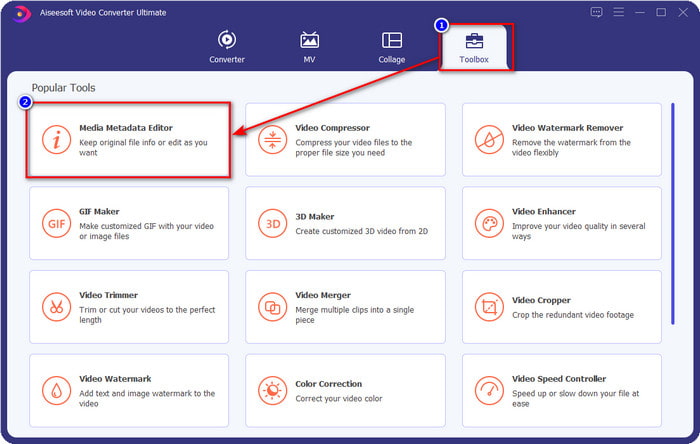
步骤 2. 前往工具箱栏目,找到媒体元数据编辑器,点击打开。
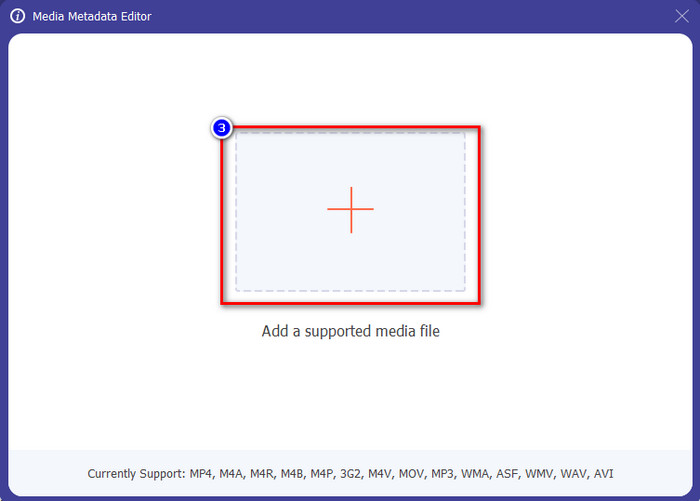
步骤 3. 会有一个新窗口弹出到屏幕上;点击+按钮,添加你想要新增或编辑元数据的视频。在电脑文件夹中定位该视频并点击打开继续。
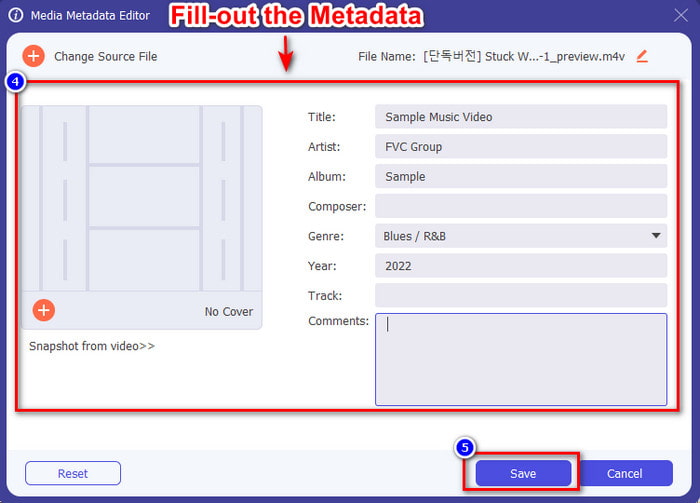
步骤 4. 等待工具加载完成,元数据编辑器界面将会显示;在此区域,你可以通过填写文本框来添加个性化的元数据。添加完必要信息后,点击保存即可下载已带有元数据的媒体文件。轻轻松松,你就已经为文件添加或编辑好了元数据。
相关内容:
第 4 部分。关于元数据的常见问题解答
为什么添加元数据后文件变大了?
如果媒体文件的大小由于元数据而变大,您不应该感到惊讶,因为它会。其背后的原因是元数据是存储在每个媒体文件中的元素;元数据会影响视频的大小。
元数据会影响视频的质量吗?
即使您添加、编辑或下载带有元数据的视频,视频的质量也不会改变。
要添加的重要元数据是什么?
假设您想将元数据添加到没有元信息的文件中。您需要填写重要的内容:作者姓名、标题、日期和时间。一切都很重要,但这些是元数据的重要组成部分。
结论
最后,我们已经对元数据有了较为全面的了解,所有困扰你的问题都已在本文中得到解答。既然你已经了解了元数据,就应该借助桌面端最出色的元数据编辑器,为文件添加元数据,从而增加一层保护。毫无疑问,FVC Video Converter Ultimate 是一款人人都能轻松使用的完美工具,无论是为文件添加元数据,还是编辑已有元数据都不在话下。有了这款软件,你还能做很多其他事情,想知道都有哪些吗?点击下载按钮,你就能看到它提供的更多惊人功能。
-
 在 Tiktok 上同时添加视频和图片的 3 种有效方法
 想知道如何在 Tiktok 视频上添加图片吗?在这种情况下,请单击并阅读本文以了解如何轻松地将图像添加到您的 Tiktok 视频中。
-
 使用前 3 名最好的视频编辑器向视频添加文本 [毫不费力]
 使用正确的工具向视频添加文本是一项简单的任务。因此,今天我们将向您展示可用于在共享视频之前向视频添加文本的不同工具。
-
 关于 6 个文本视频应用程序的善意评论 [2022]
 想知道可以跨平台使用的文本视频应用程序是什么?本文将对市场上的六款文字视频应用进行真实的回顾。
