


 视频转换大师
 屏幕录影大师
 视频修复
视频修复将 SWF 文件转换为 MKV 文件的最佳在线和离线转换器
SWF 文件是一种用于 Adobe Flash 的格式,其中包含视频和基于矢量的动画。而这种类型的文件通常无法处理多种字幕流。许多人正在寻找一种能够同时处理多条字幕流以及多语言音轨的文件格式。因此,如果你也是在寻找将SWF 转换为 MKV解决方案的人之一,我们在这里为你推荐几款最佳转换器!

第 1 部分。使用 FVC Video Converter Ultimate 将 SWF 转换为 MKV 离线
FVC Video Converter Ultimate 是一款免费的离线工具,可以将多种文件格式进行转换,例如将 SWF 转换为 MKV、MP4、WMV、MOV、AVI、FLV 等等。该转换器配备了许多强大的功能,可以帮助你优化文件。你可以剪辑、添加特效、添加水印以及添加字幕。更棒的是,你还可以批量转换 SWF 文件。此外,它支持超高速转换,只需几秒钟就能完成文件转换。下面提供的步骤一定可以帮助你将 SWF 转换为 MKV 文件。
步骤 1. 首先,点击下方适用于 Windows 或 Mac 的下载按钮下载转换器。下载完成后,打开应用程序即可开始转换流程。
步骤 2. 打开转换器后,点击添加文件按钮或+号按钮,在软件的首个界面中导入你的 SWF 文件。
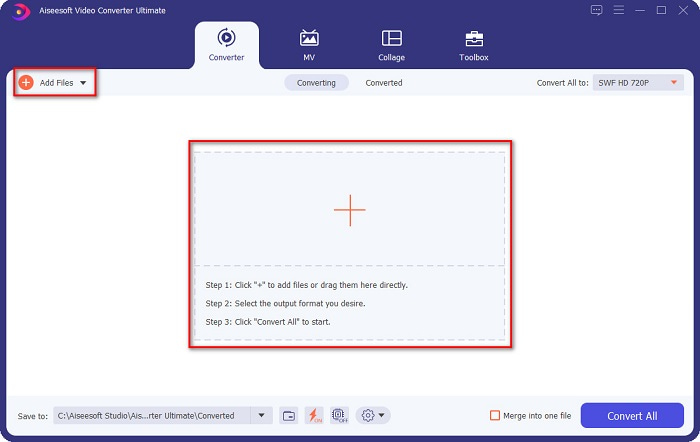
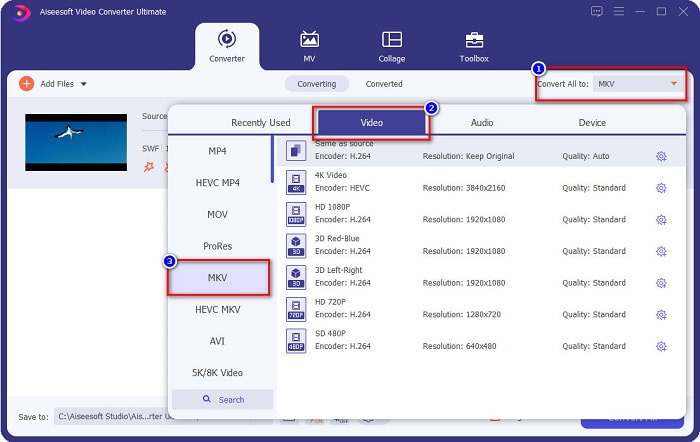
步骤 3. 接着,点击全部转换为按钮。点击后会出现一列文件格式列表,然后选择MKV 文件格式。
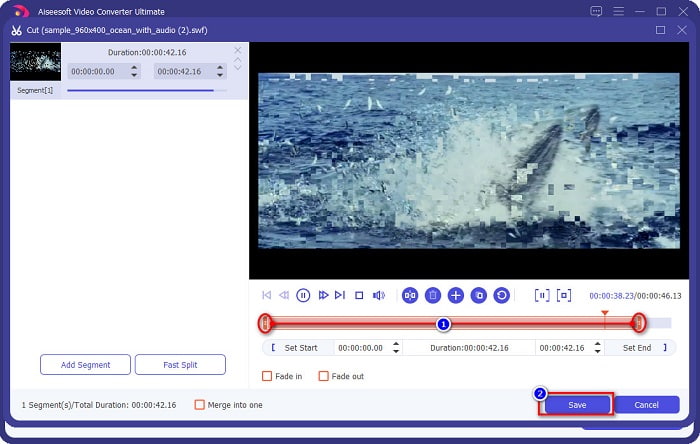
可选项:如果你想剪短文件时长,点击剪刀按钮。通过拖动播放头到你想要的起止位置即可完成剪辑,然后点击保存按钮保存更改。
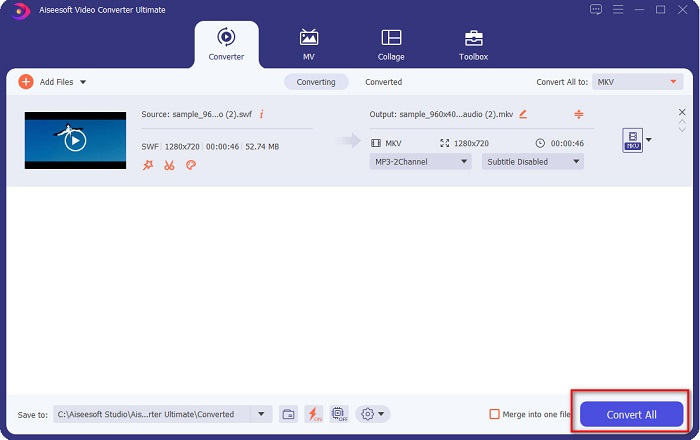
步骤 4. 最后,点击全部转换按钮,即可将 SWF 文件转换为 MKV 文件。就这么简单!几秒钟后,你的文件就可以使用了。
第 2 部分。使用免费在线转换器在线将 SWF 转换为 MKV
不可否认,使用在线工具转换文件更方便,因为您无需下载任何内容。因此,我们提供了当今最好的免费在线工具之一。
FVC免费在线视频转换器
使用 FVC Free Online Video Converter 进行转换的步骤:
步骤 1. 若要使用此转换器,可在浏览器中搜索 FVC Free Online Video Converter,或点击此链接,即可跳转至其官网。
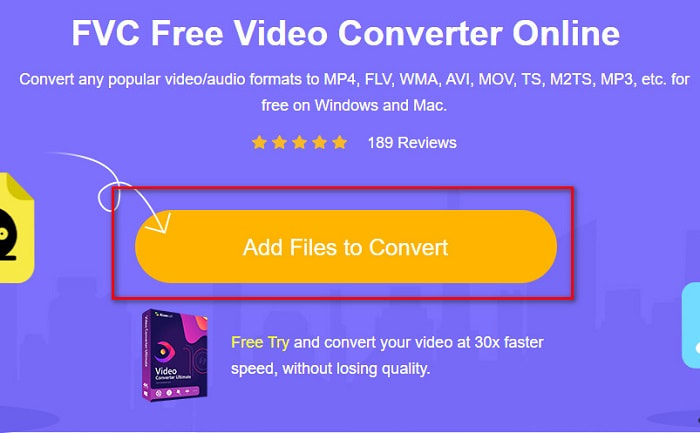
步骤 2. 进入网站后,点击添加文件进行转换。随后启动转换器,当电脑文件窗口弹出时,选择你的 SWF 文件。
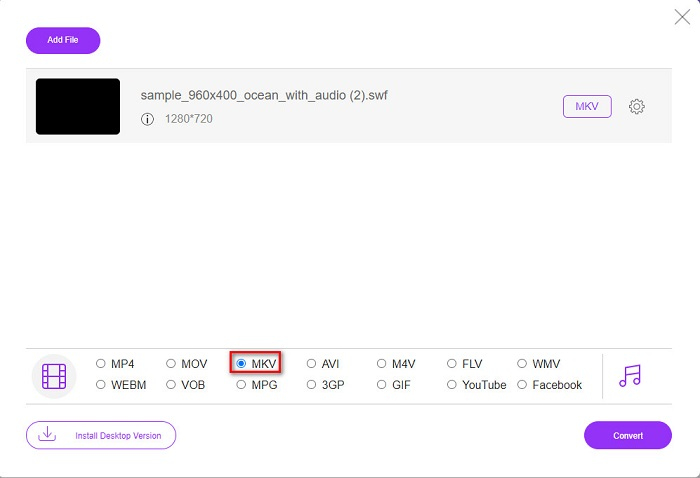
步骤 3. 在软件第二个界面的下方会列出可选文件格式。点击MKV 文件,然后继续下一步。
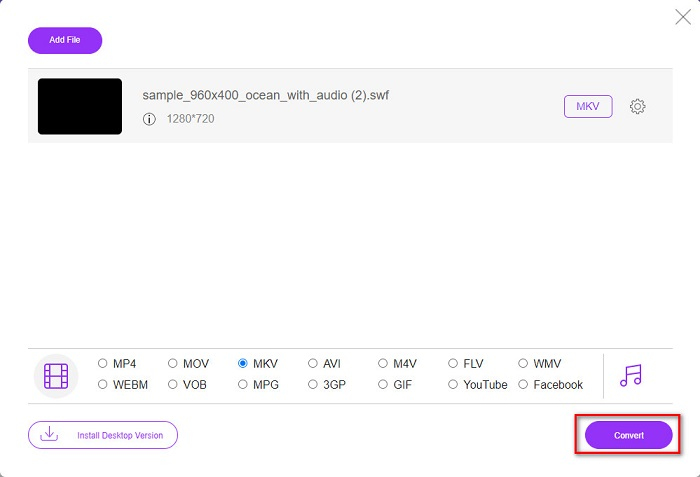
步骤 4. 最后,点击转换按钮开始转换。然后等待转换完成即可。
Aconvert.com
你还必须尝试的另一款免费在线转换器是 Aconvert.com。此工具可以在网上转换多种不同类型的文件。它同样易于使用,并且根据你的网速,可以实现快速转换。由于该转换器是在线工具,你可能会遇到转换速度变慢以及一些令人干扰的广告。尽管如此,它仍然可以帮助你轻松将 SWF 转换为 MKV。
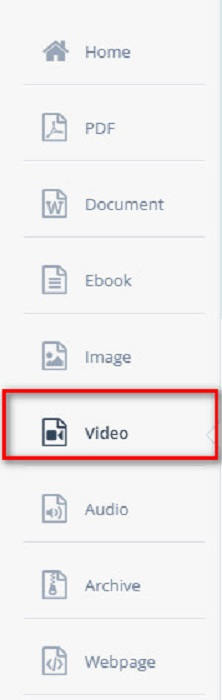
步骤 1. 在浏览器中搜索 Aconvert.com。然后在软件界面左侧点击视频面板。
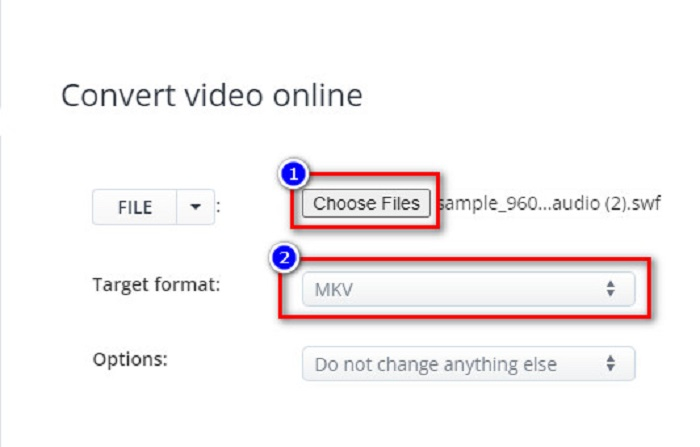
步骤 2. 接着,点击选择文件按钮,并选择你的SWF 文件。然后在目标格式中选择 MKV 文件。
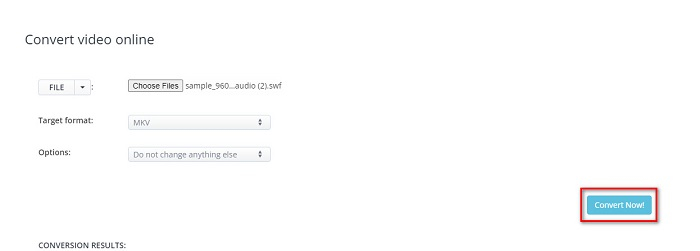
步骤 3. 最后一步,点击立即转换!按钮,开始将 SWF 文件转换为 MKV。
FreeConvert.com
FreeConvert.com 是一款可以将 SWF 文件转换为 MKV 文件格式的在线转换器。它的使用方法十分简单;不过,其中包含不少干扰性广告。尽管如此,该转换器仍支持多种在网络上常见的文件格式。
步骤 1. 在浏览器中搜索 FreeConvert.com 并进入其网站。然后点击选择文件按钮。电脑文件窗口弹出后,选择你的SWF 文件。

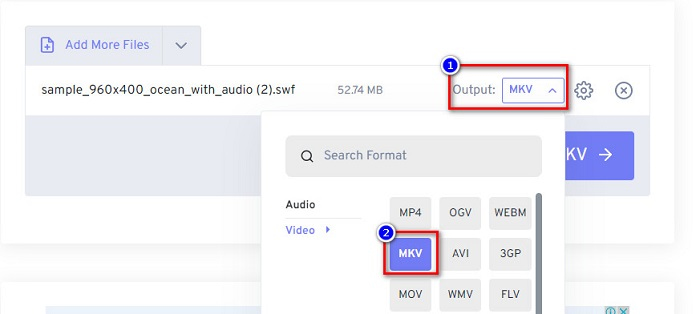
步骤 2. 点击输出一词旁边的下拉按钮以选择输出格式。选择MKV 作为文件输出格式。
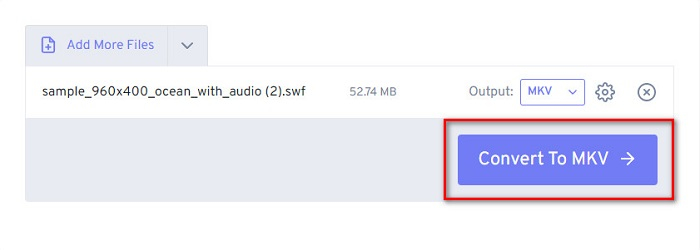
步骤 3. 然后点击转换为 MKV按钮,开始转换你的文件。
第 3 部分。 SWF 和 MKV 的扩展知识
SWF 或冲击波文件是一种 Adobe Flash 文件格式。 Macromedia 开发了它,但后来归 Adobe 所有。这种文件格式通常在网络上使用,但您可以通过在浏览器中启用 adobe flash 来打开它。 SWF 文件不仅包含视频,还包含基于矢量的动画。此外,这种类型的文件格式具有压缩的音频、视频和动画,因此可以在网络上使用。
相比之下,MKV 文件或 Matroska 是各种音频和视频编解码器支持的文件格式。它通常用于存储短视频剪辑和电影。虽然 MKV 的文件大小更大,但 MKV 文件是面向未来的文件,这意味着这种类型的文件被设计为不会过时。
第 4 部分。有关将 SWF 转换为 MKV 的常见问题解答
您可以无损地将 SWF 转换为 MKV 吗?
是的。您可以将 SWF 文件转换为 MKV 文件而不会丢失质量。一些转换器可以无损地将 SWF 更改为 MKV,例如 FVC Video Converter Ultimate。该转换器可以在不影响质量的情况下转换文件。
你可以在 Windows 上玩 SWF 吗?
是的你可以。但是,您仍然需要为 adobe 下载隐藏的 flash 播放器,因为 adobe flash 正在逐步淘汰。
Windows Media Player 是否支持 SWF 文件?
不支持。Windows Media Player 不支持 SWF 文件。不过,如果你安装 .swf 编解码器,就可以在 Windows Media Player 中播放该格式。或者,更简单的方式是将 SWF 文件转换为诸如 MP4 这类被各种媒体播放器广泛支持的文件格式。若想了解更多关于将 SWF 转换为 MP4 的信息,可以阅读这篇文章:SWF to MP4: Free Convert SWF to MP4 Online and PC。
结论
本文通过上述几款离线和在线转换器向你展示了如何将 SWF 转换为 MKV。不可否认,在线工具使用起来更加方便,但你在使用它们时可能会遇到转换速度较慢的情况。此外,FVC Video Converter Ultimate 拥有更多有利于文件处理和转换的功能——还在犹豫吗?立即下载,亲自体验这款转换器所带来的独特功能吧!
-
 [免费和简单] 用于将 SWF 转换为 MOV 的特殊工具
 您是否尝试过将 SWF 转换为 MOV,因为您无法编辑视频?谁是您的视频编辑器's 不兼容的罪魁祸首?继续阅读您的解决方案。
-
 4 个隐藏的转换器,用于免费在线和离线将 SWF 转换为 FLV
 想了解更多有关可用于将 .swf 文件转换为 .flv 的隐藏转换器的信息吗?如果是这种情况,那么您必须阅读这篇文章才能有一个想法。
-
 将 SWF 转换为 WMV 的最有用工具(在线和离线)
 您是否难以为您的 SWF 文件寻找播放器?您不必担心,因为您可以将其转换为 WMV 格式以获得更好的视频消费体验。阅读本文以了解有关此转换过程的更多信息。
