


 视频转换大师
 屏幕录影大师
 视频修复
视频修复
 安全下载
安全下载详细了解什么是照片上的水印以及为什么要添加水印
网上发布的70张%的照片有水印,确保文件属于某人或某物。照片上的水印是什么?许多用户对为什么其他用户在他们在线拍摄和发布的图像上使用水印感兴趣。为了帮助您更好地理解它并丰富您的知识,那么阅读文章的重要性就很简单了。当我们提供信息时,您需要。事不宜迟,让我们进入下面添加的信息。

第 1 部分。 什么是照片上的水印
众所周知,水印完美地用于保护我们想要在网络上发布的图像。它增加了一层额外的保护,以帮助我们防止任何人窃取我们的工作。虽然对图像加水印对每个人来说都不是什么大不了的事,但对专业人士来说却是。除了安全性之外,它还添加了数字标识,以证明它是您的原创作品或所有权。现在我们知道图片上的水印是什么,下一部分将讨论您可以在图像上使用的不同类型。
第 2 部分。 视频水印的类型是什么
这 5 种是专业人士通常使用的最常见的数字水印技术,但现在您可以在图像上使用它们。
可见
它是您见过的最常见的数字水印,因为它在视觉上是可用的。可感知的水印是直接的,可以在图像内部看到,常见于图像的侧面或中间部分。
不可见
这种类型的水印很难分析,因为它是在图像上嵌入水印,肉眼是看不到的。通常,它通过算法自动应用水印,但有些是手动完成的。
脆弱型
在我们在这里征集的不同类型的水印中,这种水印是最敏感的。一旦您的图像使用了此水印,任何人都可以通过简单地操作图像上的数据来删除它。更改文件大小或压缩它可以轻松删除它。
鲁棒型
它是一种多用途的水印类型,因为无论您更改图像的数据,水印将始终是图像的一部分,无论是压缩还是转换。无论您压缩或转换多少次,图像的水印都将保留。因此,如果您想知道照片中的水印带来了什么灵活性,就是这样。
可逆
这是您将遇到的最复杂的数字水印。因为它在进入这个过程之后会降低图像的质量,并不意味着如果你使用这个数字水印添加水印会降低图像的质量。相反,它处理所有者的身份验证以在锁定或保护后将其恢复为原始质量。一般情况下,当一张图片需要密码才能打开时,如果您是该图片的拥有者,并且想要高质量保存,您可以输入密码并像之前拍摄的相机上的图片一样保存它。
第 3 部分。 为什么要在图像中添加水印
在您的图像中添加水印会给窃贼一种印象,即他们无法轻易窃取图像,因为有人拥有它。虽然您可以手动为图像添加水印,但许多相机都会为您拍摄的图像添加水印,例如佳能、富士、索尼等。此外,其他移动设备确实支持在您的图像上自动添加水印,但如果您不想在图像上添加水印,您也可以关闭水印。
此外,摄影师使用水印是因为他们希望其他用户和摄影师能够识别或识别作品。他们中的大多数使用徽标、签名、名称和印章。除此之外,添加水印的用户可以将自己的作品出售给他人;购买后,他们现在可以看到高质量的图像。虽然他们可以免费预览图像,但它提供的质量并没有那么多可看。
第 4 部分。如何添加要拍摄的水印照片
对于 Android 和 iOS 等移动设备,他们可以在您正在谈论的图像上添加水印。它提供的水印是基于文本的;您可以通过在设备的内置编辑器上编辑一个来创建您的水印。因此,如果您想在移动设备上拍摄的图像上添加水印,您可以按照以下步骤操作。
对于安卓设备:
步骤1. 在你的安卓设备上打开图库。
步骤2. 然后选择你想添加水印的图片,点选它,然后进入编辑。
步骤3. 在编辑界面中,点击文字,输入你想添加到图片上的文字水印,完成后按保存。
对于 iOS 设备:
步骤1. 打开存放你图片的照片,点选一张你想添加水印的图片。
步骤2. 点击编辑菜单,然后点三个点,再点标记。虽然你可以涂鸦、添加签名和放大镜,但我们先专注于添加文字。
步骤3. 点击加号图标并点文字。请输入你想用作水印的文字,并把它适当地放在图片上;完成后点击完成。
第 5 部分。 如何从照片中删除水印
要删除图片上的标志、签名和印章,你可以使用 FVC 免费水印去除器。这个在线工具只需四个步骤就能移除附着在图片上的水印。尽管它只能处理可见水印,但与其他网页或可下载的水印去除工具相比,它在去除水印方面依然更胜一筹。由于操作简单、易于上手,用户很容易被吸引,并且对效果十分满意。那么,你想知道这个工具是如何工作的么?你可以按照下面的步骤轻松去除图片上的水印。
步骤1. 你可以点击这个链接在线打开图片水印去除器。
步骤2. 点击上传图片以添加带有水印的图片,在弹出的文件夹中选择它,并按打开进行上传。
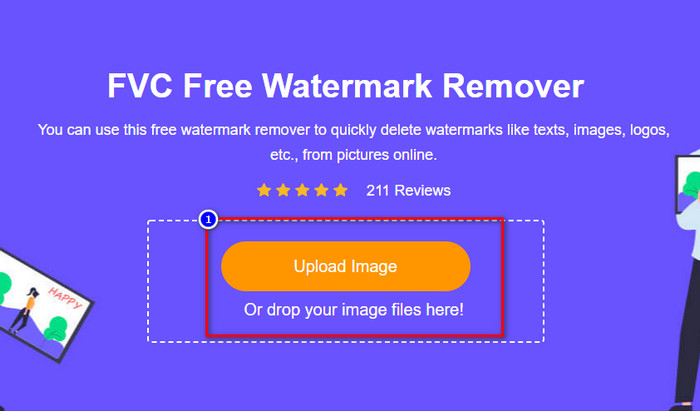
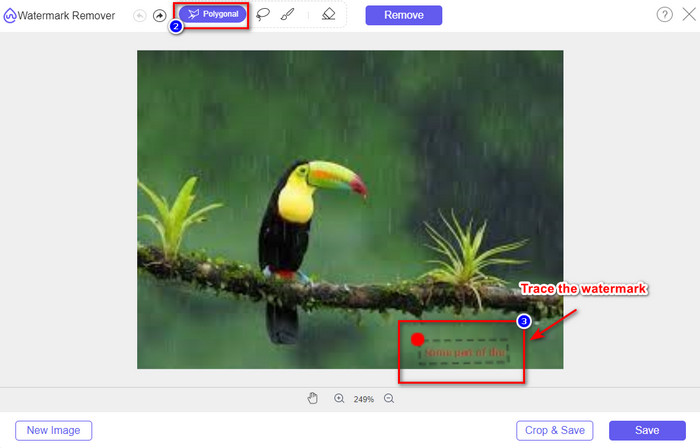
步骤3. 使用多边形工具在图片上勾选出水印区域,并确保完全覆盖水印。
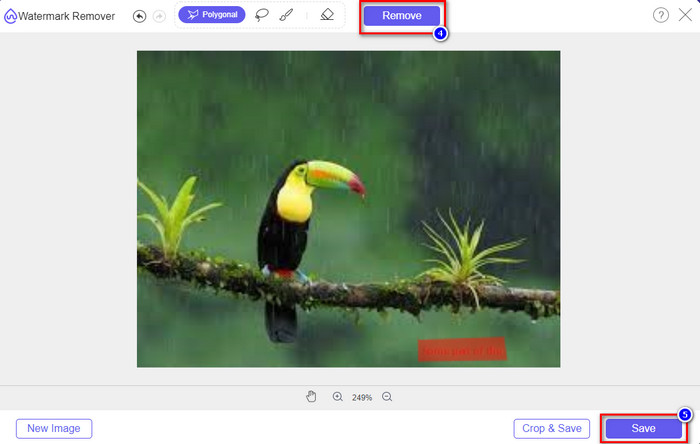
步骤4. 点击移除以去除你上传图片上的水印。等待处理完成,如果你对结果满意,点击保存。
相关内容:
第 6 部分。关于什么是照片上的水印的常见问题解答
我可以使用其他字体样式来添加文字水印吗?
是的,您可以使用您选择的编辑器上提供的各种字体样式。确保对它们进行全部测试,以查看该文本水印是否适合图像。
我需要下载软件才能去除图片上的水印吗?
现在去除水印已经可以在网页上完成,无需下载或安装额外文件。你不必在桌面上下载图片水印去除器,尤其是有了 FVC 免费水印去除器,因为它同样可以立即完成相同的工作。
给照片添加水印的最佳方式是什么?
到目前为止,在我们上面解释的水印类型上,我们可以看到可逆是最好的销售图像,鲁棒性是最好的灵活性,可感知是最好的,因为它使用算法作为水印的通用不可感知。无论您在它们之间做出什么选择,您仍然会得到最好的结果。
结论
阅读本文后,我们对什么是数字图像水印的想法变得更加广泛,我们希望本文能够为您提供您想了解的所有想法。我们错过了一些信息吗?你可以给我们留言,我们一起讨论。
-
 如何快速在任何视频上添加水印的 4 种最佳方法
 如果您阅读本文,让我们通过详细步骤了解如何在 Windows、Mac、在线、iOS 和 Android 上的任何视频中添加水印。
-
 从 Tiktok 视频中删除 Tiktok 水印的 4 种有效方法
 您需要从导出的 Tiktok 视频中删除 Tiktok 水印吗?您可以在我们提供的工具的帮助下在这里完成;你可以轻松做到。
-
 如何在 Mac 上的 iMovie 中为视频添加水印 [All Embracing]
 您想知道在 iMovie 中为视频添加水印的秘密吗?不要将茶洒在任何人身上,并通过阅读本文来学习。
