视频转换大师 大盒

多合一视频工具箱,能够以超快的速度将视频/音频转换为 1000 多种格式。

免费下载

Login Security安全下载

免费下载

Login Security安全下载

在线和离线删除 Coub 水印的简单方法

Coub is a website that is used for sharing videos online. It is a popular website that users use to create and share videos up to ten seconds long. Unlike GIFs, Coub videos have high-quality sounds, making them popular with many people. However, when you save or download videos from Coub, the video contains a watermark. So, if you want to remove the Coub watermark, you need to use a tool that can remove watermarks. This article will give you the most amazing tools to easily remove Coub watermarks on your videos.

去除 COUB 水印

第 1 部分。 4 删除 Coub 水印的方法

现在很多人都对在线观看和下载 Coub 视频感兴趣。但是,当您从 coub 下载视频时,它会包含水印。您将知道如何使用这四种简单的方法去除 Coub 水印。

FVC Video Converter Ultimate

FVC Video Converter Ultimate is a desktop application that can remove any watermarks from your videos. This tool is user-friendly because it has a simple user interface and is easy to download. In addition to that, you will not have a problem with the file formats that it supports because it supports numerous file formats, like MP4, MKV, AVI, MOV, M4V, WEBM, FLV, and 1000+ formats.

它还具有高级编辑功能,包括来自工具箱的媒体元数据编辑器、视频合并器、视频压缩器等。当您从视频中删除水印时,它允许您设置删除区域的大小。您还将看到文件的预览视频,以便您检查视频的输出。如果您想使用此转换器去除 Coub 水印,请按照以下步骤操作。

Step 1. Download FVC Video Converter Ultimate on your desktop by clicking the Download button below. Follow the installation process, then run the app.

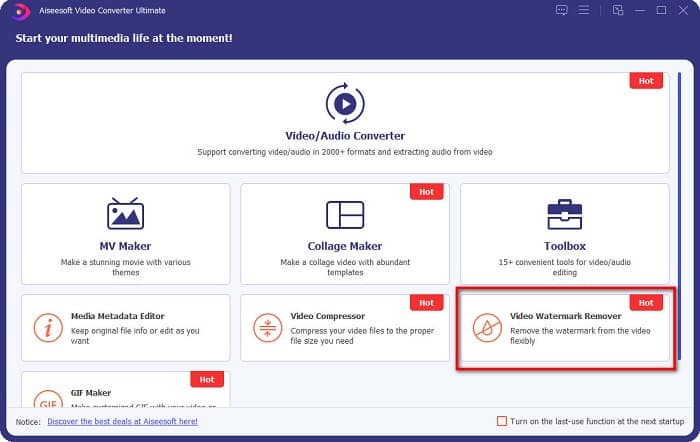
Step 2. And then, on the software’s first interface, go to Video Watermark Remover. If you cannot find it on the first interface, click the Toolbox.

视频水印去除剂

Step 3. Click the + sign button to upload the coub video on the next interface. Your computer files will prompt, where you will select the video and click Open.

加号按钮

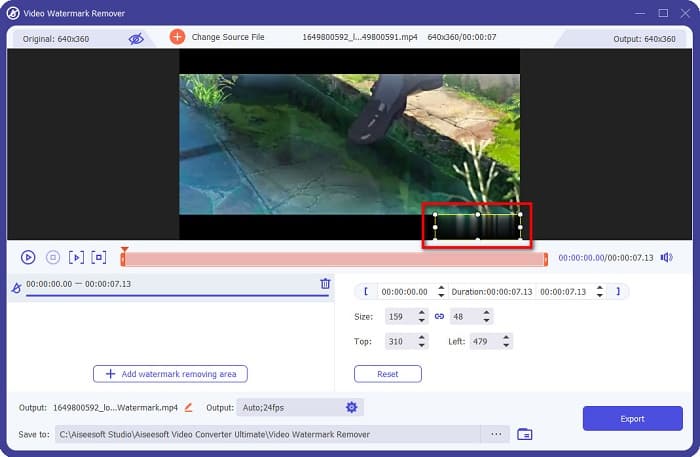
Step 4. Next, click the Add watermark removing area button so that the removing area will appear. And then, move the removing area box to the coub watermark. You will see that the area you choose will blur.

去水印区

Step 5. Lastly, click the Export button to remove the Coub watermark, then your output will automatically be saved on your computer folders.

导出按钮

Easy, right? By doing the simple steps above, you can remove the coub watermark on your video. Click here to learn how to remove the TikTok watermark.

Hitpaw 水印去除剂

Hitpaw Watermark Remover is one popular downloadable watermark remover that allows you to easily remove the coub watermark on your video. If you want to have a Coub video without a watermark, you can use this tool to remove it. Furthermore, this tool has a simple user interface, making it user-friendly.

您还可以通过移动滑块轻松删除视频特定部分的水印。更重要的是,它可以让您在去除水印时平滑填充。它也可以在几乎所有媒体设备上免费下载。

Step 1. First, download the Hitpaw Watermark Remover, follow the installation process, and run the app.

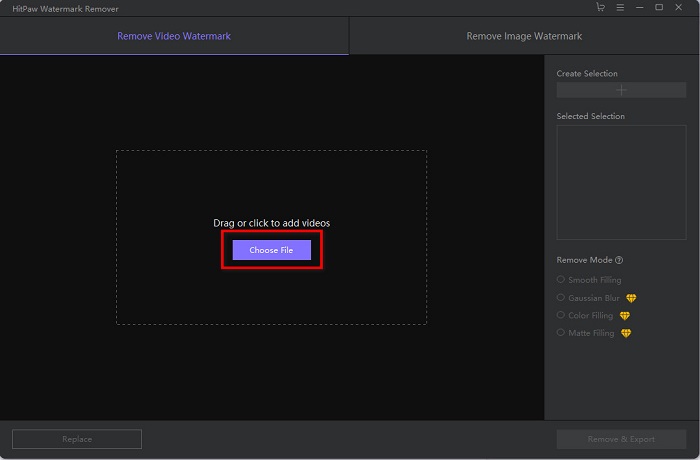
Step 2. Then, click the Choose File button on the software’s main interface to upload your coub video. Your computer files will prompt where you will open your coub video.

选择文件

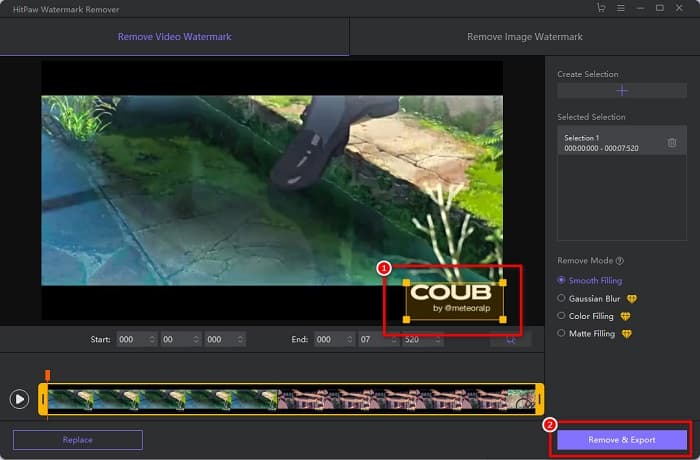
Step 3. Move the removing area to the coub watermark, then click the Remove & Export button at the bottom right part of the interface to permanently remove the watermark.

删除和导出

媒体.io

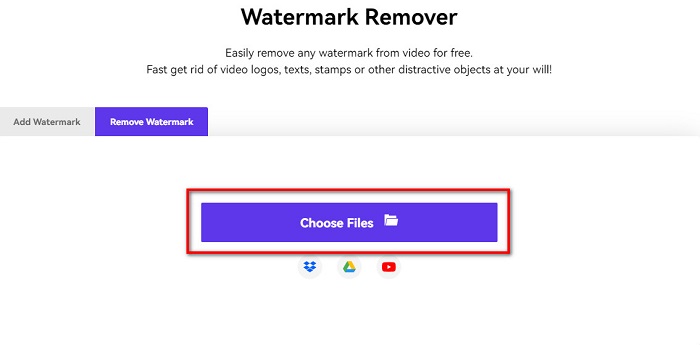
Media.io is an online watermark remover for videos. This online tool can remove watermarks, like logos, texts, and stamps. If it's the first time that you use a watermark remover, you will not have a hard time using this online watermark remover because it is easy to use. In addition to that, it supports the most common video formats, like MP4, MKV, AVI, FLV, MOV, and more. You can also choose video files from your Dropbox, Google Drive, and Youtube. Moreover, it is safe to use and free. Media.io is accessible on all web browsers, including Google, Firefox, and Safari.

Step 1. On the browser that you use, search Media.io, then go to their webpage. On the software’s main interface, click the Choose Files button.

单击选择文件

Step 2. A new interface will prompt where you will click the Choose Files button or drag and drop your Coub video on the software’s interface. Wait for your video to upload, then proceed to the next step.

拖放

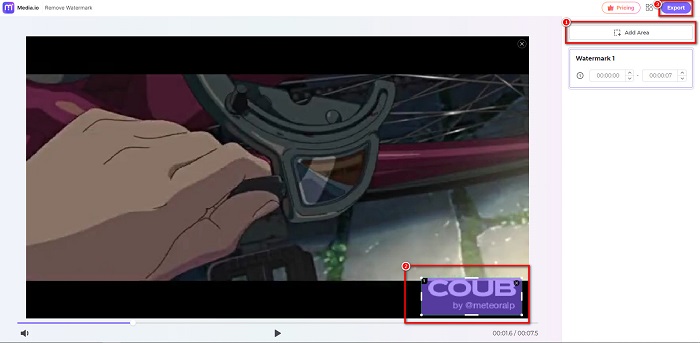
Step 3. And then, click the Add Area at the left corner of the interface, then move the removing area to the coub watermark. Click the Export button to remove the watermark, and your file will automatically be saved on your device. You can also use the way to remove the video watermark.

添加区域导出

蜜蜂切

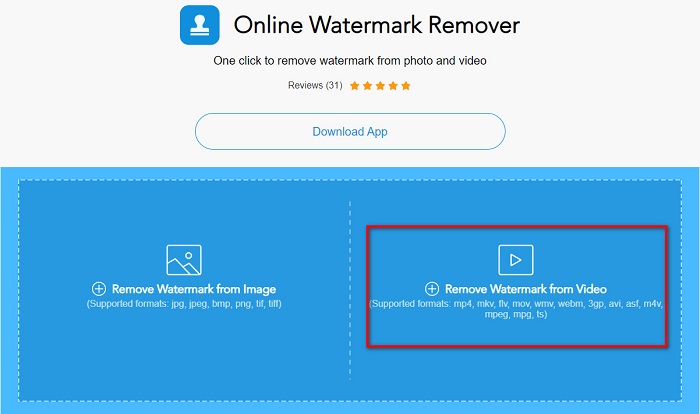
BeeCut is another way to remove Coub watermarks online. This tool is very convenient because you do not need to download anything on your device. In addition to that, it is free and safe to use. Interestingly, this tool supports numerous file formats, including MP4, AVI, MKV, FLV, and other common formats.

此外,它是一个对初学者友好的工具,因为它具有易于操作的用户界面。但是,当您的 Internet 连接速度较慢时,您可能会遇到操作过程缓慢的情况,因为它依赖于 Internet。要使用 BeeCut 删除 coub 水印,请按照以下简单指南进行操作。

Step 1. Search BeeCut on your browser, then click Remove Watermark from Video on the software’s main interface. Upload your video by opening it from your computer files.

去除水印视频

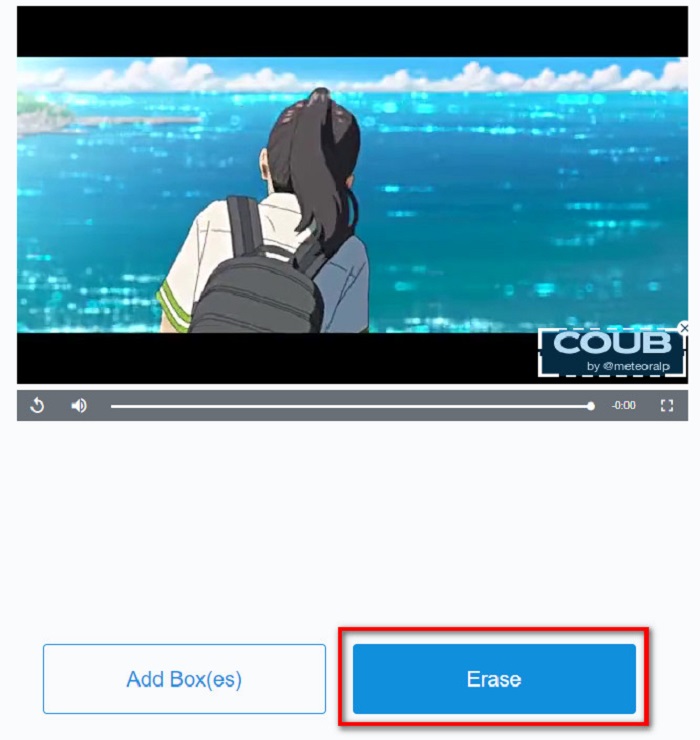
Step 2. Move the remover area to the coub watermark you want to remove on the next interface. And if you have other watermarks, logos, or stamps on your video, you can add another remover box by clicking Add Box(es).

Step 3. Finally, click the Erase button to remove the coub watermark on your video. You will see your output on your computer folders.

擦除按钮

第 2 部分。关于删除 Coub 水印的常见问题解答

你能得到没有水印的 coub 视频吗?

不幸的是,没有特定的方法或工具可以下载没有水印的 coub 视频。但是,水印去除器将帮助您制作没有水印的 coub 视频。

去除水印会减少视频的文件大小吗?

不会。从视频中删除水印不会影响视频的文件大小。

为什么去除水印区域后会出现模糊?

对您删除的水印区域进行模糊处理,因为这就是工具如何删除图像或视频上的水印的方式。

结论

Removing Coub Watermark on videos may sound complicated. But when you use the tools presented above, you can easily remove Coub watermarks from your video. However, if you want to use a watermark remover that is fast processing and has many features to use, download FVC Video Converter Ultimate.

优秀的

评分:4.6 / 5(基于 166 票)