


 视频转换大师
 屏幕录影大师
 视频修复
视频修复
 安全下载
安全下载永久删除视频上的 Animoto 水印的最佳技术
Animoto 是一个基于云的视频制作者,任何人都可以使用它制作出色的视频,以打动观看视频的观众。拥有数百万用户的 Animmoto 以编辑和创作视频而闻名,但对后期制作没有广泛的了解。由于访问该网站的日常使用,许多用户喜欢使用它并为他们的演示创建多个令人惊叹的短视频。
然而,该工具的免费版本会在视频结尾处保留工具的标志。对有些人来说这可能很烦人,而我们当然希望把它去掉,这样才能把视频干净利落地呈现出来,不带任何水印。为了给你提供可以免费去除 Animoto 水印的工具,你需要继续往下读这篇文章,我们会在文中为你汇总所有能派上用场的工具。

第 1 部分。如何从 Animmoto 视频中删除水印 [2022 年最常用的水印去除器]
FVC Video Converter Ultimate – Windows 和 Mac 上的终极水印去除器
如果你想去除 Animotica 水印,可以充分利用 FVC Video Converter Ultimate 所具备的功能和特性。该工具提供了最有效的去除视频水印方式,也就是直接将其移除。借助它,你可以用自己设计的个性化标志覆盖 Animoto 的 Logo,这样你制作的视频中就不会再显示这个工具的标志。就整体去水印表现而言,我们可以很容易地说,这是我们在市面上发现的效果最好的工具。
此外,除了删除和添加水印之外,您还可以利用其他特性和功能,如编辑、转换、创建 MV 等。在它的所有特性和功能中,我们可以承认它为最终目的服务于桌子上的正确盘子。因此,如果您想知道如何从 Animmoto 视频中删除水印,您可以阅读以下信息。
步骤 1. 请点击下方下载按钮,将其下载到你的 Windows 或 Mac 上。根据你的操作系统选择合适的按钮以下载正确版本。之后,点击你下载的文件开始安装,按照安装提示完成安装,然后打开程序。
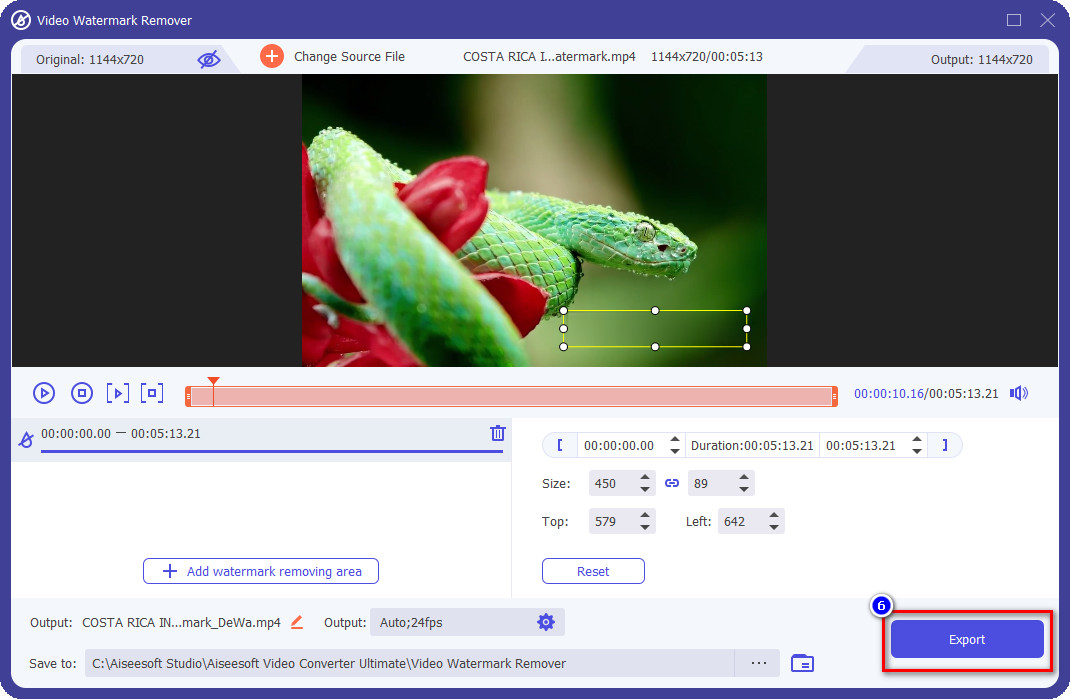
步骤 2. 前往工具箱(Toolbox),打开其中的视频水印去除器(Video Watermark Remover)功能。
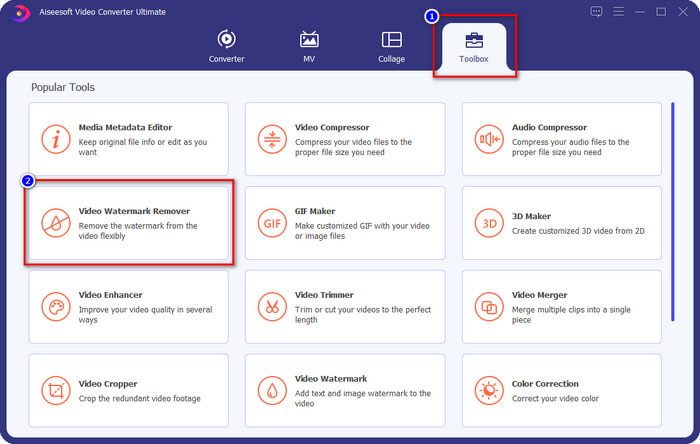
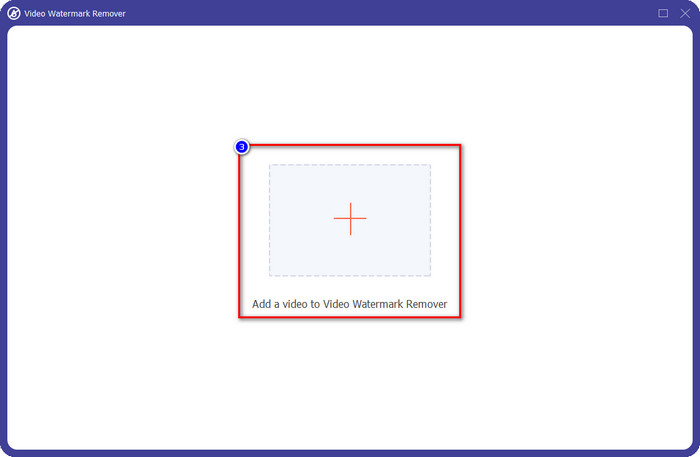
步骤 3. 然后点击屏幕上显示的 + 按钮,上传你在 Animoto 中编辑且带有水印的视频。
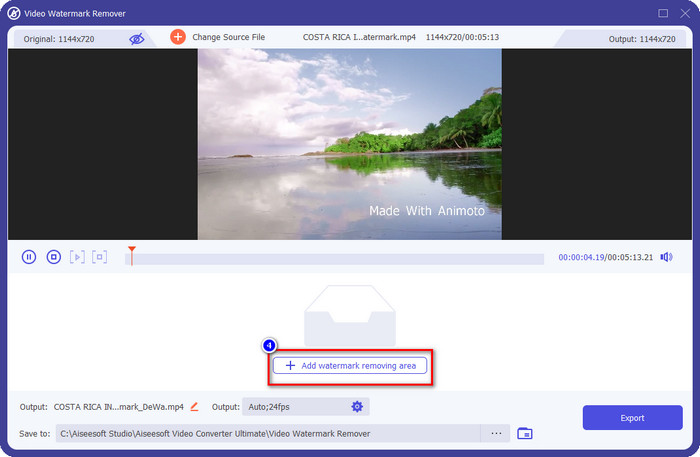
步骤 4. 上传视频后,你会看到屏幕上弹出一个新窗口。点击界面中间偏下方的 Add Watermark Removing Area(添加水印去除区域)。
步骤 5. 请调整选框的大小和位置,使其正好覆盖住水印。
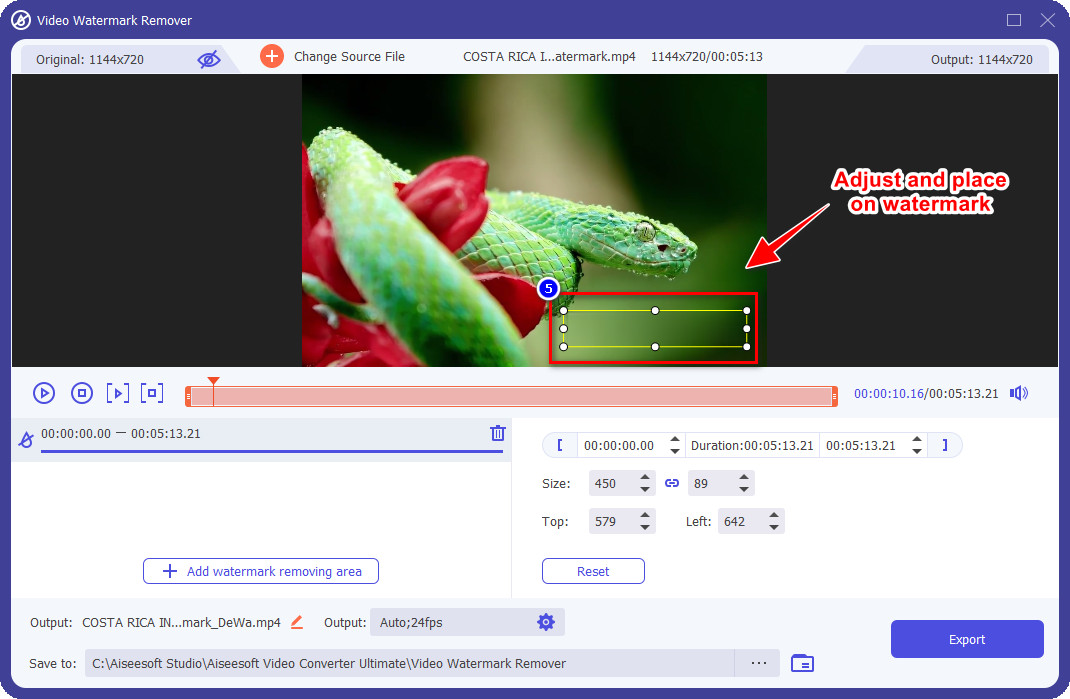
步骤 6. 当选框已经覆盖在水印位置后,你就可以点击“导出”(Export)按钮,将去除水印后的视频终版保存下来。
Mac 上的 iMovie
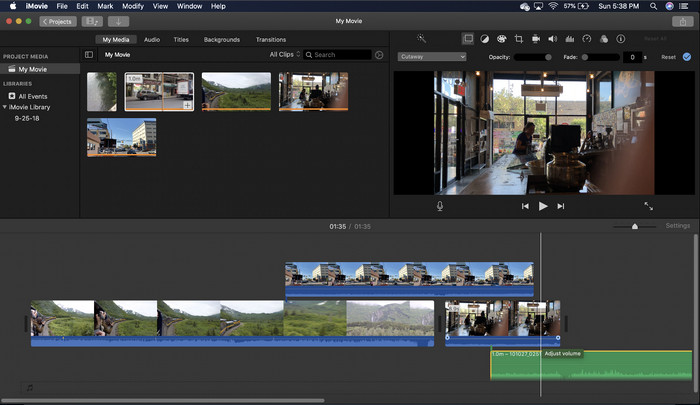
iMovie 是一种流行的视频编辑器,您可以使用它通过裁剪来删除视频上的水印。每个 Mac 用户无需在其设备上下载软件即可发挥其潜力,因为它已经预装,从而节省下载和安装时间,甚至节省存储时间。虽然该工具非常适合视频编辑,但它支持的水印去除功能与第一个工具提供的不同。它裁剪视频帧以去除视频中的水印,因此如果水印放在中间,您将需要裁剪几乎一半的视频视觉呈现。
它并不总是去除水印的最佳选择,但如果徽标位于视频的末尾,您可以按照以下步骤了解如何通过裁剪从视频中去除 Animmoto 水印。
步骤 1. 在 Mac 设备上打开视频编辑器:进入 Finder,然后进入“应用程序”,在里面找到 iMovie 图标并双击打开。
步骤 2. 点击导入(import)按钮上传你想编辑的视频,并在本地磁盘中找到该视频文件。
步骤 3. 视频上传完成后,你需要将刚导入的视频拖拽(drag)到时间轴上。
步骤 4. 在工具界面的右侧,你会看到许多编辑功能图标;在列表中点击裁剪(crop)图标。
步骤 5. 调整画面框(frame),把 Animoto 水印裁剪在画面之外。
步骤 6. 点击左上方的共享(share)按钮,然后选择导出为视频(Export as a Video),开始下载已处理好的视频。
第 2 部分。 保存无水印 Animoto 视频的其他方法
我可以在 Animoto 上保存没有水印的编辑视频吗?你可以。您无需使用我们上面提到的软件,而是在此网络工具上购买订阅费来保存您在此处编辑的视频,但这次没有水印。为了帮助您做到这一点,您可以按照以下步骤操作。
步骤 1. 打开浏览器,搜索 Animoto Video Editor,然后进入其官方网站。
步骤 2. 在官方网站上,点击Pricing(价格)选项。
步骤 3. 在该页面下,你会看到可以选择按月或按年两种订阅方式。不要被年费看起来更低的单价迷惑,因为按年来算最终比按月订阅花费更高——“annual”意为每年收费。
步骤 4. 在这里创建一个账号,并添加你的账单地址及想要使用的付款方式。完成之后,你就可以开始使用这款在线工具的专业版了。
有关的:
第 3 部分。有关如何删除动画水印的常见问题解答
Animoto和Animotica是一样的吗?
这两个视频编辑器彼此无关,但关于它们的文章最常谈论比较每个工具。就其本身而言,它们都是彼此的最佳选择。
哪个更好,模糊或裁剪 Animoto 水印?
模糊会对您的视频产生好的和坏的影响;模糊水印的好处是我们的肉眼无法察觉,特别是如果它与颜色混合或融合得很好。但不好的一面是,如果出口不顺利,您会在导出后看到可追溯的标记。种植时也是如此;裁剪视频时,不会对视频产生模糊效果,但帧大小会变窄。
Animoto 有一次性付款吗?
不幸的是,它不支持一次性付款。但是,如果您想更便宜并长期使用它,我们建议您选择年度订阅以使用网络工具一年,然后再次订阅它以供下一年并继续使用。
结论
那么您认为您会使用哪种方式去除 Animmoto 水印?无论您的决定是什么,我们都希望我们能帮助您解决在 Animmoto 上编辑的视频上去除水印的问题。
-
 如何快速在任何视频上添加水印的 4 种最佳方法
 如果您阅读本文,让我们通过详细步骤了解如何在 Windows、Mac、在线、iOS 和 Android 上的任何视频中添加水印。
-
 从 Tiktok 视频中删除 Tiktok 水印的 4 种有效方法
 您需要从导出的 Tiktok 视频中删除 Tiktok 水印吗?您可以在我们提供的工具的帮助下在这里完成;你可以轻松做到。
-
 如何在 Mac 上的 iMovie 中为视频添加水印 [All Embracing]
 您想知道在 iMovie 中为视频添加水印的秘密吗?不要将茶洒在任何人身上,并通过阅读本文来学习。
