


 视频转换大师
 屏幕录影大师
 视频修复
视频修复
 安全下载
安全下载在不同平台上删除 VideoShop 水印的主要方法 [免费]
Videoshop 是一款可以在移动设备上使用的一体式视频编辑器,到目前为止,该应用程序已定期收到更新。由于该应用程序会定期更新并在收到更新后添加新功能,因此移动用户倾向于选择它作为他们的视频编辑器。尽管该应用程序提供了几乎完整的视频编辑功能,但许多用户仍然会遇到一些缺点,例如它的界面令人困惑,以及在导出的视频上添加了水印。因此,在今天的文章中,我们将向您解释可用于删除可在 iOS 和 Android 上下载的 Videoshop 水印的不同方法,以及可在桌面上使用的终极软件。

第 1 部分。如何使用平台上最有效的工具删除 VideoShop 水印
FVC Video Converter Ultimate - 在 Windows 和 Mac 上删除水印的终极解决方案
由于在今天的文章中,FVC Video Converter Ultimate 能高效去除视频中不需要的水印,因此被我们选为推荐工具。这个工具内置了丰富的去水印功能,你基本上在第一次使用时就能轻松上手。如果你选择使用它,直观的界面设计和工具本身的轻量化特性会让你在去除水印时完全不会迷茫。借助该工具,你还可以完成许多其他实用操作,比如添加水印、调整尺寸、压缩、剪切、裁剪等等。
水印的终极解决方案就在这里;如果您需要有关如何删除 Videoshop 水印的教程,请按照以下指示的步骤操作,并使用终极工具来消除水印。
步骤 1. 首先,你需要根据自己电脑所使用的操作系统版本,选择合适的安装包并下载到桌面。然后完成安装过程,启动软件即可开始使用。
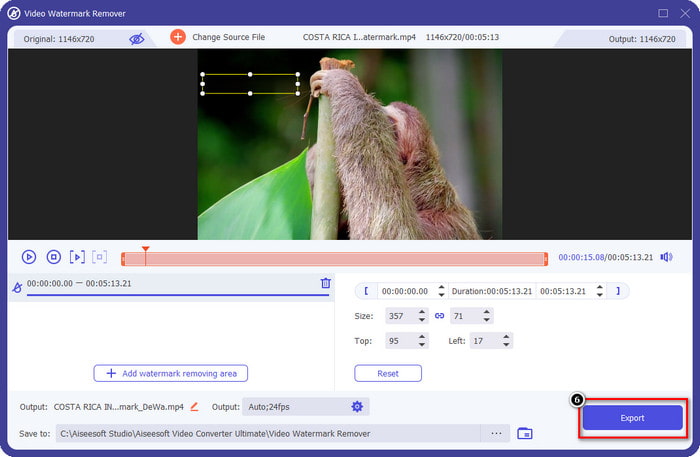
步骤 2. 点击打开 工具箱(Toolbox),然后在屏幕上显示的功能列表中找到并选择 Video Watermark Remover(水印去除器)。
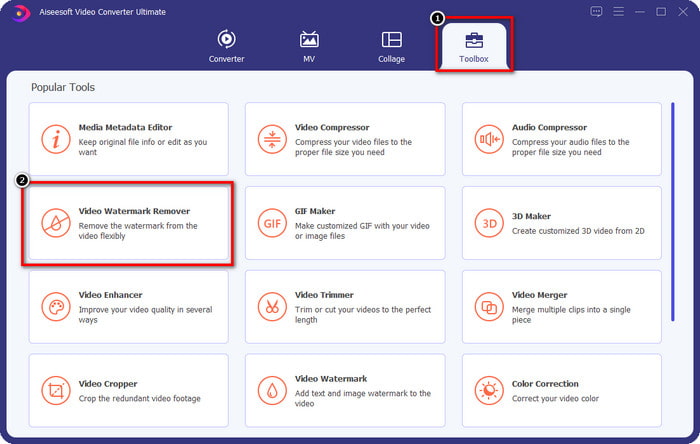
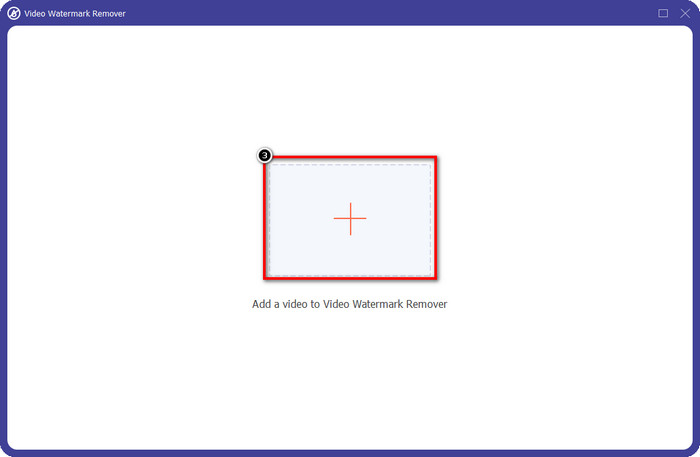
步骤 3. 接着点击 + 按钮,添加带有 Videoshop 水印的视频文件。在文件管理器中找到该视频文件,单击一次后,点击 打开 即可上传。
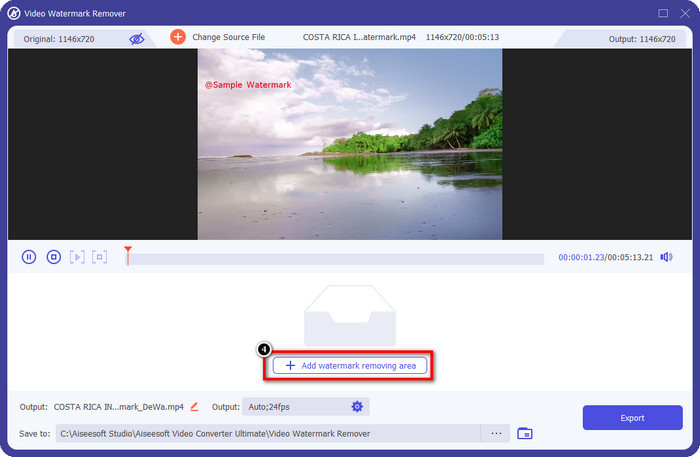
步骤 4. 在文件上传完成后弹出的新窗口中,点击 添加去水印区域(Add Watermark Removing Area)。
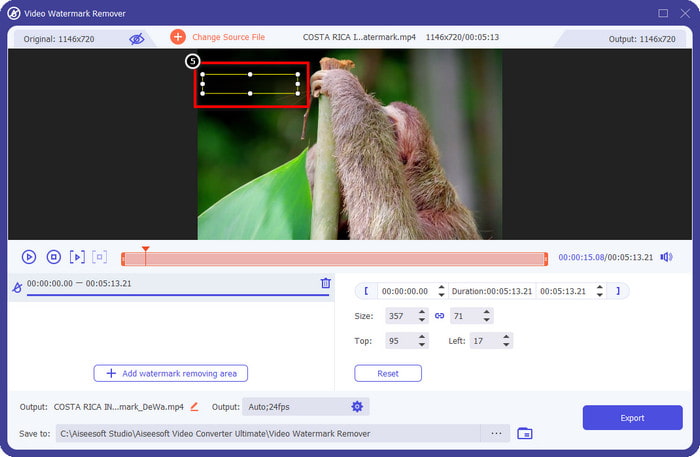
步骤 5. 将矩形框 放置 在水印位置上,将其完全遮住。请确保预览界面中的矩形区域能够完整覆盖视频中的水印,这样你下载导出的视频时就不会再显示水印。
步骤 6. 按下 导出(Export),即可将已去除水印的 Videoshop 视频保存到你的桌面;导出完成后,会自动弹出文件夹,你可以在其中查看该文件。
相关内容:
Photo Retouch [iOS] - iOS 设备上最好的水印去除器
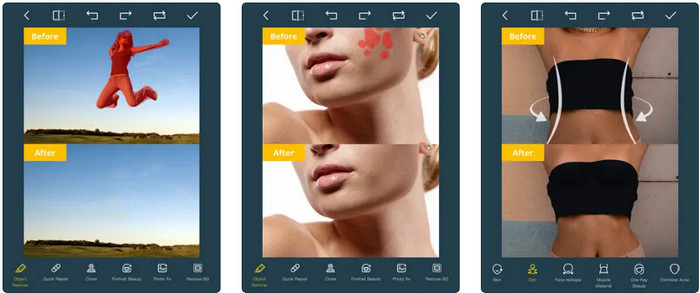
Photo Retouch 是一款基于 iOS 的应用,可以在你导出视频后不留任何痕迹地去除水印。这款应用可在 App Store 免费下载,可以前去体验。尽管工具名称里带有“照片”字样,你依然可以用它来处理视频水印,去除视频中你想删除的任意物体。如果你想试用这款应用,可以参考下面的步骤,学习如何去除 Videoshop 的水印。
步骤 1. 在 App Store 中搜索该应用并下载,点击“获取(Get)”即可安装。
步骤 2. 安装完成后打开应用,点击 + 图标,选择“Video Eraser(视频橡皮擦)”。然后选择一个带有水印的视频文件。
步骤 3. 使用下方提供的工具,在视频中描绘出水印区域;你可以使用该工具支持的标记形状(Mark shape)来高亮视频中的水印位置。
步骤 4. 当你在视频上高亮水印后,导出过程会自动开始;在此期间请不要关闭你的 iOS 设备,以免中断处理,等待进度完成即可。
删除和添加水印 [Android] - 适用于 Android 设备的顶级水印去除器
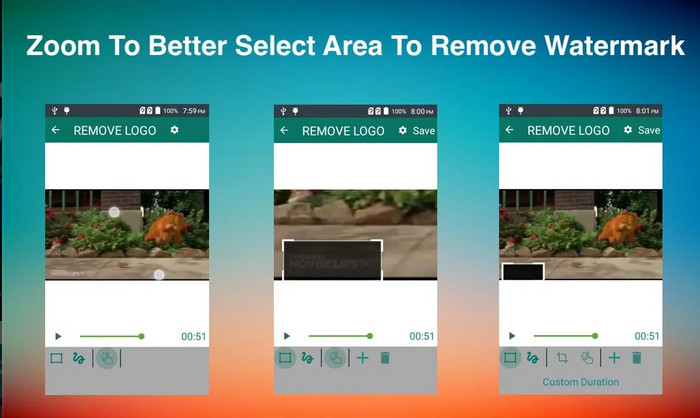
如何在 Android 上删除 Videoshop 水印? Android 用户无需担心,因为您可以在设备上下载删除和添加水印。此应用程序可免费下载;如果您想在您的设备上下载该应用程序,您可以稍后前往 Playstore。是什么让这个应用程序与众不同?这是因为它在图像和视频上提供了有效的水印去除功能。使用此应用程序,您还可以根据需要在您拥有的视觉媒体上添加您的个性化水印。如果您想使用此应用程序删除 Videoshop 在您的视频上留下的水印,请按照以下指南操作。
步骤 1. 如需使用该应用,首先要在 Play 商店中搜索其名称并下载安装。
步骤 2. 打开应用,点击“选择视频(Select Video)”,此时会出现两个选项,点击“去除水印(Remove Watermark)”。随后上传一段存储在相册中的视频。
步骤 3. 使用矩形选区或套索工具,将视频中的水印区域高亮选中。
步骤 4. 点击“保存(Save)”即可下载处理后的视频,导出的视频将不会再显示任何水印。
第 2 部分。有关如何删除 Videoshop 水印的常见问题解答
视频商店多少钱?
Videoshop Pro版的价格是$2.99。凭借这种低成本的价格,您可以通过 Videoshop 在您的设备上拥有最好的视频编辑器之一。
Videoshop 可以在 Android 和 iOS 上下载吗?
是的,Videoshop 可以在 Android 和 iOS 上下载。因此,无需担心多平台用户,因为此视频编辑器可在具有相同特性和功能的两个不同操作系统上使用。
如何在 Videoshop 应用上付款?
对于 iOS 用户,您可以加载您的 iTunes 帐户以便更轻松地进行交易,它会根据您选择的订阅计划自动向您的帐户收费,但会提前一天。对于 Android 用户,您可以使用 Google Pay 使用其专业版。
结论
本文适用于寻找有关在不同平台上有效删除 Videoshop 水印的教程的用户。使用我们在此处包含的应用程序,如果按照本文中包含的步骤进行操作,则可以删除没有任何痕迹的水印。不用担心使用它们,因为我们首先尝试了它们并且对我们收到的结果感到满意,所以我们今天分享它们。即使您不熟悉水印去除,您仍然可以尝试使用我们提供的水印去除器。我们希望这篇文章对您有所帮助;如果您愿意,可以阅读下面的其他有用文章。
-
 如何轻松地从 Wondershare DVD Creator 中删除水印
 本文涵盖有关如何从 Wondershare DVD Creator 中删除水印的信息。要获得您需要的所有信息,必须阅读此内容。
-
 使用简单的步骤轻松从 PDF 中删除水印
 按照这些简单的步骤从 PDF 中删除水印。了解如何使用这些神奇的工具轻松地从 PDF 文件中删除水印。
-
 如何通过简单的步骤去除 Coub 水印
 了解如何使用这些流行的水印去除器去除视频上的 coub 水印。阅读本文以了解这些神奇的工具以及如何使用它们。
