


 视频转换大师
 屏幕录影大师
 视频修复
视频修复
 安全下载
安全下载轻松去除视频上的Animotica水印
Animotica 是一款广受欢迎的 Windows 视频编辑器,几乎人人都爱用,因为一旦上手,它就能为你带来极为出色的成片效果。凭借其友好的界面和功能,即便你只是视频剪辑的新手,也能像专业人士一样制作出精彩的视频成品。难怪这款工具的名字一直位列 Windows 上顶级视频编辑器之列。尽管它非常好用,许多用户在使用过程中仍然会遇到一个问题:视频上残留的水印成为大家最关心的痛点。与其烦恼,不如阅读本文来去除 Animotica 水印。我们是否成功吸引了你的注意?那就继续往下看,了解如何高效地解决这个问题。

第 1 部分。 如何使用您必须知道的 3 种方法从 Annotica 视频中删除水印
FVC Video Converter Ultimate [最推荐的视频水印去除器]
FVC Video Converter Ultimate 能为你去除视频水印提供极佳的输出效果。即使你的剪辑功底不如其他视频编辑者,只要稍加熟悉,你仍然可以获得非常出色的成片效果——不用担心,很快你就能像专业用户一样驾驭这款工具。与网上其他可下载或在线使用的去水印工具相比,它的表现几乎无可比拟。因此,如果你想用这款软件去除 Animotica 视频中的水印,可以参考下方为你准备的图文教程步骤。
步骤 1. 首先,在电脑上下载这款软件,并根据你的操作系统选择合适的版本。然后按照安装向导完成安装,接着打开软件继续操作。
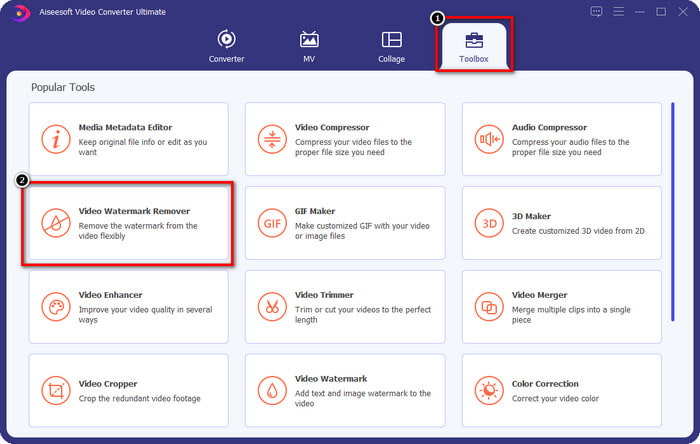
步骤 2. 打开应用后,进入工具箱(Toolbox),选择并打开视频去水印(Video Watermark Remover)功能。工具箱下还有更多功能可以使用,你可以稍后再慢慢体验。
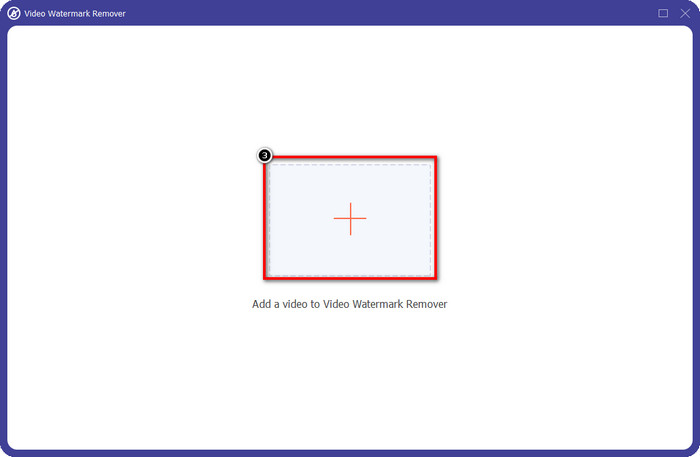
步骤 3. 点击+图标,上传你在 Animotica 中编辑过的视频。在弹出的文件夹中找到带有水印导出的那个视频文件,然后点击打开(Open)进行导入。
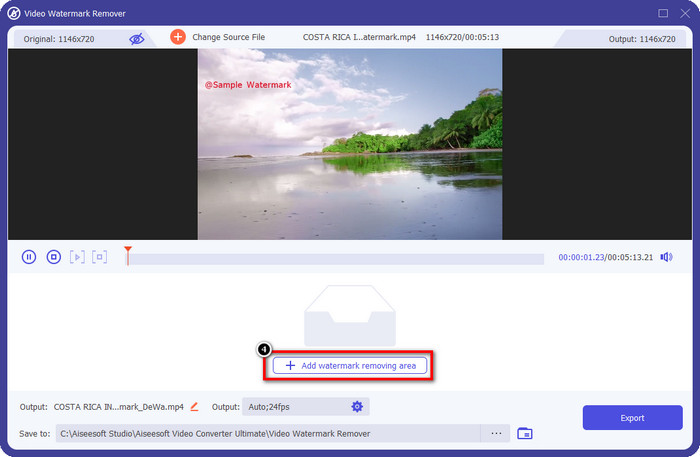
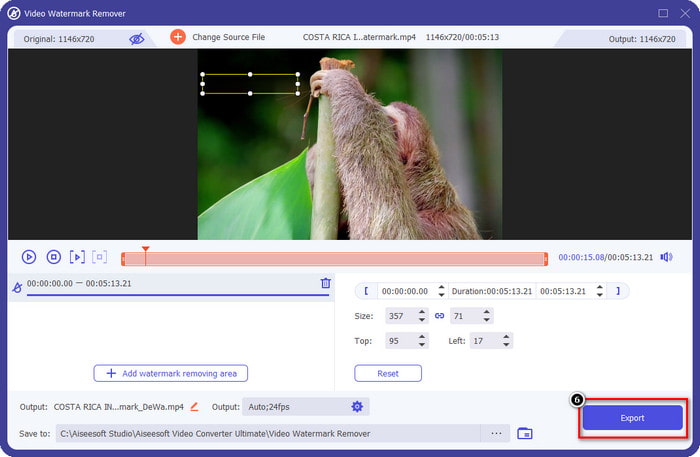
步骤 4. 在弹出的窗口中,点击添加去水印区域(Add Watermark Removing Area),这会再打开一个窗口,让你用来框选水印位置。
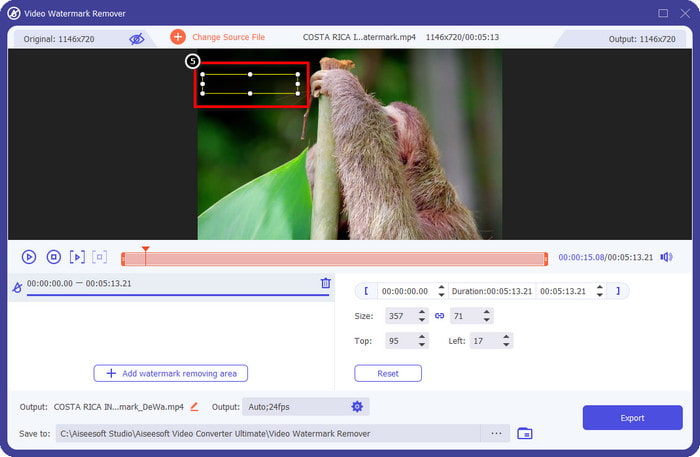
步骤 5. 在这里,将矩形框移动到水印所在的位置,将其完全覆盖。如果矩形框太小或太大,你可以直接拖拽边缘调整选区的大小。
步骤 6. 设置完成后,点击界面右下角附近的导出(Export)按钮,即可保存一个不带水印的 Animotica 视频。
相关内容:
UkeySoft 视频水印去除器
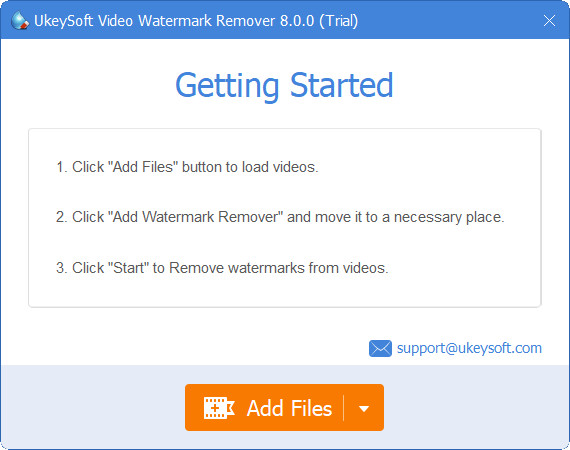
你可以免费下载 UkeySoft Video Watermark Remover 来去除视频中的水印。这款工具支持在 Windows 上使用,也就是说,只要你是 Windows 用户,就可以自由下载并使用它来去除水印。和其他去水印工具类似,它能提供很好的输出效果,并且在导出后不会明显降低原始视频的画质。
但是,如果您使用此工具的可访问版本,一些限制可能会阻碍您,例如您无法在此处免费上传超过一分钟的视频。这是免费删除Animotica水印的完整指南。
步骤 1. 要在电脑上下载该软件,先访问其官方网站,然后点击下载按钮,将安装包保存到你的 Windows 系统中。
步骤 2. 打开去水印软件,点击添加文件(Add Files),导入带有水印的视频。
步骤 3. 点击添加去水印区域(Add Watermark Remover),将选框移动到水印位置。然后点击勾选(check)图标,开始对视频执行去水印操作。
步骤 4. 要保存你所做的更改,并获得一个去除了 Animotica 水印的视频,点击下一步(Next)。
Apowesoft Watermark Remover 在线
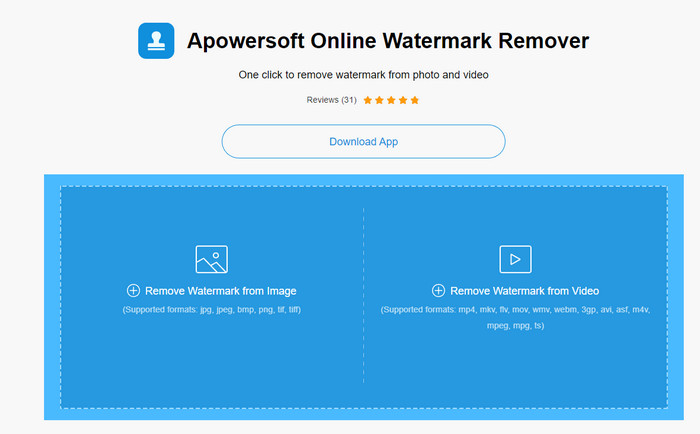
Apowersoft 在线去水印工具(Apowersoft Watermark Remover Online) 是一款专门用于去除水印的在线工具,如果你不想在设备上安装软件,它是一个不错的选择。由于基于网页端使用,这款工具与不同操作系统的兼容性非常好。不过尽管它是在线工具,其去水印表现依然不输给你在电脑上安装的其他同类软件。当然,它也有一些局限,比如支持的视频格式较少、依赖网络速度等。
但是,如果这个工具引起了您的注意,下面是一个使用在线工具快速删除视频中动画水印的教程。
步骤 1. 要使用这个在线去水印工具,你可以在浏览器中搜索其名称,然后打开对应的网站。
步骤 2. 点击从视频中去除水印(Remove Watermark From Video),然后选择带有水印的视频文件。接着等待上传过程完成,如果你的网速较慢,这一步可能会花费较长时间。
步骤 3. 视频上传完成后,将矩形框拖动到水印所在的区域,用它覆盖住视频中的水印。
步骤 4. 当目标水印已被选中后,点击擦除(Erase),就能删除矩形区域内的视频水印。
第 2 部分。有关如何删除动画水印的常见问题解答
Animotica Light 多少钱?
Animotica Light 的价格为 $6.99。它的价格仍将取决于 Microsoft Store Region。它包括一些免费版本中不包含的小功能,例如总高清输出、无水印、所有过渡、无限帧速率等。
使用 Anotica Pro 是不是一个绝佳的选择?
对于 $15.99,对于想要进行基本编辑的初学者来说,此工具是一个不错的选择,提供您可以享受的非凡特性和功能。使用专业版,您可以导出最高 2160 (4k) 质量、60 FPS、完整编辑功能等的视频。
为什么Animotica水印变得模糊?
大多数工具会模糊视频上的水印以使其不可见。但是,如果您看久一点,您会注意到它会留下可能使视觉效果恶化的残留物。因此,请使用导出后不会模糊水印的水印去除器,正如 FVC Video Converter Ultimate 所产生的那样。
结论
事实上,我们在本文中提到的所有工具在去除 Annotica 水印方面都有不同的优势和劣势。在我们结束本文之前,您将使用哪个工具来去除水印?假设您还没有决定使用什么。在这种情况下,我们建议您选择终极水印去除器,因为它是去除任何视频上的水印并在一次下载中执行多项任务的最有效工具。我们希望通过这篇文章回答您的疑问。上面的教程将帮助您去除视频上的水印,这样您就可以享受观看没有水印的高质量视频了。
-
 了解如何免费删除 Movavi 水印 [必须拥有!]
 在 Movavi 上导出视频或图像会留下水印,但是否可以将其删除?要教如何免费删除水印,请阅读此内容。
-
 在 Windows 和 Mac 上删除 Fiverr 水印的 3 种简单方法
 如果您正在寻找可以删除 Fiverr 水印的应用程序,那么您在正确的页面上。阅读这篇文章,了解如何轻松删除 Fiverr 水印。
-
 如何使用这些很棒的工具删除 Lomotif 水印
 您想了解如何从视频中删除 Lomotif 水印吗?阅读本文以了解最出色的在线和离线删除方法。
