


 视频转换大师
 屏幕录影大师
 视频修复
视频修复
 安全下载
安全下载如何在图上有效去除原图中的水印
当你需要为复杂到难以用文字描述的数学或科学数据创建模板时,可能就要用到 Origin Graph。这款软件已经帮助了学生、研究人员、教授、商务人士以及其他需要自行制图的人。借助它提供的一系列模板,你可以制作出视觉效果出色、能吸引观众注意力的图表。若使用免费版本,你可能会遇到的问题是:软件会在最终输出上添加文字水印。处理水印让你头疼吗?别担心!我们已经为你想好对策。下面我们将介绍一些实用技巧,教你如何移除 Origin Graph 的水印,然后把处理好的图表插入到你的 Word 或 PowerPoint 演示文稿中。

第 1 部分。如何使用在线图像水印去除器从原始图中删除水印
FVC 免费在线去水印工具是一款一流的文字水印去除工具,你可以用它来消除 Origin Graph 的水印。该工具在移除图片中任意对象方面表现高效,去除水印后能让你的图片更加专业。凭借这一点,我们可以向你保证,它是一款专门的水印去除工具,在遇到此类问题时值得依赖。想知道它是否易于使用?别担心!下面我们列出的步骤,就是你可以参考的操作流程,帮助你去除 Origin Graph 为图片添加的文字水印。
步骤 1: 点击这个链接打开在线图片去水印工具,它会在新标签页中直接打开,你即可访问并使用该工具。
步骤 2: 点击上传图片,将带有水印的照片添加到工具中,在文件夹中找到该图片文件,然后点击打开,即可成功上传。
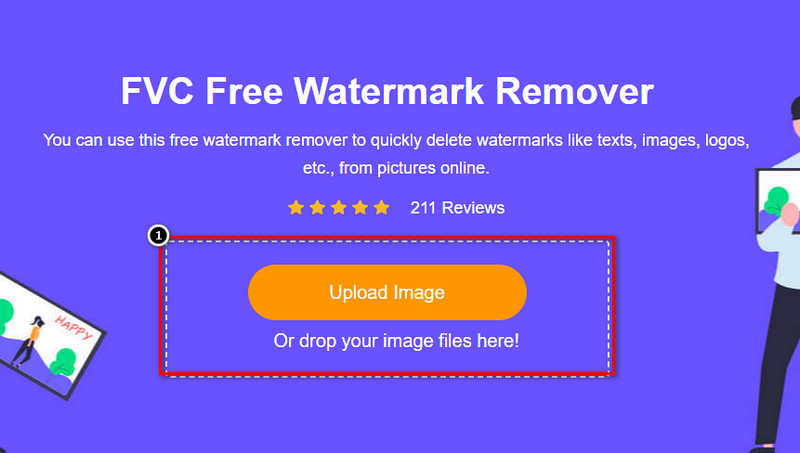
步骤 3: 你可以使用三种工具来圈选水印区域;它们的操作方式不同,但去除效果相同。选择其中一种工具,然后在图片上标记出带有水印的区域。
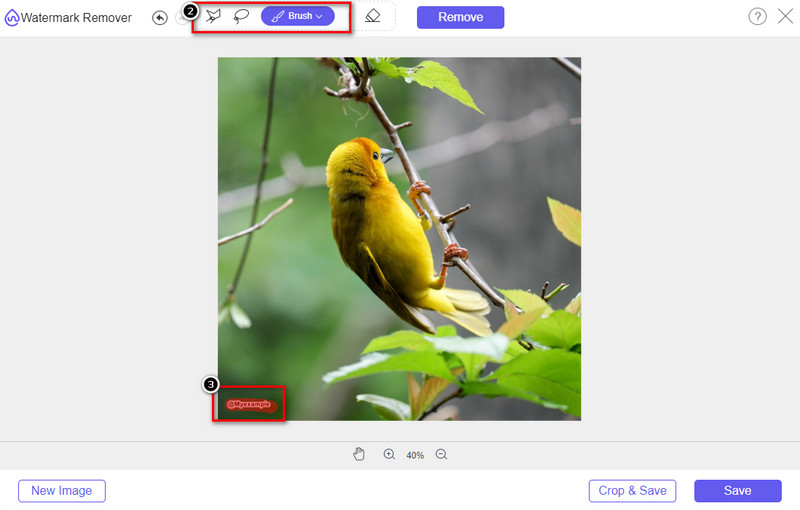
步骤 4: 在用工具圈选完水印后,一定要点击移除图标。此步骤十分关键,这样当你导出图片时,才能得到一张已经去除水印的图片。
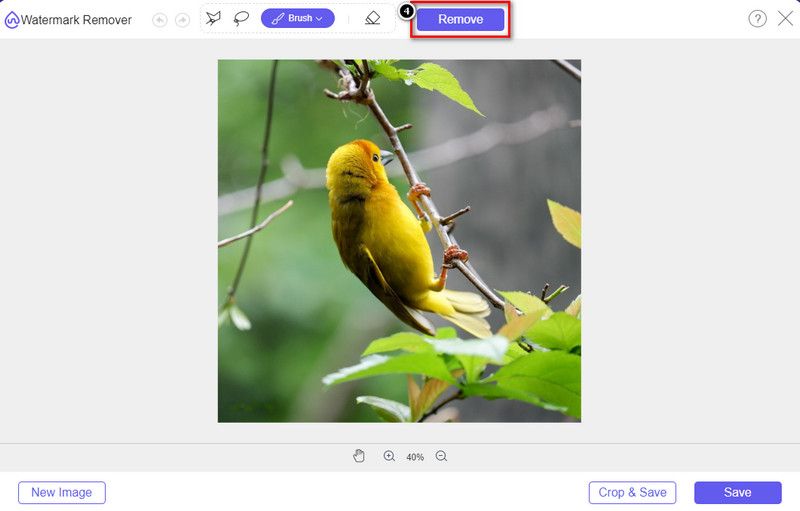
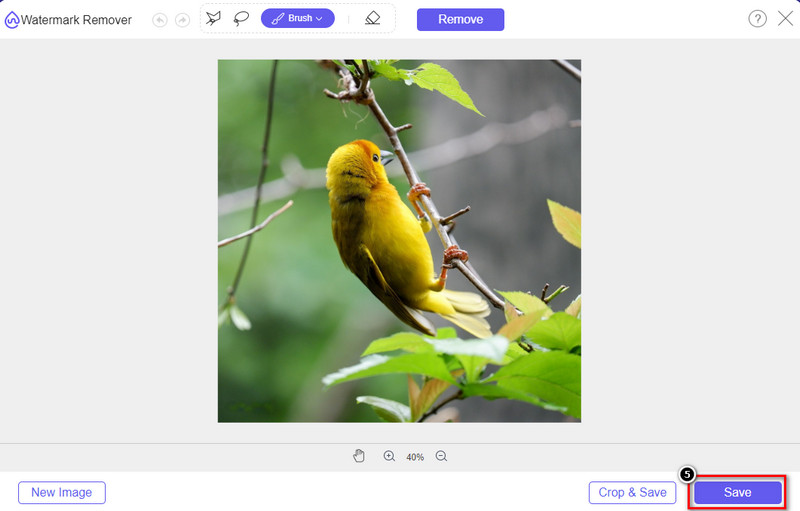
步骤 5: 若要开始导出过程,现在可以点击保存按钮。等待处理完成后,你就可以查看图片,此时 Origin Graph 的水印已经从对应区域消失。
优点
- 您可以访问的免费的基于网络的图像水印去除器。
- 它在 AI 技术支持下有效去除水印。
- 它支持您在本地驱动器上可能拥有的各种图像格式。
- 导出的图像不添加水印。
缺点
- 需要互联网连接才能运行。
- 它的重点是去除水印,仅此而已。
第 2 部分。 如何将图形从 Origin 复制到 Word 或 PowerPoint 没有水印
在本文的这一部分中,我们将为您提供在没有水印的情况下在 Origin Graph 上添加您创建的图形所需了解的过程。按照它相应地添加您在 Microsoft Word 和 PowerPoint 上制作的无水印图表。
由于文件很大,您至少需要释放 1.9GB。在 1.9GB 的文件中,你可以得到你需要的帮助,但如果你不需要帮助,你可以通过 .zip 或 .exe 下载它的 652 MB 版本。
如何在没有水印的原始图上创建图的步骤:
步骤 1: 首先前往 Origin Graph 官方网站,在你的操作系统上下载并安装该软件。打开软件,开始创建你想要的图表。
步骤 2: 启动软件后,输入表格中所需的数据值。你可以在此添加更多变量以及相应数量的图表。
补充: 你可以点击Plot,查看其他可用的图表类型,例如 Basic 2D、Bar、Statistical 等。
步骤 3: 点击“File(文件)”,然后按保存,将你创建的图表导出。
步骤 4: 你可以参照第一部分中的步骤,按照教程,使用 FVC 免费在线去水印工具来移除 Origin Graph 的水印。
如何在没有水印的 Word 上使用图形:
步骤 1: 在桌面上打开 Word 应用,然后点击“空白文档”。如果你已经创建过文档,则直接打开该文件。
步骤 2: 转到插入选项卡,然后点击图片。在本地磁盘中查找图表文件,单击一次选中,再点击“打开”,即可将其插入到 Word 中。
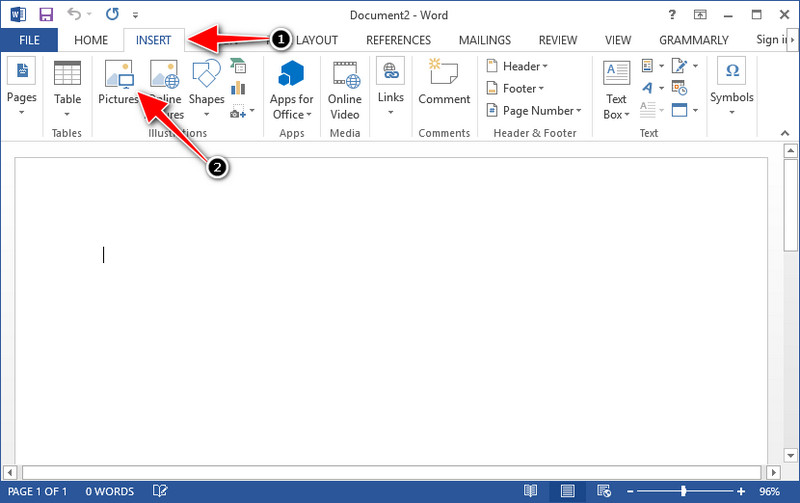
步骤 3: 图表会自动加载到你打开或新建的 Word 文档中;你可以按住并拖动图片,在文档中调整它的位置。
如何在没有水印的 Powerpoint 上使用图表:
步骤 1: 在电脑上启动 PowerPoint,然后点击“空白演示文稿”。你也可以在左侧查看最近创建的演示文稿。如果有需要添加图表的文件,点击将其打开。
步骤 2: 点击插入,再点击图片,将你在 Origin Graph 中生成的图表图片插入到幻灯片中。
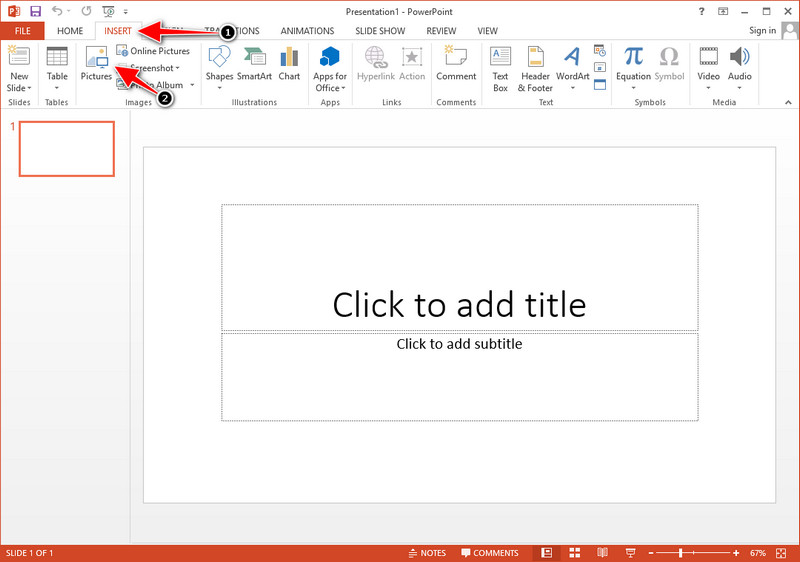
步骤 3: 调整图表图片的大小与位置,使其布局适合当前幻灯片。
延伸阅读:
第 3 部分。有关如何从原始图中删除水印的常见问题解答
Origin Pro 多少钱?
对于个人用户,您可以从 $435 开始获得 Origin Graph 的高级版本。您可以在 Origin Lab 上访问其官方商店。
我在哪里可以正式下载 Origin Graph?
访问 Origin Lab 以下载 Origin Graph。在您将软件下载到桌面之前,它会询问问题。之后,将有两个选项来下载文件,如果您想在帮助或不帮助下下载文件,则以 .exe 或 zip 的形式。
Excel和Origin是一样的吗?
Excel 和 Origin 具有类似电子表格的 GUI,用于排列数据、计算和定义标签。但是,Excel 确实专注于包含您可以使用的许多列和行。但是对于 Origin,它用于排列使用列公式而不是 Excel 支持的单元格公式的属性。
结论
现在您已经了解了如何从 Origin Graph 中删除水印,现在是时候使用您创建的图表并专业地展示它了。如果您的目的是在 Word 或 Powerpoint 上使用它,您可以阅读第 2 部分以了解如何操作。到目前为止,想要去除图像上的水印的人最想要使用此工具去除水印。这个工具解决了这个问题。如果本文对您有所帮助,请在下方留下 5 星。
-
 Pixlr去除水印的详细步骤[有效]
 想知道如何使用 Pixlr 去除水印?如果是这样,请继续阅读下文以了解如何操作以及您可以使用的替代方法。
-
 使用 3 种经过验证的方法删除导出视频上的 Annotica 水印
 您有没有想过是否可以删除您导出的视频上的动画水印?本文提供了一个操作方法。
-
 删除视频上 VideoShop 水印的免费方法 [毫不费力]
 要删除 VideoShop 水印,您的设备将需要一个水印去除器。要了解这些是什么,请阅读本文。
