


 视频转换大师
 屏幕录影大师
 视频修复
视频修复
 安全下载
安全下载使用这些快速简便的方法提高图像质量
你的图片是否模糊或画质较差?你最应该做的,就是提升图片的质量。幸运的是,现在有许多工具可以帮助你改善图片画质。不过,并不是电脑上的所有应用或工具都具备最强大的功能。因此,我们专门查找了线上、线下以及 iPhone 上最热门的图片增强工具。想要了解如何提高图片质量,请继续阅读本文。

第 1 部分。如何在线提高图像质量
使用在线图像增强器比在计算机上下载软件应用程序更方便。使用在线工具的好处是您可以在您的网络上自由访问它。这部分将向您展示如何使用最令人惊叹的在线照片增强器来提高图像质量。
FVC Free Image Upscaler 是一款在线、免费使用的图片增强工具,深受众多用户欢迎。这个在线应用可以将图片放大到 2 倍、4 倍、6 倍和 8 倍。此外,它支持目前最常见的图像格式,包括 PNG、JPG、JPEG 和 BMP。你也可以通过所有主流浏览器访问它,例如 Google、Firefox 和 Safari。而且,你不必担心数据安全问题,因为这款工具的使用是安全可靠的。
此外,它具有强大的人工智能技术,可以自动识别图像的模糊部分。此外,FVC Free Image Upscaler 可以修复丢失的像素、颜色纹理和更多细节。如果您想使用这款出色的图像升频器,请按照下面的简单指南进行操作。
如何使用 FVC Free Image Upscaler 在线提高图像质量:
步骤 1. 打开浏览器,在搜索框中搜索 FVC Free Image Upscaler。你也可以直接点击提供的链接进入其主页。
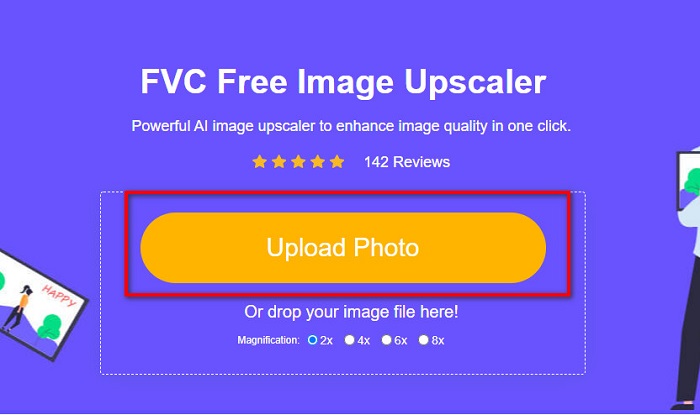
步骤 2. 然后,在主界面点击Upload Photo(上传照片)按钮,导入你想要放大的图片。等待图片上传完成后,再进行下一步。
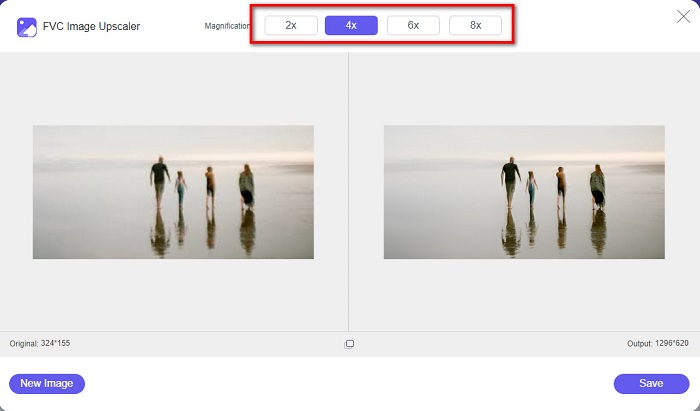
步骤 3. 接着,选择你想要的图片Magnification(放大倍数)。你可以在2x、4x、6x 和 8x之间进行选择。
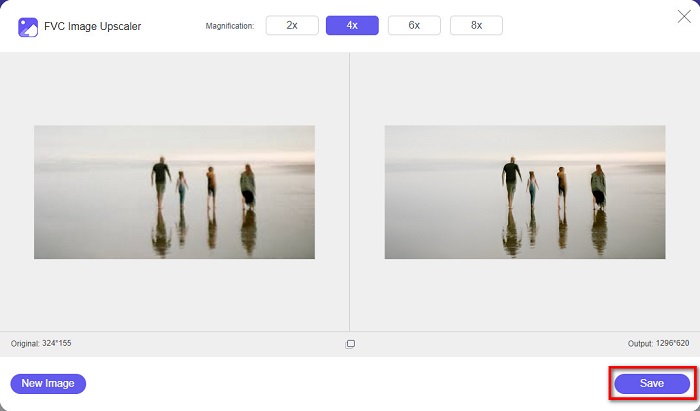
步骤 4. 你可以预览放大后的图片,如果对效果满意,点击Save(保存)按钮,将放大后的图片保存到你的设备中。
就是这样!您现在可以在计算机上以高质量视图查看您的图像。
第 2 部分。 如何提高 Photoshop 中的图像质量
如果您想使用专业工具来提高图像质量,我们可以满足您的需求。本部分将教您如何使用 Adobe Photoshop 提高照片质量。
Adobe Photoshop 是一款专业级的图像编辑软件,你可以用它来提升图片质量。Adobe Photoshop 提供了非常丰富的编辑工具,方便你对图片进行各种处理。此外,许多专业人士都会使用这款工具,因为它功能强大。同时,该软件可以输出高质量的图像,方便你分享到各类社交平台或网站。此外,Adobe Photoshop 是 Adobe 公司最出色的作品之一,你几乎可以在所有主流平台上下载使用。借助这款编辑软件,你可以设计 Logo、横幅、宣传册等更多作品。不过,许多用户并不知道,它同样可以用来增强图片。另外,因为软件界面相对复杂且价格较高,不少用户在上手使用时会感到有一定难度。
如何在 Photoshop 中提高图像质量的步骤:
步骤 1. 首先,在电脑上下载Adobe Photoshop。按照安装流程完成安装,然后打开该应用。
步骤 2. 在主界面中,点击File > Open(文件 > 打开),选择你想要增强的图片。
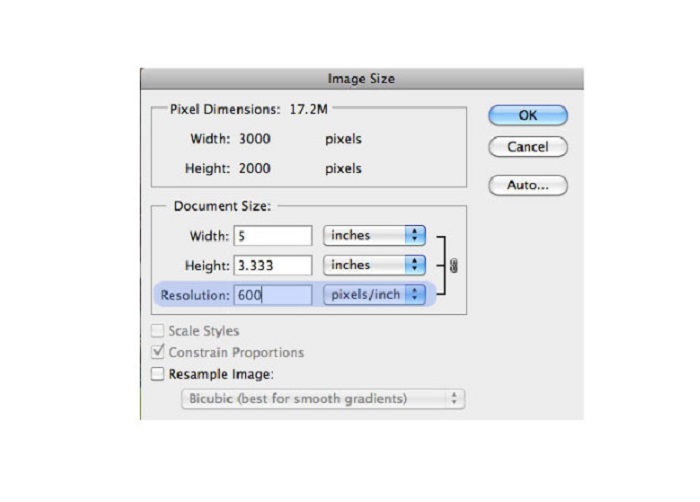
步骤 3. 然后,依次点击Image > Image Size(图像 > 图像大小)。弹出对话框后,取消勾选Resample Image(重设图像像素)选项,这样就只会改变图片的分辨率。在“分辨率”选项中输入你希望设置的分辨率数值。
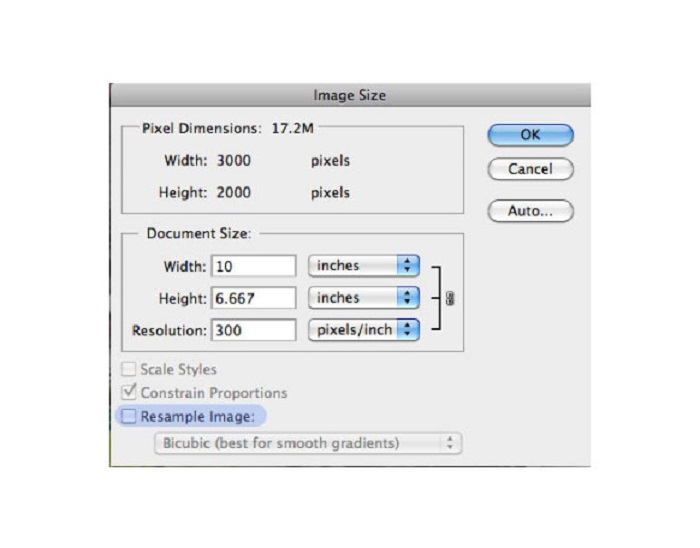
步骤 4. 当你更改了Resolution(分辨率)后,图片的Width and Height(宽度和高度)也会随之改变。然后点击OK按钮,保存你对图片所做的更改。通过这种方式,你就可以将低分辨率图片转换为高分辨率。
第 3 部分。 如何提高 iPhone 上照片的质量
如果您是 iPhone 用户,某些应用程序可以增强您的低质量图像。尽管 AppStore 上提供了许多照片增强器应用程序,但我们选择了其中最著名的应用程序。阅读本部分以了解如何提高 iPhone 上照片的质量。
Remini 是一款非常出色的应用程序,你可以用它来增强低画质的图片。这个强大的应用拥有简洁的界面,上手非常容易。此外,它还运用了 AI 技术,可以自动检测图片中的模糊区域。该应用的使用也很安全,你的文件在处理过程中能够得到良好的保护。它的不足之处在于:如果你想查看和下载处理结果,需要先观看广告;或者你也可以购买完整版,这样就无需观看广告即可直接下载结果。
如何使用 Remini 应用程序提高 iPhone 上的图片质量:
步骤 1. 在 AppStore 上下载Remini 应用。下载完成后,在手机上打开它。
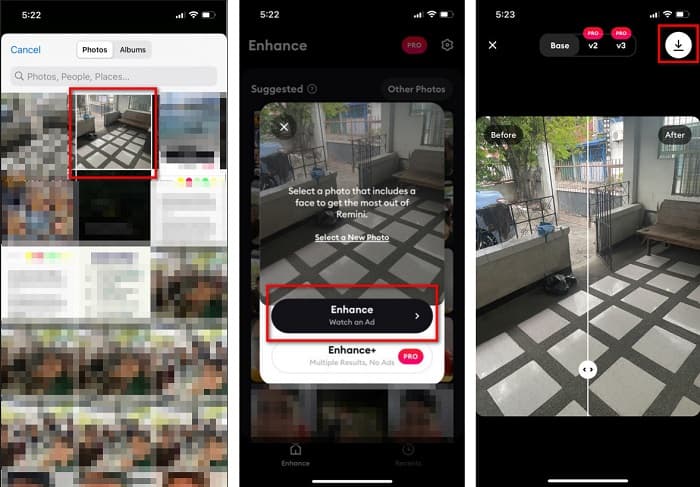
步骤 2. 然后,在应用主界面中选择你想要放大的图片。
步骤 3. 接着,点击Enhance(增强)按钮来提升图片质量。如果你开通了专业版,就无需观看广告;否则,系统会要求你先观看广告,才能查看并保存处理结果。
步骤 4. 现在,你就可以查看已经增强的图片了。然后,点击屏幕右上角的下载图标。就这样!通过以上几个简单步骤,你就能提升图片的画质。
第 4 部分。有关如何提高照片质量的常见问题解答
有没有可以提高安卓图像质量的应用程序?
增强照片质量工具是提高图像质量的最佳图像质量增强器应用程序之一。使用图片美化效果将使您的图像具有专业的外观。
如何提高 Lightroom 中的照片质量?
Adobe Lightroom 是 Adobe 公司的另一款产品,你也可以用它来提升图片的分辨率。阅读下方的简单步骤,了解如何在 Lightroom 中提高照片质量。 1. 在电脑上下载Adobe Lightroom。 2. 然后,在 Lightroom 中打开你的图片。 3. 点击Choose Photo > Enhance(选择照片 > 增强)。 4. 接着,选择Super Resolution(超级分辨率),然后点击“Enhance(增强)”。 5. 之后,你会看到 Lightroom 自动提升图片分辨率,并将结果保存为 DNG 文件。
如果您放大图像,它会影响文件大小吗?
更改打印分辨率不会改变图像的像素数,也不会影响图像的大小。
结论
现在要提高图片质量变得非常简单,尤其是你已经有了可参考的详细指南。此外,无论是在电脑还是 iPhone 上,都有许多应用可以帮助你放大和增强图片。如果你想使用一款能够自动放大模糊图片的免费在线工具,那就立刻试试FVC Free Image Upscaler 吧。
-
 使用最佳工具去除 B612 水印的 5 种方法
 想知道如何去除照片中的 B612 水印吗?您可以使用这些出色的工具轻松地从图像中删除 B612 水印。
-
 如何删除 WOW 滑块水印的简单步骤 [已解决]
 WOW Slider 是一款用于创建精彩幻灯片的应用程序。但是,它会在其输出中嵌入水印。阅读以下内容以了解如何删除 WOW Slider 水印。
-
 如何去除防拍水印的简单方法
 按照这些简单的方法删除防拍水印。使用这些神奇的水印去除剂轻松从图像中去除防拍水印。
