


 视频转换大师
 屏幕录影大师
 视频修复
视频修复
 安全下载
安全下载从 MP4 视频中删除水印的轻松程序
你是否也会遇到这样的问题:在使用 Mac 或 Windows 等设备时,完全不知道如何从 MP4 视频中去除水印?那么,这篇文章就为你提供最佳解决方案。如果你也是喜欢看电影、短片等视频的人,那你一定能体会到,在喜欢的视频画面上看到水印或各种不相干的东西是多么令人烦躁和讨厌。而且,这些水印还会挡住屏幕的一部分,让你根本看不完整个画面。最让人崩溃的是,有些视频的水印特别大,几乎铺满画面,让人完全无法好好欣赏喜欢的视频。
值得庆幸的是,已经有一个巨大而卓越的软件应用程序带有视频水印去除器,您可以使用它来消除视频上那些不必要的对象,例如水印、徽标、文本、图片等。您可以快速消除或移除这些对象,并使用这些应用程序享受观看或播放视频的乐趣。使用这些应用程序,您将永远不会感到沮丧或烦躁。然后,如果您对这个主题着迷,您必须阅读这篇文章以提供足够的信息,尤其是轻松去除 MP4 视频上的水印。

第 1 部分:从 MP4 视频中删除水印的最佳方法
如果你正在寻找一款在去除 MP4 视频水印方面表现出色、功能强大的应用程序,那么 Video Converter Ultimate 就是最佳工具。它可以把视频中恼人的水印、Logo、文字或图片等对象都去除掉。而且,在保存视频时你也无需等待太久,去除水印后就能快速导出视频。
此外,Video Converter Ultimate 具有许多您可以使用的编辑工具,例如视频增强器、去除水印、添加水印、视频速度控制器、GIF 制作器、拼贴制作器、视频和音频记录器、视频/音频压缩器、转换各种文件格式,如 MP4、FLV、MOV、TRP、MTS、M2TS、MKV、AAC、MP3 等。此外,最好的部分是您不必再购买或购买此应用程序。您可以免费操作它。此外,此应用程序非常简单易用。如果您想删除 MP4 视频上的水印,Video Converter Ultimate 可以为您提供两种方法。继续阅读以了解这两种消除视频水印的方法。
1.使用视频水印去除器
步骤 1: 访问 Video Converter Ultimate 的官网。免费下载该应用程序,然后进行安装。
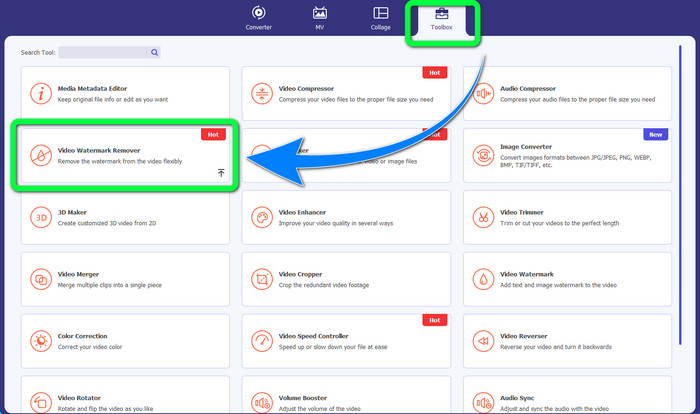
步骤 2: 启动软件。选择 工具箱 > 视频水印去除。
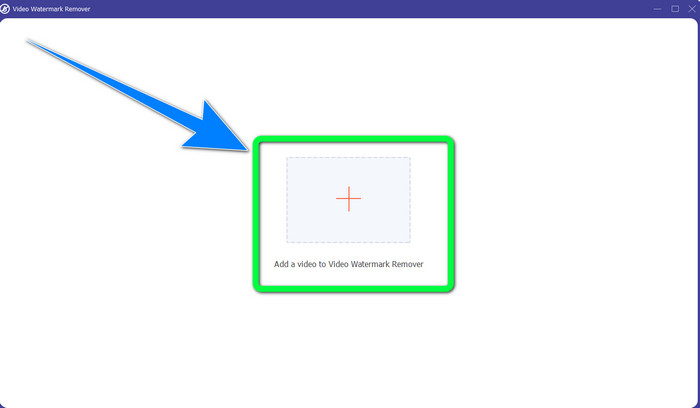
步骤 3: 会弹出一个新的界面。点击加号按钮,添加带有水印的 MP4 视频。
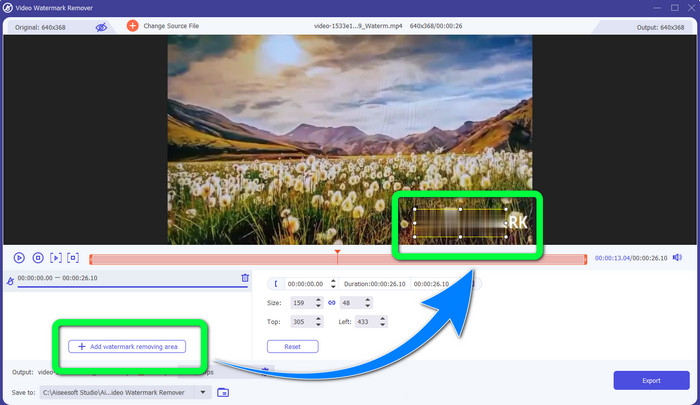
步骤 4: 点击添加水印去除区域按钮。此时视频上会出现一个小框,拖动这个框覆盖住视频中的水印区域。
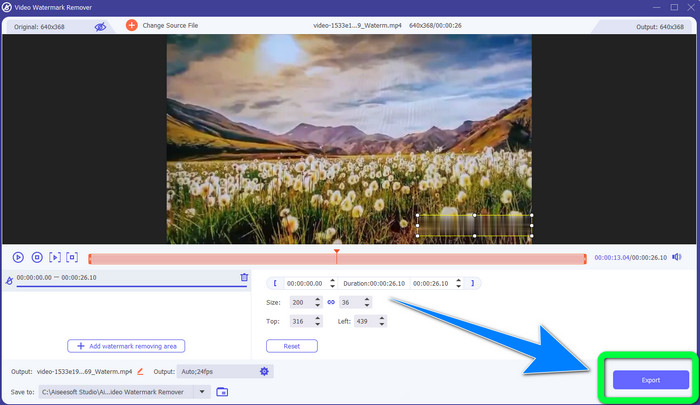
步骤 5: 去除水印设置完成后,点击导出按钮保存视频。现在,你就可以尽情欣赏没有水印干扰的喜爱影片了。
2. 使用视频裁剪器
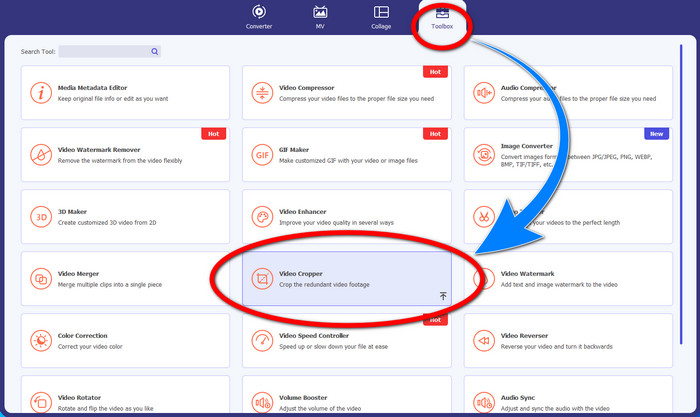
步骤 1: 启动 Video Converter Ultimate,然后点击 工具箱 > 视频裁剪。
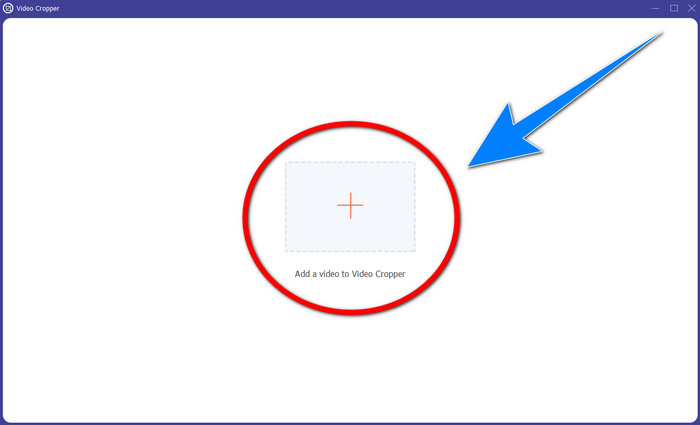
步骤 2: 点击视频裁剪后,会弹出新的界面。点击加号图标,添加带有水印的 MP4 视频。
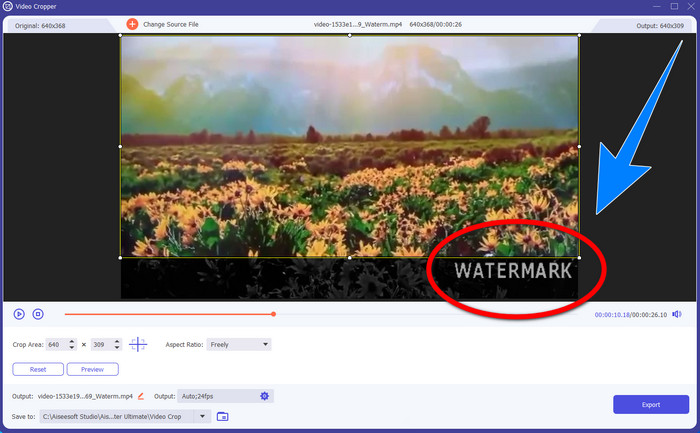
步骤 3: 添加好视频后,你可以裁剪 MP4 视频,从画面中把水印裁掉。
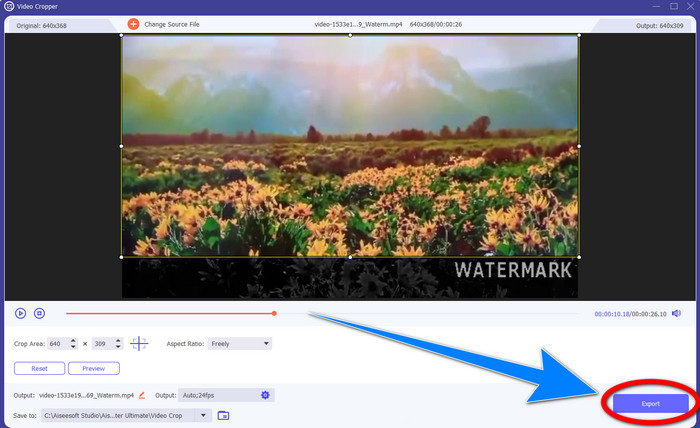
步骤 4: 当你通过裁剪已经把水印去除后,点击导出按钮保存视频。这样,你就能观看没有水印的视频了。
第 2 部分:从在线 MP4 视频中删除水印
你是否在寻找一款优秀的在线工具,可以免费去除 MP4 视频中的水印?那么,你可以放心选择 HitPaw 在线水印去除工具。此外,这款工具完全免费,无需付费即可使用。你可以无限次去除水印、Logo 和签名,而且页面没有广告。操作也非常简单易懂,只需三步就能去除视频水印,非常适合新手。
HitPaw Online Watermark Remover 可用于任何设备,例如 Windows、Mac、iPhone 和 Android。此应用程序也很安全,它确保您是唯一可以查看和编辑视频的人。但是,如果您删除视频上的水印,该区域有时会变得模糊和令人不安。此外,保存过程很慢。如果您想在线删除 MP4 视频上的水印,请按照以下简单步骤操作。
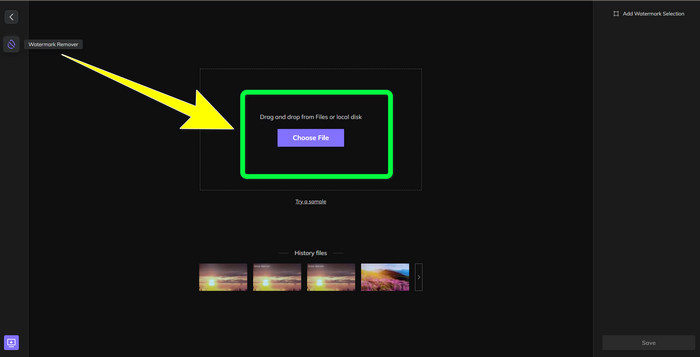
步骤 1: 进入 HitPaw 在线水印去除工具网站。点击立即去除水印,然后选择选择文件,导入带有水印的 MP4 视频。
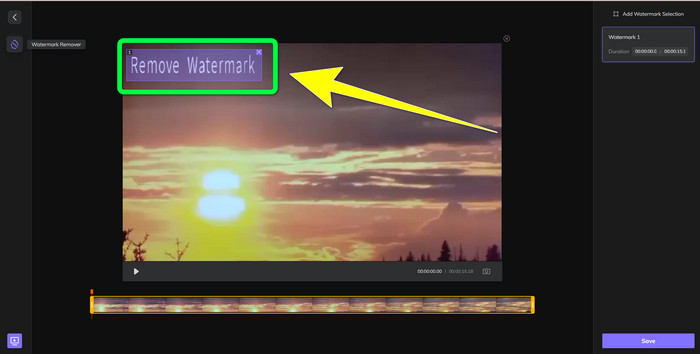
步骤 2: 添加视频后,画面上会出现一个矩形区域。拖动它覆盖在水印位置,以便去除水印。
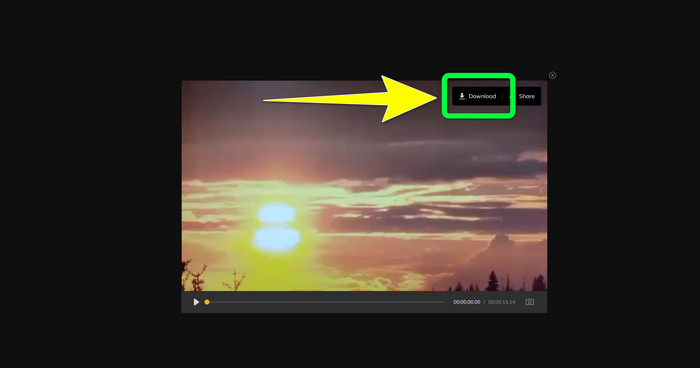
步骤 3: 去除视频水印后,点击保存按钮。等待保存过程完成,然后点击下载按钮,把处理好的视频保存到你的设备中。
第 3 部分:有关从 MP4 中删除水印的常见问题解答
是否也可以消除我视频上的签名?
是的,可以实现。Video Converter Ultimate 同样可以去除视频中的签名。凡是视频画面中令人分心、影响观看的多余元素,都可以通过这款软件轻松移除。
从 MP4 视频中去除水印是否耗时?
这取决于您使用的应用程序。如果要删除 MP4 视频上的水印,请使用 Video Converter Ultimate。它可以立即去除水印。
我可以使用的最好的视频水印去除器是什么?
如果你正在寻找一款可靠的视频去水印工具,Video Converter Ultimate 是非常值得使用的软件。你可以去除视频中的水印,并在不损失画质的情况下保存视频。
我可以使用 HitPaw Online Watermark Remover 上的裁剪工具来消除水印吗?
绝对没错!如果要删除视频上的水印,尤其是水印位于视频的角落或边缘时,也可以使用此应用程序的裁剪工具。
除了去除水印,是否可以使用 Video Converter Ultimate 在我的视频上添加水印?
绝对是的! Video Converter Ultimate 不仅限于删除视频上的水印。此应用程序还可以为您的视频添加水印,特别是如果您想添加一些文字、徽标、签名等。
结论
如上文所述,你可以轻松使用 Video Converter Ultimate去除 MP4 视频中的水印。此外,本文还介绍了一些可以在线移除 MP4 视频中多余对象的软件供你选择。
-
 如何免费删除视频或项目上的 Filmora 水印
 如何去除 Filmora 水印?这个问题在网络上流传,在这里我们列出了您可以使用的不同方法!
-
 从视频中删除 Adobe Stock 水印的最快技巧 [教程]
 您对 Adobe Stock 水印有疑问吗?阅读此内容并了解如何从视频中删除 Adobe Stock 水印。
-
 以专业方式从视频中删除水印的 5 种方法
 需要从视频中删除水印以使其看起来更专业吗?好吧,阅读这篇文章,因为我们添加了一个关于如何做到这一点的教程!
