


 视频转换大师
 屏幕录影大师
 视频修复
视频修复
 安全下载
安全下载如何使用2个免费视频压缩器在线压缩WebM文件
WebM 是一种视听媒体文件格式,通常用于网页上的多媒体内容。它兼容所有主流网页浏览器,如 Chrome、IE、Safari、Firefox 等。当你希望视频加载和播放得更流畅时,就需要对其进行压缩。问题在于,你是否知道如何压缩 WebM 文件而又不会造成明显的画质损失?

你是否正在寻找压缩 WebM 文件、减小其体积的方法?在这篇文章中,我们将分享 2 种免费的方法,帮你在线压缩 WebM。
第1部分。如何免费在线压缩WebM文件
要在尽量保持原有画质和音质的前提下,通过压缩 WebM 来减小文件大小,你可以使用流行的Free Video Compressor。它专为压缩各种常用视频格式而设计,包括 WebM、AVI、MP4、FLV、MKV、MOV 等。
这种易于使用的WebM文件压缩器具有减小视频文件大小的能力,而不会降低质量。它允许您压缩4K UHD和1080p,720p HD和普通SD视频。您可以导航到“免费视频压缩器”页面,以轻松地直接压缩WebM。
步骤 1: 在电脑上打开浏览器,进入这个免费在线 WebM 文件压缩工具的官方网站。

步骤 2: 进入页面后,点击Add Files to Compress(添加文件进行压缩)按钮,为 WebM 压缩安装一个体积很小的启动程序。安装完成后,在弹出的窗口中选择并添加你要压缩的 WebM 文件。

步骤 3: 你可以根据实际需求自由设置 WebM 文件的压缩程度。此外,你还可以自定义视频分辨率、帧率和比特率、视频名称以及输出格式。完成所有设置后,只需点击Compress(压缩)按钮,就能开始在线压缩 WebM。

与许多其他在线WebM视频压缩工具不同,此免费视频压缩器不会在您的压缩WebM文件中添加任何水印。
第2部分。如何使用WebM Compressor压缩WebM
要在线压缩 WebM 文件,你也可以使用VEED WebM Compressor。无论你的文件超过电子邮件附件大小限制、Facebook Messenger 附件限制,还是其他上传限制,都可以通过这个 WebM 压缩工具来减小 WebM 视频的文件体积。
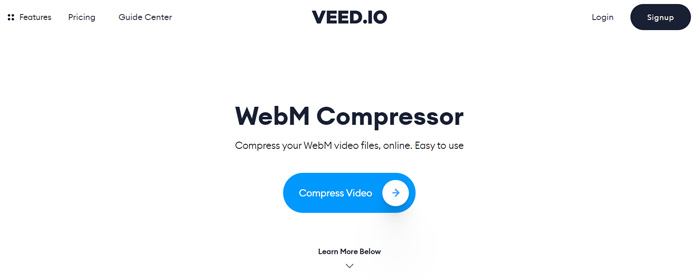
步骤 1: 打开浏览器并进入 VEED WebM Compressor 网站。点击Compress Video(压缩视频)按钮,进入下一步上传页面。
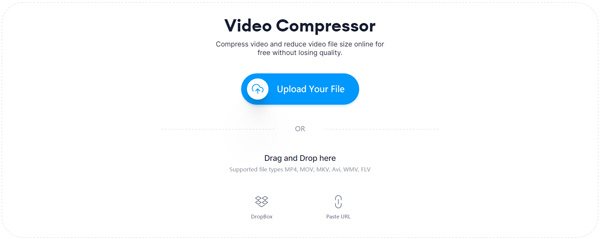
步骤 2: 点击Upload Your File(上传文件)按钮上传你的 WebM 视频。你也可以直接拖放文件进行 WebM 上传。这个免费的 WebM 视频压缩工具还支持从 DropBox 和 URL 上传视频。
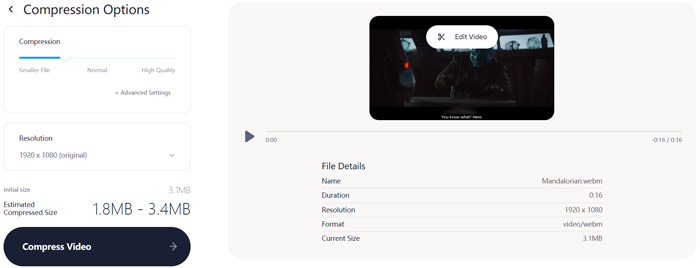
步骤 3: 你可以根据需要自由调整视频的压缩程度。此外,你还能自定义视频分辨率。你也可以点击Edit Video(编辑视频)来裁剪 WebM 文件。它内置媒体播放器,方便你预览已加载的视频。
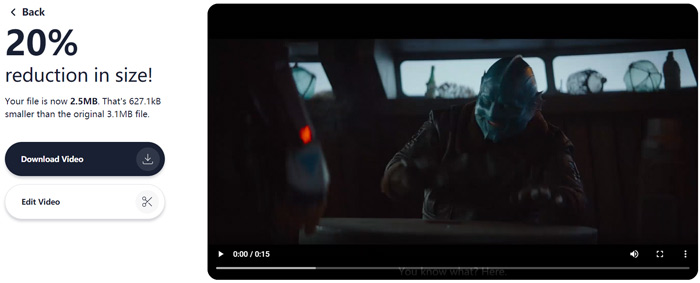
步骤 4: 点击左下角的Compress Video(压缩视频)按钮开始压缩 WebM 文件。完成后,点击Download Video(下载视频)按钮,将压缩好的 WebM 视频保存到电脑。
第3部分。压缩WebM文件的常见问题解答
问题1.什么是WebM格式?
WebM是一种开放源代码格式,包含使用VP8或VP9编解码器压缩的视频和使用Vorbis或Opus编解码器压缩的音频。 WebM最初旨在提供可在HTML5视频和HTML5音频元素中使用的免版税替代方案。 WebM文件主要用于网页上的媒体内容。
问题2.如何将WebM在线免费转换为MP4?
若想免费将 WebM 文件转换为 MP4,你可以使用流行的视频转换工具 Free Online Video Converter。它不仅能轻松完成WebM 转 MP4,还支持其他各种视频和音频格式之间的转换。
问题3.什么是高质量的最小视频格式?
MP4它通常以最小的文件大小提供最佳的视频质量。
结论
当你打算将 WebM 视频分享到 Facebook、Instagram、Twitter 或其他社交媒体账号时,最好先对其进行压缩。在本文中,你可以学到两种简单的方法来免费在线压缩 WebM。你可以根据自己的喜好选择合适的视频压缩工具,减小 WebM 文件的体积。
-
 在iPhone / Android /在线上压缩电子邮件视频的教程
 无法通过太大的电子邮件发送视频?如果遇到此问题,您可以在此处找到可行的方法来压缩视频以发送电子邮件。本文将详细介绍如何免费缩小大型视频文件。
-
 MP4到WebM转换器–将MP4转换成WebM的4种最佳方法
 当您想免费将MP4转换为WebM时,可以从本文中免费了解有关4种最常用方法来免费获取所需视频的信息。
-
 3种方法来压缩和转换WhatsApp的大视频文件
 从本文中,您可以获得3种简单的方法来在线压缩WhatsApp的视频。为什么您不能在WhatsApp上发送视频?如何解决WhatsApp视频大小限制?只是阅读并检查。
