


 视频转换大师
 屏幕录影大师
 视频修复
视频修复
 安全下载
安全下载用于提升内容的最佳 MP4 转换器 - 无缝转换工具
将视频文件转换为 MP4 格式对于任何想要跨设备无缝播放的人来说都是必不可少的。虽然有无数工具可用于将视频转换为 MP4,但并非所有工具都能提供相同的质量和性能。
That is the reason why we have taken the time to review and compare the best MP4 converters on the market, so you can make an informed decision and streamline your video workflow. Whether you're a professional videographer, a content creator, or just looking to convert some videos for personal use, our comprehensive review of the top-rated MP4 converters will help you find the perfect tool for your needs.

第 1 部分. 程序比较
如果您想一目了然地了解最适合您需求的程序,可以查看比较本文中提到的程序的表格。所有这些程序保证可以帮助您转换为 MP4。
| 程式 | 批量转换 | 显卡加速 | 附加功能 |
| 免费在线视频转换 | 是 | 没有 | 输出格式自定义,批量转换 |
| Online-Convert.com | 是 | 没有 | 各种文件类型的转换 |
| 云转换 | 是 | 没有 | 与云存储服务集成 |
| 转换 | 是 | 没有 | 与云存储服务集成,各种文件类型的转换 |
| FVC Video Converter Ultimate | 是 | 是 | 视频编辑、GIF 制作器、3D 制作器 |
| VLC媒体播放器 | 没有 | 没有 | 媒体播放器、视频流、音频转换 |
| 手刹 | 是 | 没有 | 视频编辑、批量扫描 |
第 2 部分。 最佳 4 MP4 在线转换器
使用在线文件转换器,您可以轻松地从任何设备转换文件,而无需下载任何其他软件。在线文件转换器通常也非常快速、免费且安全,确保您的数据免受未经授权的访问。因此,如果您希望转换为 MP4 或从 MP4 转换,您可以查看这些在线程序。
1. 免费在线 MP4 转换器
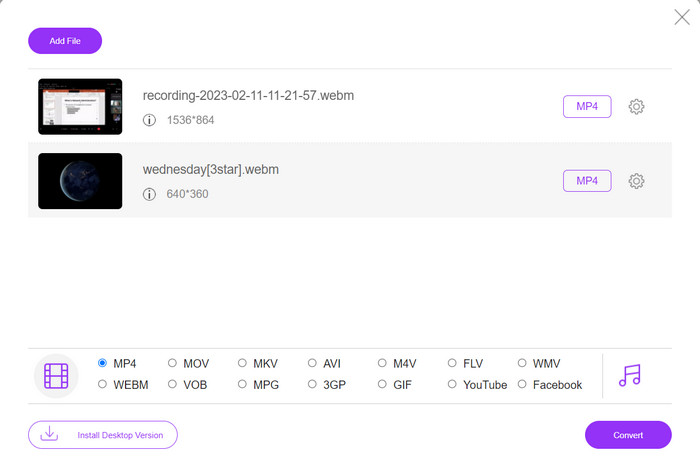
Converting files online is very convenient as you can do it from any device with an internet connection without needing to download any additional software. That is what Free MP4 Converter Online is made for. That means you do not have to install anything on your device to convert files to MP4. One of its outstanding features is its customization option. Users are able to edit the video resolution, bit rate, frame rate, etc. Besides, the process is simple and straightforward.
主要功能:
◆ 快速将视频转换为多种输出格式。
◆ 不限制用户可以下载的文件大小。
◆ 可从任何可访问互联网的浏览器和设备访问。
Step 1. You can use this MP4 video converter by visiting its official website. Simply open any browser on your computer and instantly visit its website.
Step 2. Immediately install the bit-sized launcher and upload the video(s) you wish to convert to MP4. From the format selection below, choose MP4 by ticking on its radio button.
Step 3. Finally, hit the Convert button to initialize the process of converting files.
2. Online-Convert.com
Online-Convert 是一款用户友好且多功能的在线 MP4 转换器,支持多种输入和输出格式,包括自定义输出设置,如分辨率、比特率和帧速率。该工具快速可靠,具有云存储集成和 SSL 加密等安全功能,可在上传和转换过程中保护您的文件。此外,它是完全免费的,没有任何隐藏费用,对于需要在预算内转换视频文件的任何人来说,它都是一个可访问的选项。
主要功能:
◆ 支持多种视频格式。
◆ 用户友好的界面。
◆ 快速可靠的转换。
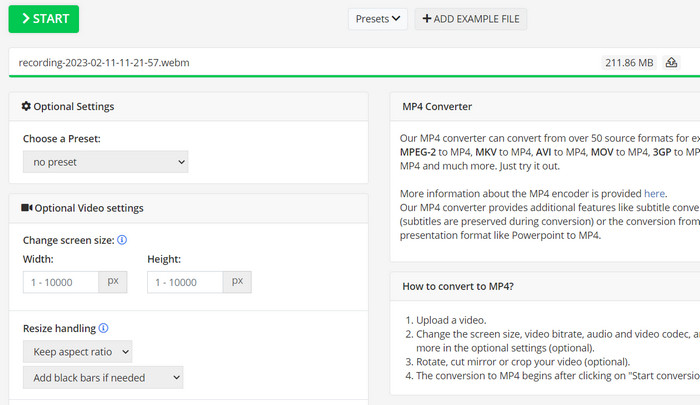
Step 1. Go to Online-Convert.com and choose Video Converter from the list of tools.
Step 2. Click Choose Files to add the video file you want to convert. You may also drag the file and drop it into the box.
Step 3. You can also change the resolution, bitrate, and frame rate of the result if you want to. The settings will be available underneath the conversion area.
Step 4. To start the conversion process, click the Start button. A progress bar will show how far along the conversion is on the page.
3.云转换
CloudConvert 是一款在线 MP4 转换器,可为用户提供全面的功能,包括全面的格式支持、可自定义的输出设置、用户友好的界面、云存储集成、安全和隐私、API 集成以及免费和付费选项。此外,此视频到 MP4 转换器是将视频文件转换为 MP4 格式的可靠且多功能的工具。其可自定义的输出设置使其成为需要微调视频质量和大小以满足其特定需求的用户的绝佳选择。
主要功能:
◆ CloudConvert 提供用于集成工作流的API 集成。
◆ 它使用SSL 加密来保护用户的文件。
◆ 支持云存储集成。
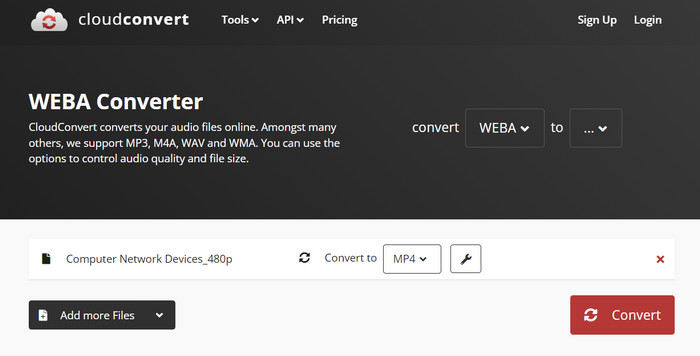
Step 1. Go to the CloudConvert website and make a free account if you haven't already.
Step 2. Click on Select Files to add the video file you want to convert. You can also just drag and drop the file into the upload box. Choose MP4 from the drop-down menu for the output file.
Step 3. Change the output choices, such as resolution, bitrate, and frame rate, if you want.
Step 4. Click the Convert button to begin the conversion process.
4. Convertio
如果您想快速将视频文件转换为 MP4 格式,Convertio 是一个不错的选择。凭借其易于使用的界面和快速的转换时间,您可以轻松更改电影,以便在各种设备和平台上观看它们。 Convertio 是一款多功能工具,可以处理您所有的视频转换需求。它适用于云存储,让您可以使用各种输入和输出文件。了解这个免费的 MP4 转换器是如何工作的。
主要功能:
◆ 多个文件的批量转换。
◆ 与Google Drive、Dropbox 等服务集成。
◆ 用于转换扫描文档的OCR 等高级功能。
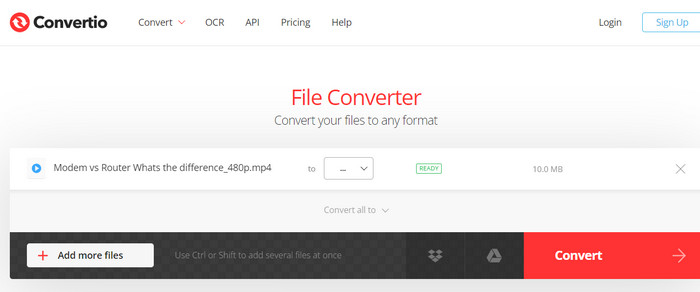
Step 1. Click Choose Files on the Convertio website (https://convertio.co/) to add the video file you want to convert. You may choose to drag the file and drop it into the upload area.
Step 2. From the drop-down box, choose MP4 as the format to use. You can also change the resolution, bitrate, and frame rate of the result if you want to.
Step 3. To start the conversion process, click the Convert button. A progress bar will show how far along the conversion is on the page.
Step 4. Once the process is done, you can click Download to save the MP4 file to your computer.
第 3 部分。最佳 3 MP4 转换器离线
现在,如果在某些情况下您发现自己无法访问互联网,则可以在这些情况下选择离线程序。因此,这是您可能依赖的工具。
1. FVC Video Converter Ultimate
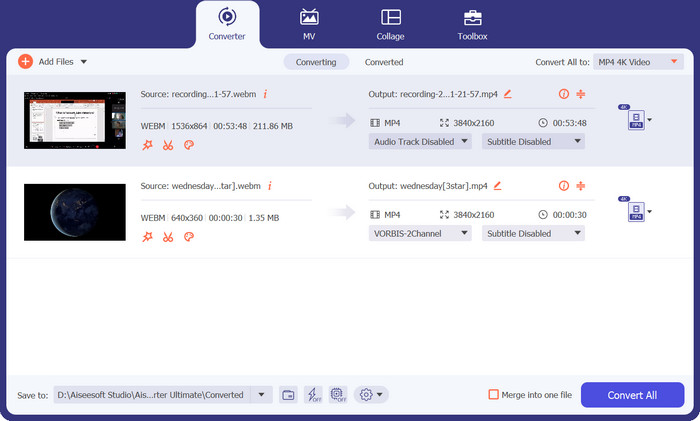
FVC Video Converter Ultimate is a powerful software that provides a comprehensive solution for converting video files to MP4 format. It supports a wide range of input and output formats, including support for HD and 4K video, and offers customizable output settings to ensure high-quality output. Additionally, this MP4 converter offers batch conversion for multiple files at once and includes editing tools for trimming, cropping, adding watermarks, and more. With its fast conversion times and high-quality output, FVC Video Converter Ultimate is a reliable and versatile tool for all your MP4 conversion needs.
主要功能:
◆ 它包括对高清和4K 视频的支持以保留高质量的视频。
◆ 支持NVIDIA 和AMD GPU 的硬件加速。
◆ 支持多种输出设备。
Step 1. The first thing you need to do to use this converter is to get its installer. Then, install it on your device. You may get the app using the Free Download buttons below.
Step 2. Then, launch the tool and load any video by ticking the Plus sign button from the main interface of the program.
Step 3. Next, go to the Profile menu and select MP4 from the Video tab. Finally, hit the Convert All button and get all your videos transformed to MP4 files.
2. VLC媒体播放器
VLC Media Player 是一款免费的多媒体播放器,因其几乎可以播放任何音频或视频文件格式的能力而受到广泛认可。很多人可能不知道的是,VLC Media Player 也是一个强大的视频转换器,可以轻松地将您的视频转换为 MP4 格式。以下是它的一些主要功能,以了解有关该程序的更多信息。
主要功能:
◆ 它可以编辑视频和音频编解码器、分辨率和比特率。
◆ It has the ability to add subtitles to videos.
◆ 可以在转换前预览视频。
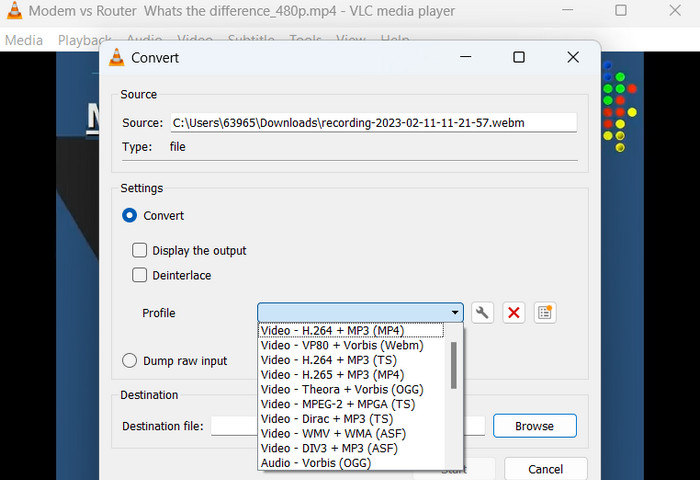
Step 1. Open VLC Media Player on your computer. Click on Media in the top menu bar and select Convert/Save from the drop-down menu.
Step 2. Click on the Add button to select the video file you want to convert. Once you have added the file, click on the Convert/Save button.
Step 3. In the Profile section, select Video - H.264 + MP3 (MP4) as the output format. Click on the Start button to begin the conversion process and wait for the conversion to complete.
3.手刹
HandBrake 是一种开源视频转码器,可让您将视频文件转换为多种格式,包括 MP4。由于其易用性和强大的功能,它是视频爱好者中流行的工具。同样,这款 MP4 视频转换器还提供批处理功能,因此您可以一次转换多个文件,并且它具有一系列预设,可以轻松针对不同的设备和平台优化您的视频。
主要功能:
◆ 免费和开源软件。
◆ 支持字幕和章节制作。
◆ 优化视频输出的预设。
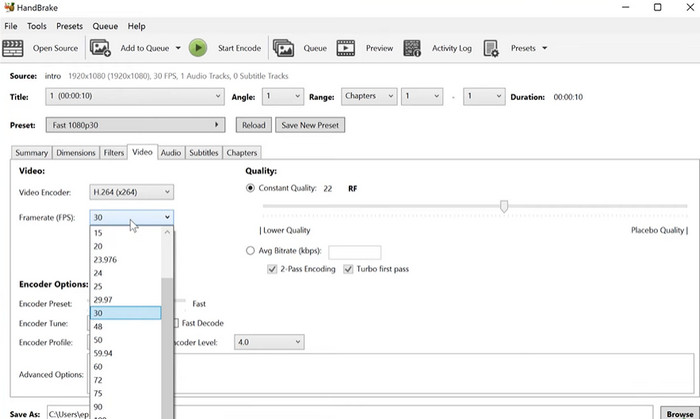
Step 1. Download and install HandBrake from the official website. Open HandBrake and select the video file you want to convert by clicking the Open Source button in the top left corner of the window.
Step 2. Choose a preset for your output file by selecting one of the options from the Presets menu in the top row of the window. If you're unsure which preset to use, you can choose Fast 1080p30 for a good balance between speed and quality.
Step 3. Click the Start Encode button in the top menu to begin the conversion process.
第 4 部分。 关于 MP4 转换器的常见问题解答
我可以在 iPhone 上播放 MP4 文件吗?
Yes. MP4 is already a supported format on iPhone devices. MP4 is a universal video format that is compatible with most devices, including iPhones. Therefore, you will not have to use an MP4-to-iPhone converter. You can simply use the pre-installed player of iPhone or find a 3rd-party video player for iPhone.
我可以将 MP4 文件上传到 TikTok 吗?
是的。您不必找到 MP4 到 TikTok 转换器来上传,因为 TikTok 接受 MP4 视频文件作为将视频上传到平台的受支持格式之一。
我可以将 MP4 文件转换为 iTunes 兼容的格式吗?
是的。您无需寻找 MP4 到 iTunes 转换器。您可以使用转换器(例如 HandBrake)来帮助您完成此操作。
结论
MP4 converters are essential tools for anyone looking to watch or share their videos across different devices or platforms, and they provide a convenient and reliable way to ensure compatibility and high-quality video playback. Therefore, we have compiled and compared the best programs available to help you choose the right-fit app.
-
 2023 年适用于 Windows 和 Mac 的最佳 MP4 编辑器
 无论您是使用计算机进行MP4视频编辑还是在手机上工作,都可以在此处找到一些不错的选择,包括适用于Windows和Mac的最佳MP4编辑器。
-
 如何将MP4视频压缩到较小的尺寸
 MP4视频太大,无法上传?是否要缩小视频尺寸?这是3种无限制地将MP4文件压缩为较小尺寸的有效方法。
-
 5 位顶级 MP4 元数据编辑器 [2023 年更新]
 如何更改我的 MP4 元数据?更改 MP4 元数据的最佳方法是使用支持 MP4 格式的标签编辑器,如我们在下面列出的示例。
