


 视频转换大师
 屏幕录影大师
 视频修复
视频修复
 安全下载
安全下载如何通过 FLAC 到 MP4 转换来提升您的音乐体验
Whether you're a music lover seeking the ultimate sonic adventure or a creative professional looking to enhance your multimedia projects, this FLAC to MP4 conversion article guide is tailored to meet your needs. Expand the horizons of your music library, enjoy seamless compatibility across devices and platforms, and unlock endless possibilities for sharing, streaming, and captivating your audience.
准备好重新定义您的音乐体验,沉浸在卓越的音频与令人惊叹的视觉效果相结合的境界中。我们邀请您加入我们将 FLAC 转换为 MP4 的变革之旅,其中卓越的音质与迷人的视觉元素相结合,带来难忘的感官体验,将您的音乐聆听提升到新的高度。

第 1 部分:离线将 FLAC 转换为 MP4 的最佳方法
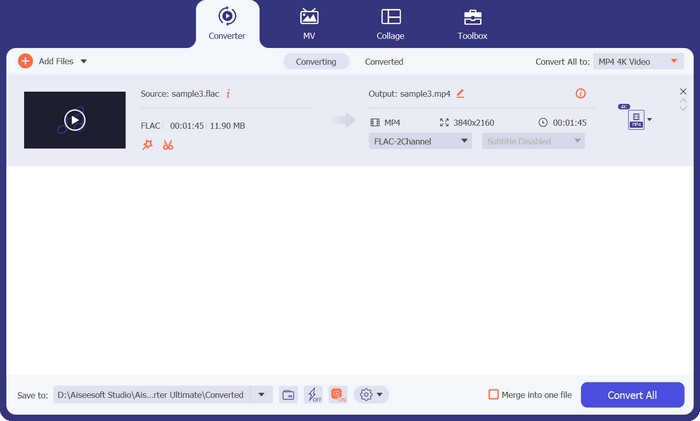
Video Converter Ultimate is a sensible selection featuring a user-friendly interface that provides satisfactory results. The rapid conversion speed and superior preservation of original quality are the primary factors that attract users to utilize this software. Additionally, the software has the capability to convert a wide range of audio and video formats, and it also supports batch conversion. Below are the key features of this program to convert FLAC to MP4 on a Mac or Windows PC.
核心功能
◆ 多功能输出选项:Video Converter Ultimate 软件提供多种输出选项选择,以满足您的个性化需求。如果您打算转换视频以便在智能手机、平板电脑和游戏机等不同设备上播放,或者为在线平台和社交媒体准备内容,您可以选择从预定义的输出配置文件中进行选择或自定义设置以获得最佳结果。
◆ 高速转换:Video Converter Ultimate 提供闪电般的转换速度。该解决方案利用尖端算法和硬件加速技术,提供快速有效的转换,同时保持高质量的输出。消除长时间的等待并及时访问转换后的媒体文件。
◆ 批量转换:利用批量转换功能一次转换多个文件,优化您的工作效率。 Video Converter Ultimate 软件使用户能够通过同时添加和转换多个视频来有效简化工作流程并最大限度地提高效率。
Step 1. Finding the proper installer is the first step. The Windows and Mac installers are listed below. Install the tool on your computer after you have it. Launch it after that on your computer.
Step 2. Select your target FLAC file from your computer's folder by clicking the Plus sign icon that is present on the main screen. You should then see a thumbnail of it.
Step 3. Then, reveal the drop-down list option to examine all the formats that are offered. Look for the MP4 format under the Video tab. After that, you can choose the video conversion's preferable quality.
Step 4. Hit the Convert All button at the program's screen after uploading a file and choosing an output format to start the conversion process.
第 2 部分。免费在线将 FLAC 转换为 MP4 的最佳方法
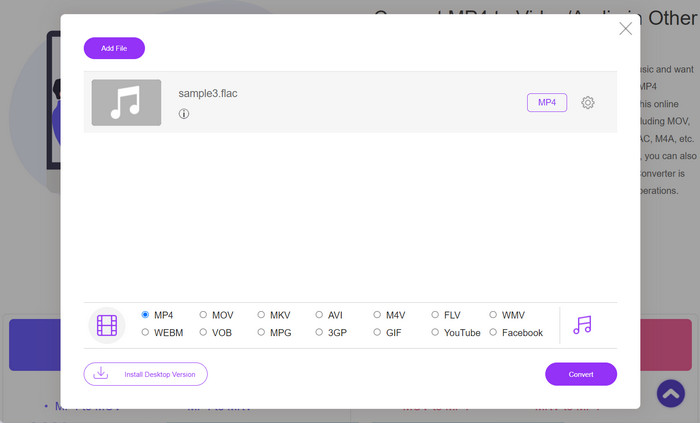
Free MP4 Converter Online is suitable for individuals who prefer not to install software on their personal computers and solely require a conversion tool. This is a web-based application that facilitates the conversion of FLAC to MP4 at a rapid pace. Additionally, it offers cross-platform functionality, allowing users to utilize the converter on both Windows and Mac operating systems. The utilization of this FLAC to MP4 converter is straightforward, even for novice users, provided that optimal network conditions are present.
核心功能
◆ 预设输出设置:从针对不同设备和平台定制的一系列预设输出设置中进行选择。无论您是要转换视频以便在智能手机、平板电脑还是特定媒体播放器上播放,Free MP4 Converter Online 都提供预配置的配置文件,以确保最佳的兼容性和质量。
◆ 可调整的输出参数:根据您的喜好调整各种参数来定制您的输出文件。修改分辨率、比特率、帧速率和音频质量等设置以获得所需的结果。
◆ 无水印或大小限制:免费 MP4 在线转换器可确保无水印和不受限制的转换体验。转换文件时不受文件大小或不需要的水印的任何限制,让您以原始质量享受转换后的文件。
Step 1. Please visit the official webpage of Free MP4 Converter Online for online conversion.
Step 2. Tick on the Add Files to Convert button to upload the FLAC files that you wish to convert.
Step 3. The MP4 radio button is selected by default. This implies that your files will undergo conversion to the MP4 format.
Step 4. Now, tick on the Convert button to initiate the conversion process.
第 3 部分:用另一种方法将 FLAC 转换为 MP4
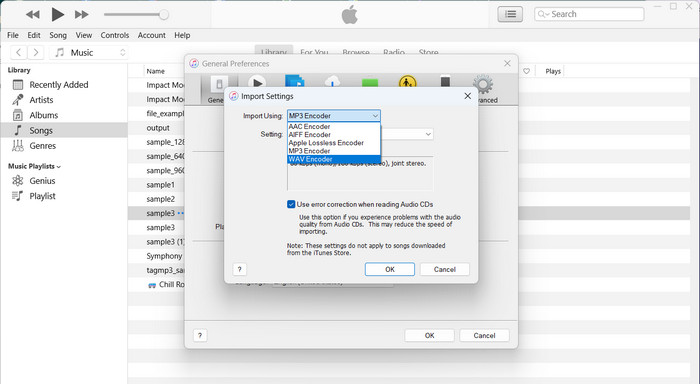
iTunes是苹果公司开发的一款综合性媒体播放器和库管理软件,最初是为管理和播放音乐文件而设计的。虽然 iTunes 本身支持 MP4 格式,但您可以按照在 iTunes 上将 FLAC 转换为 MP4 的操作来实现解决方法。
Step 1. You need first to import the FLAC files into your iTunes library.
Step 2. Once the FLAC files are in your iTunes library, you can create MP4 versions of these files. This can be done by selecting the FLAC files and choosing the Create MP4 Version option within iTunes.
Step 3. iTunes will then convert the selected FLAC files to MP4 format. After the conversion, you can locate the newly created MP4 versions in your iTunes library and export them to a desired location on your computer.
延伸阅读:
最佳 WAV 转 MP4 转换器推荐:实现从音频到视频的转换
第 4 部分。 比较图表
下面是一个比较表,重点介绍了 Video Converter Ultimate、Free MP4 Converter Online 和 iTunes 作为 FLAC 到 MP4 转换器的功能:
| 视频转换大师 | 免费在线MP4视频转换 | 的iTunes | |
| 格式支持 | 多种格式 | 有限的格式支持 | 有限的格式支持 |
| 转换速度 | 快速 | 因互联网而异 | 缓和 |
| 使用方便 | 用户友好的界面 | 用户友好的界面 | 用户友好的界面 |
| 批量转换 | 支持的 | 不支持 | 不支持 |
| 定制选项 | 高级编辑工具 | 有限定制 | 有限定制 |
| 输出质量 | 保留原始品质 | 根据设置而变化 | 根据设置而变化 |
第 5 部分. 有关转换 FLAC 和 MP4 的常见问题解答
我可以在不损失音质的情况下将 MP4 转换为 FLAC 吗?
是的,您可以将 MP4 转换为 FLAC,而不会损失任何音质。 FLAC 在压缩和解压缩过程中保留原始音频数据。然而,值得注意的是,音频质量将取决于源 MP4 文件。如果原始 MP4 文件的音频质量较低,将其转换为 FLAC 不会提高质量。
有没有可以将 MP4 转换为 FLAC 的在线工具?
是的,有多种在线工具可让您将 MP4 转换为 FLAC。 Online Audio Converter、Convertio 和 Zamzar 等网站提供在线转换服务,您可以上传 MP4 文件并将其转换为 FLAC,而无需安装任何软件。
我可以在在线平台上直接将 FLAC 转换为 MP4 吗?
不可以,在线平台通常不提供从 FLAC 到 MP4 视频的直接转换。在线转换工具主要专注于音频到音频或视频到视频的转换。
我可以将 FLAC 转换为带字幕的 MP4 吗?
是的,在将 FLAC 视频转换为 MP4 时,可以向 MP4 文件添加字幕。大多数视频编辑软件允许您导入 SRT(SubRip Subtitle)或 VTT(WebVTT)等格式的字幕文件,并将其与视频同步。通过使用视频编辑软件,您可以将 FLAC 音频、视频流和字幕文件组合起来创建嵌入字幕的 MP4 文件。
将 FLAC 视频转换为 MP4 时是否需要考虑质量问题?
MP4 音频质量取决于源 FLAC 文件和转换格式。 FLAC 保留原始音频质量。转换为 AAC 可能会因压缩而导致音频质量下降。使用高比特率和质量设置可以最大限度地减少转换过程中的质量损失。
结论
FLAC to MP4 with video requires a two-step process of converting the FLAC audio to a compatible format and then combining it with a video stream using video editing software. While online platforms may not directly support this conversion, dedicated video editing software offers greater control and flexibility for achieving the desired results.
-
 如何毫不费力地转换 FLAC 和 WAV(免费和付费)
 您是否希望将 FLAC 更改为 WAV 但需要帮助了解从哪里开始?本指南将教您如何快速轻松地进行操作。
-
 Mac 和 Windows 上排名前三的 FLAC 元数据编辑器 [2023 年更新]
 您想更改 FLAC 元数据吗?在这种情况下,您必须阅读本文,因为我们提供了有关可以使用的最新 FLAC 元数据编辑器的足够知识。
-
 轻松将 M4A 转换为 MP4 的最佳工具(在线和离线)
 通过我们全面的审查和比较指南,发现将 M4A 转换为 MP4 的顶级工具。了解哪些软件和在线转换器可提供最佳结果。
