


 视频转换大师
 屏幕录影大师
 视频修复
视频修复
 安全下载
安全下载适用于在线、离线和移动用户的最佳 MP4 到 MP3 转换器回顾
沉浸于MP4 转 MP3 转换器所打造的感官新境界。欣赏视频褪去画面、化作纯粹听觉享受的神奇蜕变。只需几次点击,你就能解锁隐藏在视频中的交响乐,将你的聆听体验提升到全新的高度。
准备好被迷住,视频变成迷人的配乐,准备好陪伴您的音乐之旅。走进一个声音至高无上的世界,让旋律占据中心舞台。

第 1 部分:MP4 到 MP3 转换器的详细比较
下表展示了 Video Converter Ultimate、Free Video Converter Online 和 Media Converter - Video to MP3(作为 MP4 到 MP3 转换器)的特性和功能。
| 视频转换大师 | 免费在线视频转换 | 媒体转换器 – 视频转 MP3 | |
| 软件安装 | 需要在设备上安装 | 无需安装 | 需要在设备上安装 |
| 支持的平台 | Windows、苹果系统 | 基于网络的 | 安卓、iOS |
| 转换速度 | 快速 | 取决于互联网连接 | 快速 |
| 定制选项 | 比特率、采样率、通道 | 比特率、采样率、通道 | 比特率、采样率、通道 |
| 附加功能 | 视频编辑 | 没有 | 修剪音频、元数据编辑 |
| 用户界面 | 功能丰富、直观 | 简单且用户友好 | 干净且用户友好 |
| 文件大小限制 | 无具体限制 | 取决于网站的政策 | 无具体限制 |
| 价钱 | 带有试用版的付费软件 | 自由 | 免费,可选择应用内购买 |
第 2 部分:适用于 Windows 和 Mac 的 MP4 转换器
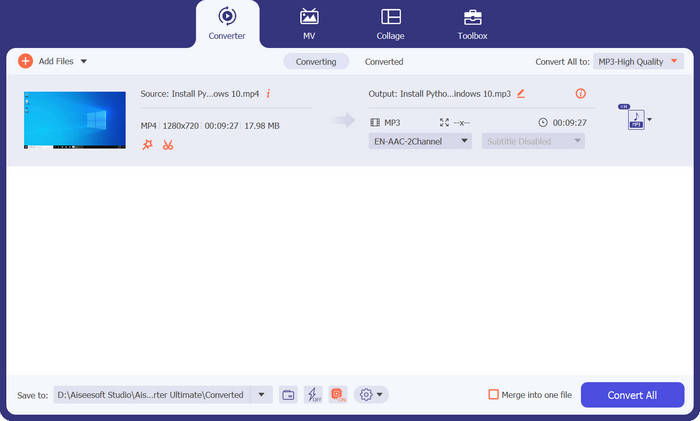
Video Converter Ultimate 是你将 MP4 视频转换为 MP3 音频文件的一体化解决方案,操作极其简单且功能多样。该功能强大的软件提供了全面的功能组合,可满足你所有 MP4 转 MP3 的转换需求。你可以轻松地将 MP4 文件转换成高质量的 MP3 音频。该程序支持包括 MP4、AVI、WMV、MOV 等在内的多种输入格式,确保与各种视频文件兼容。此外,它还能在 Windows 和 Mac 系统上作为 MP4 转 MP3 转换器使用。
最重要的是,Video Converter Ultimate 中的自定义选项也很丰富。通过调整比特率、采样率和通道等设置,根据您的具体喜好定制 MP3 输出。微调您的音频输出以实现质量和文件大小的完美平衡。
核心功能
◆ 可自定义的输出设置:通过调整比特率、采样率和通道等设置来微调 MP3 输出,以获得所需的音频质量和文件大小。
◆ 视频编辑功能:在将视频转换为 MP3 之前,修剪视频、应用滤镜、添加字幕以及执行基本视频编辑任务以增强视频效果。
◆ 高品质输出:确保在转换过程中保留音频质量,提供出色的 MP3 音频文件。
◆ 批量转换:同时将多个MP4 视频转换为MP3,节省您的时间和精力。
◆ 试用版:在购买之前通过试用版探索 MP4 到 MP3 转换器软件的特性和功能。
优点
- 转换速度快。
- 可定制的输出设置。
- 宽格式支持。
缺点
- 试用版可能有限制或水印。
- Video Converter Ultimate 是一款付费软件。
步骤 1. 首先,你需要通过下方的免费下载按钮获取该程序。你可以在 Mac 或 Windows 系统上安装这款 MP4 转 MP3 音频转换器。安装完成后,立即启动程序。
步骤 2. 在程序主界面中,点击加号按钮打开文件浏览器。然后选择你想要转换的文件。
步骤 3. 在配置文件(Profile)下拉列表中会显示多种格式。在音频(Audio)窗口中选择MP3作为输出格式。你也可以根据需要修改配置文件设置。
步骤 4. 如果一切设置就绪,现在就可以开始将 MP4 文件转换为 MP3。只需点击全部转换(Convert All)按钮即可开始转换过程。
第 3 部分. MP4 到 MP3 在线转换器
体验 MP4 到 MP3 转换器在线程序的便利性和强大功能,让 MP4 到 MP3 转换变得毫不费力。享受灵活性、高质量输出和用户友好的界面,所有这些都无需安装软件。
为你介绍Free Video Converter Online——将 MP4 转换为
MP3 毫不费力。这款多功能在线转换器结合了便利性、灵活性和强大的功能,可以满足您的所有转换需求。使用免费视频转换器在线,您只需几个步骤即可将您喜爱的 MP4 视频转换为高质量的 MP3 音频文件,无需安装任何软件。
核心功能
◆ 用户友好的界面:直观且用户友好的界面使任何人都可以轻松导航和转换文件。
◆ 无缝转换过程:通过程序的在线平台体验流畅高效的转换过程,让您轻松地将MP4 转换为MP3。
◆ 自定义选项:通过调整比特率、采样率和通道等设置,根据您的喜好定制 MP3 输出,从而获得所需的音频质量。
优点
- 在任何网络浏览器上将 MP4 转换为 MP3。
- 免费的。
- 消除下载和额外安装。
缺点
- 互联网依赖。
- 文件大小限制。
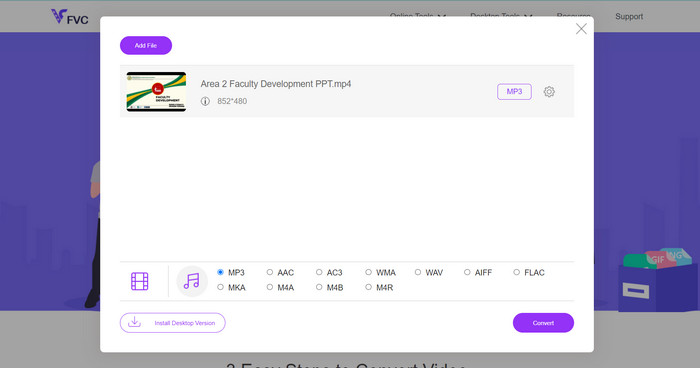
步骤 1. 首先,启动你常用的浏览器并访问该程序的官网。当页面加载完成后,你会看到添加文件以转换(Add Files to Convert)按钮。点击它并添加你的 MP3 音频文件。
步骤 2. 接着,通过进入以音符图标表示的音乐(Music)标签来选择输出格式。在这里,你会看到可用格式列表。若要免费将 MP4 转换为 MP3,请选中 MP3 的单选按钮。
步骤 3. 你还可以点击设置(settings)图标来自定义音质。根据个人喜好编辑比特率、采样率或声道数。设置满意后,点击转换(Convert)按钮开始转换过程。以上就是使用这款免费 MP4 转 MP3 转换器的方法。
第 4 部分:适用于 Android 和 iOS 的 MP4 到 MP3 转换器应用程序
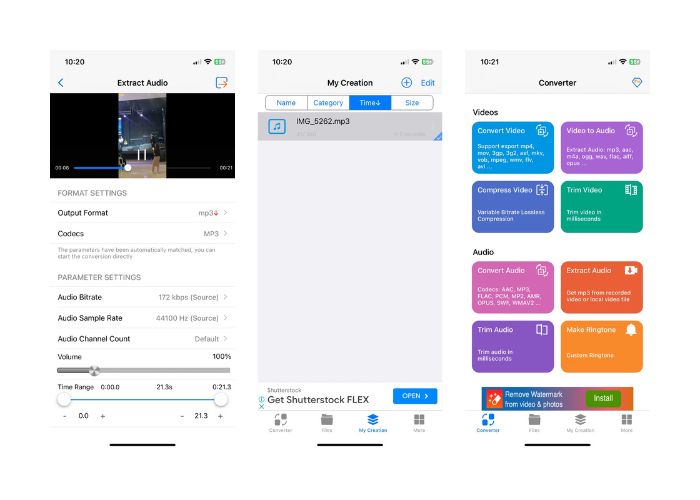
这款多功能 MP4 到 MP3 转换器应用程序使您能够从 MP4 视频中提取音频,并将其轻松转换为高质量的 MP3 音频文件。凭借其用户友好的界面和强大的功能,媒体转换器 - 视频到 MP3 是满足您所有移动音频转换需求的完美伴侣。
核心功能
◆ 元数据编辑:添加或修改元数据标签,例如标题、艺术家、专辑和封面艺术,以个性化您的 MP3 文件并增强其组织。
◆ 修剪和编辑音频:媒体转换器- 视频到MP3 还提供修剪和编辑音频文件的功能,允许您在转换之前提取特定片段或执行基本编辑任务。
◆ 无缝转换过程:凭借其高效的转换引擎,Media Converter - Video to MP3 提供流畅无忧的转换体验,节省您的时间和精力。
优点
- 在 Android 或 iOS 设备上直接转换器。
- 兼容各种MP4文件。
- 附加音频编辑功能。
缺点
- 性能基于移动设备的规格。
- 偶尔可能会出现错误或问题。
- 充满了烦人的广告。
适用于 Android:
◆ 从Google Play 商店下载并安装Media Converter - Video to MP3 应用程序。
◆ 在您的Android 设备上启动该应用程序。
◆ 在应用程序的主屏幕上,点击视频转音频选项。
◆ 从设备存储中浏览并选择要转换的 MP4 视频文件。
◆ 如果需要,可自定义输出设置,例如比特率、采样率和通道。
◆ 或者,您可以通过选择所需的片段来修剪和编辑音频文件。
适用于 iOS:
◆ 从App Store 下载并安装Media Converter - Video to MP3 应用程序。
◆ 在您的iOS 设备上启动应用程序。
◆ 在应用程序的主屏幕上,点击视频转音频选项。
◆ 从 iOS 设备存储中选择要转换的 MP4 视频文件
◆ 轻触转换(Convert)按钮以开始转换过程。
◆ 转换完成后,生成的 MP3 文件将在应用程序中可用。
延伸阅读:
M4V 转 MP3 转换器——提取 M4V 文件中 MP3 的 4 种最佳方法
第 5 部分:有关 MP4 到 MP3 转换器的常见问题解答
将 MP4 转换为 MP3 的目的是什么?
将 MP4 转换为 MP3 允许您从视频文件中提取音频,为您提供可在各种设备和平台上播放的独立音频文件。当您想要收听视频的音频内容(例如音乐、播客、演讲或采访)而不需要附带视频时,它非常有用。
我可以将受版权保护的 MP4 视频转换为 MP3 吗?
尊重版权法非常重要。在没有必要的权利或许可的情况下将受版权保护的 MP4 视频转换为 MP3 可能会侵犯版权。确保您拥有适当的权利或仅使用无版权或个人视频进行转换。
将 MP4 转换为 MP3 时如何调整音频质量?
大多数转换工具允许您调整输出设置,例如比特率、采样率和通道,以自定义音频质量。较高的比特率和采样率通常会带来更好的音频质量,但文件大小也会更大。
哪些设备和操作系统与 MP4 到 MP3 转换器兼容?
MP4 到 MP3 转换器适用于各种设备和操作系统,包括 Windows、macOS、Android 和 iOS。选择与您的特定设备和操作系统兼容的转换器。
将 MP4 转换为 MP3 需要多长时间?
转换时间可能会有所不同,具体取决于视频长度、转换设置和转换器性能等因素。然而,许多转换器提供快速转换速度以最大限度地减少等待时间。
结论
总之,将MP4 转换为 MP3,让你能轻松从视频中获取和享受音频内容,带来更多可能性。从保留音频质量、定制输出参数,到编辑音频与管理元数据,这些转换工具提供了多样功能,以提升你的转换体验。请务必遵守版权法规,确保在转换受版权保护的素材前已获得相应授权。借助 MP4 转 MP3 转换器所提供的简便性与灵活性,你可以轻松将喜爱的视频转换为独立音频文件,并在各种设备上尽情欣赏。
-
 轻松将 M4A 转换为 MP4 的最佳工具(在线和离线)
 通过我们全面的审查和比较指南,发现将 M4A 转换为 MP4 的顶级工具。了解哪些软件和在线转换器可提供最佳结果。
-
 通过程序和信息发现最好的 MP4 修剪器
 您想学习如何剪辑像您观看的视频博主一样的视频吗?然后继续阅读这篇文章,了解您可以使用哪些 MP4 修剪器。
-
 [2023] 将 MPEG 转换为 MP3 的最佳工具和简便方法
 本文主要讨论如何使用列表中最可靠的工具将 MPEG 视频转换为 MP3。
