


 视频转换大师
 屏幕录影大师
 视频修复
视频修复
 安全下载
安全下载如何增强视频色彩:您可以尝试的神奇方法
在你的视频中增添一丝艺术感,并不仅仅是对转场和特效做文章。有时,只是改变某个特定物体或背景的颜色,就能带来巨大的差异。基于这一点,大多数人会通过给故事视频添加滤镜,或选择一款可靠的视频编辑器来完成这项工作,从而更改视频颜色。如果你在数字存储设备中还留有旧素材,不妨利用当下顶级的视频编辑器将其纳入你的创作流程。

第 1 部分:更改视频的颜色
FVC Video Converter Ultimate 不仅仅适用于将音频和视频文件转换为其他格式。这款多功能工具在编辑视频片段方面同样表现出色,能让画面更加清晰、精致。它的视频编辑功能不仅涵盖基础编辑工具,还允许用户使用高级功能,如叠加特效、滤镜、添加水印、字幕等。更重要的是,这款工具因其轻量、操作简洁而广受欢迎。你可以按照四个简单步骤,学习如何使用 FVC Video Converter Ultimate 来增强视频色彩。
步骤 1:安装 Video Converter Ultimate
首先点击下方的下载按钮,在你的设备上启动并安装程序。按照安装向导提示完成安装。完成后,先熟悉一下程序的界面。
步骤 2:导入视频片段
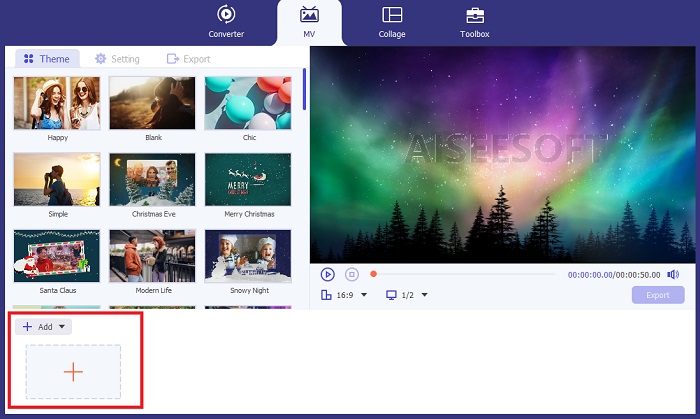
在 Video Converter Ultimate 中进入 MV 功能区来进行颜色调整。点击加号(Plus)按钮,从本地文件夹中选择目标文件,等待它显示在时间轴(Timeline)上。
步骤 3:调整视频颜色
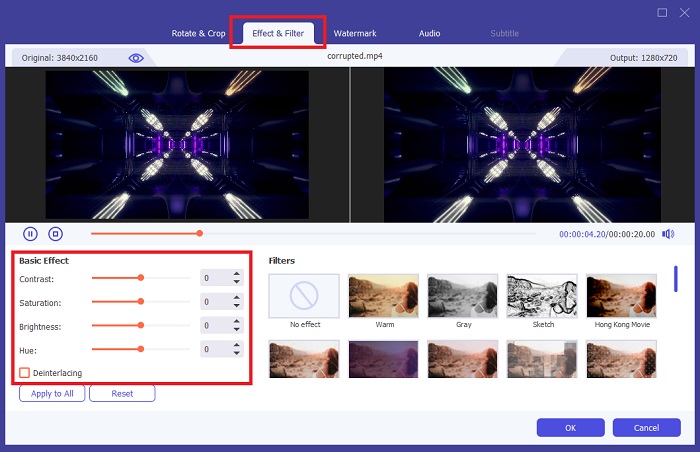
在时间轴(Timeline)区域,选中你的片段,点击剪辑工具旁边的魔术(Magic)按钮。弹出新窗口后,点击效果与滤镜(Effect and Filter)选项卡。如果你想通过添加滤镜来改变视频颜色,可以从工具中提供的多种滤镜中进行选择。另一方面,你也可以进入基本效果(Basic Effect)部分,通过调节颜色设置(Color Settings)来手动修改颜色。
步骤 4. 保存输出文件
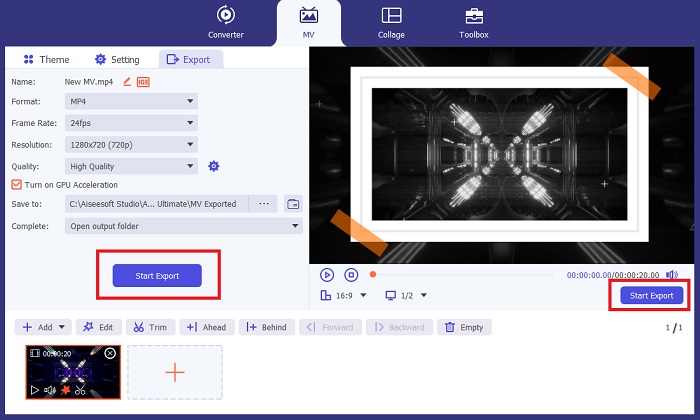
最后,点击应用到全部(Apply to All)按钮保存你的调整。若要将作品保存到本地文件夹,点击导出(Export)按钮,输入文件名并设置输出分辨率,然后点击开始导出(Start Export)。
优点
- 它提供多种视频和音频格式以确保高兼容性。
- FVC Video Converter 可以渲染从 1080p 到 8k 分辨率的高质量输出。
缺点
- 视频编辑器仅限于基本编辑工具。
- 它无法安装在 Linux 操作系统上。
第 2 部分:Adobe Premiere Pro 更改视频颜色
那些致力于专业制作输出的人应该严重依赖 Adobe Premiere Pro 等高级视频编辑器套件。在后期制作工作流程中,该程序可以使用滤镜效果工具调整特定对象或整个视频本身的视频颜色。通过更改所选对象的对比度和颜色饱和度,Adobe Premiere 可在您的终端上工作,使您的输出准备好在社交媒体平台上查看内容。
另一方面,该工具是专业的视频换色器,并且具有基本的视频编辑功能。如果您想了解在 Adobe Premiere 上更改视频颜色的技术,您需要执行以下操作。
步骤 1. 先从在工具中创建一个新项目开始。启动 Adobe Premiere Pro,点击文件(File)> 导入(Import),并上传你希望编辑的视频。
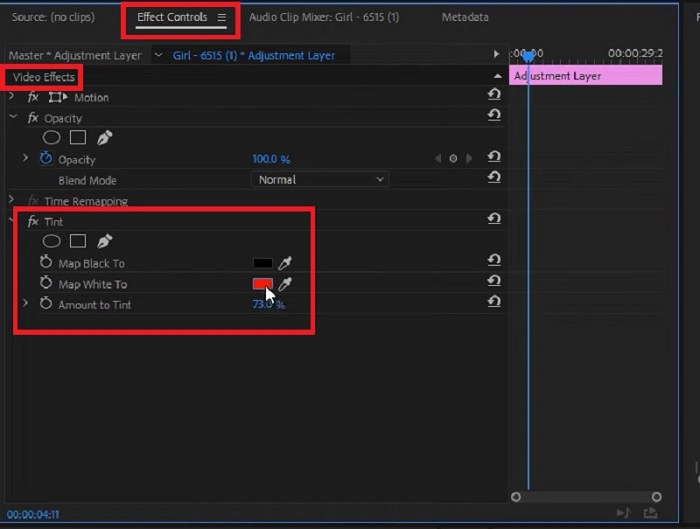
步骤 2. 然后,在键盘上按下F7键以打开“效果(Effects)”面板。在搜索框中输入Change to Color,选择Video Effects > Color Correction > Change to Color,并将该效果拖到时间轴上的视频片段。
步骤 3. 接着,在Change to Color面板中选择滴管(Eyedropper)工具,将其移动到你想调整颜色的对象上。当你选定要更改的区域后,在色相(Hue)设置中修改颜色选项。
优点
- 对于需要高级编辑的剪辑来说,该工具是一个出色的解决方案。
- 它可以以不同的颜色梯度和精度来改变颜色。
缺点
- 操作视频编辑工具需要大量的技术技能。
- 与竞争对手相比,该计划成本较高。
第 3 部分:After Effects 更改颜色视频
当您希望更改视频素材的颜色时,您可能需要考虑 After Effects。该程序是 Adobe 创建的另一个编辑器,是渲染 2.5 维图形动画和矢量的绝佳选择。许多专业人士在渲染 Web 应用程序、电影甚至电视节目的输出时通常会使用 Adobe After Effects。尽管看起来很有前途,但该工具可以帮助您使用程序中的不同方法调整视频颜色。但在本教程中,您可以使用填充效果更改特定的视频背景。
步骤 1. 首先,通过文件(File)> 导入(Import)将你的素材导入After Effects的时间轴。
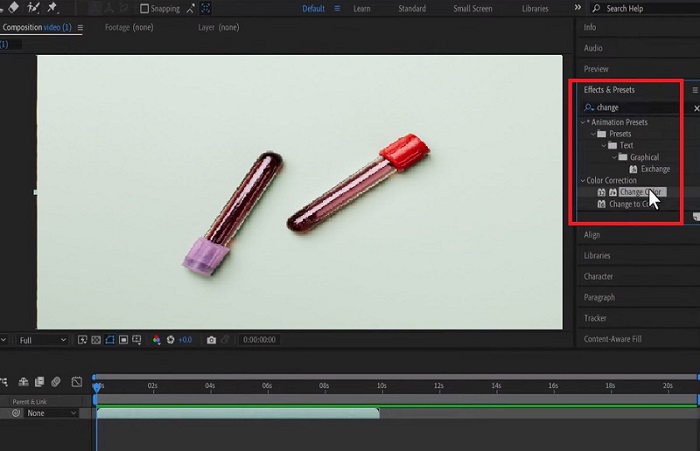
步骤 2. 然后,前往程序左侧角落的“效果和预设”(Effects and Preset)面板,点击Color Correction > Change Color。完成后,等待“滴管(Eye dropper)”图标出现,并将其拖到你希望更改颜色的对象上。
此时,你会在Change Color面板中看到“设置颜色(Set color)”,它将与所选对象当前的颜色相匹配。
步骤 3. 最后,在效果控件(Effect Controls)面板中调节诸如色相(Hue)、亮度(Lightness)、饱和度(Saturation)、容差(Tolerance)以及柔和度(Softness)等颜色参数,直到达到你理想的色彩效果。
优点
- 该视频换色器对于初学者来说是一个易于使用的程序。
- 编辑工具中的颜色选择也很多。
- After Effects 与 Windows 和 Mac 操作系统兼容。
缺点
- 该工具的成本昂贵。
延伸阅读:
第四部分:视频颜色调整方法常见问题解答
为什么 Instagram 会改变我视频的颜色?
Instagram 是一款社交媒体应用程序,可让您通过视频分享他们的视频或直接将其上传到他们的时间轴上。不过,这个平台只能通过视频滤镜来改变视频。这样,您就可以以不同的色调观看视频。
有没有可以改变视频中眼睛颜色的应用程序?
绝对没错!某些应用程序可以帮助您通过几种简单的方式更改手机视频上的眼睛颜色。 YouCam Video 可以完成这项工作,并且可以在 App Store 和 Play Store 上找到。
如何更改视频中衣服的颜色?
使用视频编辑器时,您可以通过使用选择工具隔离对象来精确更改衣服或任何对象的颜色。突出显示对象后,转到吸管工具并选择要更改对象颜色的颜色。之后,您可以通过调整色相和饱和度来调整细节,以满足您的喜好和要求。
可以在线更改视频的颜色吗?
有很多在线工具可以帮助快速调整视频的颜色,例如 VEED.IO 在线视频编辑器。该工具是免费的,允许您进行基本编辑。它可以帮助您通过放置滤镜来更改视频颜色。然而,在线工具通常无法更改剪辑上的特定对象,如果这是您的目标,这可能是一个缺点。
结论
顺畅的工具才能带来顺畅的成片。在本教程中,你已经了解了 Adobe Premiere 和 After Effects 的高级编辑功能。当你打算使用这些工具来调整视频颜色时,掌握各个视频编辑套装的技术细节是实现理想效果的关键。不过,如果你正在寻找一款更友好、可作为替代方案的工具,那么 FVC Video Converter Ultimate 就是值得选择的那一款。
-
 2025 年必备的五大视频调色工具
 需要有关如何对视频进行色彩校正的帮助吗?别再犹豫了,因为我们'已经为您提供了合适的工具。单击此处深入了解这些工具。
-
 如何改变视频的色调?探索创意的可能性
 在这篇书面文章中,我们收集了可能的解决方案,可以帮助和指导视频爱好者改变视频项目的色调。
-
 视频过滤器:使用桌面上的过滤器和效果增强您的视频
 最好的视频滤镜是什么?如何添加视频滤镜?您所有的问题都将在这篇文章中找到答案。你在等什么?单击此。
