


 视频转换大师
 屏幕录影大师
 视频修复
视频修复
 安全下载
安全下载FlexClip AI 评论:了解这个 AI 媒体工具
科技一直在不断重塑数字内容创作的格局,从手动、传统的剪辑方式,发展到自动化、无烦恼的处理流程。一切确实发生了巨大的变化。在市面上众多的 AI 工具之中,FlexClip AI 已经成为该领域的颠覆性产品之一。借助人工智能的融合,这款视频编辑工具为打造引人入胜且专业的视频带来了革命性的方式。但它的亮点远不止于此,让我们一起来深入了解一下,在竞争激烈的视频编辑领域,它究竟凭什么脱颖而出。

第 1 部分:FlexClip 会怎样
FlexClip AI 是一款免费的在线视频制作与编辑工具,充分利用人工智能的能力来简化并增强AI 视频的创作与剪辑流程。用户可以轻松在线编辑和生成视频,享受流畅高效的剪辑体验。平台提供多种 AI 视频模板,为创意视频项目提供灵感。值得一提的是,该工具配备了文本转视频功能,允许用户在几分钟内将书面内容转换成视觉吸引力十足的画面和动画。
主要功能:
◆ 人工智能内容创作。
◆ 文本到视频的转换。
◆ 用于文本分析的自然语言处理。
◆ 个性化和推荐功能。
◆ 拖放界面,方便编辑。
◆ 用于快速创建视频的模板。
◆ 内容丰富的媒体库。
◆ 多种格式支持,实现多种输出。
◆ 动态音频语音发生器。
◆ 隐私选项和安全水印。
优点
- 友好的用户界面。
- 4000+ 模板。
- 基于云的视频解决方案。
- 高效的定制功能。
- 高级编辑工具。
缺点
- 没有离线功能。
- 由于云问题可能导致工作损失。
- 缺乏 4K 支持。
- 有限/免费版本有限制。
价钱
| 自由 | 加 | 商业 |
| 0$ | 每月 9.99$ | 每月 19.99$ |
| 包含: | 包含: | 包含: |
| ✅720p高清下载 ✅每个项目 1 个库存视频 ✅每个项目 1 个库存音频 ✅免费人工智能积分 ✅最多12个项目 ✅视频长度最多10分钟 | ✅1080p 全高清下载 每个项目 ✅5 个库存视频 ✅每个项目 5 个库存音频 ✅加上人工智能学分 ✅在线保存无限的项目 ✅视频长度无限 ✅定制品牌 ✅30GB云存储空间 ✅100GB视频托管空间 ✅上传自定义字体 ✅保存最多100个模板 ✅无 FlexClip 水印 | ✅1080p 全高清下载 ✅无限量的库存视频 ✅无限量的库存音频 ✅商业人工智能学分 ✅在线保存无限的项目 ✅视频长度无限 ✅定制品牌 ✅100GB云存储 ✅1TB视频托管空间 ✅上传自定义字体 ✅保存多达200个模板 ✅无 FlexClip 水印 |
使用安全吗?
FlexClip AI 是一个值得信赖的视频编辑平台,将您的隐私放在第一位。您的视频文件和个人信息将得到安全保障。该工具使用加密技术来确保您的数据安全传输。
请记住使用强密码,并在网上分享个人详细信息时务必小心。
二、如何使用FlexClip进行AI视频生成
FlexClip AI 具有用户友好的界面,无论您是技术专家还是新手,都可以轻松使用。要使用它,请按照以下步骤操作:
步骤 1. 在其官方网站上创建一个账号。
步骤 2: 点击 Create a Video(创建视频)按钮。
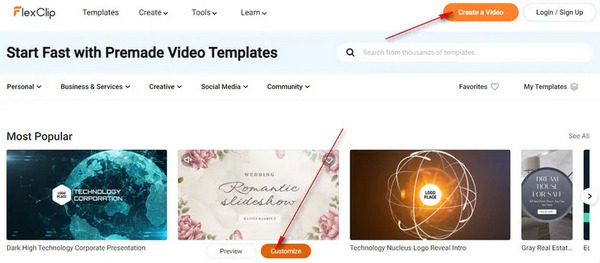
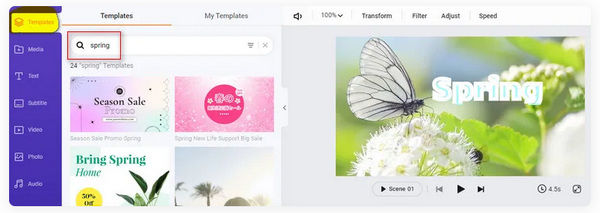
步骤 3: 要添加模板,点击左侧标签栏中的 Templates(模板)。添加媒体、字幕、视频、照片、音频和元素的操作方法也是相同的。这些功能都会显示在左侧标签栏中,你只需根据需要点击相应的选项即可使用。
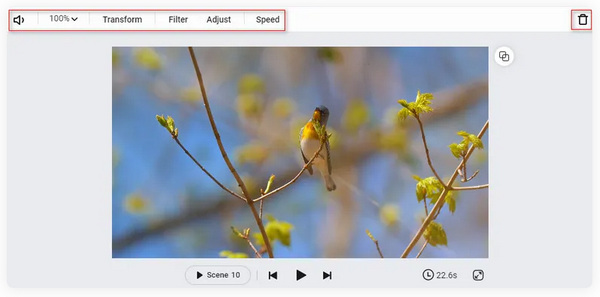
步骤 4: 要编辑视频,请在时间轴中点击 Video Scene(视频场景)。在这里你可以看到多种实用功能,例如音量、缩放、变换、滤镜、调整、速度等。别忘了在这里尽情发挥你的创意。如果你想节省时间,也可以使用文本转视频生成器,通过 AI 一键生成视频。
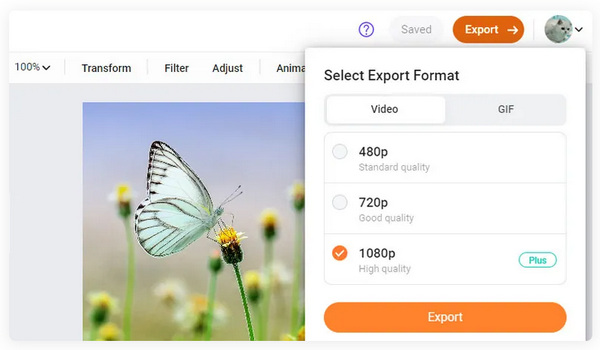
步骤 5: 最后,当你完成视频的自定义编辑后,点击 Export(导出)按钮进行保存。
你在这! FlexClip AI 可以成为您首选的 AI 视频编辑伙伴。只需简单的步骤,您就可以制作触手可及的精彩视频。但是,为了让您使用其完整功能,您必须订阅他们的订阅。尽管如此,它仍然是一个很好的工具,我们可以用来利用我们的编辑经验。
第 3 部分:提示:自定义生成 AI 视频的最佳工具
有时候,仅仅使用 FlexClip AI 还不够,尤其是当我们想添加的一些功能平台上并没有时。因此,这里提供一个额外的工具,你可以用它来进一步自定义由 FlexClip 或其他工具生成的 AI 视频。为此,FVC Video Converter Ultimate 软件工具将是你的最佳选择。它是一款功能全面的 AI 视频制作工具,可用于深度定制你生成的视频,并内置多种元素和功能供你使用。下面是一个简要的使用步骤说明:
步骤 1: 首先从其官网下载该程序并安装到你的电脑上。
步骤 2: 接下来,浏览各个标签页。你会看到“Converter”(转换)、“MV”和“Collage”(拼贴)标签。可以自由探索并加以利用。其中,Converter 标签用于转换不受支持格式的视频,MV 标签则用于自定义你的视频。
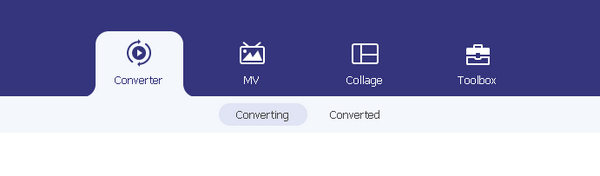
步骤 3: 现在,要添加生成好的视频,点击 Add File(添加文件)按钮。
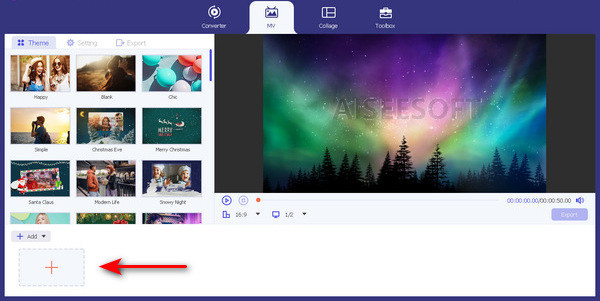
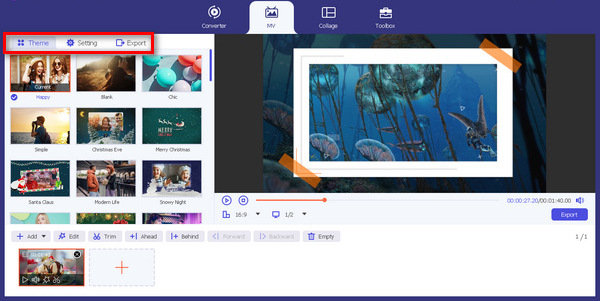
步骤 4: 接着,探索主题、模板以及其他编辑功能,以便对视频进行个性化定制。
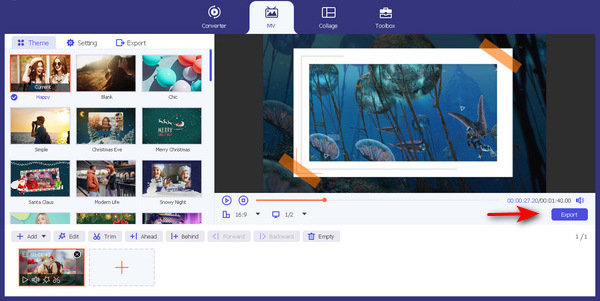
步骤 5: 最后,当你完成编辑后,点击 Export(导出)按钮。
通过这些简单的步骤,FVC Video Converter Ultimate 可以自定义或个性化您生成的视频。您只需按照这些步骤操作即可。此外,当您需要转换或拼贴某些内容时,您还可以利用它们的一些功能。但现在,用它来释放你的创造力。
第 4 部分:FlexClip AI 常见问题解答
FlexClip 会留下水印吗?
不会。FlexClip AI 不会在您的视频上留下水印。您可以创建和编辑视频,而无需平台上的任何品牌。但是,如果您想添加水印来个性化您的视频,您可以在他们的平台上轻松完成。
我可以使用 FlexClip for YouTube 吗?
是的。 FlexClip AI 是为 YouTube 创建内容的绝佳选择。借助其平台的功能,您可以轻松编辑和增强视频。此外,还有现成的 YouTube 视频模板可供您使用。
什么比 FlexClip 更好?
虽然 FlexClip AI 是一个出色的视频编辑平台,但 Adobe Premiere Pro 和 iMovie 等替代平台为专业视频编辑提供了更高级的功能。但是,有必要考虑您的需求和专业水平来选择最适合您的工具。
我在 FlexClip 上的数据的安全性如何?
FlexClip AI 优先考虑用户数据的隐私和安全。您的视频文件和个人信息将受到保护并谨慎处理。该工具嵌入了加密技术,确保数据的安全传输。但是,建议在在线共享个人信息时使用强密码并谨慎行事。
FlexClip 适合初学者吗?
是的。 FlexClip AI 的设计易于使用,使其成为初学者的绝佳选择。该平台直观的界面和有用的功能使所有技能水平的用户都可以轻松访问它。
结论
这篇FlexClip AI 评测已经全面地讨论了你需要了解的关键信息。如果上述内容都符合你的需求,你就可以随时放心使用这款工具。尽管这款 AI 工具足以帮助你完成视频剪辑,但也不要错过使用 FVC Video Converter Ultimate 来进一步定制生成视频的机会。将二者结合使用,不仅可以大大简化编辑流程,更能显著提升视频成品的质量。
-
 如何使用 AI Video Maker 创建 YouTube Shorts
 正在寻找 AI 视频制作者来制作 YouTube Shorts?嗯,这篇文章适合你。我们将讨论并指导您如何使用各种人工智能工具来制作它们。
-
 生成电影的最佳 3 个 AI 音频到视频转换器工具
 正在努力寻找 AI 音频到视频转换器吗?这场斗争今天结束了,因为在这篇评论中,我们将为您提供可以使用的最好的人工智能转换器。
-
 制作字幕的最佳 5 个 AI 字幕生成器
 添加字幕的传统方式需要花费大量的时间和工作。这篇评论将教您当今可以使用的五种最好的人工智能字幕生成器。
