


 视频转换大师
 屏幕录影大师
 视频修复
视频修复
 安全下载
安全下载什么是碎片化 MP4 以及如何将其转换为离线播放
If you still do not know, a fragmented MP4 comes with advantages, especially in the online world. However, as the benefits are visible, there are still vital drawbacks that can be encountered with such a file. This article has been written to help you learn more about fragmented videos in MP4. So, keep on reading the content below to learn the precise meaning of the file and the ways to convert such fragments into traditional MP4 files to address the present drawbacks.

第 1 部分。什么是碎片 MP4 [精确信息]
碎片化 MP4,也称为 fMP4,是一种 MP4 文件,用于改善网络上的流媒体播放效果。常规 MP4 文件需要完全下载或缓冲后才能观看,而碎片化视频只需下载一小部分即可立即开始观看。这是因为碎片化视频被分割成称为片段的较小部分,即使您的互联网速度很慢,也可以播放。这意味着这种碎片化可以实现更高效的流媒体播放,因为视频可以分块传输。即使您的互联网连接速度很慢,这也能实现更快、更流畅的播放,这是您在搜索碎片化 MP4 与 MPEG4 信息时需要注意的关键因素。
此外,fMP4 文件还支持自适应比特率流等功能,可根据互联网连接速度动态调整视频质量。因此,由于其灵活性以及在不同网络和设备条件下提供无缝观看体验的能力,它已成为通过互联网交付视频内容的标准格式。
优点
- 通过将内容分成更小的段或块,可以实现更高效的互联网流媒体传输。
- 支持自适应比特率流,可根据观看者或用户的互联网连接速度动态调整视频质量。
- 更高级的功能,如互动内容、音频描述和多种语言选项。因为它包括备用视频流、字幕和音轨等元数据。
- 与现代流媒体协议和媒体播放器的兼容性更高。
缺点
- fMP4 文件需要强大的流媒体基础设施,能够有效地向观众提供分段或分块的内容。
- 由于文件结构中包含分段和元数据,因此与常规 MP4 相比,其文件大小更大。因此,可能需要额外的存储开销。
- 您可能需要使用专门的编码工具或软件来生成针对流媒体优化的 fMP4 文件。
第 2 部分。碎片化 MP4 与 MP4
本部分将向您展示普通或常规 MP4 与 fMP4 之间的区别。在这里,我们将显示它们区别的信息放在图表中。
| 方面 | MP4(碎片) | MP4(非碎片化) |
| 文件扩展名 | .mp4, .fmp4 | .mp4 |
| 尺寸 | 由于附加的分段和元数据,因此很大。 | 体积小,文件结构简单。 |
| 存储要求 | 需要额外的存储空间。 | 由于它具有更有效的存储条件,因此不需要额外的存储。 |
| 内容创建工具 | 需要专门的软件。 | 需要标准软件。 |
| 兼容性 | 现代媒体播放器。 | 一般来说,大多数媒体播放器。 |
| 可用性 | 用于流式传输。 | 本地播放和分发。 |
第 3 部分。将碎片 MP4 文件转换为 MP4 的最简单方法
Good news! You don’t need specialized software just to convert the fragmented MP4 to MP4. If you have bunches of fMP4 that you need to transform easily, quickly, yet efficiently, then the FVC Video Converter Ultimate has got you covered. It is the ultimate video converter that doesn’t require conversion expertise since it comes with an intuitive and very simple interface. What makes it even the best for all types of users is its capability to convert bulk files with the power of its hardware acceleration, which makes the conversion 120x faster! Moreover, besides MP4, this ultimate converter allows you to work on more than 1000 various media types, making it more flexible to utilize.
它不仅可以用于媒体文件转换,还提供大量功能,让您可以创建、编辑和增强视频和音频文件。使用 FVC Video Converter Ultimate,您可以合并、裁剪、添加片段、拆分片段以及进行许多您喜欢的编辑!只需将所有视频文件拖放到其界面上,它就会让您随心所欲地个性化或自定义文件。同时,以下是使用 FVC Video Converter Ultimate 将大量碎片化的 MP4 转换为传统 MP4 的方法。
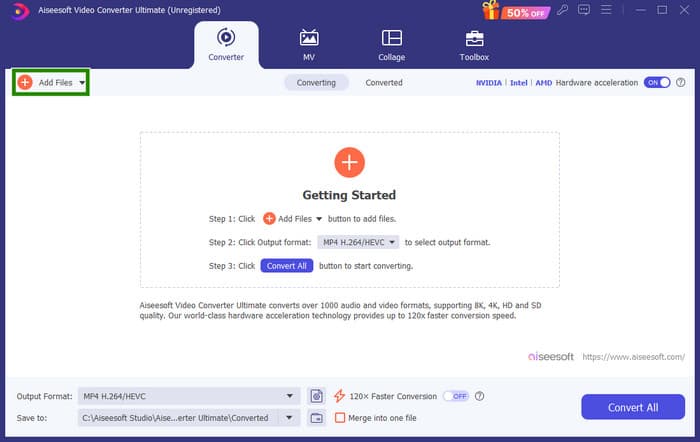
Step 1. Make sure that the fMP4 files are already saved on your computer. Open the converter tool and click the Add Files tab to upload all of the files.
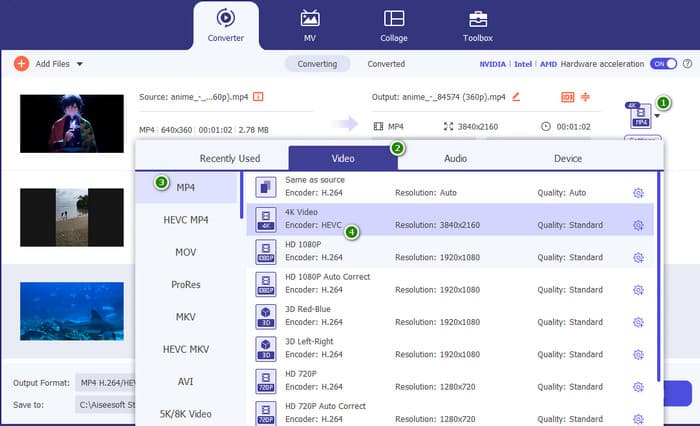
Step 2. Once the files are loaded, you may now proceed to set them to the regular MP4 format. Click the inverted triangle button at the right part of each uploaded file, then go to Video > MP4 and select the source you want.
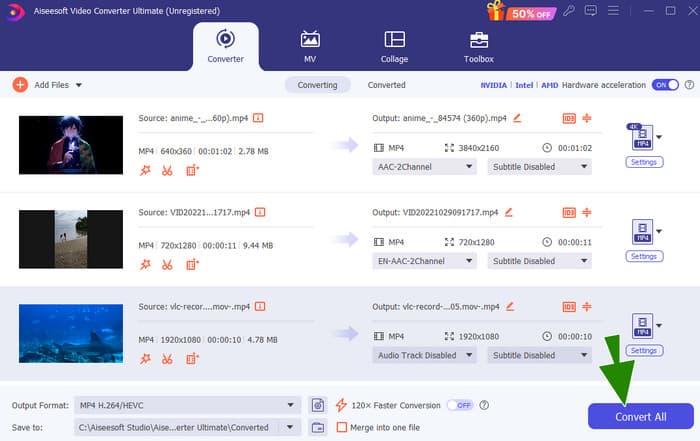
Step 3. As simple and quick as that, you can now click Convert to process the conversion.
第 4 部分。将碎片 MP4 转换为传统 MP4 的专家方法
Suppose you are searching for a professional solution that will handle well your task of converting fragmented MP4 to MP4. That said, think of FFmpeg as a free Swiss Army knife for your videos and music. Ffmepg can record, change formats, and even stream them. However, you got to know that it uses a command line process for you to do the conversion. Fortunately, this guide will show you how to use FFmpeg to convert your media files from one type to another, like changing a .fmp4 to a regular video file!
Step 1. Install the FFmpeg on your PC, then open the Command Prompt.
Step 2. To start, use the cd command to navigate to the folder containing your fragmented MP4 file. You can type the cd / (path to your video).
Step 3. Once done, you may start the conversion command. To convert your fMP4 to MP4, use this command: ffmpeg -i video name.fmp4 - copy regular video.mp4.

第 5 部分。关于将碎片 MP4 转换为 MP4 的常见问题解答
为什么我不能用我的普通 MP4 播放器播放 fMP4?
The reason why your regular MP4 player can’t play fMP4 is that fMP4s are optimized for streaming and might have a different structure compared to regular MP4s.
我应该将 MP4 转换为 fMP4 吗?
不一定。除非您想在现代设备上播放视频并且不需要自适应比特率流之类的功能,否则无需进行转换。
为什么我需要将碎片化 MP4 转换为常规 MP4?
您可能需要出于兼容性考虑进行转换。一些较旧的媒体播放器和视频编辑软件不支持碎片化视频。
结论
You’ve just learned something about fragmented MP4. You now know how it works, how it differs from the regular MP4, and most importantly, how to make the conversion easily and expertly.
-
 什么是 MP4:描述、优点等
 在将 MP4 转换为其他格式之前,您必须先了解一些相关知识。这篇文章揭示了您需要了解的有关 MP4 及其替代品的所有信息。
-
 如何修复 MP4 文件:在几分钟内恢复您的视频
 揭开MP4修复的秘密!请按照我们易于理解的教程进行故障排除和修复。不要让损坏的视频破坏您的媒体体验。#039;
-
 [已解决] 如何解决 MP4 媒体播放器没有声音
 MP4 声音有问题吗?以下是有关如何修复 Windows Media Player、Adobe Premiere 和 OBS Recording 上没有声音的 MP4 音频的分步指南。
