


 视频转换大师
 屏幕录影大师
 视频修复
视频修复
 安全下载
安全下载编辑适用于 Windows、macOS、在线和移动电话的 M4A 文件
由于 M4A 文件并非为所有设备而设计,许多音频编辑器在处理这种音频格式时会遇到困难,导致用户在修改它们时比较麻烦。实际上,M4A 基本上被所有设备所支持,由于其经过压缩,在设备上运行会更轻量,占用空间更小,同时还能保持不错的音质。无需担心,借助我们精心挑选的适用于 Windows 和 macOS 的软件工具、适用于浏览器的在线工具以及移动端应用,编辑M4A 文件依然完全可行。

第 1 部分。在 Windows 11/10/8/7 和 macOS 上编辑 M4A 文件
1. 一体化 M4A 编辑器
这款由 FVC 精选的 Video Converter Ultimate 是一款多功能且易于使用的 M4A 编辑器。它是一款基于软件的工具,被视为一体化的 M4A 编辑器,集成了 M4A 裁剪、合并、压缩、降噪、音量增强等功能。作为一款同时具备音频和视频编辑能力且界面简洁的软件,它在 Windows 和 Mac 设备上都表现出色。为帮助你快速上手这款多合一 M4A 编辑器,下面是一份简要指南,帮助你高效使用这款软件。
步骤 1:在桌面上下载并安装 FVC 精选的 Video Converter Ultimate。
步骤 2:在工具界面中,点击添加文件(Add Files)按钮,将你的 M4A 文件添加到软件中。
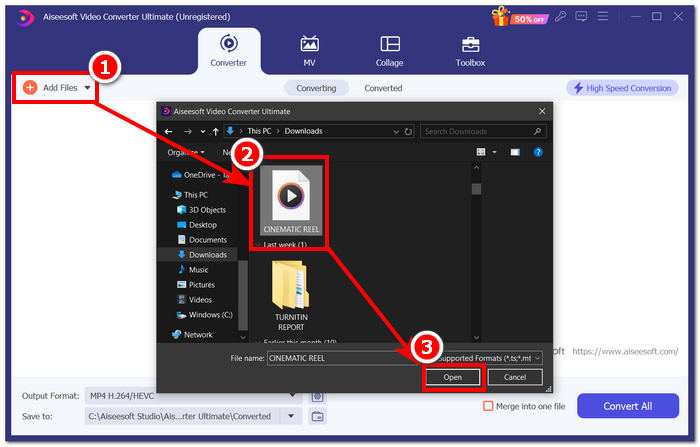
步骤 3:当 M4A 文件成功导入工具后,你可以通过选择紧挨着已上传 M4A 文件的编辑(Edit)和剪切(Cut)工具来开始编辑该文件。
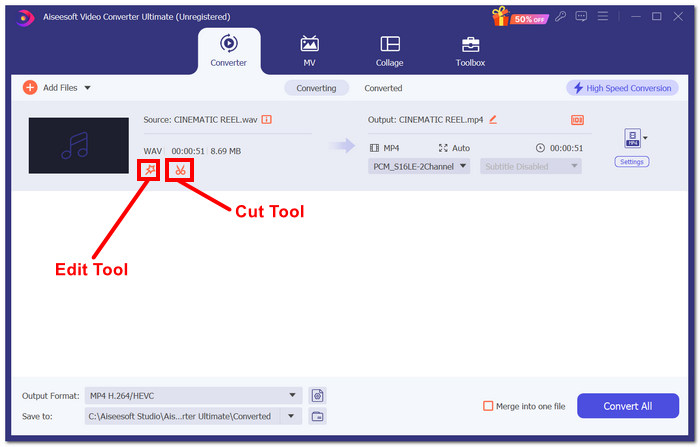
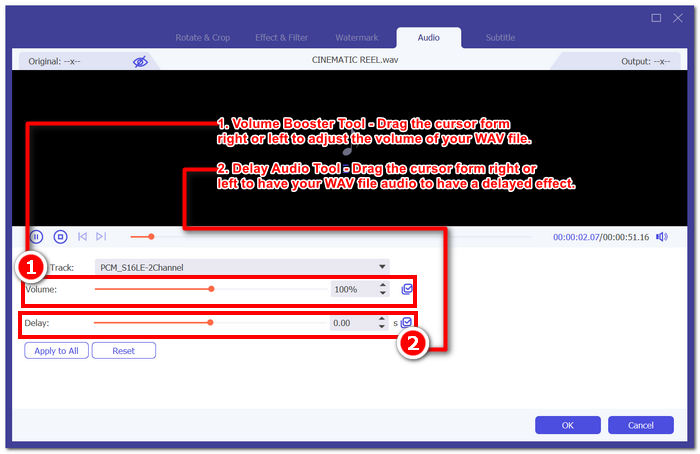
注意: 如果你想为 M4A 文件添加音量增强和音频延迟功能,请点击魔术棒(Magic Wand)图标。
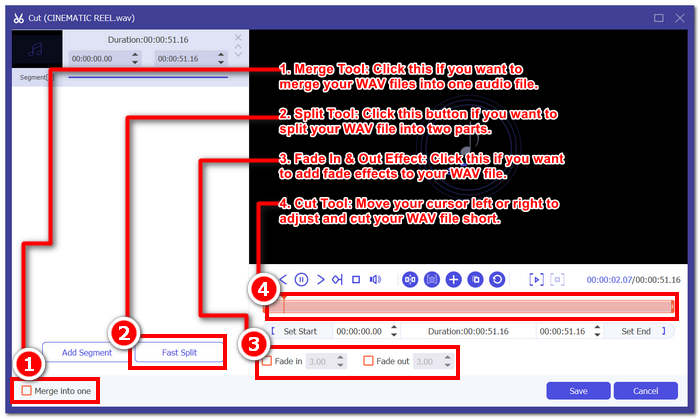
否则,单击剪刀图标即可使用“添加淡入淡出、剪切、拆分和合并效果”等功能将效果添加到您的 M4A 文件。
步骤 4:当你按自己的喜好成功编辑并剪辑好 M4A 文件后,点击全部转换(Convert All)按钮,将其下载到你在桌面上指定的文件夹中。
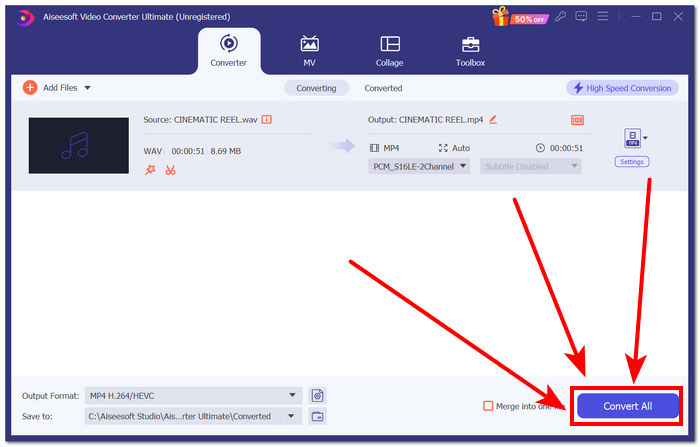
FVC 选择的软件确实不负其作为一体化 M4A 编辑工具的声誉。令人惊讶的是,该工具支持多种音频和视频格式,例如 MP3、M4A、MP4、AAC、WMA、WAV 等。此外,由于该工具提供无限的文件大小上传和高速导出技术,可以更快地处理和导出 WAV 文件,同时保持文件质量,因此用户始终可以确保获得高质量的导出。
2. 开源且功能强大的 M4A 编辑器
开源 M4A 编辑器 Audacity 也可用于录音,它就是广受欢迎的 Audacity。凭借多年的音频制作专业知识,该程序是列表中最受欢迎和使用最广泛的工具。它以录制音乐、编辑、混音和组合歌曲的能力而闻名。它还可用于编辑和制作用于播客的 M4A 文件。它与其他文件格式(WAV、MP3、MP2 等)的兼容性也使其成为轻松编辑和录制 M4A 的灵活工具。
步骤 1:在桌面上下载并安装 Audacity。
步骤 2:安装完成后,打开 Audacity。在界面中,点击屏幕左上角的文件(File)选项,然后点击打开(Open),选择你要编辑的 M4A 文件。
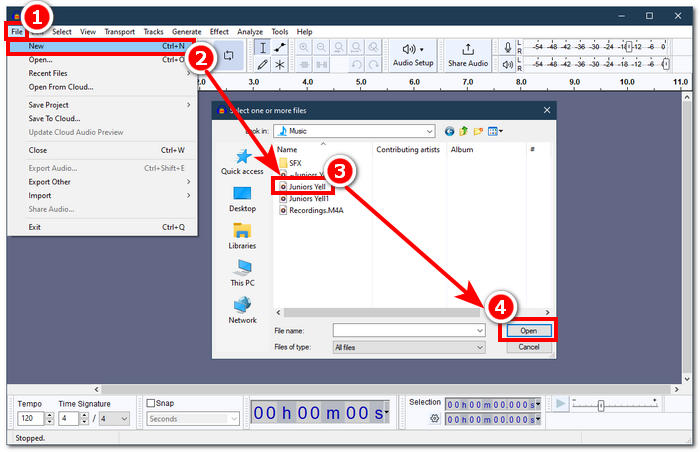
需要 FFmpeg 插件才能在 Audacity 中使用 M4A 文件。在继续编辑 M4A 之前,请确保安装该插件。
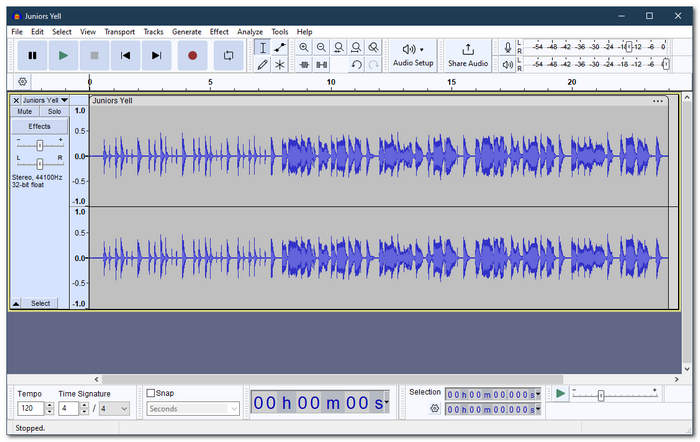
步骤 3:当 M4A 文件成功导入工具后,你就可以使用其中提供的功能来编辑它。
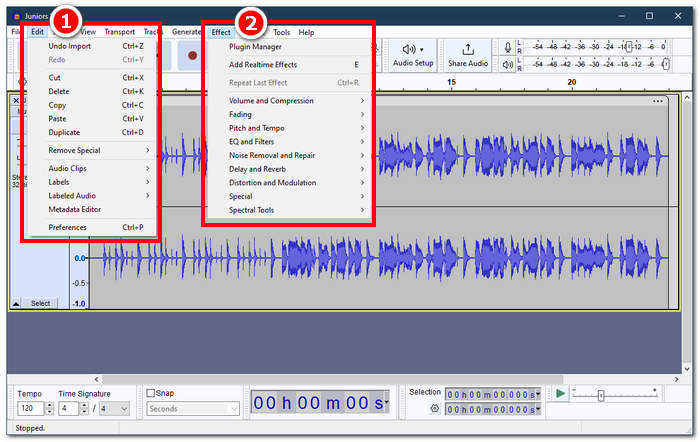
注意: 若要在 Audacity 中进行剪切、删除片段、应用效果、复制、粘贴、复制一轨或合并音轨,请点击工具左上方菜单中的编辑(Edit)选项。若要调整音量、应用淡入淡出效果、修改音高和节奏等,请点击同一区域中的效果(Effect)选项。
步骤 4:当你对 M4A 文件的所有修改都感到满意后,通过 文件(File) > 导出音频(Export Audio) 来导出你的音频。
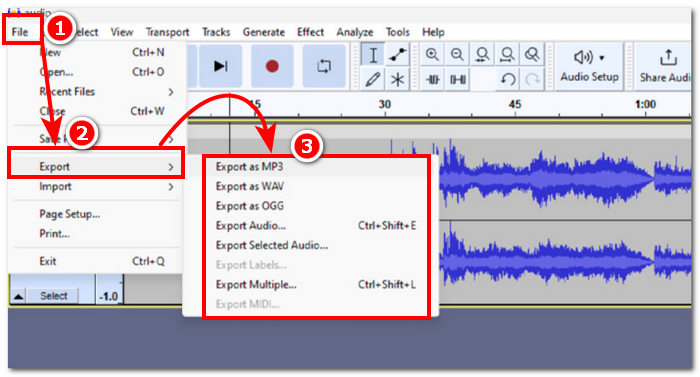
对于简单的 M4A 编辑,Audacity 是一款出色的应用程序,因为它免费且有助于提高工作效率。此外,颜色跟踪特性也很有用,因为它们可以对标签部分进行多轨跟踪。同时处理多个音轨的缺点是该程序一次只能管理一定数量的音轨。
第 2 部分。在线编辑 M4A 文件
如果你想通过在线或网页工具编辑 M4A 文件,Aspose Audio Cutter 是一款非常适合用于快速、即时 M4A 编辑的理想解决方案。该网页工具专门用于对 M4A 文件进行精确剪切,并支持 AAC、AIFF、FLAC、M4A、MP3、WAV 等多种格式。其使用方式非常简单,只需上传你的 M4A 文件,然后选择你希望剪切并保存的具体时间段即可。
步骤 1:访问 Aspose Audio Cutter 的官方网站。
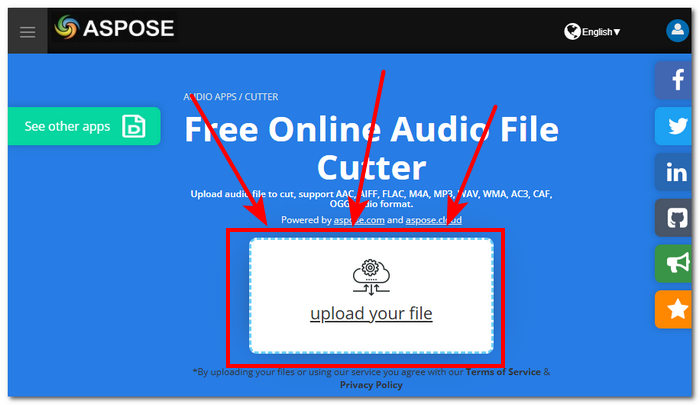
步骤 2:在网站提供的上传区域中,上传或拖放你想要编辑的 M4A 文件。
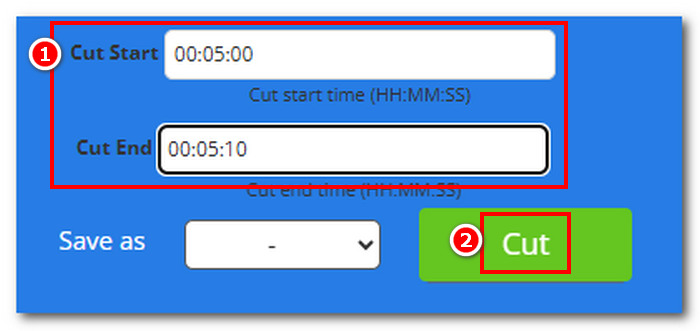
步骤 3:输入你期望的“开始剪切时间”(Cut Start)和“结束剪切时间”(Cut End),精确排除你想在 M4A 中删除的部分,然后点击剪切(Cut)按钮开始处理。
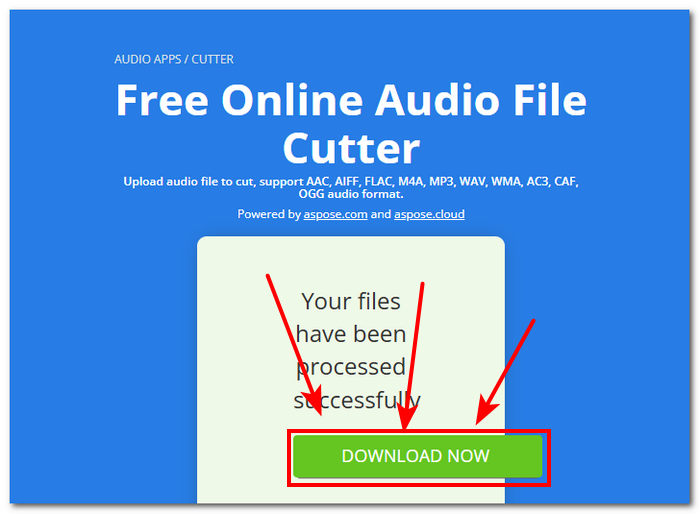
步骤 4:当 M4A 文件剪切完成后,点击立即下载(Download Now)按钮,将其保存到你的桌面。
你可以在自己的M4A 播放器中打开该文件来检查效果。
Aspose Audi Cutter 确实是一款用户友好的工具,具有直观的界面,专门用于对 M4A 文件进行精确剪切。该服务速度很快,无需安装应用程序即可使用。因此,它的功能仅限于剪切功能,无法执行其他 M4A 编辑任务,例如添加淡入淡出效果、修剪、分割等。
三、在手机上编辑 M4A 文件
WavePad 移动版的界面与桌面版相同,因此用户更容易上手。这款移动版应用可在 Android 和 iOS 设备上免费下载,广泛支持音频格式,确保该工具在编辑音频文件时的多功能性。此外,其 M4A 编辑功能提供多种功能和效果,例如轻松剪切、修剪、复制、粘贴、插入、静音和自动修剪 M4A 文件。
步骤 1:前往手机应用商店,在那里下载 WavePad 移动版。
步骤 2:应用安装完成后,在应用界面上方点击打开(Open)图标,将你的 M4A 文件加载到应用中,然后等待导入完成。
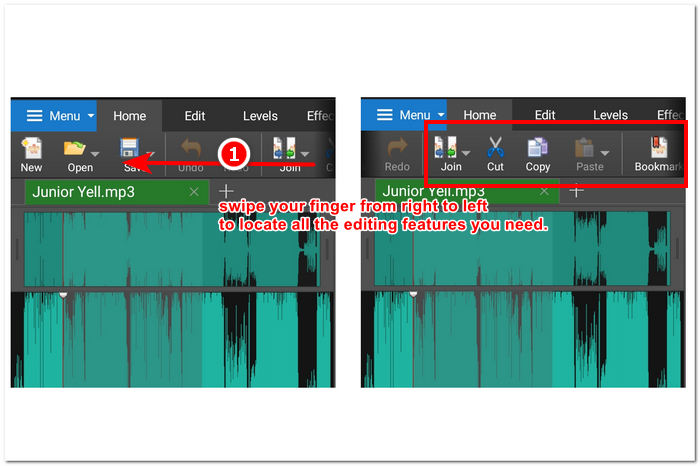
步骤 3:当 M4A 文件在应用中加载完成后,开始探索应用提供的各种功能来编辑你的 M4A 文件。你可以将手指放在工具界面最上方,从右向左滑动,以查看剪切、复制、拼接、粘贴等功能。当你找到编辑 M4A 文件所需的工具后,只需点击相应功能即可将其应用到你的 M4A 文件中。
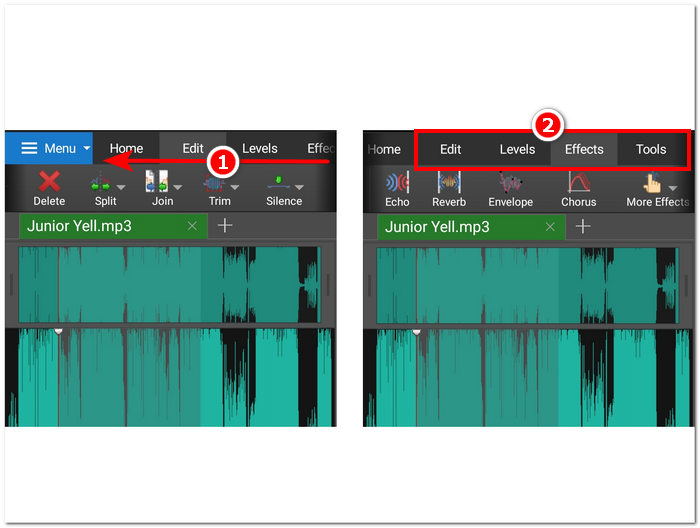
您还可以通过在编辑部分所在的字段中从右向左滑动手指来探索和查看可用于编辑 M4A 文件的其他效果和功能。在那里,您可以将效果应用于 M4A 文件等。
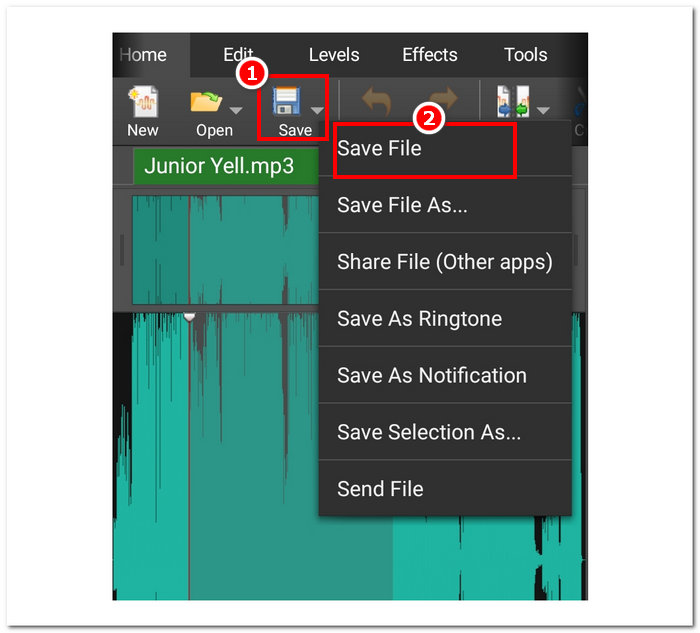
步骤 4:完成 M4A 文件编辑后,返回主页(Home)部分,点击保存(Save)按钮,然后点击“保存文件(Save File)”,即可将编辑后的 M4A 文件下载到你的移动设备中。
尽管如此,WavePad mobile 无疑是一款功能强大的移动 M4A 编辑器应用,它允许用户对其 M4A 文件进行几乎任何操作。这款应用非常适合只有移动设备且总是在路上的用户。
第 4 部分。有关如何编辑 M4A 文件的常见问题解答
M4A 比 MP3 差吗?
M4A 并不被认为比 MP3 更差,相反,根据不同用途,M4A 通常能在相同比特率下提供更好的音质,同时凭借更先进的压缩算法实现更优的码率表现。关于 M4A 与 MP3 的更多区别,你可以在此处查看。
M4A 有什么缺点?
M4A 文件尚未得到设备和平台的广泛支持,因此您需要使用转换工具才能使用它们。此外,用户在使用 M4A 作为音频文件时经常会遇到兼容性问题,这使得它不是一种理想的文件,尤其是在共享时。
有没有免费软件可以将 M4A 转换为文本?
是的,有很多免费软件可以转换 M4A,例如 Google Docs Voice Typing 和 Otter.ai。这些工具非常可靠,因为它们集成了语音识别技术,可以将 M4A 文件中的音频文件转录为文本。
编辑后我可以把 M4A 文件转换成其他格式吗?
是的,许多 M4A 编辑器,例如 FVC 选择的 Video Converter Ultimate,都有内置转换器工具,允许用户保存或导出具有不同音频格式的编辑后的 M4A 文件。
我如何确保我编辑的 M4A 文件的质量得以维持?
为了确保在保存编辑的 M4A 文件时始终获得最高质量的导出,请务必避免过度压缩,并确保使用支持无损导出质量的可信工具,
结论
由于兼容性问题和某些音频编辑器的支持有限,在多个平台(包括 Windows、macOS、互联网工具和手机)上编辑 M4A 文件可能很困难。与 WAV 等广泛接受的格式相比,M4A 文件在质量和压缩之间提供了很好的折衷,使其在保持可观的音频保真度的同时具有良好的存储效率。但是,您可以使用正确的工具和程序(例如 FVC Video Converter Ultimate 的桌面版、Aspose Audio Cutter 的网页版和 WavePad 的移动版)轻松编辑 M4A 文件,从而保证高质量的输出和各种编辑选择。
-
 适用于Windows和Mac的5大最佳鼠标和键盘记录器
 这是可以保存鼠标移动和键盘单击并重复事件的前五名最佳鼠标和键盘记录器程序。
-
 最受欢迎的4种AVI屏幕录像机,可将屏幕视频捕获为AVI文件
 为了以高质量的AVI文件记录屏幕,本文确定并分享了本文中排名前4位的免费AVI屏幕记录器。了解更多详细信息以找到所需的内容。
-
 行动!屏幕录像机评论–缺点,优点及其最佳替代方案
 Action Screen Recorder 是捕捉游戏视频的理想游戏录制软件吗?只需从评论中了解更多细节,并从文章中了解更多细节。
