


 视频转换大师
 屏幕录影大师
 视频修复
视频修复
 安全下载
安全下载如何轻松将图像大小调整为 100KB [3 种快速方法]
如今,大多数图像的文件大小都很大,这并不奇怪。这源于先进的技术进步,相机系统利用强大的功能来实现尽可能高的分辨率。文件大小过大的图像文件在使用时会造成不便,尤其是在上传和发送,甚至网站优化方面。那么,如果您只需要对照片设置特定的文件大小限制,该怎么办?
别担心,我们来帮你!有多种解决方案可以帮你缩小这些图片的体积。在这篇文章中,你将了解 3 种简单的方法,轻松将图片压缩到 100KB,从而获得理想的文件大小,方便你在各种场景中使用。

第 1 部分。快速简便地将图像大小调整为 100KB 而不会损失质量
其中一款能够在不明显降低画质的情况下压缩图片的优秀工具,就是FVC 免费图片压缩器。这款速度快、界面简洁易用的工具,专门用于在尽量保证质量的前提下,将图片压缩到 100KB。它在压缩 JPEG、PNG、SVG 和 GIF 等多种图片格式方面表现出色,压缩效果优于许多其他软件。此外,它完全免费,并且可以在各种设备上在线访问。如果你需要压缩大量图片,这款工具也非常适合,因为它支持批量同时压缩,并将压缩后的图片打包成一个 ZIP 文件,方便你一次性下载和管理。
使用 FVC 免费图像压缩器将图像大小调整为 100KB 的方法如下
步骤 1:首先,你需要访问他们的官方网站。
步骤 2:然后点击 Upload Images,导入你想要压缩到 100KB 的照片。工具会自动开始压缩你的图片。
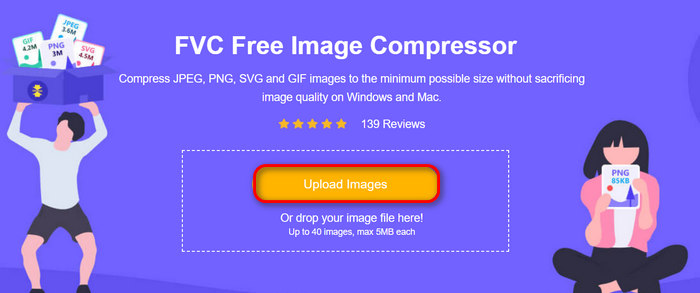
步骤 3:压缩完成后,你可以预览图片新的压缩后大小。最后,点击 Download All 保存你的图片。
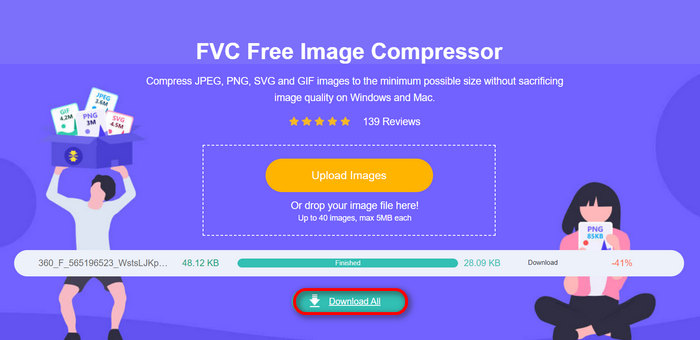
FVC 免费图像压缩器最棒的地方在于其简单且非常直观的界面。用户只需执行上传步骤,一切都将轻松处理,因为压缩是自动完成的。
优点
- 自动压缩照片。
- 具有最佳的优化和压缩算法。
- 广泛支持各种图像文件格式。
- 它可以很容易地在线访问。
- 支持最多40张图像的批量压缩。
- 简单且非常直观的用户界面。
缺点
- 没有针对其他压缩需求的定制功能。
第 2 部分。精确地将图像压缩至 100KB
如果您想将图像精确压缩到 100KB,那么最好的工具就是 Photoshop。这款编辑工具以其全面的功能而闻名,这些功能对于增强和修改图像非常有用。使用此工具,您只需在图像大小功能中调整必要的设置即可精确缩小图像的大小。
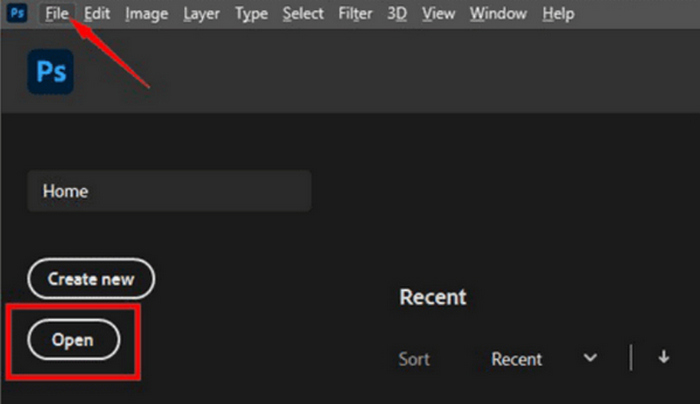
步骤 1:在 Photoshop 中打开你的图片,可以点击 Open,或进入 File 选项卡,选择你想要压缩到 100KB 的图片。
步骤 2:接着,前往 Image 菜单并选择 Image Size(图像大小)。
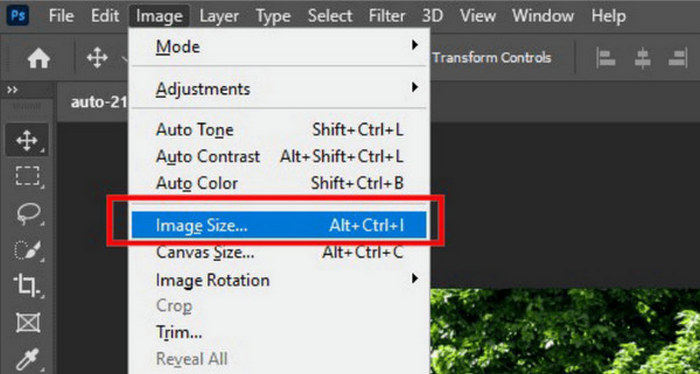
步骤 3:在Image Size(图像大小)对话框中,从下拉菜单中选择Pixels(像素)。若需设置具体尺寸,在宽度和高度输入框中填入数值,并点击OK调整图片大小。
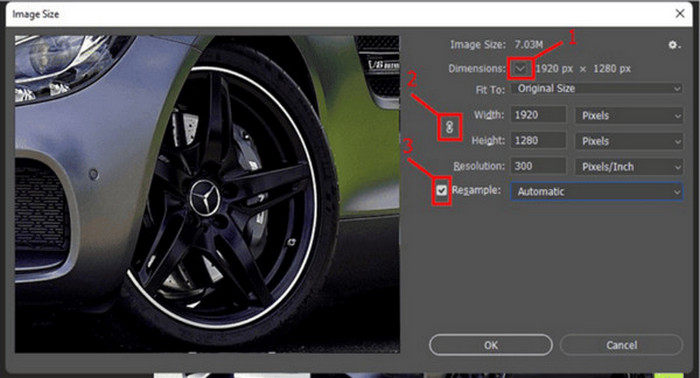
步骤 4:最后,在 File 菜单下点击 Save As 按钮保存你的图片。
注意: 在保存 PSD 文件之前,请先将其保存为图片格式。
步骤 1:在 Photoshop 中打开你的图片,可以点击 Open,或进入 File,选择你想要压缩到 100KB 的图片。
步骤 2:接着,前往 Image 菜单并选择 Image Size(图像大小)。
步骤 3:在Image Size(图像大小)对话框中,从下拉菜单中选择Inches(英寸)。若需设置具体尺寸,在宽度和高度输入框中填入数值,并点击OK调整图片大小。
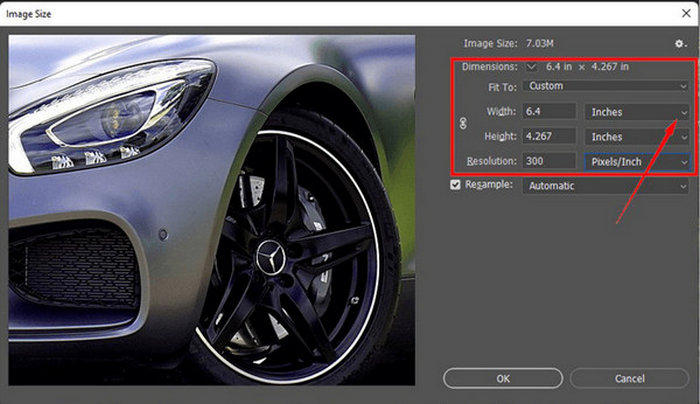
步骤 4:最后,在文件(File)选项卡下点击另存为(Save As),保存最终图像。
使用 Photoshop,可以精确地将图像大小调整为 100KB。您只需小心调整像素和英寸的大小即可。但是,用户在使用它时必须注意一些线性曲线,尤其是对于新手来说。
优点
- 精确控制图像大小的调整。
- 更多关于压缩照片的自定义选项。
缺点
- 界面复杂,不适合初学者。
- 需要订阅才能享受其所有功能。
第 3 部分。将图像大小调整为 100KB,不受大小限制
如果您希望将图像大小调整为 100KB 且不受大小限制,则可以使用此图像调整工具。GIMP 是一款免费的开源图像编辑器,具有多种功能,包括无大小限制地调整图像大小。
以下是使用 GIMP 将图片压缩到 100KB 的方法:
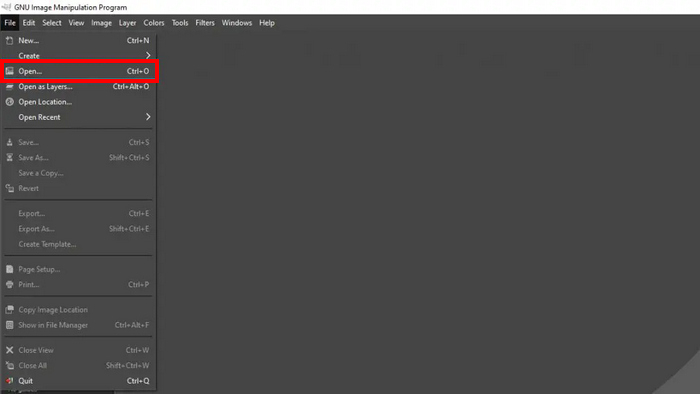
步骤 1:首先,进入 File 选项卡,点击 Open 打开你想要压缩到 100KB 的图片。
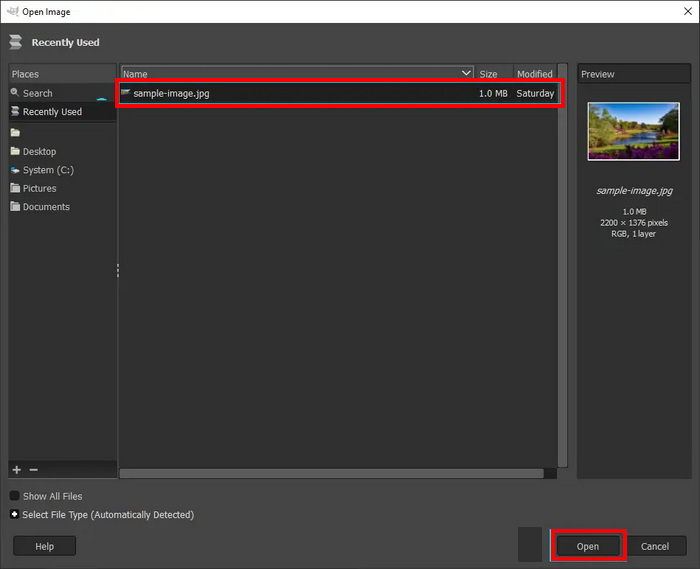
步骤 2:在你的源文件夹中选择要压缩的图片,然后点击下方的 Open 按钮。
步骤 3:接着,进入 Image 菜单并选择 Scale Image。
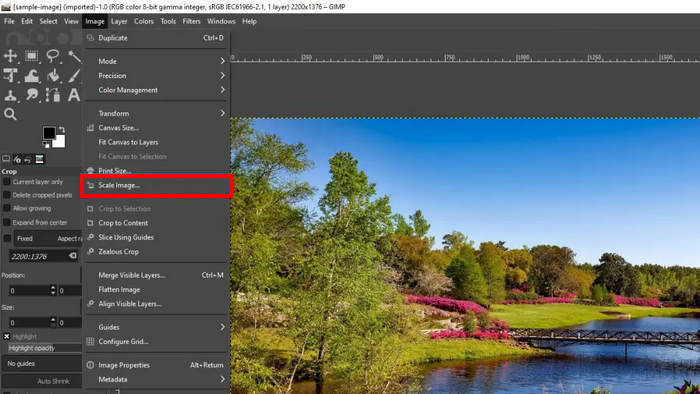
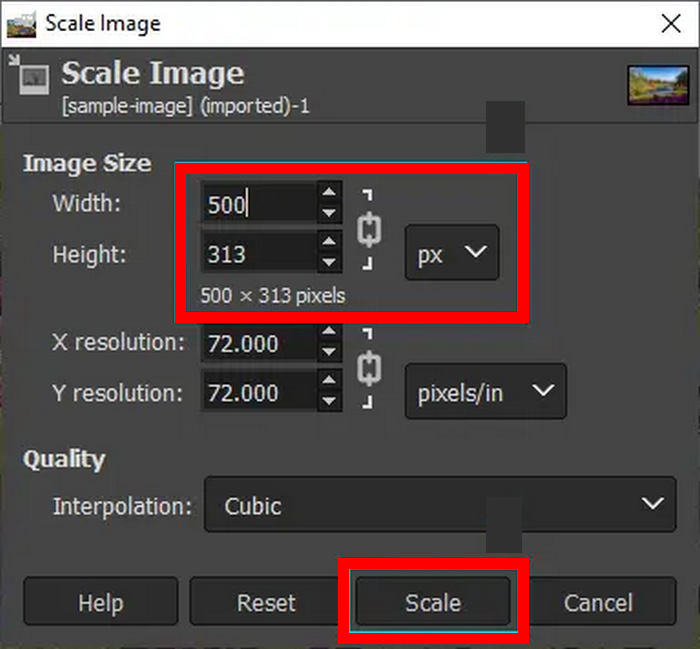
步骤 4:在这里,你可以通过修改图像宽度和高度(像素)来将图片压缩到 100KB。设置完成后,点击 Scale 按钮。
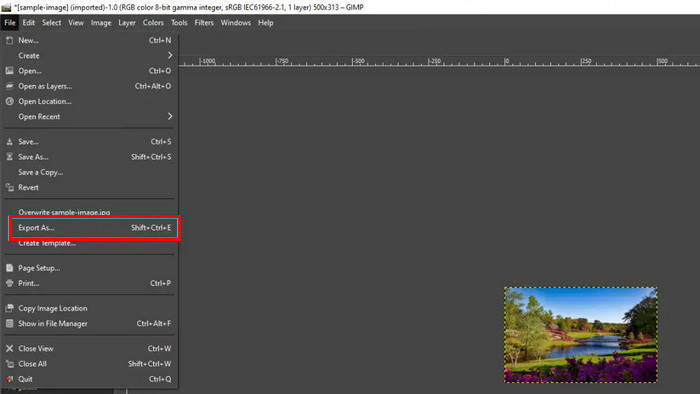
步骤 5:要保存新尺寸的图片,前往 File 选项卡 并点击 Export As,将其导出为 JPG 格式。
使用 GIMP,您可以享受在 Photoshop 上将图像调整为 100KB 时几乎相同的功能。但问题是,使用此工具,您可以免费完成此操作。但话又说回来,用户在使用此工具时应该注意学习曲线。
优点
- 精确控制图像大小的调整,就像 Photoshop 一样。
- 免费和开源。
缺点
- 界面不够友好。
- 批处理模式可以通过命令行完成。
第 4 部分。关于将图像大小调整为 100KB 的常见问题
如何在 Paint 中将照片大小缩小到 100KB?
在 Paint 中将图像大小调整为 100KB 只需几个简单的步骤。在 Paint 中打开图像,然后单击工具栏中的调整大小按钮。选择百分比选项或输入特定像素尺寸以缩小图像大小。调整大小后,选择另存为并从文件类型选项中选择 JPEG,以 JPEG 等压缩格式保存图像。这种方法虽然简单,但可能需要反复试验才能达到精确的 100KB 大小。
100 KB 的照片尺寸是多少?
100KB 照片的物理尺寸会因分辨率、格式和压缩级别而有很大差异。一般来说,100KB JPEG 图像在中等质量下约为 800x600 像素,但这会根据图像内容和所用压缩算法的效率而有所不同。关键因素是图像质量和文件大小之间的平衡。
如何离线将 JPEG 压缩至 100KB?
要将 JPEG 图像离线压缩至 100KB,您可以使用 Photoshop、GIMP 等软件,甚至更简单的工具(如 Paint)。所有这些工具都可精确控制压缩设置,让您在保持可接受的图像质量的同时获得所需的文件大小。
结论
了解如何将图片压缩到 100KB非常重要,它可以避免在发送、上传图片文件时遇到各种不便,同时还能帮助你针对网页使用进行优化。本文提到的所有工具和方法都能很好地满足你的图片压缩需求。那么还在等什么?赶紧动手试试吧!
-
 调整图像大小而不损失质量的 3 种有效方法
 担心压缩照片时会损失质量?不用再担心了!在本文中,了解 3 种轻松调整图像大小而不损失质量的方法。
-
 2种有效压缩TS文件而不损失质量的有效方法
 想要将高清TS视频文件保存在您的设备上吗?本文展示了更多TS视频转换的方法。
-
 MTS 文件 – 什么是 MTS 文件以及如何将 MTS 转换为 MP4/MOV/MKV/AVI
 什么是MTS文件,我该如何播放?这篇文章为您提供有关MTS文件的基本说明。此外,您可以获得3种简单的方法将MTS文件转换为高质量的MP4,MOV,AVI,MPEG,MTS,MKV或其他格式。
