


 视频转换大师
 屏幕录影大师
 视频修复
视频修复
 安全下载
安全下载MP4 无法在 Google Drive 中播放的 3 个提示
Google Drive 是一项云原生协作服务,可让你在任何设备、任何地点备份并访问所有文件。它为你提供 15GB 的免费存储空间,在 Google Drive、Gmail 和 Google 相册之间共享,用于存储各种类型的数据。你可以将 MP4 文件上传到 Google Drive,并直接在上面播放。
一般来说,你只需双击文件就可以轻松在 Google Drive 中播放 MP4。不过,有时会遇到某些 MP4 无法在 Google Drive 中播放的错误提示,例如 '无法播放此视频' 或 “糟糕!播放此视频时出现问题”。

如果你无法通过常规方式在 Google Drive 中播放 MP4 文件,可以尝试下面另外 3 种方法来播放你的 Google Drive 视频。
第 1 部分。使用新窗口在 Google Drive 中播放 MP4
当您想在 Google Drive 中播放 MP4 时,您可以使用其内置的视频播放器双击它开始播放。但是,如果您无法使用此方法播放 MP4 文件,您可以选择在新窗口中播放 Google Drive 视频。
步骤 1: 打开 Google Drive,找到你想观看的 MP4 视频。右键点击该文件并选择“预览”。
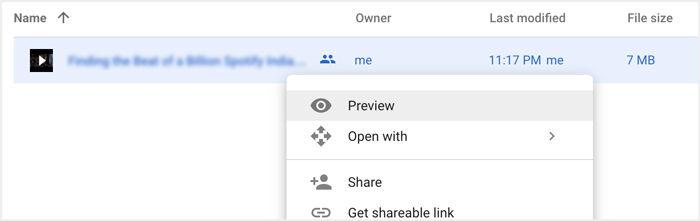
步骤 2: 现在点击右上角的三点图标呼出菜单,在下拉列表中选择“在新窗口中打开”选项。
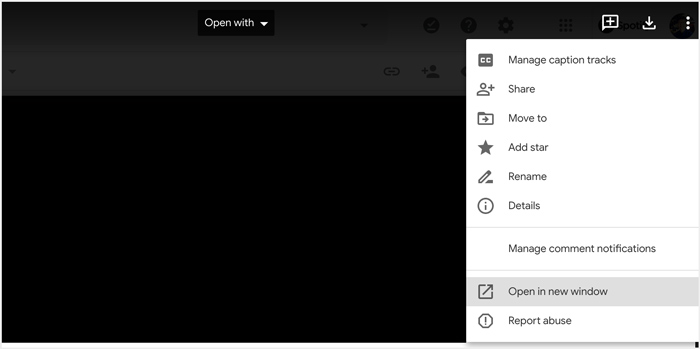
完成所有操作后,Google Drive 中的 MP4 文件将在新窗口中播放。您可以检查该视频是否可以正常播放。
第 2 部分。删除帐户以在 Google Drive 中播放 MP4 文件
在某些情况下,无法在 Google Drive 中播放的 MP4 文件错误是由多个 Google 帐户引起的。因此,您可以尝试删除一些不需要的帐户来修复它。
步骤 1: 若要退出不需要的账号,你可以在 Google 网站上进入你的Google 账户。它位于页面右上角。点击你的头像,查看所有已登录的 Google 账号。
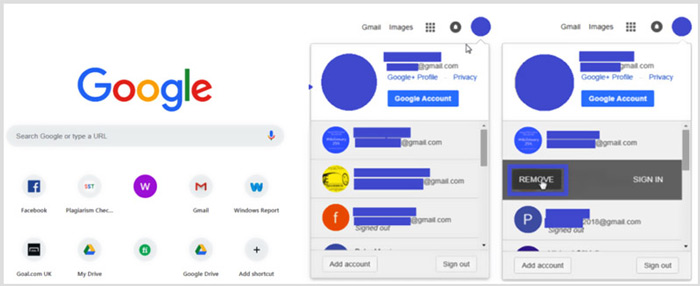
步骤 2: 找到不需要的账号,然后点击“移除”按钮。你可以只保留一个常用账号处于登录状态。之后,刷新 Google 网站,然后返回你的 Google Drive,找到想看的 MP4 文件并进行播放。
第 3 部分。将视频转换为在 Google Drive 中播放 MP4
尽管 Google Drive 支持 MP4 格式,但当你的 MP4 文件无法在 Google Drive 中播放时,你应检查视频文件大小、分辨率及其他相关因素。要将视频转换为 Google Drive 支持的文件格式,你可以借助专业工具 Video Converter Ultimate。它能够在无损画质的前提下转换任意视频和音频文件。
- 1. 将包括 MP4 在内的任何视频转换为 Google Drive 支持的高质量文件。
- 2. 将 8K/5K/4K、1080p/720p 高清和标清视频转换为 500 多种格式,如 MP4、MOV、AVI、FLV、MP3、FLAC、AAC 等。
- 3. 编辑视频、调整效果、提高质量、压缩视频、编辑 ID3 信息并从容地创建 GIF。
- 4. 前所未有的硬件加速技术,提供超快的转换速度。
步骤 1: 若要将视频转换为 Google Drive 支持的文件,你需要先在电脑上免费下载并安装此转换器。双击其下载按钮,然后按照提示完成安装。
步骤 2: 打开这个适用于 Google Drive 的视频转换工具,并使用其'转换器'功能。点击中间的大“+”或“添加文件”来导入你的 MP4 文件。
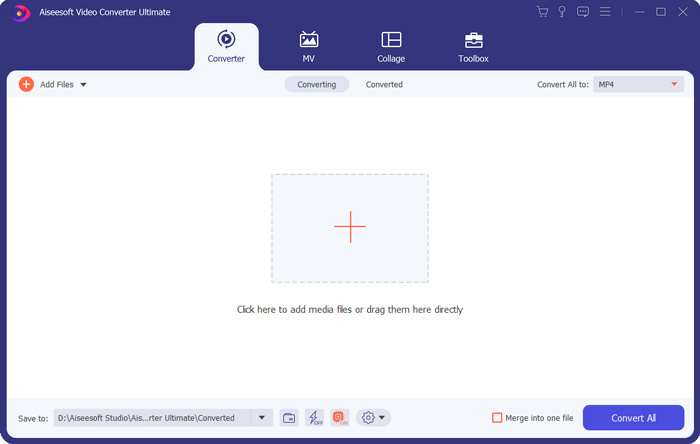
步骤 3: 输出格式会默认设置为MP4。你可以点击该选项来选择其他合适的格式。
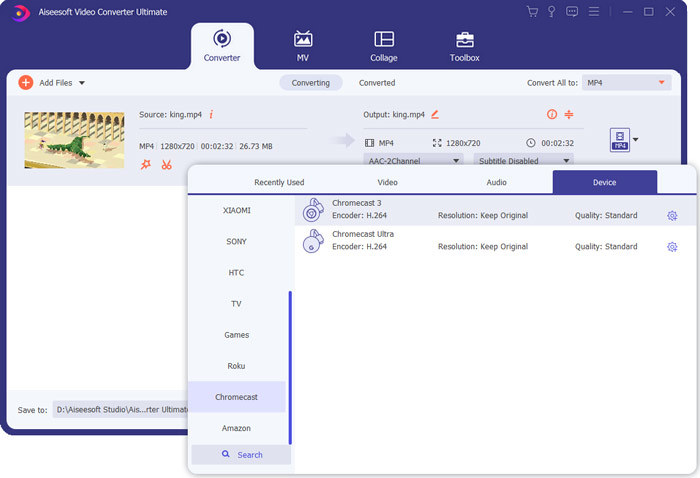
在此步骤中,你可以点击“自定义配置文件”图标来自定义更多设置。
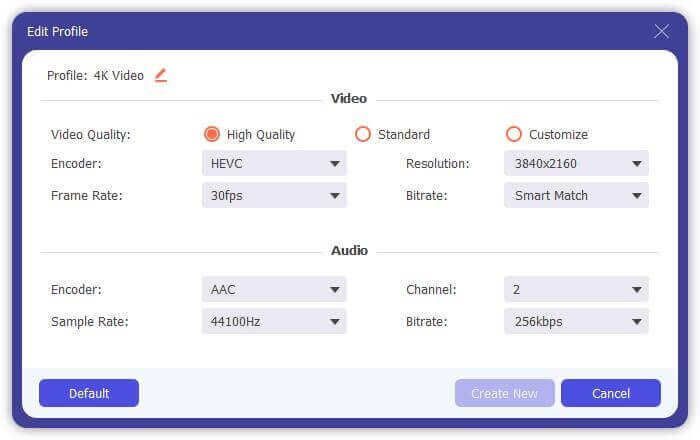
步骤 4: 完成以上所有操作后,你可以点击'全部转换'按钮开始视频转换。转换前,你还能重命名输出文件、选择合适的目标文件夹、编辑视频并调整画面和声音效果。
第 4 部分。 在 Google Drive 中播放 MP4 文件的常见问题解答
Google 云端硬盘支持什么视频分辨率?
您可以在 Google Drive 中存储和播放视频。您可以轻松地将任何分辨率的视频备份到它。但是您应该知道,Google Drive 的最大播放分辨率是 1920x1080。
为什么我不能在 Google Drive 中播放视频?
许多不同的原因会导致视频无法在您的 Google 云端硬盘中播放。一个主要原因是不受支持的视频格式。此外,浏览器过时、网速不佳、视频分辨率较高、文件较大、路由器安全设置、第三方插件等其他因素也会导致Google Drive视频播放问题。
在哪里管理我的 Google 帐户?
Google 允许您添加和使用一个或多个帐户。当您想管理您的 Google 帐户时,您可以打开 Chrome 浏览器并单击右上角的 Google 帐户图标。从下拉菜单中,单击管理您的 Google 帐户按钮。
如何将 MP4 上传到 Google Drive?
要将包括 MP4 视频在内的文件上传到 Google Drive,您只需单击左上角的“新建”图标,然后选择“文件上传”或“文件夹上传”将您的文件添加到其中。
结论
Google Drive 提供了一种便捷方式来备份、管理和查看各种类型的文件。本文主要介绍了针对部分 Google Drive 视频无法播放问题的 3 个实用技巧。希望在阅读完本页内容后,你能更顺利地在 Google Drive 中播放 MP4。
-
 如何在PC和Mac上免费将Cisco WebEx ARF转换为MP4
 获取ARF文件,但不知道如何打开它?这篇文章可以帮助您。以下是2种在Mac和PC上将ARF转换为MP4的免费方法的详细信息。
-
 2021 年不容错过的 5 款 iPhone 最佳视频播放器
 要在 iPhone 上播放所有格式的视频并获得更好的观看体验,您应该阅读本文并了解适用于 iPhone 12/11/X/8/7/6 的最佳 5 视频播放器。
-
 适用于Android,iOS和计算机的5个最佳免费WAV播放器
 如何在Android手机上播放WAV文件?哪些玩家可以玩WAV?此帖分享了5个针对Android,iPhone,Mac和PC的最佳免费WAV播放器。
