


 视频转换大师
 屏幕录影大师
 视频修复
视频修复
 安全下载
安全下载如何将 Sony 摄像机中的 MXF 视频文件与原始 4K 质量合并
问:“我现在订购了 Sony X70 来更换我的佳能 XF100 相机。使用佳能 XF100,我可以使用佳能 XF Utility 快速合并所有 MXF 文件。有没有类似的软件可以合并索尼 X70 创建的 MXF 文件?”
当您使用索尼 XDCAM(包括索尼 X70)、佳能 XF305 和松下 AG-HPX500M 等专业相机使用 4K 模式拍摄视频时,视频文件将以高质量的 MXF 格式保存。但大多数视频加入者不支持 MXF 文件。以下是您应该了解的最常用的 MXF 组合器。

第 1 部分:如何免费在线合并 MXF 文件
If you simply join some large MXF files without size limitation, FVC Free Online Merger is a versatile method you can take into consideration. It enables you to upload videos in multiple formats. Moreover, you can produce an impressive video with no watermark added.
- 1.将MXF视频文件并排在线,没有任何大小限制。
- 2. 将多个 MXF 视频文件合并为 1080p 分辨率的 MP4 格式。
- 3. 使用各种预设配置和调整分辨率设置。
- 4.保护隐私在24小时内删除上传的MXF。
Step 1: Head to FVC Free Online Merger and click the Upload Videos to Merge button to install the browser plugin, and choose the MXF files you want to join.

Step 2: Click the Plus icon to insert other MXF files in the desired order. Then choose the MP4 format to ensure the videos can be uploaded and played smoothly on YouTube. To keep a high quality of videos, you can choose the 1920*1080P resolution.

Step 3: After that, you can set the path to save your combined videos to the computer and click the Merge Now button at the bottom right corner to start joining MXF files automatically.

第 2 部分:如何加入没有原始质量的 MXF 文件
When you need to preserve the original 4K-quality of MXF videos to create movies or televisions, FVC Video Converter Ultimate is a versatile way to combine video files, including MXF, MKV, MP4, and more. It enables you to trim the desired part, compress the file, and convert it to another video format. Moreover, it enables you to join MXF files with 1080P or 4K-resolution.
- 1. 组合不同的视频格式,包括 MXF、MKV、MP4 等。
- 2.提供4种方法来提升分辨率,去除视频噪音等。
- 3. 调整视频分辨率、比特率、帧率等参数。
- 4. 将组合视频转换为社交媒体网站的另一种视频格式。
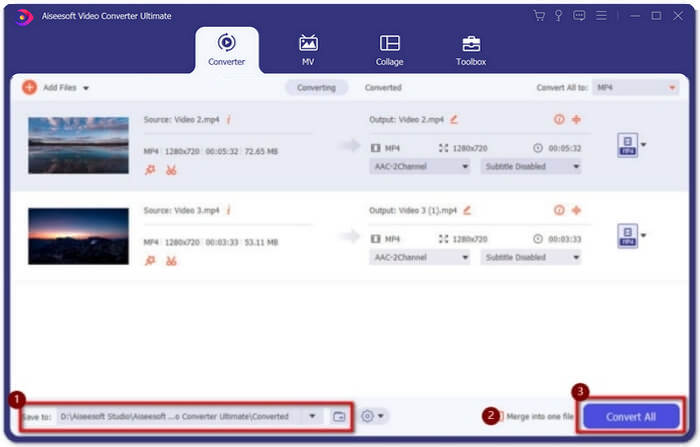
Step 1: Download and launch Video Converter Ultimate. Click the Add Files button to choose all the MXF files you want to merge. You can also drag the files into the software. If you want to adjust the order, just pull the videos and release them in the right order.

Step 2: After that, you can click the Convert All to button and find MXF format in the video line. Choose the 4K or Same as Source button to keep the original high quality. Moreover, you can also upscale the video resolution according to your requirement.

Step 3: After choosing the desired storage path, tick the Merge into one file box and then click Convert All button to combine MXF files. Once you have merged the videos, you can save the files to your computer or share them on social media websites.
第 3 部分:合并 MXF 视频文件的常见问题解答
1.什么是MXF?
MXF是Material Exchange Format的缩写,是一种专业的音视频媒体格式。专业相机在4K模式下拍摄的视频始终为MXF格式,因此常用于影视行业的视频制作和剪辑。
2. 如果我想为 YouTube 合并 MXF 视频,我应该选择哪种格式?
MXF 对于 YouTube 来说太大了,您最好选择将 MXF 文件合并到 MP4 中,以保持相对较高的质量和较小的尺寸。此外,大多数设备和播放器都支持播放 MP4 视频。
3. 我可以用 QuickTime 播放器播放 MXF 视频文件吗?
Yes, you can. Although it’s an uncommon format, some video players can support playing MXF videos including QuickTime on Mac and Zoom player on Windows. If you can’t play MXF videos, you can try to convert the MXF files to some common formats like MP4, and AVI.
结论
要合并专业相机拍摄的 MXF 视频文件,您可以从文章中找到最常用的 MXF 连接器。如果您只想将这些合并后的视频上传到 YouTube,使用免费的在线木工是最好的选择,因为它可以帮助您将 MXF 文件合并成更小尺寸的 MP4。但是,如果您想制作专业的电影或电视,则应选择 Video Converter Ultimate 以保持原始 4K 质量。
-
 6 个最佳 AVI 合并:如何在 Windows 和 Mac 上加入 AVI 视频文件
 当您想加入 AVI 视频以制作 DVD 时,您可以了解前 6 名最佳 AVI 加入者的功能,包括免费在线工具,以及文章中的桌面程序。
-
 如何使用Premiere Pro和免费在线压缩MXF
 如何用较小的文件压缩MXF?如何在Adobe Premiere Pro中压缩MXF文件?这篇文章分享2种压缩MXF文件的方法。
-
 如何免费一起加入M2TS文件
 是否想自由合并摄像机捕获的M2TS / MTS文件?这篇文章分享了将2个M2TS文件合并为一个而无需重新编码的有效方法。
