


 视频转换大师
 屏幕录影大师
 视频修复
视频修复加强您在解决诸如如何放慢视频速度等问题方面的专业知识
你是一名有抱负的艺术家,想通过观看艺术设计教程来提升自己的艺术技能。然而,大多数此类教程为了减小文件体积、方便上传,都会加快视频播放速度、压缩时长。因此,你想到一个解决办法:需要把视频的播放速度降下来。但你不知道如何将延时视频放慢,就像大多数艺术教程那样。请阅读本文,深入了解这一困扰许多有志艺术家的常见问题。

第 1 部分。降低视频速度的 3 个简单步骤 [台式机/笔记本电脑]
网络提供了很多方法,无论是在线编辑器还是离线编辑器。其中一些需要下载,尤其是当您使用台式机或笔记本电脑进行编辑时。就使用细节而言,使用桌面之间存在显着差异;这就是本文选择在桌面上离线或在线放慢视频速度的最佳方法的原因。以下是提供步骤的方法:
方法 1. 使用 Video Converter Ultimate
即使在离线状态下,你也可以下载并使用许多视频转换工具。要放慢视频,你可以使用Video Converter Ultimate,这是最佳替代方案之一。它操作简便,并且可以免费下载。你无需担心在线减速时网速不给力,因为这款软件可以让你在本地轻松处理视频。多亏了它功能强大的“视频变速器(Video Speed Controller)”工具,你现在可以在一分钟之内调整视频的播放速度。既然你已经对它的实现方式产生了兴趣,下面就为你提供一套详细的操作步骤:
步骤 1: 点击免费下载按钮,将软件下载到电脑桌面。接下来按照提示完成软件的安装和安装向导中的各项自定义设置。
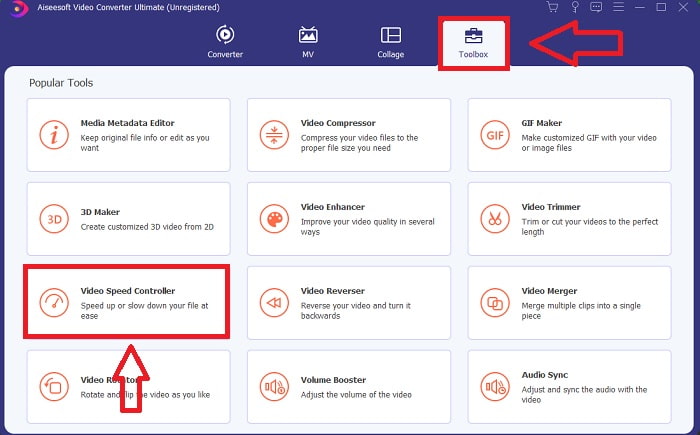
步骤 2: 要使用视频变速器(Video Speed Controller),在安装完成后立即启动软件,然后在工具箱(Toolbox)菜单中选择该功能。
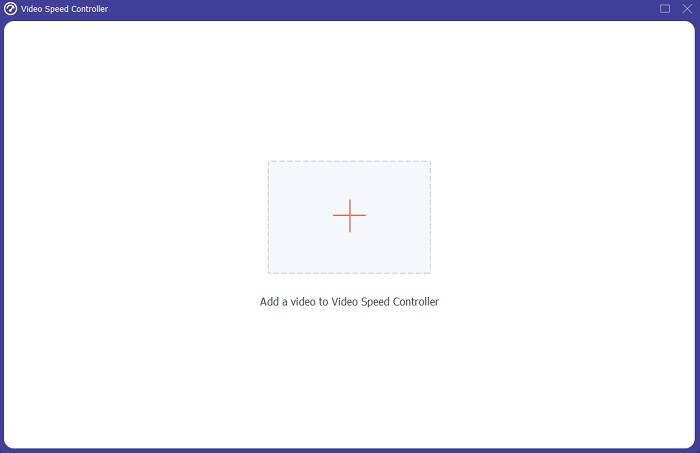
步骤 3: 点击后会弹出视频变速器(Video Speed Controller)的界面。若要上传文件,点击“+”图标即可。
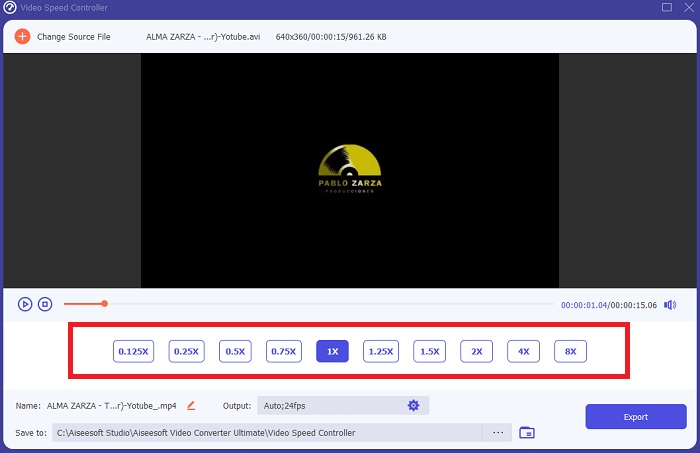
步骤 4: 现在,你可以通过选择比正常速度更小的倍速数值来开始放慢视频。大多数较慢的倍速选项都会显示在当前速度左侧的位置。
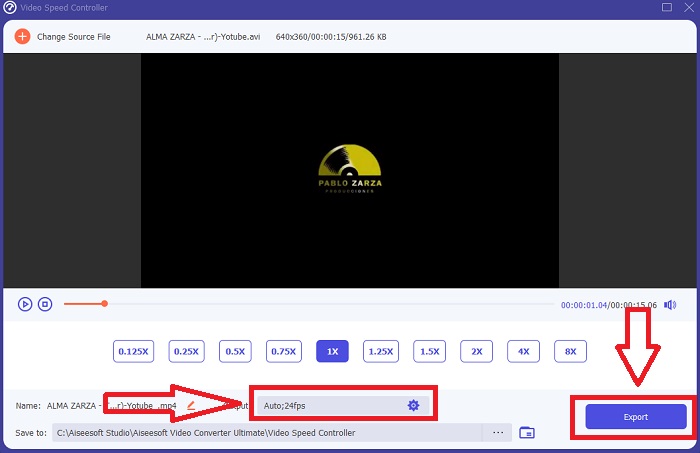
步骤 5: 完成视频片段播放速度的调整后,你可以选择输出格式、分辨率、画质以及其他参数。全部设置好之后,点击导出(Export),并选择视频文件最终保存的位置。
方法 2. 使用 VEED
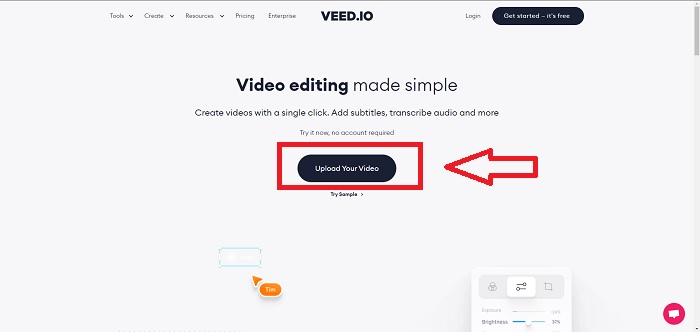
世界各地的内容创作者都依赖 VEED 及其开源网络工具来制作用于社交媒体和其他用途的视频。这是一个需要稳定连接才能正常工作的 Web 应用程序,但您可以直接上传并在其用户界面中更改播放速度。此外,它还具有多种功能,其中之一是降低视频播放速度。您现在可以放慢视频速度,而无需将任何内容下载到桌面。您只需要一个搜索引擎和强大的连接即可访问此在线工具。它具有简单、用户友好的用户界面,可以使大多数需要在不学习复杂步骤的情况下放慢视频速度的初学者用户受益。以下是要对视频进行所需调整的示例程序。
步骤 1: 点击上传你的视频(Upload Your Video)按钮,将电脑中的视频文件上传到服务器。
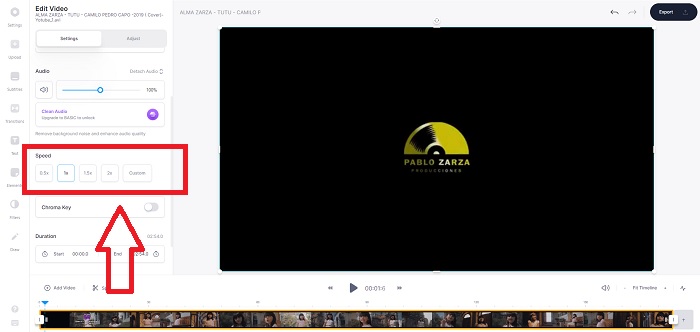
步骤 2: 点击左上角的视频轨道(Video Track)即可进入网页版工具的编辑界面。找到速度(Speed)选项并点击,然后选择更快的播放速度。如果你想要的速度在选项中没有提供,可以选择自定义(Custom),以覆盖默认设置,为你的视频片段设定自定义速度。
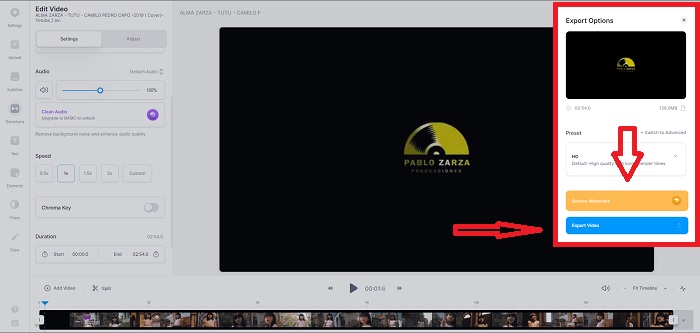
步骤 3: 当你完成所需的视频速度调整后,点击导出(Export)进入导出选项页面。同时,你可以选择视频的输出画质,并可通过购买该网页工具的高级版来去除水印。确认一切无误后,通过“导出视频(Exporting Video)”将转换完成的视频下载回电脑。
第 2 部分。 降低视频速度的 3 个简单步骤 [手机]
您是否厌倦了思考如何在 iPhone 或 Android 上减慢视频速度的解决方案?互联网上有许多应用程序和工具可用于证明给定问题有答案。但是,如果您是一名手机编辑并想用您拥有的小型设备制作杰作,我们建议您使用以下最佳和最易于使用的工具。
方法 1. 使用 iMovie
现在,你可以在 iPhone 和 iPad 上通过一款免费且实用的应用iMovie来控制播放速度或放慢视频。这是 iOS 系统中最受信赖的视频编辑应用之一,不仅可以编辑视频,更重要的是可以调节视频的播放速度。想更深入了解这款应用如何解决前面提到的问题,请按照以下步骤操作:
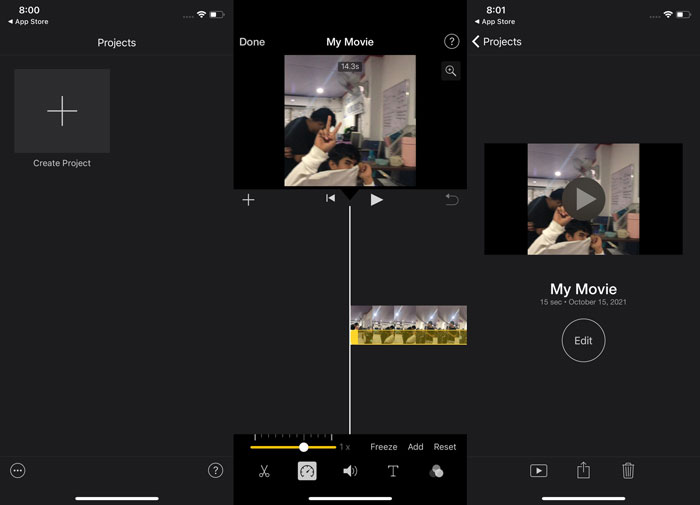
步骤 1: 在 iPhone 或 iPad 上打开iMovie开始编辑影片。继续操作前,应用可能会先简要介绍界面。进入项目(Projects)页面,点击加号添加新的视频片段,然后在“新建项目”菜单中选择影片(Movie)。
步骤 2: 在进入创建影片(Create Movie)界面之前,先从相机胶卷中选取一个视频。点选时间轴上的视频片段,等待编辑工具出现后,就能看到一个类似速度表(speedometer)的速度工具图标。拖动底部的黄色滑块向左或向右,即可让画面后退或加速播放。相较于原始速度,最高可以加速至 2 倍,或放慢至原速的 1/8。
步骤 3: 完成所有设置后,点击手机左上角的完成(Done)。然后在共享(Share)菜单中选择导出方式,决定将成品视频保存到何处。
方法 2. 使用 VideoFX Music Video Maker
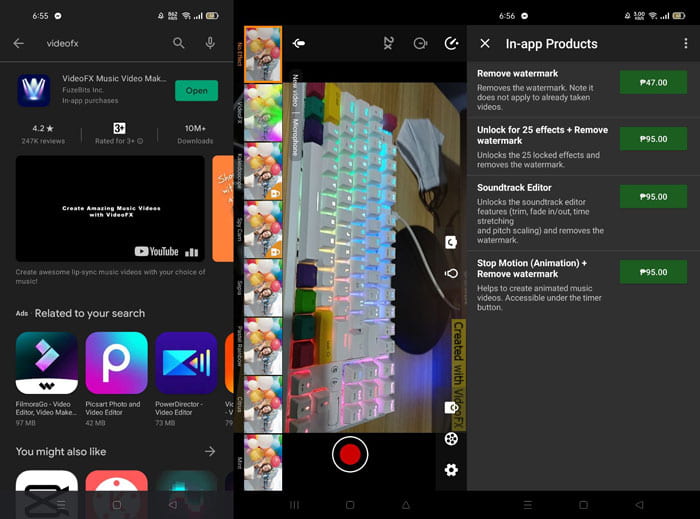
使用VideoFX音乐视频制作工具,你可以在几秒钟内创作属于自己的音乐视频。你只需用其中一种特效录制视频,选择一首歌曲,然后将成品保存到安卓手机的内部存储中。由于可以在录制之前套用滤镜,整个过程非常轻松。不过好坏参半的是,它不支持录制后的后期编辑,所有调整只能在拍摄前完成。在开始录制之前,请先挑选一首与你画面契合的歌曲。你可以在录制前调快或放慢音乐速度,但所有变速设置必须在正式开拍前完成。具体步骤如下:
步骤 1: 在安卓手机上下载并安装VideoFX。
步骤 2: 由于这款应用的特效仅能作用于录制中的画面,请先点击录制(Record)按钮开始拍摄。
步骤 3: 接着点击2x来调节你所录制视频的播放速度。在解锁应用的全部功能之前,你需要先购买完整版的使用权限。
第 3 部分。 有关放慢视频速度的常见问题解答
如何减慢 iPhone 上的视频速度?
内容创作者和视频工作者手中有大量工具可用,而慢动作就是其中最出色的一种。更高的帧率可以带来更流畅、更具冲击力的观看体验。即便如此,放慢画面并不总是每个视频的最佳选择。在某些场景中,慢动作不仅不合适,甚至显得多余。这时,你唯一的选择就是将 iPhone 上的慢动作视频恢复到正常速度。
你如何减慢画廊中的视频?
Android 和 iOS 手机有设置图标,可以在录制视频之前点击以激活慢动作或慢动作模式。您应该以 5 到 10 秒的时间连拍录制慢动作场景,以免镜头过多。
如果我放慢视频速度会降低质量吗?
不,您不会失去视频的质量,但您会看到视频的分辨率和帧速率每降低平均速度每秒就会下降。当您的视频播放速度增加或减少时,只会分割帧。增加它会产生预期的效果。快五倍,即每 1/120 秒 60 帧。换句话说,除非视频的帧率很低,否则它不会产生任何影响。
结论
通过本文,你已经了解了各大操作系统在应对放慢视频的各种应用这一问题时所提供的不同方法。文中还为毫无剪辑基础的新手用户提供了详细步骤指导。若你正在寻找一款既能调节视频播放速度、又兼具众多后期编辑工具的软件,推荐你下载Video Converter Ultimate,体验专业级剪辑师的完整工作流程。
-
 适用于不同用途的 Android 手机前 4 名最佳 VOB 播放器
 当您下载 VOB 视频并想在 Android 上观看它们时,您可以从本文的以下 4 个 VOB 播放器中选择最合适的一个。
-
 适用于 Android 手机的 5 大最佳 Windows Media Player 替代品
 由于您无法下载适用于 Android 的 Windows Media Player,您应该阅读本文并了解 Windows Media Player 的 5 种最佳替代方案。
-
 2021 年不容错过的 5 款 iPhone 最佳视频播放器
 要在 iPhone 上播放所有格式的视频并获得更好的观看体验,您应该阅读本文并了解适用于 iPhone 12/11/X/8/7/6 的最佳 5 视频播放器。
