


 视频转换大师
 屏幕录影大师
 视频修复
视频修复
 安全下载
安全下载如何在Windows / Mac /在线上免费将AVCHD转换为MP4视频
AVCHD是Sony和Panasonic便携式摄像机的默认视频格式。但是,AVCHD视频无法由大多数数字播放器和设备(如iPhone,Android,iMovie,QuickTime等)播放。要播放和编辑AVCHD视频,最好将AVCHD转换为MP4。因为MP4是全世界最受欢迎的视频格式之一。此外,通过转换为MP4格式,您可以保持AVCHD视频内容的高质量。这是在Windows和Mac上将AVCHD转换为MP4的5种可行方法。只需阅读并关注。

第1部分:免费将AVCHD在线转换为MP4
Most online AVCHD to MP4 converters have the maximum file size limit. If you want to convert large AVCHD files to MP4 online, using FVC Free Online Video Converter is your best choice. Here’re the main features of the AVCHD to MP4 online converter.
- 1.将AVCHD高质量转换为MP4和其他格式。
- 2.支持AVCHD到MP4的批量转换。
- 3.不会添加水印。
- 4.调整视频设置以自定义Sony AVCHD视频。
Step 1: Click Add Files to Convert in the official site. Download FVC launcher within half a minute.
Step 2: Browse and add your AVCHD file into the online AVCHD video converter.
Step 3: In the output section, set MP4 as the output video format. You can find it near the bottom.
Step 4: Click Convert to convert AVCHD to MP4 with no watermark online.
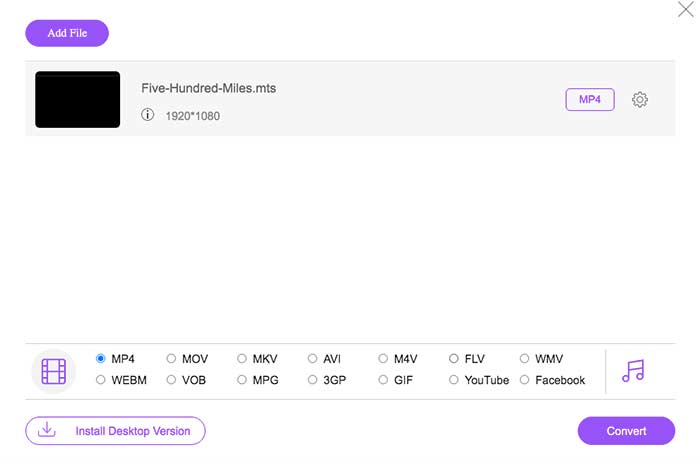
这个免费的在线MP4转换器还可以将其他格式(例如M2TS,MTS,MOV,MKV,WMV,TS等)更改为MP4。
第2部分:使用HandBrake将AVCHD转换为MP4
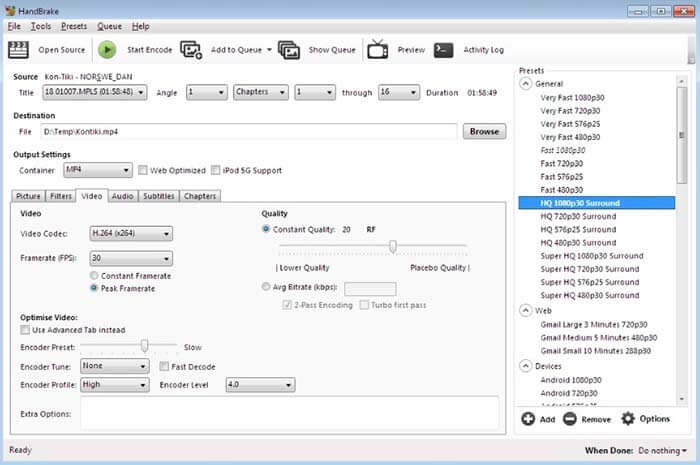
您可以使用HandBrake在Mac和Windows上免费将AVCHD转换为MP4。它是一个免费的开源视频转换器,可以将AVCHD视频转换为计算机上的MP4格式。
Step 1: Install and run Handbrake. Click Source to add an AVCHD video into HandBrake.
Step 2: In the Output Settings section, unfold the Profile list. Select MP4 file as the output format.
Step 3: Click Start on the top toolbar. Now you can start the AVCHD to MP4 conversion with HandBrake.
第3部分:使用VLC Media Player将AVCHD转换为MP4
VLC Media Player允许用户在iPhone,iPad,Android,Windows和Mac上将AVCHD转换为MP4。可以免费下载。尽管视频转换工具使用起来并不直观。
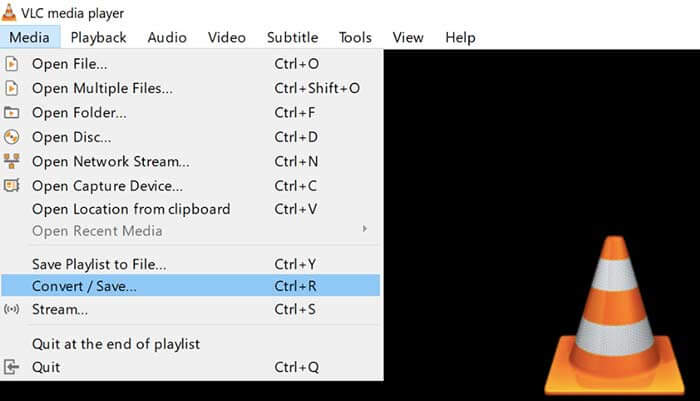
Step 1: Open VLC. Choose Convert/Save from the Media list.
Step 2: Click Add to import your AVCHD video. Then click Convert/Save near the bottom.
Step 3: In the Profile list, set MP4 as the output format for AVCHD conversion.
Step 4: Click Start to start converting AVCHD to MP4 on Windows and more platforms.
第4部分:使用FFmpeg将AVCHD转换为MP4
如果您熟悉命令行,则也可以使用FFmpeg免费将AVCHD转换为MP4。您可以在FFmpeg命令行中设置输出视频格式,文件大小和视频比特率。
Step 1: Download and install FFmpeg on your Windows, Mac or Linux computer.
Step 2: Copy and paste IFS=$(echo -en “\n\b”); for i in *.MTS; do ffmpeg -i “$i” -vcodec mpeg4 -b:v 15M -acodec libmp3lame -b:a 192k “$i.mp4”; done.
Step 3: Press Enter on your keyboard to convert AVCHD MTS to MP4 with FFmpeg.
第5部分:使用Freemake Video Converter将AVCHD转换为MP4
事实是Freemake Video Converter并非完全免费使用。如果您使用Freemake Video Converter免费将AVCHD转换为MP4,则输出文件中将附加水印。或者您需要支付Freemake Gold Pack的费用。
Step 1: Run Freemake Video Converter. Click +Video to import your AVCHD video.
Step 2: Click to MP4 near the bottom. Set the output preset and destination folder in the popup.
Step 3: Click Convert to convert AVCHD to MP4 on Sony camera with Freemake Video Converter.

第6部分:AVCHD到MP4的常见问题解答
AVCHD VS MP4
AVCHD使用MPEG-4 / H.264视频编解码器和杜比数字AC-3音频编解码器。 MP4使用相同的视频编解码器。但是,MP4音频编解码器是MPEG-4 AAC-LC编解码器。结果,AVCHD具有比MP4更大的文件大小和更好的质量。但是MP4在视频播放和自定义方面仍然很流行。在许多情况下,您需要将AVCHD更改为MP4才能继续。
如何将AVCHD导入到iMovie?
iMovie支持仅限于960至540分辨率的AVCHD。 iMovie不能打开所有AVCHD文件。因此,您需要将AVCHD转换为iMovie格式以解决此问题。
可以合并AVCHD视频吗?
是。您还可以将几个AVCHD文件转换为MP4视频。许多视频转换器可以将视频片段合并到一个新的片段中,例如AnyMP4 Video Converter Ultimate等。
总而言之,您可以使用上述工具在Windows,Mac和在线上将AVCHD MTS / M2TS转换为MP4。哪一种是在手机或计算机上将AVCHD转换为MP4的最佳方法?您可以随时在下面的评论中分享您的经验和建议。
-
 如何在不损失质量的情况下将MOV转换为MP4
 要将MOV(Apple QuickTime电影)文件转换为MP4?这篇文章分享了4种免费方法,可以将您的MOV视频文件转换为Windows 10/8/7 / XP和Mac OS X上的MP4格式。
-
 十大免费和付费高清视频转换器软件(优点和缺点)
 阅读并比较,以从10条建议中获得最佳的高清视频转换器软件。这是每个用于多平台的高清视频转换器的详细评论。
-
 如何通过免费转换器将MXF转换为MP4
 这篇文章是将MXF转换为计算机上的MP4的详细指南。您可以获得4个免费MXF到MP4转换器,可通过简单的步骤将便携式MXF转换为MP4。
