


 视频转换大师
 屏幕录影大师
 视频修复
视频修复
 安全下载
安全下载如何将 MPEG 转换为 MP4 [包括免费和在线方法]
MPEG(运动图像专家组)是一种多媒体压缩标准格式,允许用户高效地存储、传输和流式传输音频和视频。此外,它采用先进的压缩技术,可以在保持文件质量的同时减小文件大小。
On the other hand, MP4 is a video format known for its flexibility and compatibility. Compared to MPEG, this format is more versatile, as it supports video and audio, subtitles, images, and metadata. Moreover, it offers better compression efficiency. With this, converting MPEG to MP4 becomes a necessity. To learn this, dive into this article and discover five easy ways to convert your MPEG files to MP4.

第 1 部分:如何将 MPEG 视频转换为 MP4 [批量转换]
One of the best ways to convert MPEG video to MP4 is using the FVC-picked Video Converter Ultimate. This full-featured video converter tool allows users to quickly convert their video files to various preferred output formats, as it supports more than 1,000 input and output formats combined. Moreover, if you have several MPEG video files that need to be converted, this video converter tool will allow you to convert them all at once using its batch compression feature.
Here’s how to batch-convert MPEG video to MP4:
Step 1. First, download and install the FVC-picked Video Converter Ultimate on your computer.
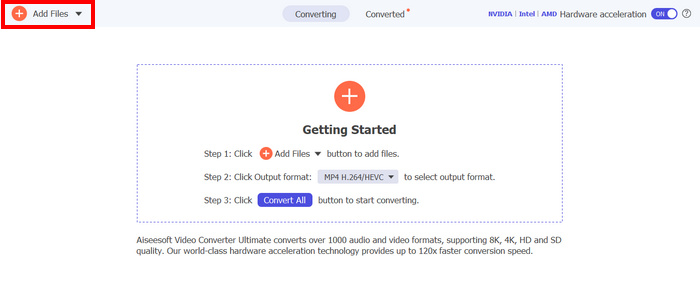
Step 2. Now, to import the MPEG files you want to compress in batch into MP4, click the Add Files button.
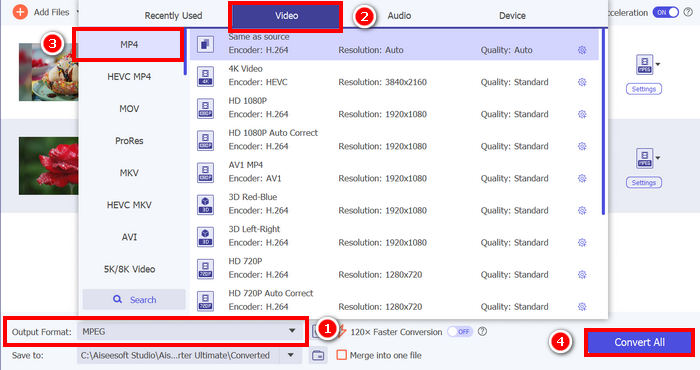
Step 3. Lastly, on the Output Format below, click on it and go to the Video tab. From there, select the MP4 from the list. Once selected, click the Convert All button to batch-compress the MPEG videos to MP4.
FVC 选择了 Video Converter Ultimate,将 MPEG 视频转换为 MP4 的过程可以快速完成。只需两三个步骤,而且用户界面直观易用。最后,凭借该工具先进的编码技术,用户可以确保转换后的 MPEG 文件在保持高质量的同时实现最佳压缩率。
第 2 部分.将 MPEG 转换为 MP4 [免费]
如果您想知道是否有免费的转换工具可以将 MPEG 视频转换为 MP4,那么您说对了!这些免费的视频转换工具可以让您将视频文件转换为您选择的视频格式。但是,需要注意的是,由于它们是免费的,因此在使用时需要考虑一些事项。以下是一些免费的 MPEG 转 MP4 转换工具:
使用 VLC 媒体播放器将 MPEG 转换为 MP4
I know you’re very familiar with VLC Media Player, as it is widely used as a media player on various devices. But did you know that this media player can also convert MPEG videos to MP4? The answer is yes. VLC can also be useful when it comes to converting video files to various video formats like MP4, AVI, MKV, and more. It’s a free and simple option for basic video conversion, though it lacks advanced features found in dedicated video converters.
Here’s how you can turn your MPEG videos into MP4 using VLC Media Player:
Step 1. First, you need to download and install the VLC Media Player on your computer.
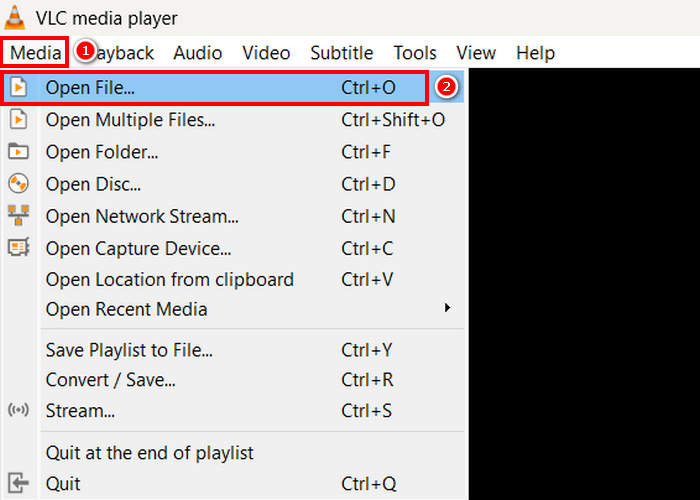
Step 2. Next, go to the Media tab and below that, click on the Open File. From there, import the MPEG video that you want to convert to MP4.
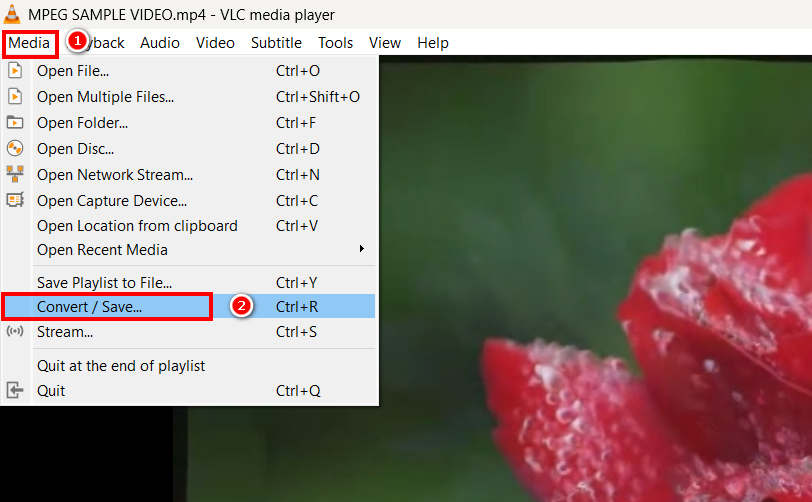
Step 3. After that, go back again to the Media tab, and this time select the Convert/ Save below.
Step 4. Now, click on the Profile and select the MP4 as your output format. Once selected, click the Start button below to begin converting the MPEG video to MP4.
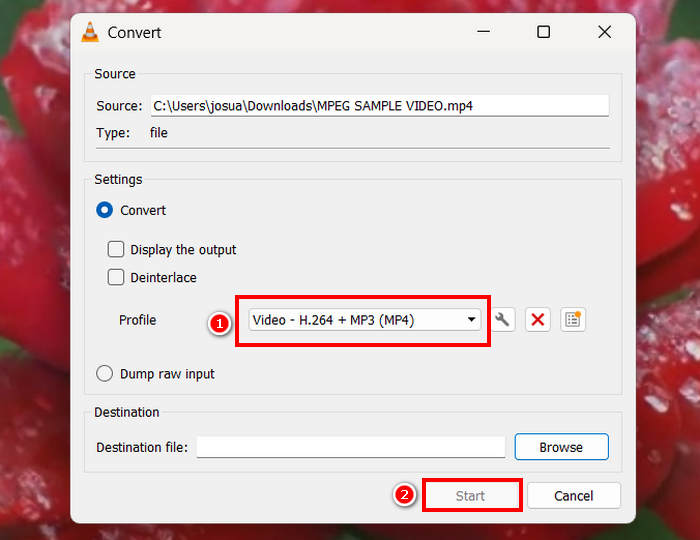
VLC Media Player 确实可以免费将 MPEG 视频转换为 MP4,但与专用视频转换工具不同,VLC 缺少高级编码选项、批量转换和其他必要功能。此外,它对格式的支持也有限,对于需要更快处理速度和更多自定义功能的用户来说,效率较低。
使用 HandBrake 将 MPEG 转换为 MP4
另一个可以免费将 MPEG 转换为 MP4 的工具是 HandBrake。这款工具被称为开源视频转码器,允许用户翻录 DVD。此外,它还可以高效地将 MPEG 文件转换为 MP4 等格式。
Here’s how you can turn your MPEG videos into MP4 using HandBrake:
Step 1. First, download and install HandBrake on your computer.
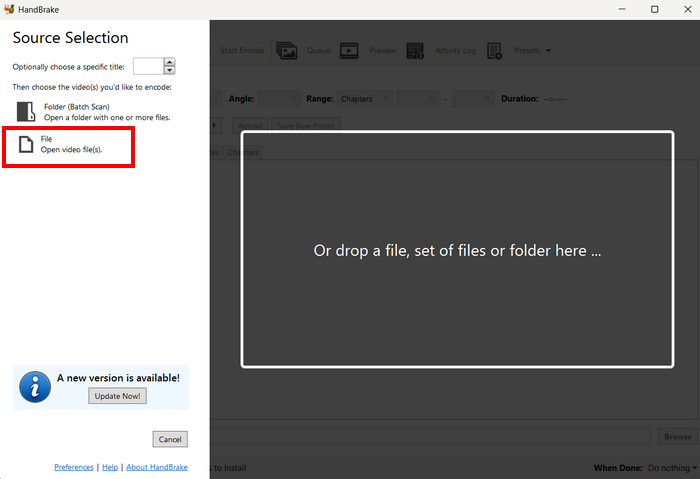
Step 2. Now, launch the tool on your computer and click the Open Video File in the left corner to import the MPEG video file that you want to convert to MP4 format.
Step 3. After that, click the Format and choose MP4.
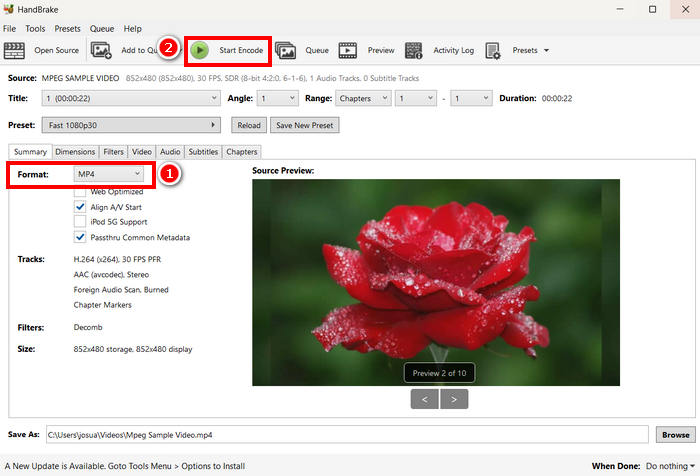
Step 4. Once done, click the Start Encode button to begin converting your MPEG video to MP4.
HandBrake is one of the best free video converter tools that can be used to turn MPEG videos into MP4. However, this tool only supports 3 output formats that might feel limited in terms of format options. HandBrake only supports MP4, MKV, and WebM, which may not be ideal if you need other formats.
三、如何在线将 MPEG 转换为 MP4
将 MPEG 转换为 MP4 的另一个完美方法是在线操作。有一些在线视频转换工具允许用户通过在线方式转换 MPEG 视频。与软件应用程序相比,在线转换器更易于使用,因为它们无需安装。但是,它们可能有文件大小限制,并且使用时需要稳定的网络连接。
使用 FVC 免费在线视频转换器在线将 MPEG 转换为 MP4
FVC Free Video Converter Online is a free online multimedia converter tool. It’s perfect for those who need to convert MPEG to MP4 as it supports various video formats such as MP4, FLV, MKV, MOV, M4V, and more. Moreover, this tool supports batch conversion, allowing users to convert a bunch of video files all at once.
Here’s how to convert MPEG to MP4 using FVC Free Video Converter Online:
Step 1. On your Chrome, type in and look for FVC Free Video Converter Online.
Step 2. Once you are on its page, click the Add Files to Convert button to import the MPEG files that you want to convert to MP4.
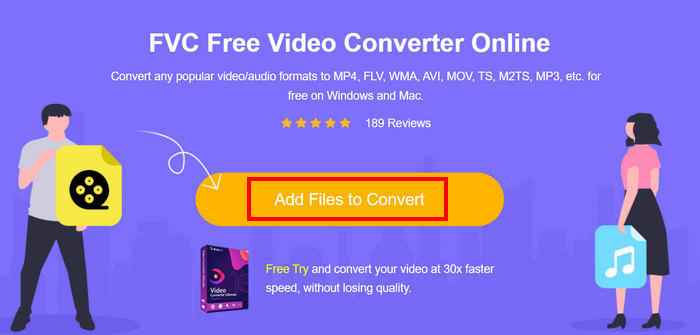
Step 3. After that, just choose MP4 as your output format and click Convert once done.
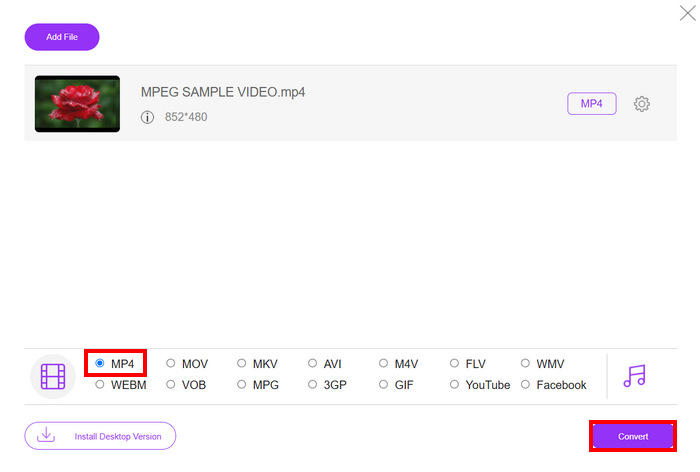
使用 FVC 免费在线视频转换器,您可以轻松地将 MPEG 视频转换为 MP4,无需安装软件应用程序。此外,它还支持多种视频格式,包括 MPEG 和 MP4。最后,它非常易于使用,即使是初学者也能轻松上手。
使用 Cloud Convert 将 MPEG 转换为 MP4
另一方面,Cloud Convert 是另一个可靠的在线 MPEG 转 MP4 工具。它支持多种媒体格式,并允许用户轻松转换 MPEG 视频文件。
然而,这款工具并非完全免费,因为免费方案有一些限制。您每天最多可以转换 25 个视频文件,但每个文件的大小必须小于 1GB。此外,一次只能处理五个转换。如果您有多个 MPEG 文件需要转换,Cloud Convert 仍然是一个不错的选择。
Here’s how to convert MPEG to MP4 using Cloud Convert:
Step 1. First, you need to visit the official website of Cloud Convert.
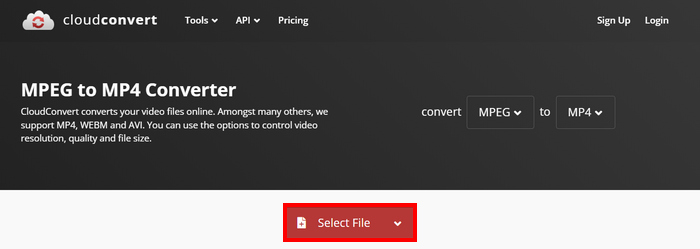
Step 2. Once you’re on the official website of the tool, click the Select File button to import the MPEG video that you want to convert to MP4.
Step 3. Next, on the Format option below, select MP4. Once done, click the Convert button.
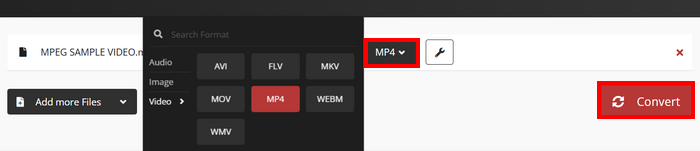
使用 Cloud Convert,想要将 MPEG 视频转换为 MP4 的用户可以轻松完成。然而,问题是,您不能完全免费使用该工具。如果您需要无限次转换或支持更大的文件,您可能需要升级到付费计划,但这需要花费一些钱。
第 4 部分。关于将 MPEG 转换为 MP4 的常见问题解答
我可以将 MPEG 转换为 MP4 而不损失质量吗?
是的。您可以使用 FVC Video Converter Ultimate 或 HandBrake 等高质量视频转换器将 MPEG 转换为 MP4,且不会损失质量。这些工具允许您调整编码设置以保持原始质量。
MPEG 和 MP4 一样吗?
不是。虽然两者都是视频格式,但 MPEG 指的是一组压缩标准,例如 MPEG-1、MPEG-2 和 MPEG-4,而 MP4 是一种可以容纳视频、音频和字幕的容器格式。
我可以将多个 MPEG 文件批量转换为 MP4 吗?
是的。可以将 MPEG 视频批量转换为 MP4。为此,您可以使用 FVC 精选的 Video Converter Ultimate,因为它支持各种视频格式的批量转换。
结论
Converting MPEG to MP4 is still widely practiced for many reasons, and now that you know how exactly it is to convert MPEG to MP4 using various methods, what’s next is to choose what works best for you. So, what are you waiting for? Choose the best tool for you and start converting your MPEG files to MP4.
-
 如何在线压缩MPEG-4文件–没有下载,没有水印
 没有足够的文件存储空间来保存所有MPEG-4文件?这里有一些解决方案,可以帮助您缩小视频文件的大小。
-
 适用于 Windows/Mac/Android/iPhone 的 4 款最佳 MPG/MPEG 播放器 [2025]
 想要流畅地播放您喜爱的 MPG 或 MPEG 文件吗?本文讨论电脑和手机上排名前 4 位的 MPG/MPEG 播放器。
-
 将 MPEG 转换为 AVI 格式的 5 种最佳选择 [在线和离线]
 您是否很难寻找 MPEG 转换器?然后尝试阅读这篇文章,因为我们将学习如何通过详细步骤将 MPEG 格式更改为 AVI 格式。
