


 视频转换大师
 屏幕录影大师
 视频修复
视频修复Wondershare Filmora 评论 - 值得大肆宣传
你是否曾想象过,自己能毫不费力地创作出引人入胜的视频,让内容带上一丝魔幻色彩?借助功能强大、搭载先进 AI 技术的多功能且易用的视频编辑器——万兴喵影(Wondershare Filmora),这一切都能实现。阅读我们的全面测评,了解它的功能亮点、优缺点、价格方案,以及快速上手指南。无论你是资深剪辑师还是初学者,Filmora AI 都能为你提供一块创意画布,将你的视频灵感变为现实。
请继续阅读,深入探索 Filmora 在视频编辑领域脱颖而出的原因。

第 1 部分. 什么是 Wondershare Filmora?
Wondershare Filmora 是一款用户友好且多功能的视频编辑软件,它利用人工智能使个人能够轻松创建、编辑和增强视频。该工具提供了直观的界面,在功能性和简单性之间取得了平衡。凭借其广泛的功能,包括效果、过渡和音频增强,它可以满足不同的视频编辑需求。人工智能技术的集成增强了软件的功能,使其成为用户将创意变为现实的创新解决方案。 Filmora 是视频编辑项目的无缝平台,无论是处理简单的家庭视频还是更复杂的编辑任务。
主要特点
◆ 自动降噪以增强音频质量。
◆ AI编辑,智能高效的视频编辑。
◆ 自动重新构图视频,以便跨平台调整构图。
◆ 音频可视化工具通过动态可视化增强音频。
◆ 自动同步,轻松实现音视频同步。
◆ AI人像特效,为人像镜头提供特殊效果。
◆ 高级编辑可实现复杂而详细的定制。
◆ 使用用户友好的AI 视频画质增强工具,轻松编辑与优化视频。
◆ Filmora 速度斜坡可实现运动中的平滑过渡。
◆ 倒放视频,创意播放效果。
优点
- 用户友好的界面确保轻松导航。
- 提供适合基本和中级编辑的各种有用功能。
- 快速视频渲染有助于高效的编辑过程。
- 提供高质量的视频输出。
- 支持屏幕录制功能。
- 与各种文件格式的兼容性增强了多功能性。
缺点
- 高级功能有限。
- 免费版本中存在水印。
- 包月和包年计划的价格更高。
- 使用过程中偶尔可能会出现滞后现象。
- 4K 编辑功能的性能不足。
Wondershare Filmora 的价格是多少 - 值得吗?
Wondershare Filmora 的定价计划反映了其价值主张,对于寻求多功能且功能丰富的视频编辑软件的用户来说,物有所值。每季度 $29.99 的跨平台季度计划、每年 $49.99 的跨平台年度计划以及 $79.99 的永久计划提供了灵活性,可以满足不同用户的偏好和需求。此外,可以看出,季度和年度计划提供相同的功能,因此付款的灵活性意味着该工具是亲用户的。
| 跨平台季度计划 US$ 29.99/季度 | 跨平台年度计划 US$ 49.99/年 | 永久计划 US$ 79.99 |
| 适用于 Windows、Mac OS、iOS、iPAD OS 和 Android | 适用于 Windows、Mac OS、iOS、iPAD OS 和 Android | 仅适用于 Windows |
| 自动续订并随时取消。 及时了解未来版本 无水印导出 1500 万+ 创意资产 100 多个高级视频编辑功能 无限 Filmora AI 积分 1GB云存储 | 自动续订并随时取消。 及时了解未来版本 无水印导出 1500 万+ 创意资产 100 多个高级视频编辑功能 无限 Filmora AI 积分 1GB云存储 | 一次性支付。 享受 Filmora 13 更新 无水印导出 1500 万+ 创意资产 100 多个高级视频编辑功能 2000 个 Filmora AI 积分 1GB云存储 |
这种定价结构有助于财务规划并减少与计费相关的任务。因此,从任何一种付款方式中进行选择都被证明是一个具有成本效益的决定,因为它不仅简化了预算流程,而且减少了频繁的计费相关管理的需要。
第2部分.如何使用Wondershare Filmora进行AI视频生成?
Wondershare Filmora 易于使用。然而,一些技术不熟练的初学者需要一些指导。在我们开始如何使用这个视频编辑工具之前,我们必须首先了解它的系统要求。这是用户确定其设备是否能够满足该工具需求的必要步骤。
Wondershare Filmora 系统要求
| 处理器 | 为了获得最佳性能,建议使用 2GHz 或以上的多核处理器,最好是 Intel i3 或更高。要处理高清和 4K 视频,建议使用 Intel 第 6 代或更新的 CPU。 |
| 操作系统 | Windows 7 及更高版本(64 位操作系统)。 |
| 内存 | 8 GB RAM(高清和 4K 视频需要 16 GB) |
| 图形处理器 | 2GB GPU 显存。 |
快速指南:
步骤 1: 前往 Wondershare Filmora 万兴喵影官方网站并下载软件。
步骤 2: 启动程序,点击导入媒体,导入你想用于项目的文件,如视频片段、音频文件和图片。
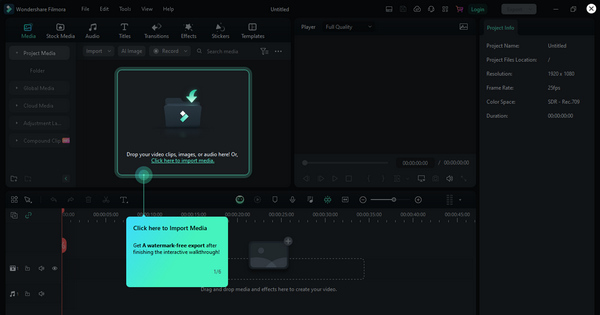
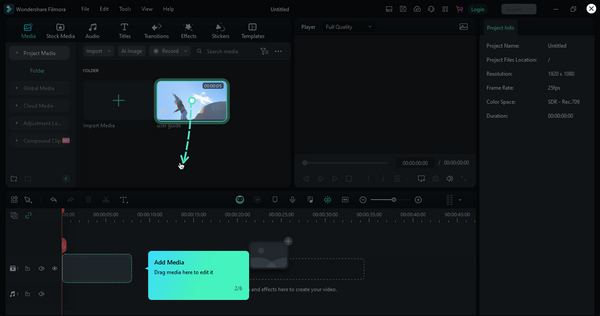
步骤 3: 然后点击添加媒体来加入这些文件。之后,将它们拖放到时间轴上,并按你期望的顺序进行排列。
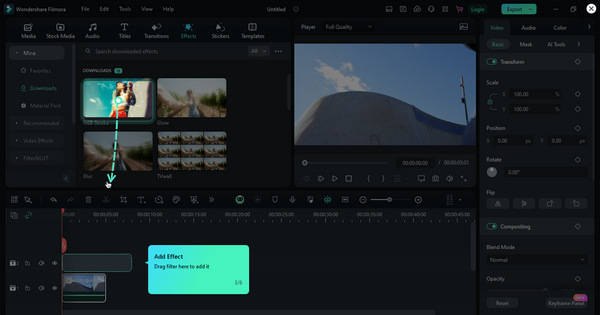
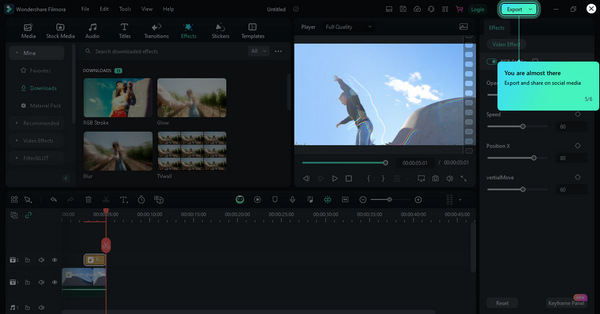
步骤 4: 接着,打开效果选项卡,为视频添加滤镜、叠加及其他特效。你也可以调整色彩校正和播放速度等参数,以获得理想的画面效果。
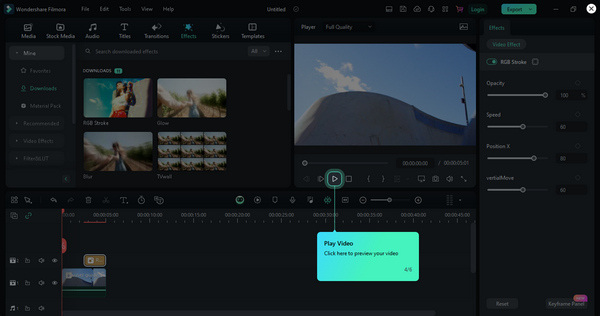
步骤 5: 完成后,点击预览按钮,对视频进行预览。
步骤 6: 当你对最终效果满意时,点击导出按钮保存或分享你的视频。
第 3 部分。2 Wondershare Filmora 的最佳替代品
弹性夹
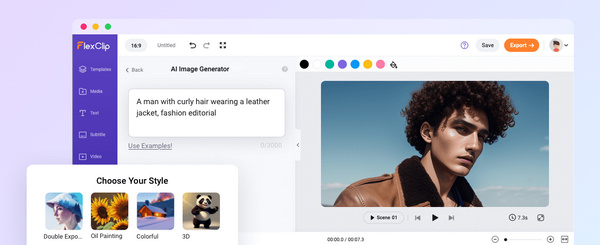
FlexClip 提供了一个灵活的网页端视频创作与编辑方案,是 Wondershare Filmora 的一款颇具吸引力的替代工具。这个多功能平台让用户可以轻松制作专业水准的视频,提供丰富多样的功能和工具。用户既可以上传自己的视频片段和图片,也可以使用平台庞大的素材库。内容上传完成后,平台通过剪裁、合并等编辑工具,并搭配吸睛特效,大幅简化视频编辑流程。文字动画、配音、音乐库选择以及顺畅自然的转场等附加功能,进一步提升了整体创作体验。凭借其友好的操作界面,FlexClip 既适合新手,也适合有经验的视频创作者,为用户带来流畅而愉悦的创作之旅。
流明5
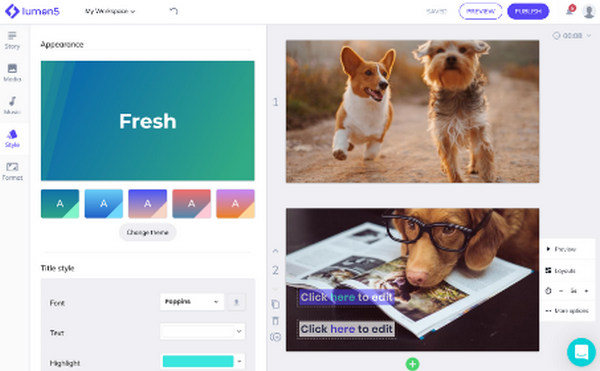
Lumen5 是一款在线工具,利用智能技术将文本转换为令人兴奋的视频。这对任何人来说都很棒,即使您以前从未编辑过视频。只需输入文本,它就会生成视频。您可以通过选择不同的主题和风格使您的视频独一无二。该工具有一个具有基本功能的免费版本和提供更多选项的付费版本。如果您想要一个简单而智能的 Wondershare Filmora 替代品来制作精彩视频,那么这是一个绝佳的选择。
第 4 部分. Wondershare Filmora 常见问题解答
菲尔莫拉安全吗?
Wondershare Filmora 是一款被广泛认为可以安全使用的软件。该软件具有可靠的使用历史,受到用户的普遍信任。但是,建议从其网站下载该应用程序,以避免与从非官方来源下载相关的任何安全风险。
Filmora 适合专业编辑吗?
是的。 Wondershare Filmora 适合业余和专业编辑。虽然它用户友好且适合初学者使用,但它还提供最适合专业编辑的高级功能。它的多功能性使其成为许多用户的首选,从内容创作者和业余爱好者到从事更复杂视频项目的专业人士。
Filmora 比 iMovie 更好吗?
Filmora 和 iMovie 之间的比较取决于用户的喜好和具体需求。 Filmora 以其用户友好的界面和各种功能而闻名,适合初学者和高级用户。另一方面,iMovie 是一款专供 Apple 用户使用的免费视频编辑软件,并且与 Apple 生态系统完美集成。 Filmora 和 iMovie 之间的选择通常取决于个人喜好、操作系统和视频编辑任务的复杂性。
Filmora 如何支持项目合作?
Filmora AI 提供了促进项目协作的功能。用户可以轻松地与他人共享他们的项目文件、媒体资产和工作进度。该软件支持导入和导出项目文件。这允许多个用户协作处理视频项目的各个方面。这种协作功能对于在视频编辑项目上一起工作的团队或个人是有益的。
我可以在 Mac 电脑上使用 Filmora 吗?
是的。 Wondershare Filmora 与 Windows 和 macOS 操作系统兼容。该软件在不同平台上提供一致的用户体验,使其可供许多用户使用。
结论
Wondershare Filmora 以其强大的功能、灵活的收费方案和友好的操作界面,毫无疑问是当下顶尖的视频创作工具之一。使用这款工具几乎不会让你踩坑。当然,根据个人偏好不同,它仍然可能存在一些不足,因此我们也为你推荐了两款同样值得一试的优质替代方案。
既然你已经阅读到这里,不妨结合本次评测中的各项见解,来判断 Wondershare Filmora 是否适合你的创作需求。
-
 如何使用人工智能制作音乐视频:创作指南
 您是否正在寻找 IA 音乐视频生成器来像专业人士一样提升您的编辑能力?好吧,在这篇文章中,我们将为您的问题提供解决方案。现在就来学习它们吧!
-
 使用人工智能制作社交媒体视频以赚取更多收入的完整指南
 您是否正在为社交媒体内容寻找人工智能视频编辑器而苦恼?漫长的搜索已经结束,因为我们已经为您完成了。继续阅读!
-
 AI视频:你需要了解的这些!
 您是想知道什么是人工智能视频的人之一吗?好吧,在这篇评论中,我们将为您提供您需要了解的所有信息。继续阅读!`
