


 视频转换大师
 屏幕录影大师
 视频修复
视频修复
 安全下载
安全下载前 5 名 WAV 音频修剪器可精确剪切您的音频文件
如今有许多软件和在线工具可用于编辑 WAV 文件,其中包括WAV 裁剪器工具。为了帮助你挑选出最合适的工具,我们根据工具的可用性、提供的裁剪功能以及作为音频编辑器的灵活性,评测了五款表现最佳的软件和在线工具。浏览下文列出的 WAV 裁剪工具,了解它们在裁剪 WAV 文件方面提供的功能。

第 1 部分。5 款最佳 WAV 修剪器概述
| 软件工具 | 操作系统 | 价钱 | 最适合 |
| FVC 精选视频转换器终极版 | 窗户 11/10/8/7 macOS X 10.12 或更高版本 | 免费计划(可用) 月度许可证($14.50) 终身许可证($49.96) | 快速处理修剪功能,同时保持 WAV 文件的原始音频质量。 |
| 波形垫 | 窗户 11/10/8/7 macOS 10.5 及以上版本 iOS 6.0 及以上版本 Android 2.3.3 及以上版本 | 免费版本(可用) 标准版($60) 主版本($99) | 高级修剪功能可自动消除静音或缩短 WAV 文件开头和结尾的静音区域。 |
| 大胆 | 窗户 11/10/8/7 macOS 13/12/ 和 OS X 10.9 Linux Ubuntu 22.04 | 免费使用 | 专业级 WAV 修剪工具,可同时处理多个 WAV 文件或项目。 |
| 音频微调器 | 基于网络的工具 | 免费使用 | 立即获得节省 WAV 文件修剪过程时间的结果。 |
| Adobe 试镜 | Windows 11/10 macOS Big Sur v11.0 或更高版本 | 月度个人($22.99) | 符合当前电影和电视音频标准的音频编辑。 |
第 2 部分。FVC-精选视频转换器终极版
FVC-picked Video Converter Ultimate是一款以界面简洁、易于上手而著称的软件工具,并且可免费下载安装到你的 Windows 和 macOS 设备上。该软件是一款功能齐全的视频和音频编辑工具,在你需要缩短 WAV 文件时,它也可以充当 WAV 音频裁剪工具。这个多功能工具可以通过简单地左右拖动轨道条来轻松裁剪 WAV 文件,同时还能实时预览你在导出前所做的修改。下面列出了该工具的一些最佳功能和局限之处,并提供了一份详细指南,帮助你更好地将其作为 WAV 裁剪器来使用。
主要功能亮点
• 用户可以添加淡入淡出效果。
• 它允许用户快速分割音频片段并合并片段。
• 用户可以设置开始和结束时间,以精确剪切 WAV 文件。
• 它提供音频延迟和音量增强器等功能。
局限性
• 它没有任何其他高级功能,例如自动修剪静音。
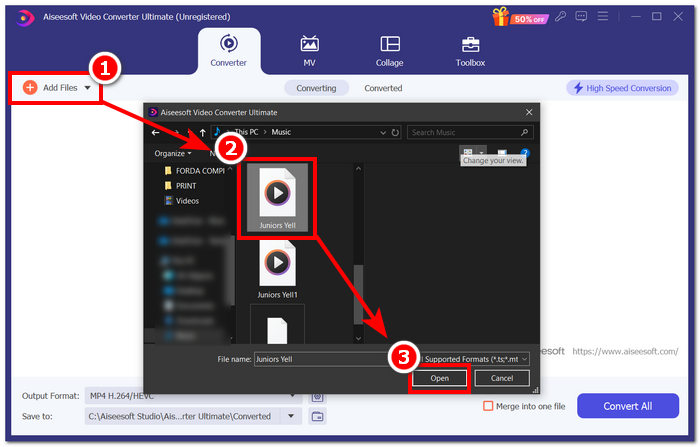
步骤 1:在桌面上安装并启动 WAV 裁剪工具软件。在软件界面中,点击工具左上角的红色+按钮,加载你想要裁剪或截取的 WAV 文件。
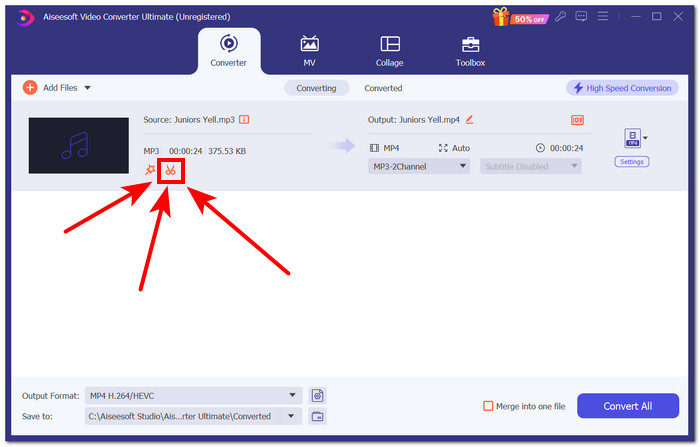
步骤 2:点击已上传 WAV 文件旁边的剪刀图标按钮,以进入工具的裁剪功能界面。
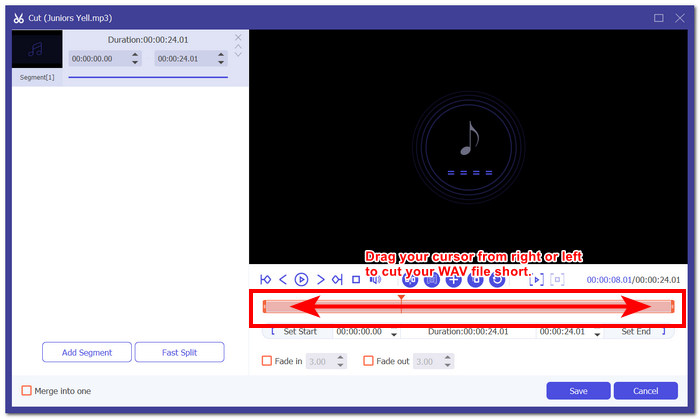
步骤 3:在 WAV 文件轨道区域,将轨道游标的末端从左到右拖动,以缩短音频文件并去除不需要的部分。
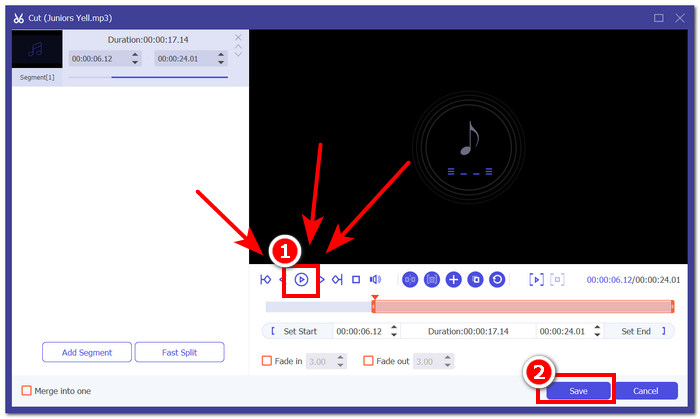
步骤 4:若要预览你对 WAV 文件所做的修改,点击播放按钮,并在需要时再次调整轨道游标。当你对 WAV 文件的裁剪结果感到满意后,点击“保存”按钮继续。
步骤 5:要在不损失音质的前提下下载裁剪完成的 WAV 文件,点击“全部转换”按钮,并将其保存到指定的下载文件夹中。
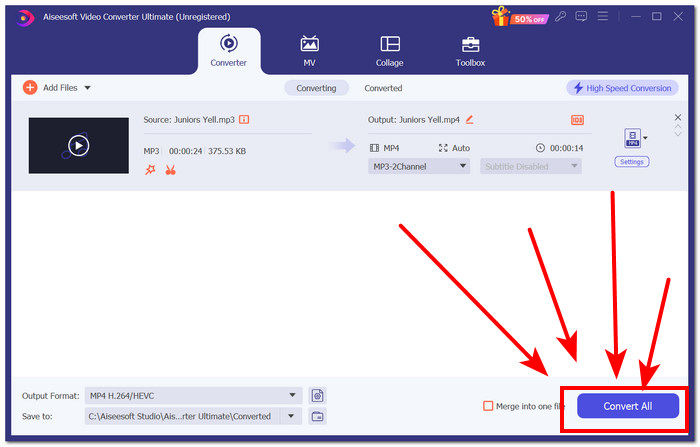
在使用 FVC 挑选的 Video Converter Ultimate 时,我们注意到,在导出修剪后的 WAV 文件时,使用付费版本导出多个批次要容易得多,也快得多。此外,剪切 WAV 文件时,其拖动光标功能让我们在剪切时具有控制力和精确度。此外,用户可以设置精确的开始和结束时间,并添加淡入淡出。实时预览也有助于确保我们正确删除了不需要的部分,而无需导出音频文件。最后,与其他工具相比,该软件工具可以更快地导出您的 WAV 文件,而不会损失任何质量。
第 3 部分 WavePad 音频编辑器
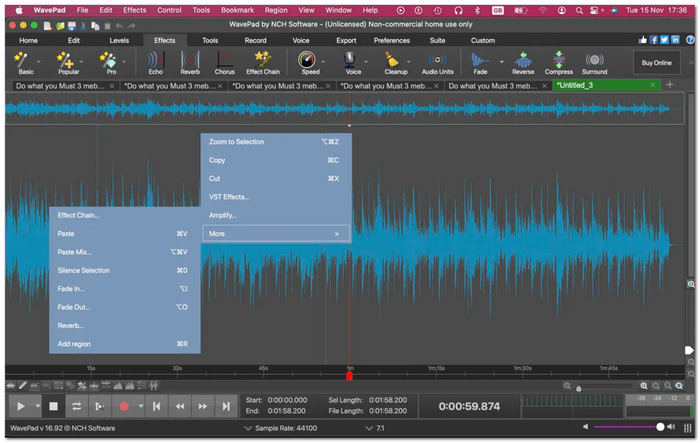
NHC 的 WavePad 是一款音频编辑软件,提供各种音频编辑和效果功能,包括修剪功能。该软件工具作为音频编辑器脱颖而出,并提供修剪 WAV 文件的额外功能。这些额外功能包括在 WAV 文件的开头和结尾自动消除静音,并自动在 WAV 文件中创建软件认为需要删除的剪切。
主要功能亮点
• 自动删除和缩短音轨中的静音区域。
• 在 WAV 文件中创建更改时自动保存功能。
• 它具有更大的工具集,包括音频放大器、均衡器、音频效果等。
• 插件功能多样,可用于编辑和修剪 WAV 文件。
局限性
• 软件界面过时。
• 对于新用户来说,WAV 修剪工具不太友好。
• 应用某些效果需要时间,尤其是在应用其他修剪工具功能时。
WavePad 可能具备用户编辑或剪切 WAV 文件时可能需要的所有功能,因此是一款完美的工具。但是,其非常复杂且过时的软件界面让新手和偶尔使用的用户难以操作。
第 4 部分 Audacity
Audacity 是一款广为人知的软件工具,擅长音频编辑,也可用作 WAV 音频文件剪切器。这款免费软件提供许多付费软件才有的功能。此外,它还具有多轨视图,允许用户在查看波形的同时执行剪切功能,以精确剪切 WAV 文件。
主要功能亮点
• 可通过 DirectX 插件使用第三方音频修剪和效果。
• 多轨 WAV 修剪工具。
• 它有一个指定按钮“I-beam”,用于立即在 WAV 文件中创建剪切。
• 将音频编辑同步到其他曲目。
局限性
• 软件用户界面的复杂性。
与 WavePad 相比,Audacity 在用户界面友好性和整个软件的可用性方面具有更大的优势,因为它提供了更简单、更直观的外观。此外,Audacity 凭借其多轨功能可以提供无缝流程,这使得它能够同时处理多个音轨以修剪 WAV 文件。
第五部分:音频修剪器
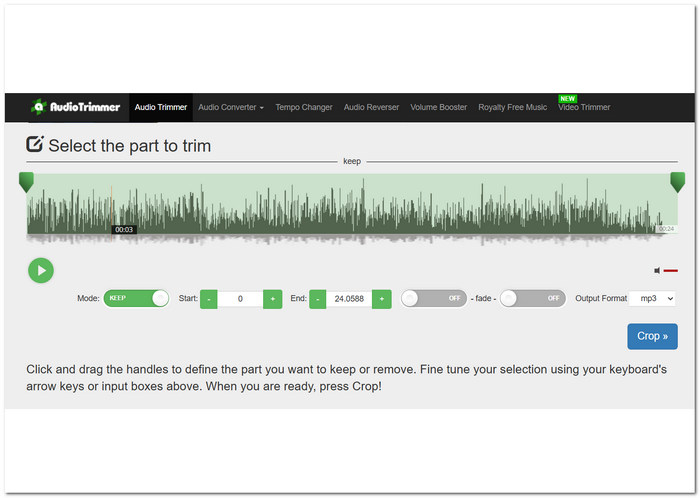
Audio Trimmer 是一款在线 WAV 修剪工具,任何用户都可以通过多种设备访问。这款新手友好型工具只需在其界面上单击几下即可轻松修剪 WAV 文件。这款直观的 WAV 剪切工具提供了视频教程来指导操作。此外,它还可以创建随时可用的铃声。
主要功能亮点
• 切换按钮可保留或删除 WAV 文件的部分内容。
• 它能够设置剪切 WAV 文件的开始和结束时间长度。
• 能够将淡入淡出效果放入 WAV 文件。
局限性
• 音频文件仅限于 MP3、WMA、AIFF、AC3、WAV 和 AAC。
• 它没有用于剪切 WAV 文件的额外高级功能。
• 用户界面过时。
Audio Trimmer 是一个操作非常简单的WAV 编辑器,用户可以通过切换按钮来选择保留或删除已选中的 WAV 文件片段。正是这种简单直接的设计,使得该工具成为本次评测中最省时的工具。
第六部分:Adobe Audition
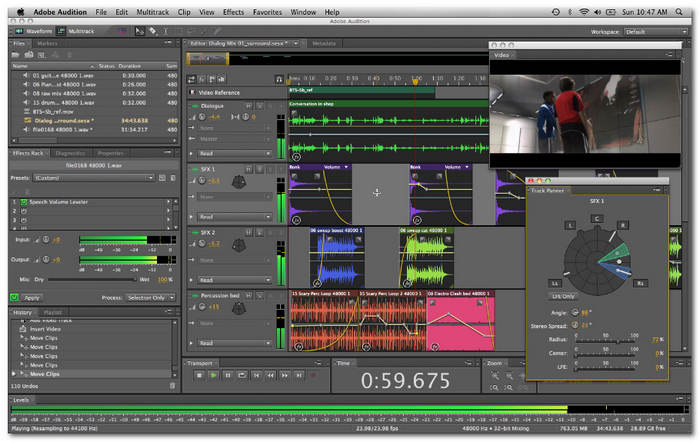
Adobe Audition 是一款专业级音频编辑软件,负责处理音频录制、混音和编辑等任务。对于修剪 WAV 文件,此软件通过其波形编辑器显示 WAV 文件轨道,从而可以更精确地修剪和编辑 WAV 文件。此软件不是典型的 WAV 切割软件,因为它主要用作数字音频工作站 (DAW),并且是主要用于音乐制作的一体化音频创作套件。
主要功能亮点
• 在混音器通道之间无缝剪切 WAV 文件。
• 它可以通过其剪切命令功能修剪 WAV 文件。
• 多轨道允许轻松修剪 WAV 文件片段。
局限性
• 定价相当昂贵。
• 缺少一些音频合成功能。
Adobe Auditions 在提供当前音频标准方面表现出色。该软件用于企业和商业行业。它相对昂贵,并且执行诸如修剪 WAV 文件之类的任务是基本的。
第 7 部分。有关 WAV 微调器的常见问题解答
您可以在 Windows Media Player 中修剪 WAV 文件吗?
不可以,你无法在Windows Media Player中直接进行裁剪 WAV 文件等操作。它的唯一用途只是作为媒体播放器,用于观看视频和收听音频文件。
WAV 的质量最高吗?
是的,WAV 是所有音频格式中质量最高的。其主要特点是未压缩且始终保持音频文件的原始质量。但是,与其他压缩音频格式相比,WAV 文件拥有的最高质量意味着文件大小更大。
用什么程序可以剪切WAV文件?
FVC 挑选的 Video Ultimate Converter 和 Audacity 等流行程序已成为剪切 WAV 文件的多功能工具。
音频修剪器安全吗?
是的,只要来源可靠,一般来说使用起来都是安全的。因此,使用音频修剪器来剪切或缩短 WAV 文件是减少文件大小同时又能安全保持其质量的一种方法。
我可以以不同的格式保存修剪后的文件吗?
是的,本评论中列出的大多数 WAV 修剪软件工具(例如 FVC 选择的 Video Converter Ultimate)允许用户以不同的格式保存修剪后的文件,例如 MP3、AAC 等。
结论
使用WAV 裁剪器可以让我们进行精确的剪辑。不过,在真正动手之前寻找一款可靠的软件往往会让人感到无从下手。幸运的是,我们对多款高效裁剪或截取 WAV 文件的工具进行了评测,清晰地展示了每款工具的优点和局限。根据我们的评测结果,针对一般的 WAV 裁剪需求,我们推荐使用 FVC-picked Video Converter Ultimate 和 Audacity。
-
 什么是元数据:了解元数据的基本信息
 什么是元数据?这很重要吗?元数据的组成部分是什么?你有同样的问题吗?在本文中,您将了解有关元数据的基本信息。
-
 4 个最佳在线和离线元数据查看器 [2022 年更新]
 我可以检查文件的元数据吗?是的,您可以,在这篇文章的帮助下,我们将向您介绍您可以使用的不同元数据查看器。
-
 6 最受欢迎的选择 Snapchat 上的 Snapchat 动画 Snapchat 过滤器
 想知道在 Snapchat 视频上添加过滤器的最佳方法吗?好吧,您可以单击它并了解可用于应用于 Snapchat 视频的不同过滤器。
