


 视频转换大师
 屏幕录影大师
 视频修复
视频修复如何以值得信赖和可靠的方式将 AMV 转换为 FLV
对于不熟悉的人来说,AMV 代表 Anime Music Video(动画音乐视频)。.amv 文件扩展名是一种使用压缩视频的格式。由中国生产的便携式媒体播放器最有可能使用 AMV 文件。低分辨率视频文件能够适配这种媒体播放器的屏幕,从而在播放时正常观看。不过,Adobe Systems 推出的 FLV(Flash Video File,Flash 视频文件)格式则不同,它包含一个简短的文件头、交错的音频、视频和元数据包,以及存储在 SWF 文件中的音视频数据。通过 Flash Video,视频流可以嵌入到 Adobe 应用程序以及 Flash 插件中。现在你已经对这两种格式有了一些基本了解,可以准备深入了解转换工具了。你应该考虑将 AMV 转换为 FLV。

第 1 部分。 用于将 AMV 转换为 FLV 的最出色的转换器
Video Converter Ultimate 是一款专业的视频转换程序,能够处理你的视频转换需求。它支持在 Windows 和 Mac 电脑上轻松实现无损的 FLV 到 MOV 转换,并且可以免费使用。此外,该工具可以在 100 多种不同格式之间进行转换,包括高清文件。同时它还提供了完整的视频编辑功能,可以对视频进行裁剪、剪切、分割、添加水印以及应用特效。除了视频转换之外,Video Converter Ultimate 还支持视频下载、视频传输等功能。要学会使用这款软件,你需要先熟悉本节中提供的使用说明。
步骤 1: 要使用这款软件,首先需要将其下载到你的电脑。只需点击本步骤下方的免费下载按钮即可。你会看到有两个下载选项,分别对应 Windows 和 Mac。下载完成后在电脑上安装该软件,然后启动软件。
步骤 2: 启动软件后,你会看到一个弹出的窗口。屏幕上会显示转换器界面,同时也能看到上传区域。点击加号按钮,或将桌面上的任意视频文件拖入其中即可继续。
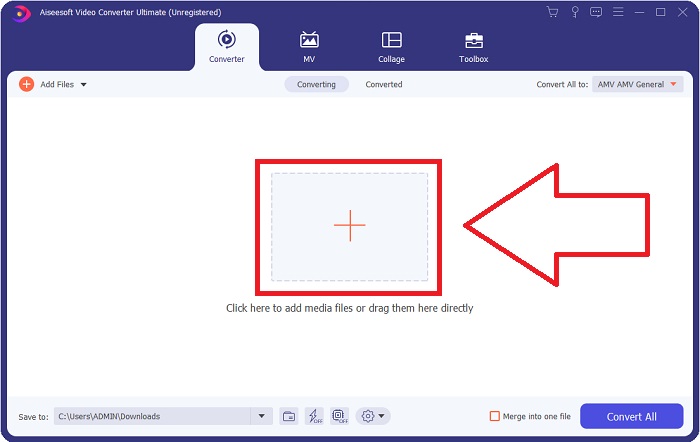
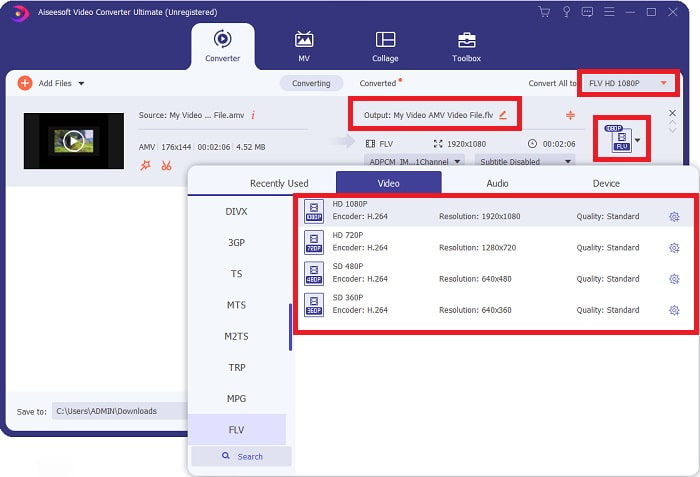
步骤 3: 若要将 AMV 视频格式转换为 FLV,在上传完文件后,你需要在软件中选择输出格式,并在可选格式中选择 FLV。之后你还可以自由选择想要的视频质量。
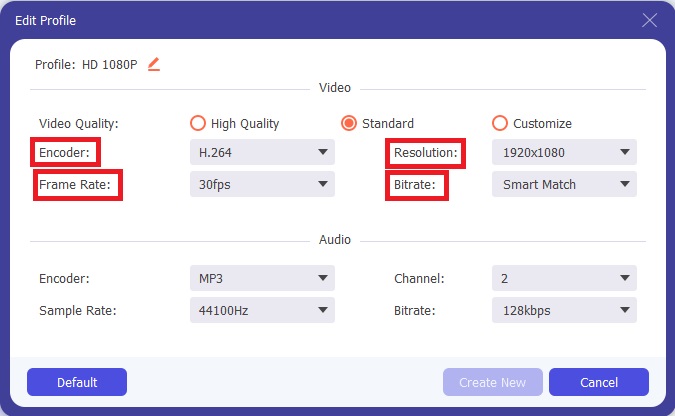
步骤 4: 如果你需要自定义或者新建一种你偏好的视频质量,可以点击视频质量选项旁边的齿轮图标。
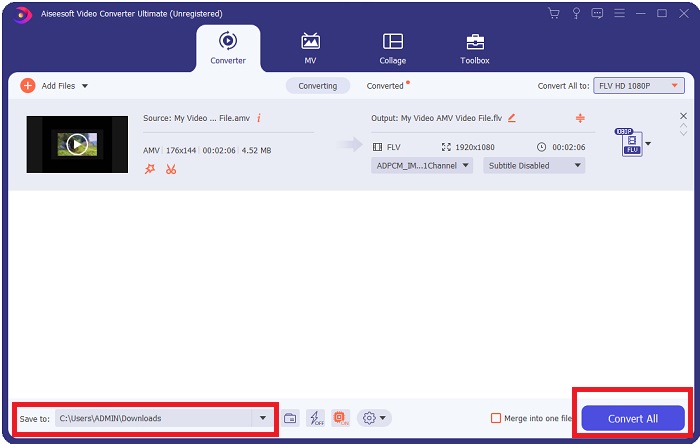
步骤 5: 就快完成了!在你已经设置好所有参数和调整之后,可以通过点击窗口右下角保存到字段旁的文件夹图标,选择转换后文件的保存位置。然后点击全部转换按钮,就可以开始转换你的视频文件。
第 2 部分。 考虑在将 AMV 转换为 FLV 时使用的在线工具
使用在线转换器很方便,因为它们不需要下载或安装任何软件。Free Video Converter Online 就是一个很好的例子,它可以快速、轻松地将 AMV 转换为 FLV。使用这个程序,你可以转换多种音频和视频格式,而且完全免费。你可以一次上传两个文件进行转换,转换完成后,生成的文件会自动保存到你的硬盘中。下面就为你介绍使用这个优秀在线工具所需了解的全部步骤。
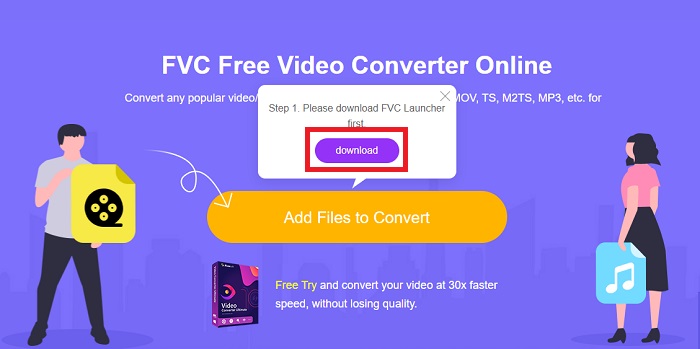
步骤 1: 点击这个链接进入该在线工具的主页面。进入后,点击添加文件进行转换开始转换文件。随后,你会在屏幕顶部看到下载按钮出现。启动器下载安装完成后,就可以从电脑中选择并上传文件到该工具。
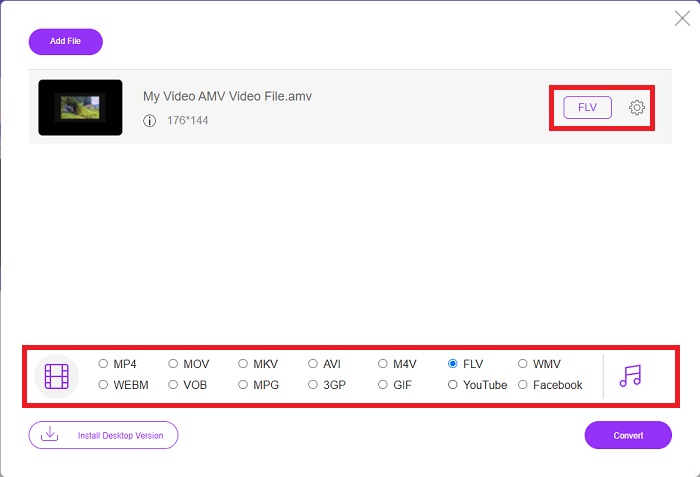
步骤 2: 现在导入的文件已经准备就绪,点击下方的 FLV 视频格式。与桌面软件类似,你也可以通过点击齿轮图标来调整输出视频的所有参数。
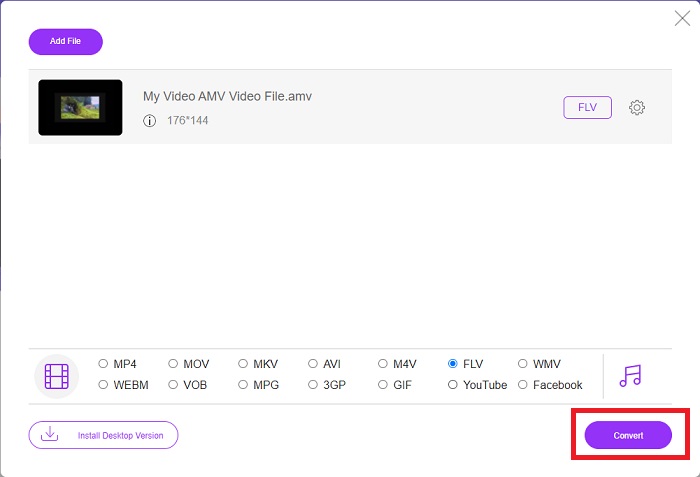
步骤 3: 最后,点击转换按钮,将你的 AMV 文件转换为 FLV 格式。
相关内容:
第 3 部分。 有关 AMV 和 FLV 的扩展知识
AMV 优化了低 CPU 和小屏幕的多功能媒体播放器,如 S1 MP3 播放器。视频编解码器是带有固定量化表的 Motion JPEG。音频编解码器是 IMA ADPCM,其中每帧的前 8 个字节是源(16 位)、索引(16 位)和加密的 16 位样本量(32 位)。这些简化编解码器的解码开销可以忽略不计。视频压缩率低(4 像素/字节 vs. MPEG-2 超过 10 像素/字节),但由于分辨率降低(96x96 高于或等于 208x176)和 fps(10、12、或 16 帧/秒)。压缩为 128x96 像素和 12 帧/秒的 30 分钟视频将是 80 MB。
但是,如果您想通过 Internet 从 Adobe Flash Player 或 Adobe Air 流式传输视频或音频,则可以使用 FLV 文件扩展名的扩展名为 .flv 的视频文件。长期以来,Flash Video 是几乎所有在线视频的默认视频格式,包括 YouTube、Hulu 和无数其他网站上的视频。出于这个原因,流媒体服务和软件开发商不再使用 Adobe 的专有 Flash 格式。有了所有这些比较,这里对您有一点帮助,本文为您提供了一个比较图表:
| 文件扩展名 | AMV | 轻型货车 |
| 文件名 | 动漫音乐视频 | Flash 视频文件 |
| 由开发 | 吉姆·卡波兹塔斯 | Adobe 系统公司 |
| 优点 | ◆ AMV 是迄今为止最受欢迎的粉丝制作的动漫音乐视频之一。 ◆ 文件小。 | Adobe Flash 用于动态和交互式网页可能是一个巨大的优势。尽管这是一个简单的过程,但结果可能是巨大的。 Flash 曾经也是简单视频游戏的流行选择。 |
| 缺点 | ◆ 与大多数媒体播放器和设备不兼容;低质量。 | FLV 的受欢迎程度下降一直是一个缺点。创建 FLV 内容既费时又费钱。 iOS 设备缺乏对 Flash 的支持严重限制了其吸引新用户的能力。 |
| 支持文件的程序 | ◆ VLC 媒体播放器 ◆ iOrgsoft AMV 转换器 | ◆ 实时播放器 ◆ 苹果 QuickTime 播放器 ◆ VLC 媒体播放器 ◆ MPlayer |
第 4 部分。 有关 AMV 到 FLV 转换的常见问题解答
AMV 的目的是什么?
AMV中的同步和统一可以实现各种视频编辑风格。可以通过简单的放大和缩小“效果”和简单的过渡过渡来实现原始编辑。众多例子如下。
AMV 是如何制作的?
AMV要想成功,必须使用与主题密切相关的歌曲,并且几乎完美地描述了它。任何阅读本文的人都会回应说:‘哇,这太棒了!这首歌是他的,她的主题曲。正因为如此,你选择了一个好作品。
FLV 质量更好吗?
FLV 格式和 MP4 能够存储高质量的视频和音频数字编码。 FLV 文件的质量是一个有争议的问题,但 FLV 的优缺点可以讨论文件格式。 MP4 中更高的压缩比导致更少的质量损失。
结论
总而言之,您将了解在将 AMV 转换为 FLV 时选择最佳转换器的重要性。其他人会在视频经过转换后产生低质量和不同步的视频。但是本文推荐的两个转换器是一流的转换器,您不必担心它会提供的质量。
-
 将 AMV 转换为 AVI 的最佳方法 [已批准]
 您是否很难将 AMV 格式的视频文件转换为 AVI?这里有一些提示,但您只能在本文中找到。
-
 3 款最新的 AMV 转换器可将 AMV 转换为 MOV 格式 [2022]
 Don'不知道如何将您的 AMV 文件转换为 MOV 格式?然后本文将讨论您可以在线或离线使用的 3 AMV 到 MOV 转换器。
-
 4种经过验证的将TS转换为台式机/在线FLV的方法
 默认情况下,您无法在计算机或手机上打开 TS。观看视频文件的唯一方法是使用我们的具体指南将 TS 转换为 FLV 或其他格式。
