


 视频转换大师
 屏幕录影大师
 视频修复
视频修复
 安全下载
安全下载将 FLV 转换为 WAV 的 3 种免费方法
想要从已下载的视频中提取音频却不知道该怎么做?你是否在寻找一种简单的方法,将FLV 转换为 WAV或 MP3?
在某些情况下,您只需要一个视频的音轨或背景音乐。所以你需要将视频转换为音频。这篇文章将主要讨论如何将FLV转换为WAV。

这里为你推荐 3 款优秀的FLV 转 WAV 转换器,帮助你将 FLV 文件转换出来。你可以选择自己偏好的方式,把 FLV 转成 WAV 音频。
第 1 部分。 在线将 FLV 转换为 WAV
当你在网上搜索将 FLV 转换为 WAV 的方法时,会发现很多搜索结果都是免费的在线转换器。如果你不知道该用哪一个,这里郑重向你推荐这款热门的免费在线视频转换器。它专门用于将 FLV 转换成常用的各种视频和音频格式,比如 MP4、MOV、AVI、MP3、AAC、M4A 和 WAV。
与其他在线 FLV 到 WAV 转换器相比,它支持更多的输入和输出格式,并提供更快的转换速度。此外,它不需要帐户注册或登录。它允许您在没有文件大小限制的情况下转换任何 FLV 文件。
步骤 1: 在浏览器中打开这个免费的在线 FLV 转 WAV 转换网站。它兼容大多数网页浏览器,包括 Safari、IE、Chrome、Firefox 和 Yahoo。
步骤 2: 点击添加文件进行转换,然后点击下载按钮,为 FLV 转换安装一个启动器。安装完成后会弹出一个窗口,供你加载 FLV 文件。

步骤 3: 进入主转换窗口后,你会看到列出了许多常见的视频格式,如 MP4、MOV、AVI、FLV、MKV、VOB、MPG、WMV 等。在此步骤中,你需要点击音频图标以展开音频格式选项,然后选择WAV作为输出格式。
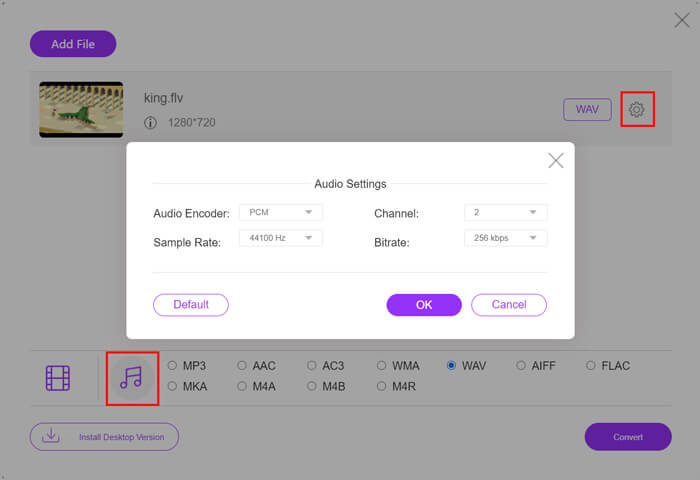
步骤 4: 在进行 FLV 转 WAV 转换之前,你可以点击输出格式旁边的设置图标,自定义更多音频参数。在这里,你可以调整音频编码器、声道、采样率和比特率。然后点击转换按钮,将 FLV 文件转换为 WAV 音频。
如果你想将 FLV 转换成 MP3、WMA、WAV 等音频格式,你需要点击音频标签并勾选相应选项。
第 2 部分。 免费将 FLV 转换为 WAV
除了在线 FLV 转换器外,还有一些免费的桌面视频转换软件也能轻松帮助你把 FLV 转为 WAV。要做到这一点,你可以使用Free FLV Converter。

免费 FLV 到 WAV 转换器
155321+ 下载- 将 FLV 转换为 WAV、AAC、MP3、M4A、MP4、MOV、AVI 等。
- 支持所有常用的视频和音频格式。
- 支持最新的多核 CPU 和 GPU 加速。
- 转换一个或多个 FLV 文件而不会损失质量。
它带有您需要的所有转换功能。以下指南将向您展示如何使用它将 FLV 转换为 WAV。
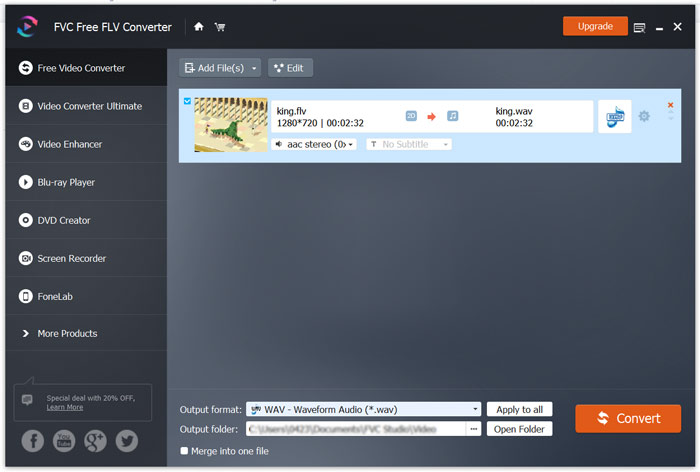
步骤 1: 免费下载、安装并运行这款免费的 FLV 转 WAV 转换器。点击添加文件导入你的 FLV 文件。

步骤 2: 点击输出格式并选择WAV作为目标格式,然后选择合适的目标文件夹。
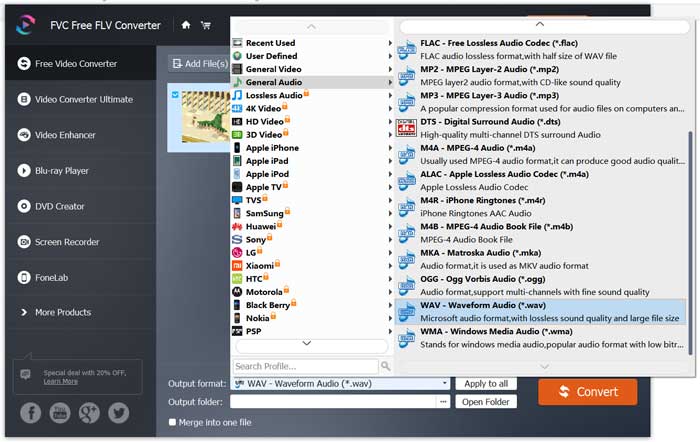
步骤 3: 点击转换按钮,开始进行 FLV 转 WAV 的转换。
第 3 部分。 使用 VLC 将 FLV 转换为 WAV
如果你的电脑上安装了VLC 媒体播放器,也可以借助 VLC 将 FLV 转换成 WAV。你需要知道,VLC 是一款很受欢迎的媒体播放器,同时也带有一些基础的转换和编辑功能。
步骤 1: 在电脑上打开 VLC 媒体播放器。你可以从VideoLAN网站免费下载并安装。点击'媒体'(Media),然后从下拉菜单中选择转换/保存选项。
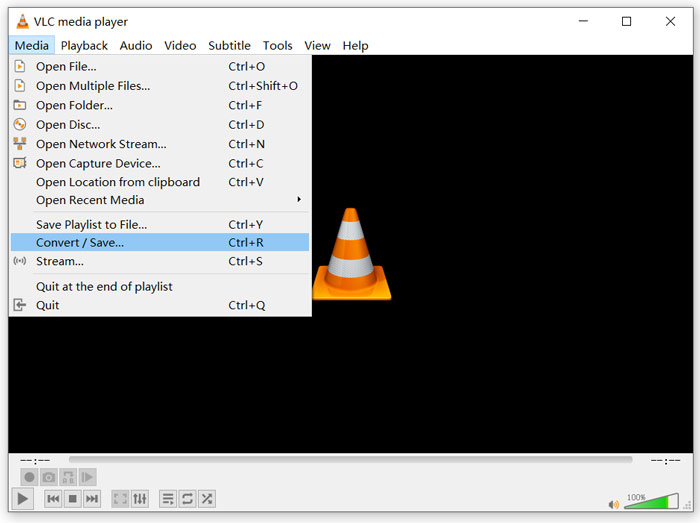
步骤 2: 现在会进入打开媒体窗口。点击添加按钮,导入你想要转换的 FLV 文件。然后点击转换/保存按钮,弹出转换窗口。
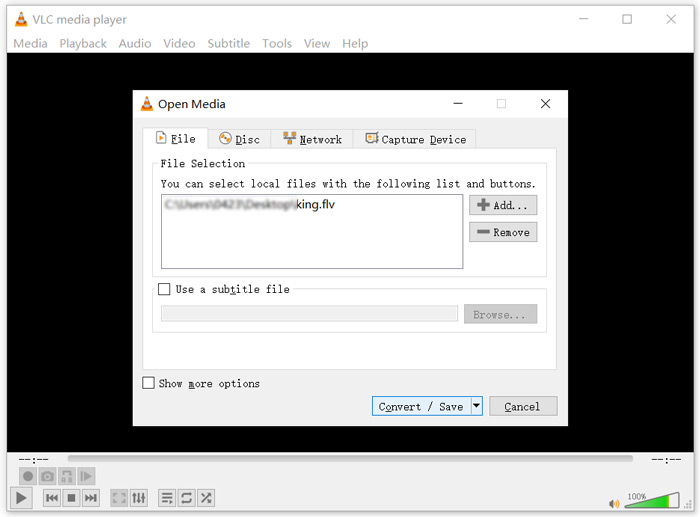
步骤 3: 在转换选项卡下,勾选显示输出选项。接着在配置文件的下拉列表中选择合适的输出格式。点击浏览按钮,选择合适的目标文件夹。在此步骤中,你可以重命名输出文件。
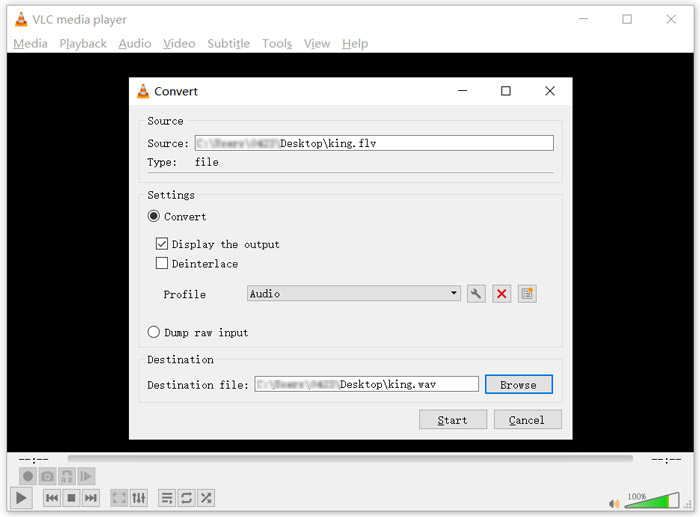
步骤 4: 点击开始按钮,启动 FLV 到 WAV 的转换。完成后,VLC 会自动播放转换好的 WAV 文件。在转换过程中,你可以看到正在转换文件的提示。在转换结束前,不要完全关闭 VLC 媒体播放器。
第 4 部分。 将 FLV 转换为 WAV 的常见问题解答
FLV 与 WAV,FLV 和 WAV 有什么区别?
FLV(Flash Video File,Flash 视频文件)是一种由 Adobe Systems 开发的、与 Flash 兼容的视频文件格式。它包含一个简短的文件头、交织存储的视频、音频以及元数据包。FLV 最初是为在 Adobe 应用程序中嵌入视频流而设计的。一个 FLV 文件通常包含分辨率为 640x360 的视频流,以及 44.1 KHz、双声道、AAC 编码的音频流。
扩展名为 WAV 的文件是一种波形音频文件格式(Waveform Audio File Format),属于一种以分段形式存储数据的容器格式。它最初由微软和 IBM 联合开发,用于存储未压缩的无损音频,因此文件体积通常非常大。该格式通过容器来存储音频数据、音轨编号、采样率和比特率等信息。
如何在没有软件的情况下将 FLV 转换为 WAV?
如果您想在不使用任何转换器软件的情况下将 FLV 转换为 WAV,您可以选择将文件扩展名从 .flv 更改为 .wav。
如何将 FLV 下载到 WAV?
市场上提供了大量屏幕录像机,可以帮助您将视频保存为本地计算机上的音频文件。
结论
阅读完本文后,你已经了解了 3 种免费方法,可以从 FLV 文件中提取 WAV 音频。当你需要将 FLV 转换为 WAV时,可以根据个人需求选择合适的 FLV 转换工具来完成操作。
-
 适用于Android,iOS和计算机的5个最佳免费WAV播放器
 如何在Android手机上播放WAV文件?哪些玩家可以玩WAV?此帖分享了5个针对Android,iPhone,Mac和PC的最佳免费WAV播放器。
-
 您必须尝试的 10 个适用于 Windows 10/8/7、Mac、iOS 和 Android 的最佳 FLV 视频播放器
 FLV播放器可帮助您轻松地在Windows,Mac,Android,iOS设备上访问FLV文件。查看可以立即下载的最佳FLV文件播放器。
-
 如何使用前5个免费转换器将WAV转换为MP3
 此页面是一长串免费的WAV到MP3转换器(iTunes,Audacity,VLC,Windows Media Player和免费的音频转换器),可以将WAV转换为计算机上的MP3。
