


 视频转换大师
 屏幕录影大师
 视频修复
视频修复
 安全下载
安全下载FLV 到 WMA 转换器 - 如何免费从 FLV 视频中提取 WMA 音频
从 YouTube 网站下载 Flash 视频文件后,您可以将 FLV 转换为 WMA 无损音频。 WMA(Windows Media Audio)是微软开发的一系列音频编解码器和相应的音频编码格式。 WMA 音频支持多声道和高分辨率音频。从本文中,您将学习在 Windows 和 Mac 上将 FLV 视频转换为 WMA 音频的 2 种方法。

第 1 部分。 免费从 FLV 中提取 WMA 音频的最佳方法
FVC Free FLV Converter 是一款免费的、简单且快速的 FLV 转 WMA 转换器,支持在 Windows 和 Mac 上批量将 FLV 文件转换为 WMA。同时,你也可以将 FLV 视频转换为其他视频和音频格式,如 HD MP4、AVI、WMV、MKV、3GP、MP3、AAC、AC3 等。借助内置的编辑功能,你还可以免费编辑 WMA 文件中的元数据信息。

FVC免费FLV视频转换
145000+ 次下载- 在 Windows 10/8/7/Vista/XP 和 Mac OS X 上将 FLV 转换为 WMA。
- 压缩、合并、添加主题和编辑 WMA 文件的元数据。
- 为您的 FLV 文件添加特殊主题,如假期、家庭、生日。
- 批量转换 FLV 到 WMA、MP3、AAC、FLAC、M4R、OGG、WAV。
步骤 1. 添加 FLV 文件
在免费下载安装 FVC Free FLV Converter 后,你可以在电脑上安装并运行该程序。点击添加文件按钮导入 Flash 视频文件。你也可以一次性将更多 FLV 文件拖拽到程序中。

步骤 2. 编辑 FLV 文件
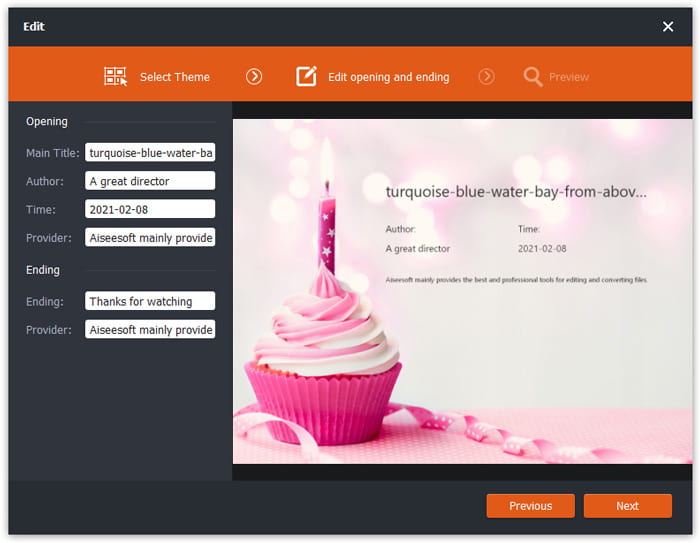
点击编辑按钮开始编辑你的 FLV 文件。你可以选择特定的主题,编辑标题、作者、片头片尾时间等数据信息。
步骤 3. 将 WMA 设置为输出
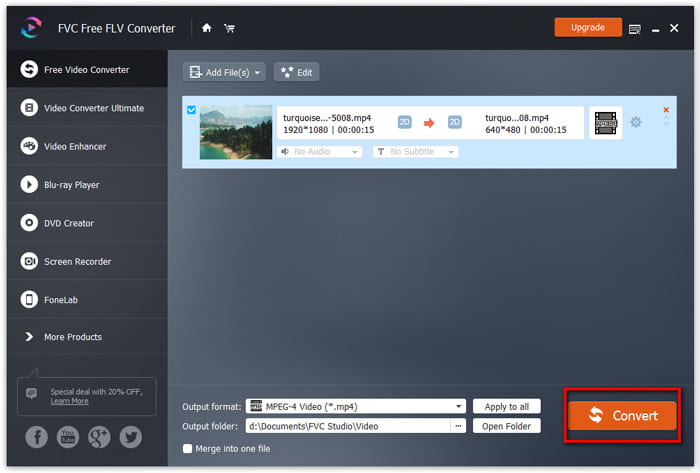
然后前往输出格式区域,在搜索框中输入 WMA。此时你可以选择WMA - Windows Media Audio (*.wma)作为输出格式。

第 4 步。将 FLV 转换为 WMA
前往输出文件夹区域,选择保存 WMA 文件的目标位置。你可以点击转换按钮,免费开始将 FLV 转换为 WMA 音频文件。
第 2 部分。 如何免费在线将 FLV 转换为 WMA
如果你不想再下载任何软件安装包,可以试试 FVC Free Audio Converter。这是一款功能强大的在线 FLV 转 WMA 转换器,可以帮助你将任意常见视频/音频文件转换为 WMA、MP3、AAC、FLAC、WAV 等。你可以通过 FVC Free Audio Converter 详细了解如何将 FLV 转换为 WMA。
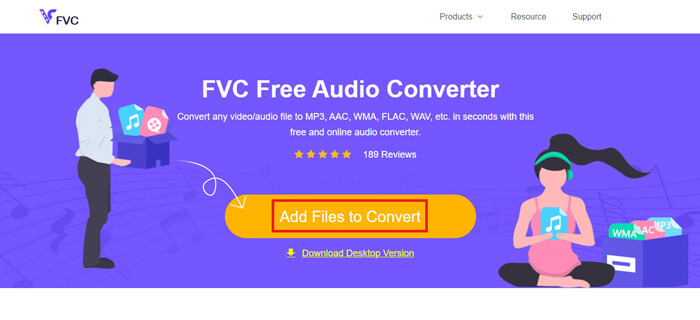
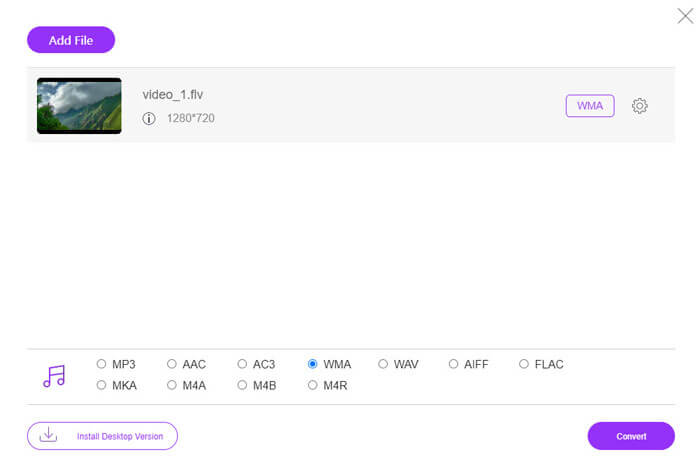
步骤 1: 访问 FVC Free Audio Converter 官方网站(https://www.free-videoconverter.net/free-audio-converter/)。点击添加文件进行转换按钮下载并安装启动器。然后你就可以从本地电脑上传 FLV 文件。
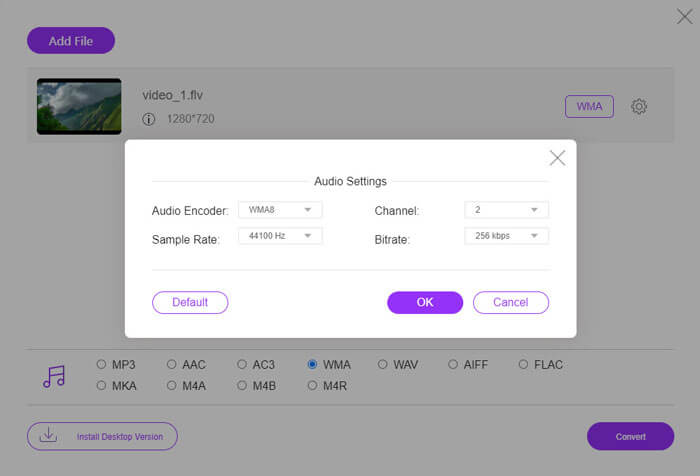
步骤 2: 在底部勾选WMA,并将其设为输出格式。如果你想调整更多设置,可以点击齿轮图标修改音频编码器、声道、采样率和比特率。点击确定按钮保存更改。
步骤 3: 最后,你可以点击转换按钮,在线免费开始将 FLV 转换为 WMA 文件。
第 3 部分。 将 FLV 转换为 WMA 的常见问题
什么是FLV文件,我该如何播放?
FLV是Adobe开发的Flash视频文件格式。它可以存储视频,音频,文本,下标等。 Windows Media Player和QuickTime都不支持FLV,因此您必须使用第三方媒体播放器来打开FLV,例如VLC。
WMA格式用于什么?
WMA是一种由Microsoft创建的有损音频格式,可以与MP3竞争。 WMA主要用于流媒体在线音乐。 Windows Media Audio是扩展名为.wma的WMA文件。 Windows Media Player可以完美地支持它。
有没有 WMA 音乐播放器?
可以。有多款WMA 音乐播放器可供选择,例如 FVC Free Video Player、KMPlayer、Elmedia Video Player、Macgo Free Mac Media Player、VOX Music Player、VLC Media Player、GOM Media Player、foobar2000、AIMP、Samsung Music 等。
结论
在本文中,我们主要讨论了在 Windows 10 PC 和 Mac 上将 FLV 视频转换为 WMA 的 2 种免费方法。希望所有这些解决方案都能帮助您解决问题。下次您从网站下载 Flash 视频时,您可以尝试使用 FVC Free FLV 转换器将 FLV 视频转换为 WMA、MP3、AAC、MP4、AVI、VOB 等。
-
 FLV到WAV –在线免费和在Mac / PC上将FLV转换成WAV
 如何转换 FLV 文件? VLC 可以将 YouTube FLV 转换为 WAV 吗?这篇文章讲述了 3 种将 FLV 转换为 WAV 且不会损失质量的免费方法。
-
 2 在 Windows/Mac 上将 MOV 文件转换为 FLV 的简单方法
 如何免费将 MOV 转换为 FLV?这里有最好的桌面和在线视频转换器,可在几秒钟内将您的 MOV 文件转换为 FLV,而无需支付一分钱。
-
 如何在Mac / Windows / Online上将WMA转换为MP3
 是否可以使用Windows Media Player将WMA转换为MP3?怎么把WMA转换成MP3免费?这篇文章分享了4种简单的方法来帮助您在Mac,Windows PC和在线上将音频从WMA转换为MP3。
