


 视频转换大师
 屏幕录影大师
 视频修复
视频修复2 款适用于 Windows/Mac/Online 的最佳 M4V 到 FLV 转换器
A video and audio container made primarily to use on every Apple iTunes, M4V. This format is protected to avoid copyright issues by DRM copyright protection. In this case, the file is hard to play if you don't have your account on iTunes with the credentials. So if you want to watch the videos on your PC or Android phone, it is a must to convert them into playable FLV. To know how to convert M4V to FLV, read this article and have a brief idea about M4V and FLV.

第 1 部分。在 Mac 和 PC 上将 M4V 转换为 FLV 的第一选择
It is the most efficient converter you would love to use, especially if you convert M4V to FLV on Mac or PC. FVC Video Converter Ultimate is the most pick converter a lot of users already depend on. Furthermore, if you want to have a multi-purpose tool that provides phenomenal output, this is a must. Also, you can convert any media file in here and set the quality to SD, HD, 1080 even 4k videos. Expect nothing less if you download this tool on your drive because it is said in its name that it is ultimate. Moreover, follow the tutorial written below if you want to experience this tool's maximum conversion capacity.
How to Convert M4V to FLV with the Help of the FVC Video Converter Ultimate:
Step 1. Click the download button below, choose what OS you are currently using. After downloading, click Install, and a welcome interface will show, then press Start Now.
Step 2. Start the tool, click + sign in the middle of the interface and select the .m4 file on the folder that will show, click it and press Open.
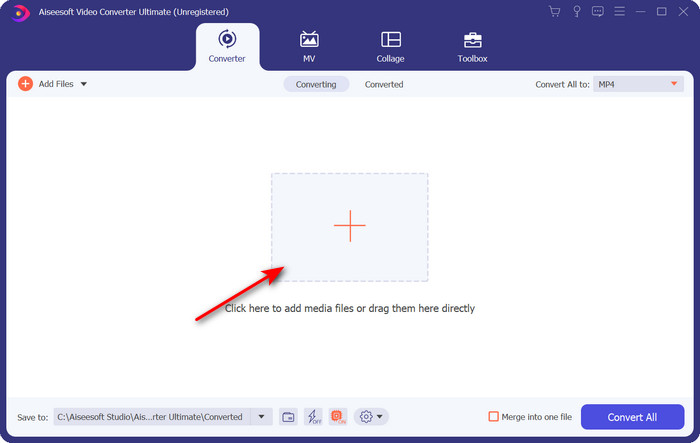
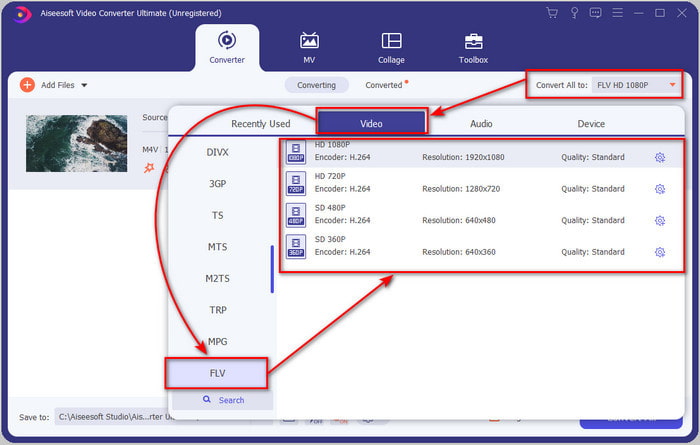
Step 3. Once the .m4v file is on the interface, click Convert All to and find the FLV format.
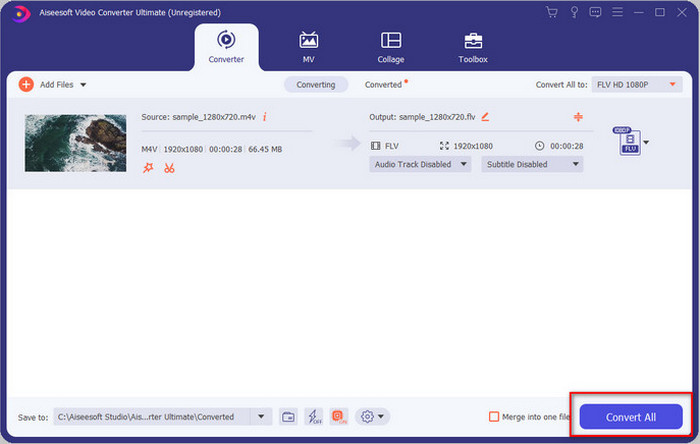
Step 4. Go ahead and click Convert All to start the changing of M4V to FLV.
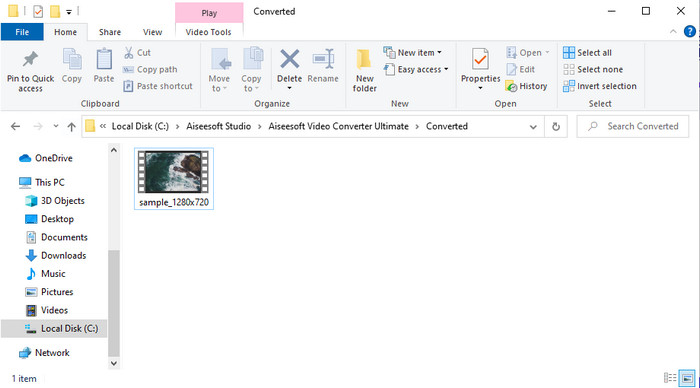
Step 5. Converting the file will take less than a minute because of the fast conversion this tool provides. A folder will show your converted file; click the file to watch or share it online.
优点
- 快速转换和硬件加速可提供最佳体验。
- 适用于所有平台,如 PC 或 Mac。
- 执行编辑视频以使其出色在这里可以不甘示弱。
缺点
- 使用前付款,但价格实惠。
- 使用前下载软件。
第 2 部分。通过在线免费将 M4V 转换为 FLV 的第二选择
Converting your files online can be efficiently executed if you use a proper convert M4V to FLV online with the help of FVC Free Video Converter Online. This online tool is the best converter you can access on all web browsers if you have an internet connection. Also, you can convert here without a limit in size, but you can't perform the batch conversion here. Even though the online software is excellent still internet connectivity is needed, so if you don't have then this is not a choice like the other web converters available. But, if you have an internet connection and want to experience a well-done free converting online, you must follow the steps below.
How to Convert M4V to FLV with the Help of the FVC Free Video Converter Online:
Step 1. Hit this link to go to the free online converter the FVC provides for you.
Step 2. On the web interface, click Add Files to Convert to download the installer. Once downloading the installer is done, hit the Add Files to Convert again and a folder, then select the M4V file.
下载桌面版以批量转换文件。
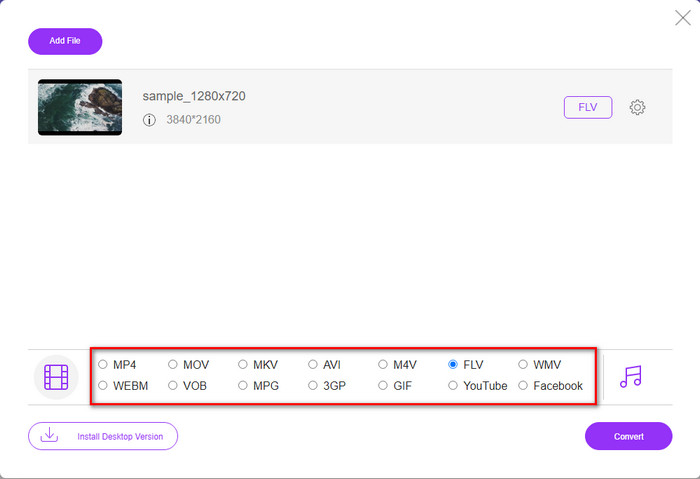
Step 3. A new web interface will show the below choose the FLV format by clicking it.
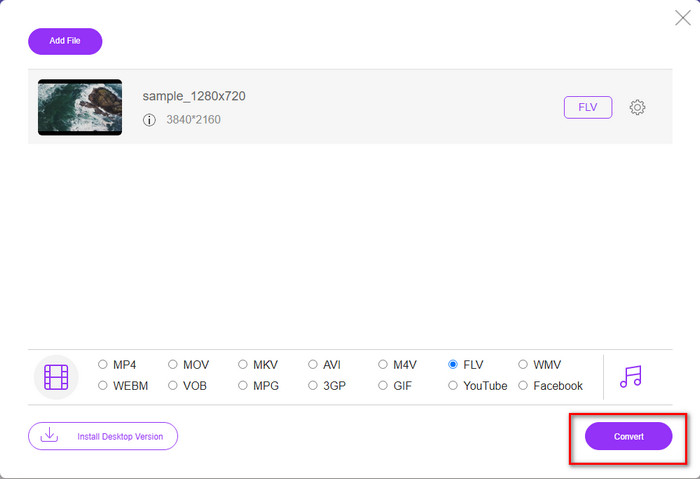
Step 4. So, to begin to convert M4V to FLV for free, click Convert.
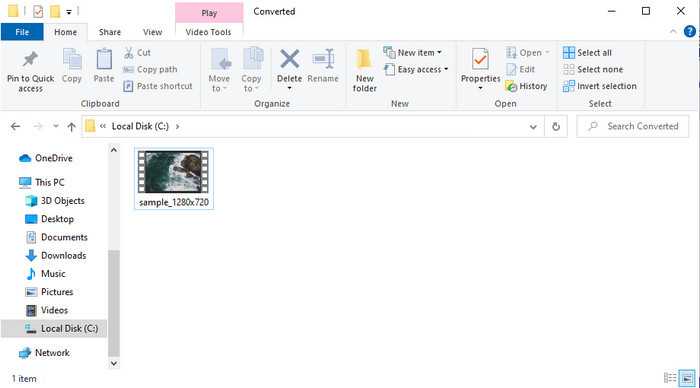
Step 5. After the conversion, a folder will show on the interface; click the file to play it on your local media player.
优点
- 免费且兼容所有网络浏览器。
- 无限的文件大小和转换。
- 安全且主要网络工具中没有广告。
缺点
- 它需要互联网连接才能使用该工具。
- 较少支持的上传和转换格式。
第 3 部分。 M4V 和 FLV 格式之间的差异
M4V 存储在您的 Apple iTunes 商店下载的最高视频质量。这种格式类似于 MP4,因为它们使用 MPEG-4 编解码器作为压缩器。但 M4V 视频受 Apple FairPlay DRM 版权保护。因此,以这种格式播放视频是很棘手的,因为如果您将它们插入到 iTunes 或 Quicktime Player 以外的媒体播放器上,它不会立即播放。通过将文件扩展名更改为 .mp4,可以在您的媒体播放器上访问未受保护的 M4V 文件。
相比之下,FLV 用于尽快通过网络传输视频和音频数据。 Flash Video 是每个 HTML 5 网站上最受青睐的格式。但是,由于 Adobe Flash 已经淘汰,这种格式已停止使用。但是,您仍然可以在下载或转换后在所需的媒体播放器插件上播放它。
M4V 与 FLV
第 4 部分。 关于 M4V 到 FLV 转换的常见问题解答
哪个更好; MP4 还是 M4V?
如果您想保护您的文件,那么 M4V 是您必须使用的格式,因为它仅在 Apple 上可用,并且受到保护。但是假设您想要一种与所有媒体播放器、编辑器等兼容的格式。在这种情况下,MP4 是您喜欢使用的通用媒体格式。
我可以在 VLC 上播放 M4V 吗?
VLC is free to use and compatible with all platforms; also, it can play almost all of the media formats. But the protected M4V can't be played here because it is protected. So now, if you want to watch .m4v on VLC, it is a must to convert the M4V file into MP4 or AVI.
转换 M4V 后质量会下降吗?
转换后的M4V,其质量应保留原始M4V质量的标准率。但是,某些转换器不支持将视频转换为 HD、1080 或 4k。因此,您最好选择完美的工具,而不是能够满足您的转换需求且不会降低其质量的好工具。
结论
All in all, the two online and offline tools presented here are destined for greatness, especially if you want to convert M4V to FLV. Also, we gain insights into the two formats, the M4V and FLV. Although altering the M4V is necessary to watch the protected file, choosing the right tool for the right job is tricky. So, we present two tools you can use to convert the format for free by using FVC Free Video Converter Online. Or rather experience new heights of converting by using the FVC Video Converter Ultimate. And now, what are you waiting for if you want to watch your M4V for free? Choose the tool above, follow the quick and easy steps presented above, and voila, enjoy the video.
-
 [指南] 如何在 Windows/Mac 上将 M4V 视频转换为动画 GIF
 如果您想从您最喜欢的 M4V 视频制作动画 GIF 文件,您可以了解 2 种简单有效的方法,使用自定义设置将 M4V 视频转换为 GIF。
-
 3 视频转换器程序用于在 Mac 上将 iTunes M4V 转换为 AVI
 不知道如何将 MKV 转换为 AVI 格式?随着我们继续阅读本文,我们将了解可以帮助您转换此文件格式的 3 种工具。
-
 免费 M4V 到 MOV 转换器 – 如何将 M4V 转换为 MOV
 如果您的媒体播放器'不支持 M4V,您是否曾经为在 iPhone 上看电影而苦恼?本文的主要主题是将其转换为 MOV 视频文件。

