


 视频转换大师
 屏幕录影大师
 视频修复
视频修复
 安全下载
安全下载如何在 Instagram Newsfeed 和 Reels 上评论 GIF
GIF 或图形交换格式是由多张图像组合而成的动画图片,或经过压缩的视频,你可以用它们为社交媒体互动增添乐趣和娱乐性。有些人甚至把这种图片格式当作梗图来用,或者以搞笑的方式表达对帖子的反应。但你是否知道,在 2012 年再次流行之前,GIF 差点在互联网世界中销声匿迹?幸运的是,随着社交媒体用户的增长,这些动画图片因为被大量用户用于点缀虚拟交流,而得以“起死回生”。如今它几乎“统治”了各大社交应用,包括 Instagram 的私信和评论区。因此,在本文中,你将学习如何在 Instagram 上用 GIF 评论。

第 1 部分:Instagram 支持 GIF 吗?
Instagram 是流行的社交媒体应用程序之一,人们可以在其中分享和展示带有简短标题的精美照片。这个照片共享平台不断发展以增强用户体验。其中一项增强功能是 GIF 的使用,允许用户在交互中添加额外的创造力和表达力。最初,该应用程序的目的只是使用有趣的 GIF 或制作可爱的 IG 故事来发送消息。但现在,您已经可以在卷轴和新闻源帖子上评论 GIF。
Instagram什么时候推出这个功能的?
Instagram 评论部分的 GIF 是由该公司负责人 Adam Mosseri 与 Meta 首席执行官马克·扎克伯格 (Mark Zuckerberg) 于 2023 年 5 月推出的。据称,推出这一最新功能是 Instagram 创始人和共同所有者的里程碑之一。他们甚至还解决了如何等待它出现在 IG 上,因为多年来评论 GIF 在 Facebook 评论部分已经很常见了。这一成就预计将鼓励 IG 用户更多地参与,因为他们可以使用 GIF 对新闻提要帖子和卷轴进行评论。
支持有区域限制吗?
IG 的 GIF 评论功能在测试期间仅限于阿根廷、爱尔兰、意大利、日本、墨西哥和美国。尽管Meta没有透露这项功能何时向所有人开放,但他们承诺,如果这项新功能在平台上获得了大量参与,他们将慢慢向全球用户推出这项功能。因此,也没有任何数据表明其区域限制。
第 2 部分. 如何在 Instagram 上评论 GIF
如果您是第一次发现此新功能,可以按照以下步骤了解如何在 Instagram 帖子上评论 GIF(前提是您已经更新了 Instagram 帐户):
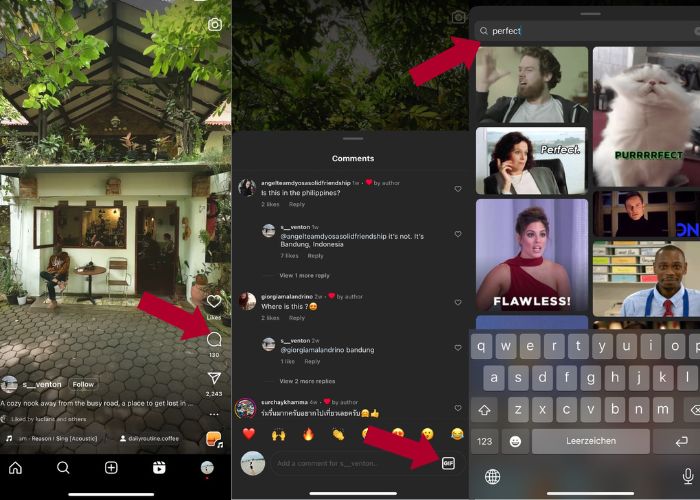
如何在 Instagram Reels 上评论 GIF:
步骤 1. 首先,前往你想互动的 Reels(短视频),然后轻触评论。
步骤 2. 接着,点按GIF 栏,即可用 GIF 发表评论。
步骤 3. 然后在 GIF 集合中选择你想评论的 GIF。你可以仔细浏览,也可以输入关键词搜索你想添加的动图。
步骤 4. 选好之后,点一下该 GIF,它就会立刻发送。
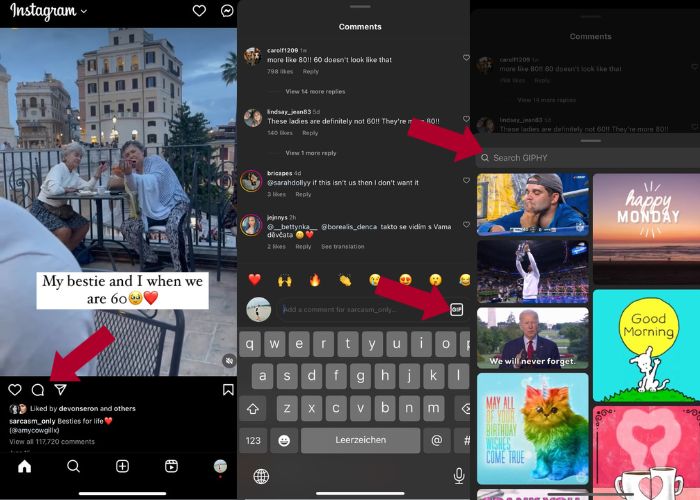
如何在 Instagram 上发布 GIF 评论:
步骤 1. 打开你好友或其他 IG 用户的动态消息流,点开你想添加 GIF 的照片,然后点击评论图标。
步骤 2. 接下来,在评论框中点击GIF 图标。
步骤 3. 搜索一个 GIF,或向下滚动查看更多 GIF,选定 GIF 后返回评论区,查看它是否已成功添加。
第 3 部分:为什么我无法在 Instagram 上评论 GIF
如果您无法使用 GIF 在 Instagram 上添加评论,您可以尝试更新您的应用。如果您碰巧仍然找不到 GIF 按钮,则您所在的国家/地区可能属于 Meta 尚未发布此新功能的地区之一。所以你必须等到它到达你的国家。
第 4 部分:如何使用 Best GIF Maker 为 Instagram 制作 GIF
若想个性化你的 GIF,你需要先将 MP4 格式的视频转换为 GIF。你也可以将多张图片制作成动画 GIF 文件。为此,让 Video Converter Ultimate 来帮你。这款软件是一个功能全面的视频编辑工具,可让你轻松编辑和转换视频。它内置 GIF 制作工具,用户可以即时为自己的 Instagram 创建 GIF。借助循环动画(Loop Animation)功能,你会惊讶于这款应用是如何把静态图片转成 GIF 的。
此外,该工具还附带了必要的编辑工具来增强您的 GIF ——编辑其对比度、饱和度、亮度和色调。您还可以使用其过滤器来设置 GIF 的基调。如果您有较长的视频,也可以使用此 GIF 制作工具对其进行修剪。此外,该软件还可以让您修改 GIF 的输出格式和帧速率。最好的部分是这个应用程序为初学者提供了直观的界面。
如果您觉得这个视频转换器令人生畏,让我们向您展示 Video Converter Ultimate 如何如此易于使用。只需按照以下步骤操作:
步骤 1. 安装并启动 Video Converter Ultimate
要开始转换过程,先点击下方免费下载按钮下载软件并安装。安装完成后,在电脑上启动程序,等待配置过程结束,然后点击立即开始进入使用。
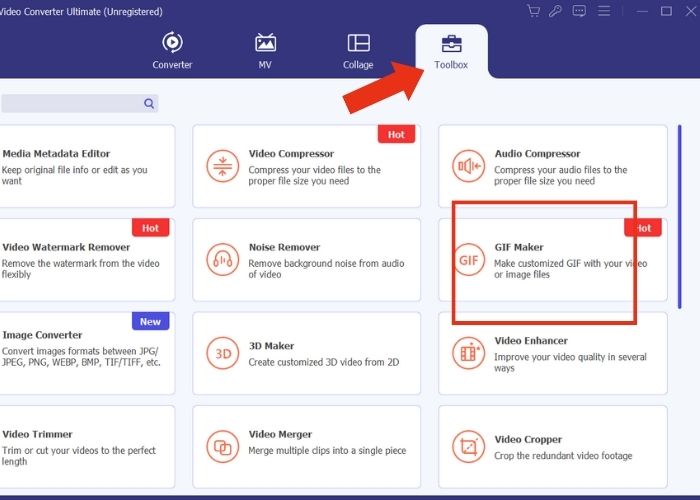
步骤 2. 导入素材
在应用主界面,转到工具箱标签,仔细浏览工具集并找到GIF 制作工具。在这里,如果你想把视频转换成 GIF,就点击视频转 GIF;如果你想把多张图片做成 GIF,就点击照片转 GIF。
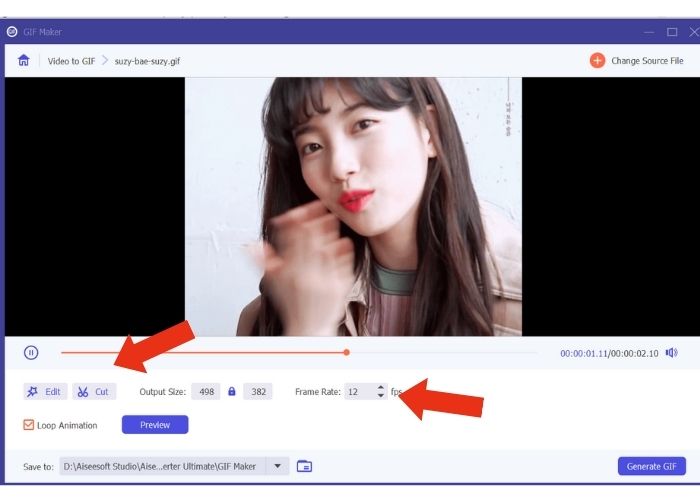
步骤 3. 修改文件设置
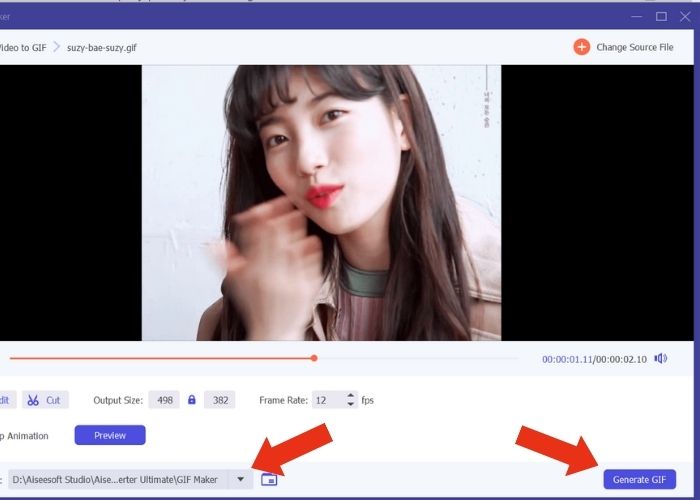
添加文件后,通过调整输出尺寸(Output Size)和帧率(Frame Rate)来设置 GIF 的属性。然后点击编辑,以控制视频的色彩强度或添加滤镜进行增强。接着点击剪切来裁剪源文件的时长,因为大多数 GIF 的时长一般不应超过 6 秒。
步骤 4. 导出并保存成品
在导出前,先选择保存输出文件的路径或文件夹。然后点击生成 GIF按钮导出 GIF。稍等片刻,工具会处理你的 GIF。完成后会弹出一个新窗口,你可以在其中预览最终成品。
第 5 部分. 如何将 GIF 上传到 Instagram 评论
现在您已经有了自己的 GIF,这部分将向您展示如何在 GIPHY 网站上上传。以下是您必须执行的步骤:
步骤 1. 创建一个 GIPHY 账号。
步骤 2. 导入你预先制作好的 GIF。
步骤 3. 添加标签,然后点击上传到 GIPHY按钮。
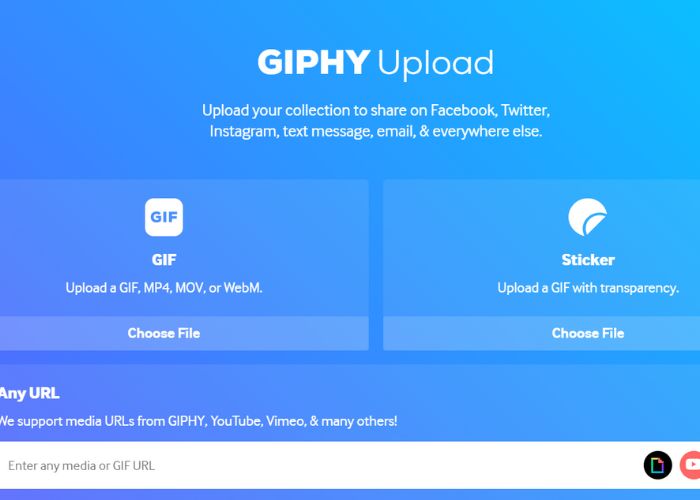
等待几天,您的 GIF 就会上传到 Instagram 的 GIPHY 库。这是一个试错活动,但此方法可能不适用于您所在的国家/地区。
延伸阅读:
在桌面端、iPhone 或 Android 上为 Instagram 调整照片尺寸
在 Windows 与 Mac 上用最佳动画 GIF 循环工具实现 GIF 循环
第 6 部分:有关如何在 Instagram 评论上发布 GIF 的常见问题解答
您可以使用 GIF 作为 Instagram 个人资料图片吗?
目前,Instagram 上的 GIF 仅限于故事、消息、Reels 上的评论框和动态消息帖子。
Instagram 消息中会显示 GIF 吗?
是的。 GIF 也适用于 Instagram 消息。
你能在 Instagram 上回复图片吗?
对于消息传递来说,是的,可以。然而,尚未允许回复 Reels 和 Newsfeed 上的故事和评论框。
如何将相机胶卷中的 GIF 放入 Instagram 故事中?
以下是如何在 Instagram 限时动态中发布 GIF:
使用 Video Converter Ultimate 将你的视频转换为 GIF,并把输出结果保存到手机相册。然后将它上传到 GIPHY 网站,等待几天,直到它出现在 GIPHY 素材库中。接着,使用你之前添加的标签来搜索这张预制 GIF。
为什么我无法回复 Instagram 上的评论?
目前,Instagram 仅支持在新闻源帖子和卷轴上评论 GIF。不幸的是,它不允许用户使用 GIF 回复评论。
结论
现在你已经知道如何在 Instagram 帖子下用 GIF 评论,就可以在好友的动态和 Reels 下用有趣的 GIF 参与互动。你也可以使用这款优秀的视频转换器——Video Converter Ultimate 自制 GIF。不过要注意,发表 GIF 评论要适度,否则有可能被判定为垃圾信息。
-
 关于如何在 iPhone 上将 GIF 保存为视频的 5 个最佳网站
 无法将 GIF 保存到我的 iPhone'?继续阅读这篇文章,我们将为您提供将 GIF 保存到 iPhone 的可能解决方案。
-
 [免费和付费] GIF 变速器:2023 年热门精选
 您是否对您在网上制作的 GIF 不满意,因为它既乏味又缓慢?这将是您的幸运日,因为我们提供了一篇关于 GIF 速度转换器的文章以及帮助您使用和掌握它的详细信息。
-
 如何在发布图像和视频之前添加和制作 Instagram 过滤器
 Instagram 上的过滤器是什么?如何应用它?如何制作一个?这些问题将在这篇文章中得到直截了当的答案,所以请阅读它们。
