


 视频转换大师
 屏幕录影大师
 视频修复
视频修复
 安全下载
安全下载将 WebM 转换为动画 GIF 的 3 种免费方法
最近,GIF 在各类社交应用上变得非常流行。你是否正在寻找一种方法,将视频(比如 WebM 转换为 GIF)?
其实,只要你找到一款优秀的动画 GIF 转换器或GIF 制作工具,用一些短视频片段就能轻松制作属于自己的 GIF。市面上有很多视频转 GIF 的转换器,包括免费在线工具,都声称可以帮你轻松完成 WebM 到 GIF 的转换。但在众多工具中,你可能不知道该选哪一个。

结合你的需求,本文将分享3 种免费的 WebM 转 GIF 方法。我们会为你推荐 3 款优秀的视频转 GIF 转换器,用来制作动态 GIF。除了 WebM,它们还支持 MP4、MOV、AVI、FLV 等常见视频格式。你可以在这里获得关于如何用这些工具将 WebM 转换为 GIF 的详细指南。
第 1 部分。使用免费在线转换器将 WebM 转换为 GIF
在第一部分,我们先为你介绍一款很受欢迎的在线视频转 GIF 转换器——Free Online Video Converter。它可以充当视频转 GIF 转换器,帮助你在线把 WebM 视频转换成 GIF。
除了 WebM,它还高度支持 MP4、MOV、MKV、AVI、FLV、WMV、M4V 等所有常见视频格式。这意味着你几乎可以上传任何视频到这个在线 GIF 转换器,并将其转成 GIF 文件。现在你可以按照下面的指南来免费在线将 WebM 转换为 GIF。
步骤 1: 打开你常用的浏览器(如 Google Chrome、Microsoft IE、Safari、Yahoo 或 Firefox),进入这个免费 WebM 转 GIF 转换器网站。进入后,点击Add Files to Convert按钮,快速安装用于 GIF 转换的启动器。只在第一次使用时需要安装。
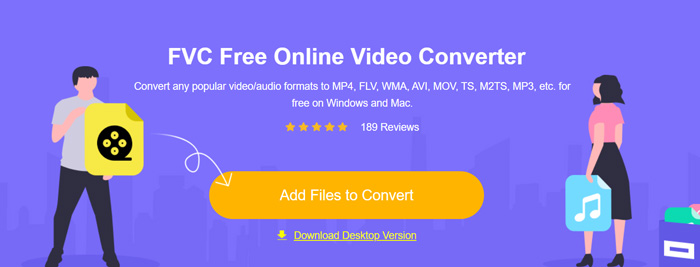
步骤 2: 安装完成后,会弹出窗口,你可以在其中浏览并选择你的 WebM 视频。在某些情况下,你可能需要再次点击 Add Files to Convert 按钮手动上传文件。然后你会进入转换器界面。
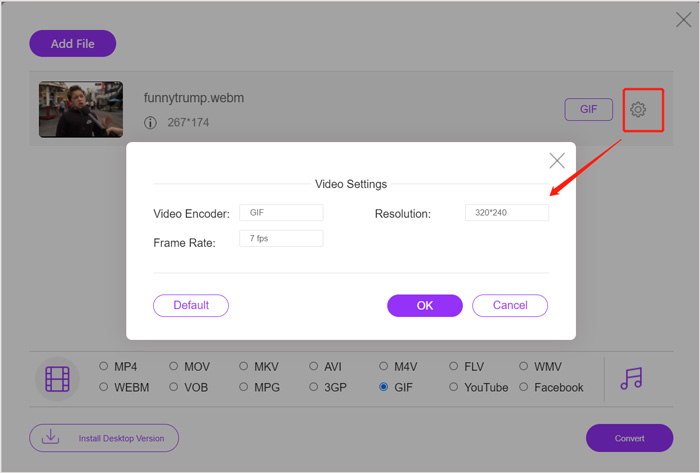
步骤 3: 在界面中会列出多种常用的视频格式。在这里你需要选择GIF作为输出格式。点击输出 GIF 格式旁边的settings图标,可以自定义视频编码器、分辨率以及帧率。点击OK保存设置。完成上述操作后,只需点击 Convert 按钮即可开始 WebM 到 GIF 的转换。正如前面提到的,它也能轻松将 MP4 转换为 GIF。
第 2 部分。 无质量损失地将 WebM 转换为 GIF 的免费方式
除了在线 WebM 转 GIF 转换器,还有其他免费的 GIF 转换工具可以帮助你将 WebM 转换为 GIF。这里强烈推荐你使用Free Video to GIF Maker。它专门用于处理各种视频和音频格式转换,能够在无损画质的情况下将 WebM 转换为 GIF。
步骤 1: 这款 WebM 转 GIF 转换器支持在 Windows 10/8/7 PC 和 Mac 上创建自己的 GIF。你可以根据系统选择合适的版本并免费下载安装到电脑上。
启动程序后,点击左侧的More Products以显示更多工具。找到Video to GIF Converter并点击其图标进行安装。
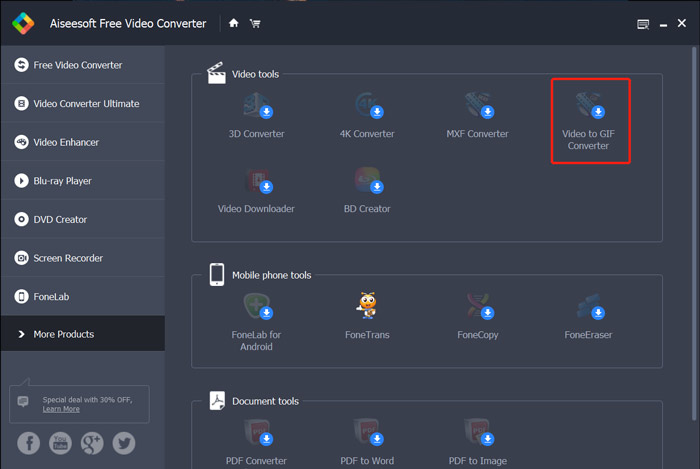
步骤 2: 安装完成后,会自动进入 Video to GIF Converter 界面。在这里你可以点击Add File来导入你的 WebM 文件。
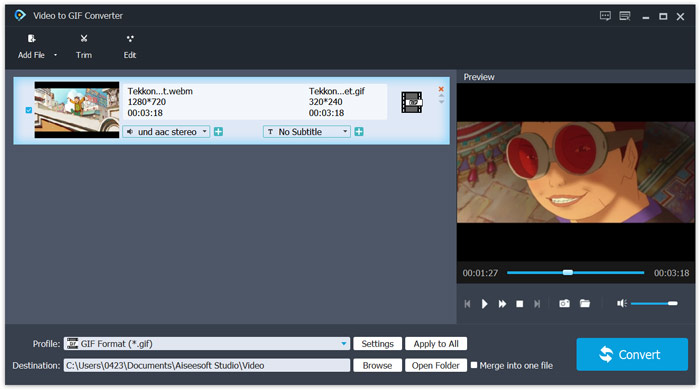
步骤 3: 这款免费的 WebM 转 GIF 转换器内置多种编辑功能,例如剪切、合并、旋转、效果、添加水印等。在转换为 GIF 之前,你可以使用这些功能对文件进行编辑并调整输出效果。
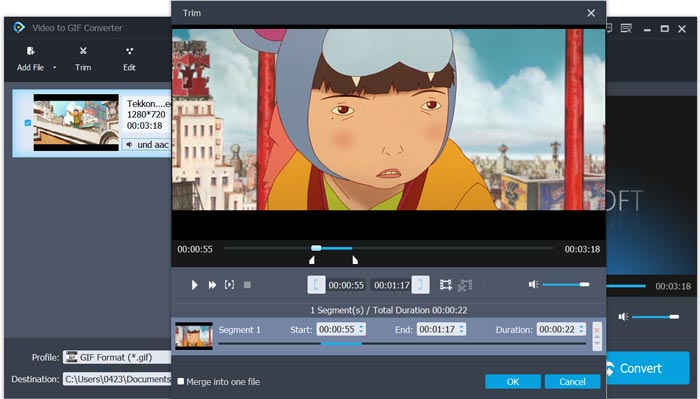
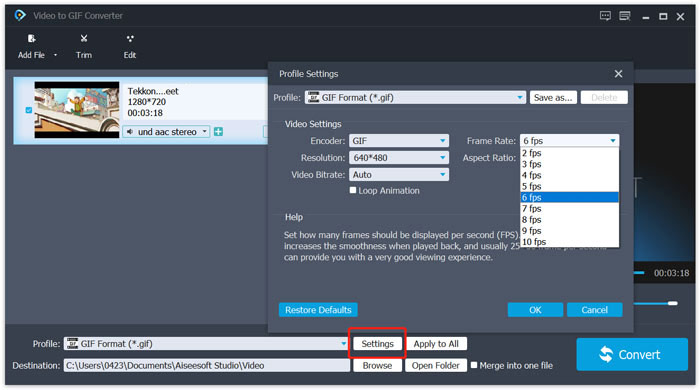
步骤 4: 目标格式会自动设置为GIF。你可以点击Profile旁边的Settings按钮,以自定义更多参数。完成设置后,点击Convert按钮,即可开始将 WebM 转换为动态 GIF。
第 3 部分。如何使用 ZAMZAR 将 WebM 更改为 GIF
Zamzar 是一款功能全面的在线文件转换器,可以轻松帮你将 WebM 转换为动态 GIF。它为用户提供多种转换服务,包括视频、音频、文档、电子书以及其他文件的转换。它有专门的 WEBM to GIF 页面,可直接进行 WebM 到 GIF 的转换。
步骤 1: 在浏览器中打开这个免费的在线 WebM 转 GIF 转换器页面。
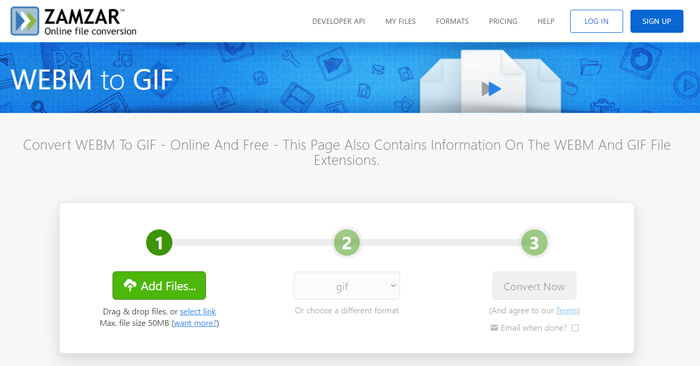
步骤 2: 点击Add Files按钮上传你的 WebM 文件。上传的单个文件大小限制为 50MB。
步骤 3:确认输出格式为GIF,然后点击Convert Now按钮。这个免费在线 GIF 转换器会开始上传文件并执行转换。
步骤 4: 转换完成后,你可以点击Download,将转换好的 GIF 文件保存到电脑中。转换后的文件会在其服务器上保留 24 小时。
第 4 部分。 将 WebM 转换为 GIF 的常见问题
问题 1. WebM 是 GIF 吗?
不,WebM 是 GIF 格式的一种替代品。与 GIF 相比,WebM 具有更高的质量和更小的文件大小。更重要的是,WebM 允许您控制其播放,如停止、开始、自动播放和循环播放。 GIF 不需要任何人按播放。
问题 2. 我可以更改文件扩展名以将 WebM 转换为 GIF 吗?
您可以轻松地将 WebM 文件扩展名更改为 .gif 以进行 WebM 到 GIF 的转换。用这个方法,你终于可以得到一个GIF文件了。但是,在大多数情况下,GIF 文件会损坏,无法正常打开或播放。
问题 3. 为什么 GIF 的质量这么低?
大多数 GIF 都是以低分辨率和小尺寸创建的。与静态图像相比,很难将一系列运动图像保持在相同的文件大小。所以大多数 GIF 看起来质量都很低。另一方面,GIF 文件可以经常共享。因此,每次保存或重新上传源文件时,源文件都会被压缩并且看起来更糟。但是仍然有很多视频到 GIF 转换器,GIF 创作者可以轻松导出高质量的 GIF。
结论
用 WebM 视频制作 GIF 非常简单。通过本文,你可以获得 3 种在电脑或在线免费将 WebM 转换为 GIF的方法。使用文中推荐的转换器,你也可以将FLV 转换为 GIF。当你想把某段视频剪辑变成动态 GIF 时,可以根据喜好选择合适的工具来完成这项工作。
-
 适用于Windows和Mac的5大最佳鼠标和键盘记录器
 这是可以保存鼠标移动和键盘单击并重复事件的前五名最佳鼠标和键盘记录器程序。
-
 高质量压缩GIF并减小其文件大小的教程
 这是在计算机或手机上压缩GIF的2种简单方法。您可以使用FVC Free Online Video Compressor和Photoshop在不同方面减小GIF文件的大小。
-
 GIF Player –适用于Windows PC,Mac,Android和iPhone的5种最佳GIF播放器
 什么程序打开GIF文件?如何在Android上查看GIF? iPhone是否具有用于打开GIF的GIF播放器?此帖为您分享5个最佳GIF播放器。
