


 视频转换大师
 屏幕录影大师
 视频修复
视频修复
 安全下载
安全下载2 将 WMV 转换为 GIF 文件以便于共享的有效方法
当您从WMV视频中剪下有趣而精彩的片段并想与您的朋友分享时,您会发现它们无法通过许多平台发送。最好的解决方案是将 WMV 片段转换为小尺寸和与网络或便携式设备高度兼容的动画 GIF 文件。通过这种方式,您可以通过任何应用轻松分享视频中您最喜欢的时刻。
本文将为你介绍两种将 WMV 视频转换为 GIF 动图的最佳方法,并附有详细步骤。你可以选择功能全面、能解决所有问题的专业方法,也可以选择步骤更简单但功能较少的便捷方法。请继续阅读,了解更多详细内容。

第 1 部分:免费将 WMV 视频转换为 GIF 的最佳有效方法
如果你想高效地将 WMV 视频制作成有趣的 GIF 动图,应该借助专业的 GIF 制作工具——FVC Free Video to GIF Maker。它实际上是一款多功能视频转换器,支持将 100 多种格式互相转换,包括把 WMV 格式转换为 GIF。此外,它还支持调节视频分辨率和帧率,以保持高画质和流畅度。
- 1. 通过简单的点击将 WMV 视频传输到 GIF。
- 2. 修剪和剪辑 WMV 视频以保留所需的部分。
- 3. 自由自定义视频分辨率、帧率和效果。
- 4. 在制作 GIF 之前对 WMV 进行裁剪、水印、水印和旋转。
步骤 1: 在 Windows/Mac 上免费下载并安装 FVC Free Video to GIF Maker 并启动。点击“添加文件(Add Files)”按钮,选择你想要转换为 GIF 的 WMV 视频。
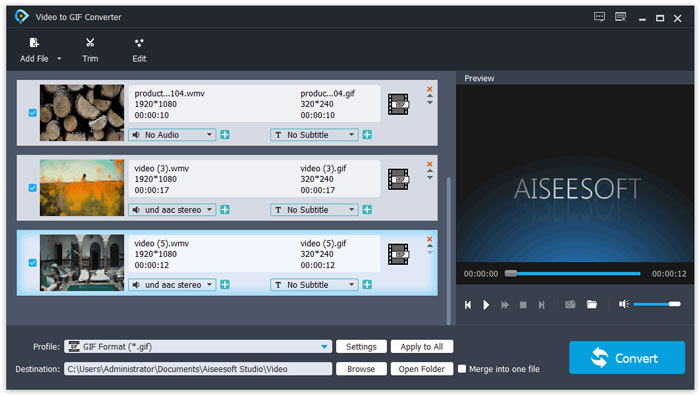
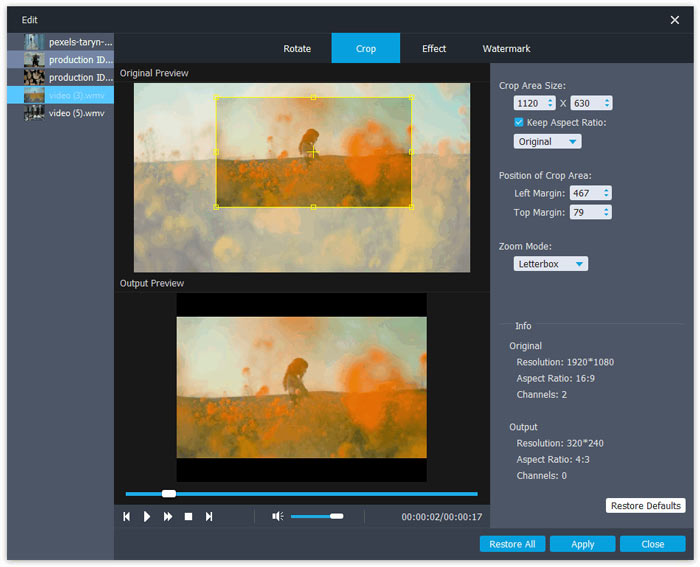
步骤 2: 点击“编辑(Edit)”按钮,将视频剪辑成短动画。你也可以自由裁剪和旋转视频。之后还可以根据需要自由添加主题、特效和字幕。
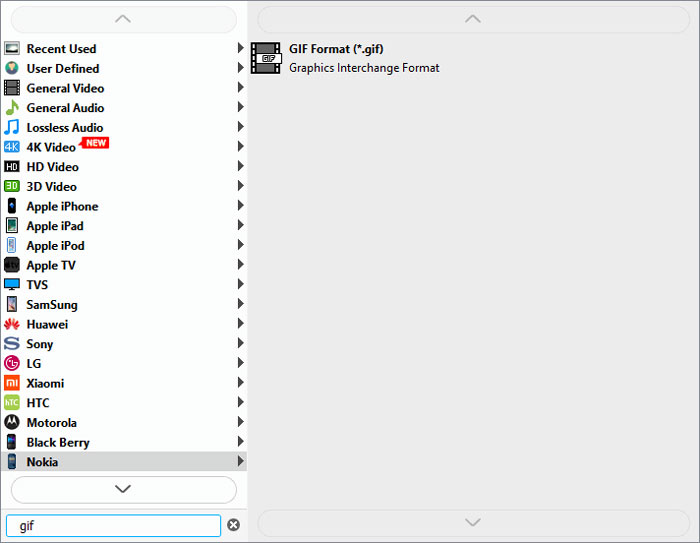
步骤 3: 接着点击'配置文件(Profile)'菜单,选择GIF格式作为导出格式。为保持 GIF 文件的画质与流畅度,点击“设置(Settings)”图标,将分辨率和帧率调至最高。然后返回主界面,点击“转换(Convert)”按钮,开始将 WMV 转换为 GIF。
第 2 部分:如何轻松地免费在线将 WMV 转换为动画 GIF
FVC Free Online Video Converter 操作非常简单,可以帮助你在线将 WMV 视频转换为动画 GIF,而无需下载其他软件。它支持导入任意格式,并可将视频输出为 10 多种常见格式。尽管 GIF 的分辨率和帧率设置偏低,但对于快速转换来说,它依然是最佳选择。详细步骤如下:
步骤 1: 在任意浏览器中打开 FVC Free Online Video Converter。点击“添加待转换文件(Add Files to Convert)”按钮安装启动器。安装完成后,再次点击该按钮添加已编辑好的 WMV 文件并启动转换器。
下载桌面版以批量转换文件。
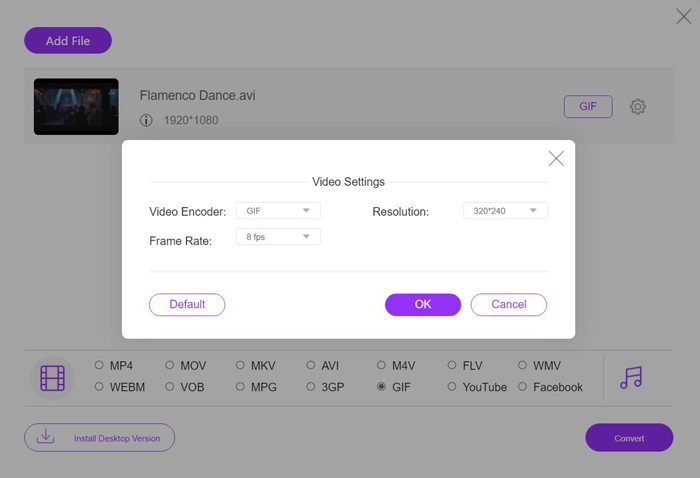
步骤 2: 在视频格式列表中选择 GIF 格式,然后点击'设置(Settings)'图标,将分辨率设置为 320×240p、帧率设置为 8 fps。接着点击“确定(OK)”保存设置。之后,点击“转换(Convert)”按钮,选择保存路径并开始将 WMV 视频转换为 GIF 文件。
WMV 与 GIF
第 3 部分:将 WMV 视频转换为 GIF 的常见问题
1.如何将WMV转为原始画质的GIF?
实际上,将WMV 转换为GIF 后,您无法保持原始质量。 GIF 仅支持 256 位颜色,因此图像质量相对较低,文件大小较小。但是您可以使用 FVC Free Video to GIF Maker 来调整设置并保持相对较高的质量。
2.为什么我不能在Twitter上发送WMV片段?
那是因为 Twitter 只支持 MP4 和 MOV 视频格式。如果您想在 Twitter 上分享电影片段,您最好将 WMV 视频转换为兼容的更小尺寸的 GIF 文件。
3. WMV 转 GIF 时需要删除音轨吗?
不,你不需要这样做。由于 GIF 仅与多个图像组合,因此它不支持音频文件。当您想将 WMV 传输到 GIF 时,音轨将被自动清除。
结论
GIF 现在非常流行,您可能想从 WMV 视频创建有趣或精彩的 GIF。本文介绍了 2 种简单有效的方法来帮助您将 WMV 视频转换为 GIF。您可以通过基本调整免费在线将 WMV 转换为 GIF。为了保持高质量和流畅性,请免费下载 FVC 免费视频到 GIF Maker 以更改分辨率和帧速率。
-
 免费 FLV 到 Xvid 转换器 – 将 FLV 转换为 Xvid 用于 CD/DVD 播放器
 这篇文章是将 FLV 自由转换为 Xvid 编码文件的分步指南,以便您可以毫不费力地在 CD 和 DVD 播放器上播放 FLV 视频文件。
-
 如何在 Windows Media Player 中下载 MKV 编解码器以实现流畅播放
 无法在 Windows Media Player 中播放 MKV 视频?您可以免费下载 Windows Media Player 的 MKV 编解码器。相反,转换 MKV 使其可在 Windows Media Player 中播放。
-
 如何在 Windows/Mac 上将 AVI 视频转换为动画 GIF 文件
 想要选择有趣的 AVI 片段来创建 GIF 模因吗?本文将告诉您剪辑 AVI 视频和免费将 AVI 转换为动画 GIF 文件的 2 种最佳方法。

