


 视频转换大师
 屏幕录影大师
 视频修复
视频修复
 安全下载
安全下载将 TIFF 转换为 JPG 和 PNG 的有效方法
TIFF 是一种在摄影师和平面设计师中常见的图像文件格式。它具有高质量、高灵活性和几乎通用的兼容性。但它的文件体积较大,不便于与他人分享或在网页上使用。在这种情况下,将该文件转换为其他格式是最佳解决方案之一。JPG 和 PNG 相比 TIFF 体积更小。因此,将 TIFF 转换为 JPG 和 PNG 会更好。本文将为你提供将 TIFF 转换为 JPG/PNG 格式的最佳方法。同时,你还会了解这些图像文件格式的所有相关信息。事不宜迟,一起来阅读这篇文章,获取你所需要的解决方案。

第 1 部分。TIFF 对比 JPG 对比 PNG
| 文件格式 | 时间格式/时间格式 | JPG | PNG |
| 文件扩展名 | .tif / .tiff | .jpg | .png |
| 由开发 | Aldus(被 Adobe 收购) | 联合摄影专家组 | 巴布亚新几内亚发展集团 |
| 描述 | 1992 年,标签图像文件格式 (国际电影节) 发展了。开发人员可以扩展这种灵活的文件类型以满足多种需求。 TIF 和 TIFF 文件都是用于存储图像的图像文件格式。但是,这些格式之间存在一些区别。 TIFF 图像文件能够在一个文件中存储多个图像。另一方面,TIF 文件只能存储一个图像。此外,TIFF 文件可以存储有关图像的元数据,但 TIF 文件不能。 | JPG 和 JPEG 是相同的扩展名,指的是相同的数字图像格式。 JPEG 和 JPG 格式之间没有区别。唯一的区别是使用的字符数。 JPG 文件以文件扩展名 .jpg 保存,JPEG 文件以扩展名 .jpeg 保存。 JPEG 是联合图像专家组的缩写。 | PNG 的首字母缩写代表便携式网络图形。您可以保存高质量的照片并使用 PNG 格式分享它们。 PNG 可以处理惊人的 1600 万种颜色。它还支持透明和半透明背景。 PNG 图像文件是一种开放格式,这意味着您可以从任何图像编辑软件保存和打开 PNG 文件。 |
第 2 部分。将 TIF/TIFF 在线转换为 JPG/PNG 的优秀方法
FVC Free Image Converter 是一款极佳的在线转换工具,可以将 TIFF 转换为 JPG/PNG。转换过程非常简单,三步即可完成图像转换。它还支持批量转换,可以一次性转换多张图片,也就意味着你可以在更短时间内完成图像转换。该工具易于理解,界面直观,设置清晰明了。此外,FVC Free Image Converter 支持多种输入格式,包括 JPG、PNG、BMP、TIFF、WEBP 和 GIF。更重要的是,这款转换工具完全免费,并且重视用户隐私,在你的图片转换并保存完成后,会立即删除你的数据。该在线应用可在各类浏览器中使用,大大提升了用户的可访问性。要使用这个 TIFF 转 JPG 转换器,请按照下方的简单步骤操作。
将 TIF/TIFF 转换成 JPG
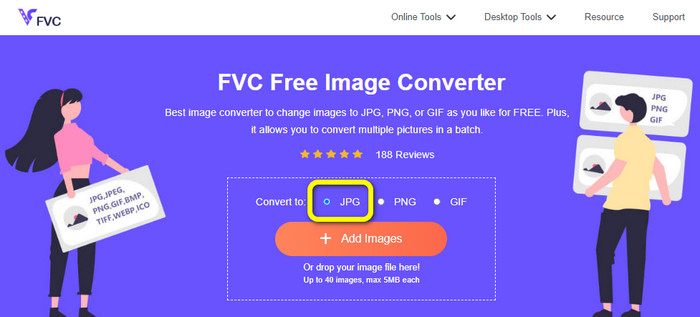
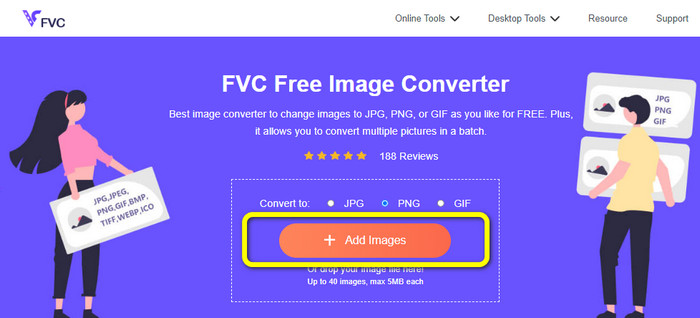
步骤 1: 在浏览器中访问 FVC Free Image Converter 网站。然后在 Convert to(转换为)选项中选择 JPG 文件格式。
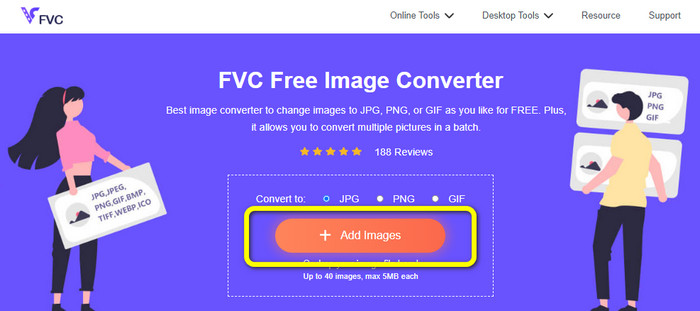
步骤 2: 接下来点击 Add Images(添加图片)按钮。点击后,电脑屏幕上会弹出文件夹窗口。选择要转换的图像文件,然后点击 Open(打开)。
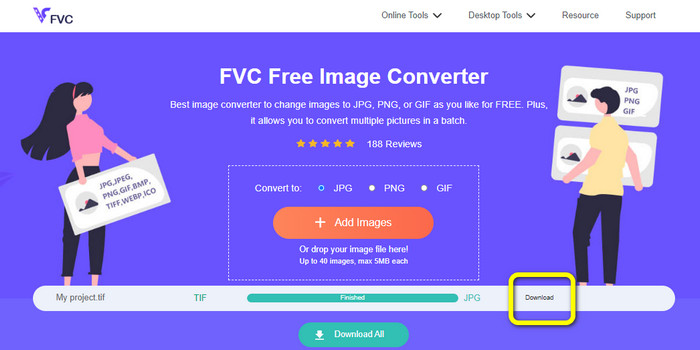
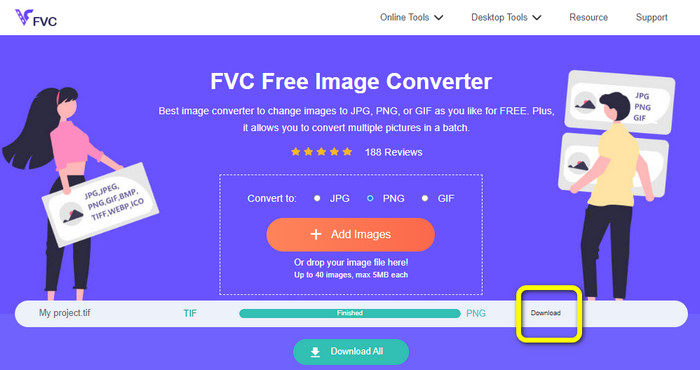
步骤 3: 图片上传后,图像转换器会自动开始转换。完成后,点击 Download(下载)按钮,将转换后的图片保存并下载到电脑中。
将 TIFF/TIF 转换成 PNG
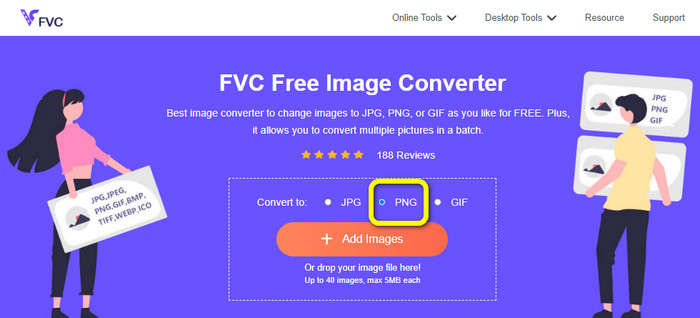
步骤 1: 在网页中,从格式选项里选择 PNG 文件格式。
步骤 2: 点击 Add Images(添加图片)按钮。文件夹窗口出现在屏幕上后,选择你想要转换的 PNG 文件,然后点击打开。
步骤 3: 转换完成后,点击 Download(下载)按钮。等待保存结束后,到文件夹中打开你的图片。点击此处了解如何将 BMP 转换为 JPG 或 PNG。
第 3 部分。将 TIF/TIFF 离线转换为 JPG/PNG 的最佳方法
Video Converter Ultimate 是将 TIF 文件转换为 JPG 和 PNG 的最佳离线方式之一。你可以在 Mac 和 Windows 系统上下载并使用该程序。通过这个离线图像转换器,你可以将 TIF 文件转换为 JPG 和 PNG。此外,它还支持 WEBP、BMP、GIF、TIFF、JPG、PNG 等多种格式。该转换器具备友好的用户界面,非常适合专业人士和初学者使用。如果你想一次性转换多个文件,也完全没有问题。其一大亮点功能就是支持批量转换,因此对经常需要转换图像文件的用户来说非常方便。此外,在转换图像的同时,你还能进行更多设置。在设置图标中,你可以放大或缩小图片,还可以根据个人喜好调整图像质量,从而获得理想的输出效果。请按照以下基本步骤,将 TIF 转换为 JPG 和 PNG 格式。
将 TIFF 转换为 JPG
步骤 1: 在电脑上下载 Video Converter Ultimate。安装完成后运行该程序。点击下方的 Download(下载)按钮即可轻松获取此转换器。
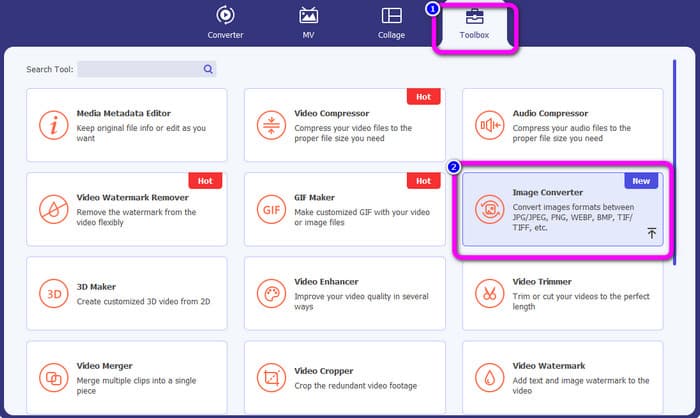
步骤 2: 点击界面顶部的 Toolbox(工具箱)面板,选择 Image Converter(图像转换器)功能。
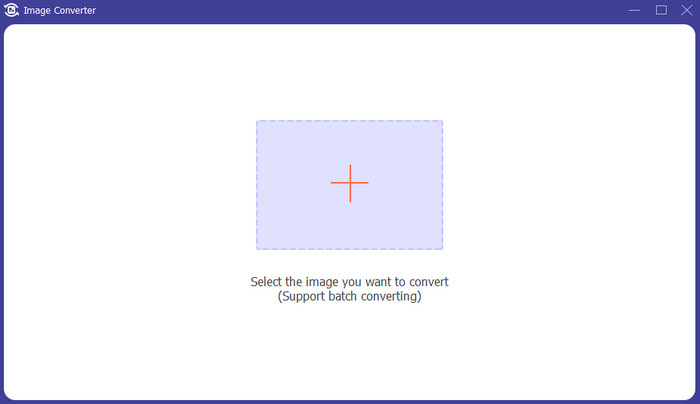
步骤 3: 然后点击中间界面上的 Plus(加号)按钮。从文件夹中选择 TIFF 图像文件并打开。
步骤 4: 如果你想添加更多图片,点击 Add Source file(添加源文件)按钮。接着前往 Convert All to(全部转换为)选项,选择 JPG 文件格式。
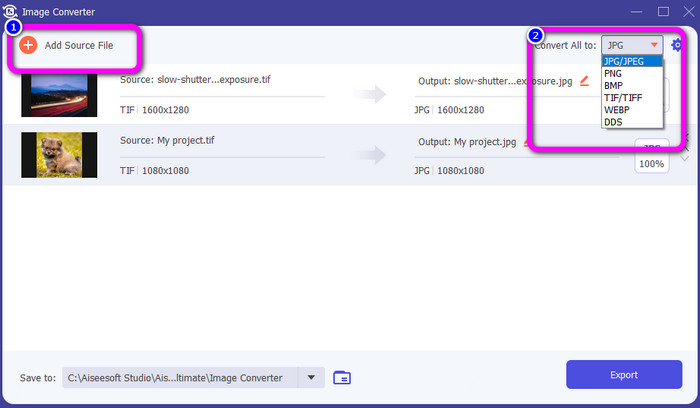
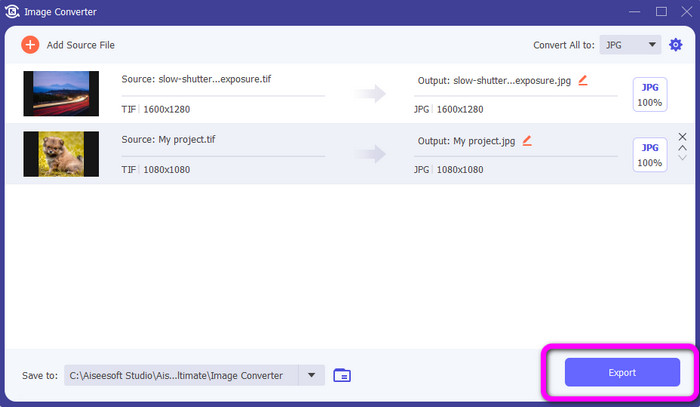
步骤 5: 最后,在选择 JPG 作为输出格式后,点击 Export(导出)按钮。转换完成后,你就可以在文件夹中打开已转换的图片。
将 TIFF 转换为 PNG
步骤 1: 你可以按照上述相同的流程操作。进入 Toolbox(工具箱)面板,并选择 Image Converter(图像转换器)功能。
步骤 2: 点击 Plus(加号)图标,插入你想转换的 TIFF 文件。
步骤 3: 添加完 TIFF 图片后,前往 Convert All to(全部转换为)选项,选择 PNG 文件格式作为输出格式。
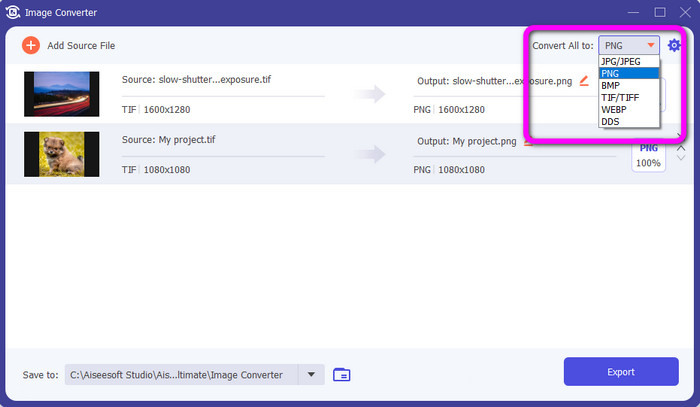
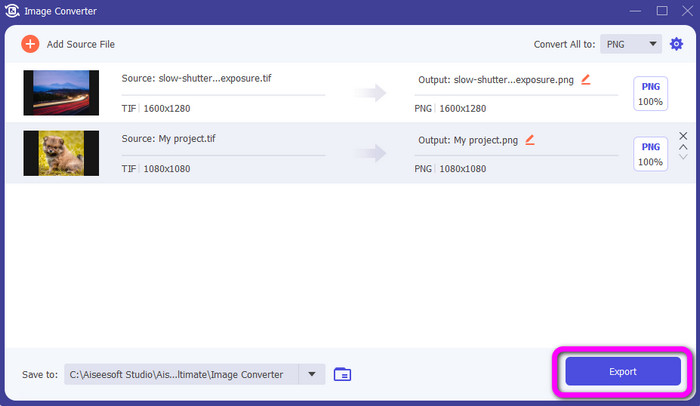
步骤 4: 最后一步,在界面左下角点击 Export(导出)按钮。你也可以使用此软件将 JPG 转换为 PNG。
第 4 部分。有关将 TIF/TIFF 转换为 JPG/PNG 的常见问题解答
1. 如何在 Mac 上将 TIFF 转换为 PNG?
在 Mac 上将 TIFF 转换为 PNG 的有效方法之一是使用 FVC Free Image Converter。在 Mac 上打开 Safari 浏览器,访问这个在线图像转换器。在主页面中,从格式选项里选择 PNG 格式。点击 Add Images(添加图片)按钮,导入你想转换的 TIFF 文件。在上传过程中,文件会自动被转换。然后点击下载按钮,将转换后的图片保存到你的 Mac 上。
2. 将 TIF 转换为 PNG 有什么好处?
如果要使文件更小,则需要将 TIF 文件更改为其他格式。最好将 TIF 转换为 PNG 文件,因为 PNG 文件较小。它将为您提供适合 Web 浏览器和设备的可管理文件大小。
3. 哪个文件更容易发送,JPG 还是 TIFF?
JPG 文件格式具有较小的文件大小。它使在线或通过电子邮件发送图像变得更加容易。 TIFF 文件较大,发送图像速度较慢。
结论
现在你已经知道,TIFF 图像文件的体积更大。如果你想在网上更快速地发送图片,最好将其转换为体积更小的其他格式。因此,本文为你提供了将 TIFF 转换为 JPG 和 PNG 的最佳解决方案。如果你想更轻松地转换图像文件,推荐使用 FVC Free Image Converter。它提供了易于理解的界面和简单的图像转换方法。
-
 高效地将 JPEG 转换为 JPG [列出的五种方法]
 快来获取关于将 JPEG 转换为 JPG 图像文件格式的最简单教程。单击此指南并开始学习您喜欢的方法
-
 将 PNG 快速转换为 JPG 的 5 大领先教程
 如果您需要将 PNG 文件转换为 JPG 格式,您可以在此处了解最佳方法。您还将了解 PNG 和 JPG 文件格式之间的区别
-
 关于 JPEG 与 JPG 与 PNG 差异的完整详细信息
 这篇文章将为您提供有关 JPEG、JPG 和 PNG 的区别的足够信息。此外,您还将学习如何将图像转换为这些文件
