


 视频转换大师
 屏幕录影大师
 视频修复
视频修复
 安全下载
安全下载3 种轻松压缩电子邮件照片的方法 [指南]
电子邮件是发送带有照片附件和其他所需文件的消息的绝佳平台。但是,有些用户在发送大文件照片时会遇到困难,因为它们会导致上传时间变慢、发送失败或超出电子邮件提供商规定的附件大小限制。为了避免这些问题,在发送照片之前调整照片大小是必不可少的。
因此,在本文中,我们将带你了解 3 种为电子邮件压缩照片的方法,确保你的照片附件在不牺牲画质的前提下,依然能够轻松发送与接收。

第一部分:压缩照片用于电子邮件的好处
总的来说,压缩照片有很多好处,包括用于电子邮件。以下是调整电子邮件照片大小时您可以享受的好处:
• 由于图像压缩意味着将照片调整为更小的尺寸,相比未压缩的照片,你就可以在一封邮件中轻松附上多张照片。
• 电子邮件服务提供商通常会对附件大小设置上限。通过为邮件压缩照片,你就能将附件控制在这些限制之内,确保邮件顺利送达。这在需要群发邮件,或是在照片之外还要附加其他类型文件时尤其有用。
• 照片压缩后,只是占用的空间变小了,从而可以更好地利用你的邮箱存储配额。
• 体积过大的邮件附件有时会被邮件服务器拦截,导致投递失败,或者邮件被标记为垃圾邮件。为邮件压缩照片可以有效避免这些问题,确保你的邮件附件顺利送达收件人。
• 在某些场景下,用户会使用手机查收邮件。已压缩的照片相比未压缩的照片,在移动设备上更容易下载和查看。
第 2 部分。通过转换图像格式压缩电子邮件照片
如果您想压缩照片以用于电子邮件,您可以尝试的第一种方法是使用图像转换工具。借助此工具,它会将您的图像转换为您想要的格式,并且转换过程还会将您的照片优化为理想且更易于管理的尺寸。
FVC Free Image Converter 是一款免费的图片转换工具,可帮助用户将照片转换为多种图像文件格式,如 JPG、PNG 和 GIF。因此,如果你在邮件中发送的图像文件格式本身数据量较大、文件尺寸偏大,就可以充分利用这款工具。此外,当你需要发送多个大文件时,它也非常适合,因为它支持一次性批量转换多达 40 张图片。以下是使用它为邮件压缩照片的步骤:
步骤 1:首先,在浏览器中搜索 FVC Free Image Converter,以便访问这款在线工具。
步骤 2:接着,在 Convert to 选项中选择你偏好的输出文件格式。然后,点击 Add Images 按钮导入你想要转换的图片。
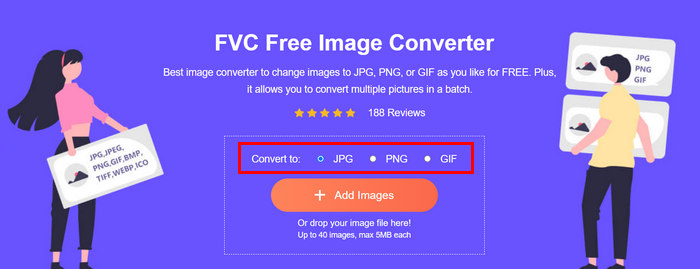
步骤 3:完成后,点击 Download All 按钮即可下载所有文件。
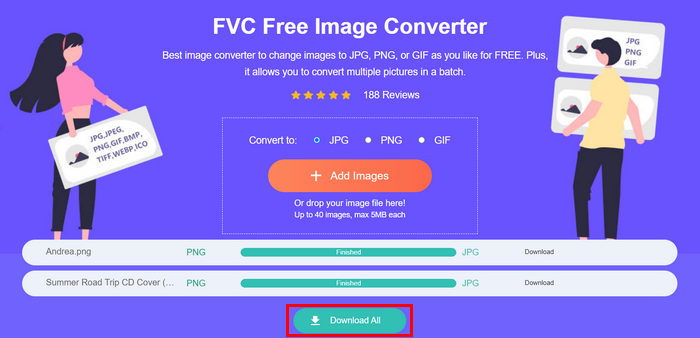 使用 FVC 免费图像转换器工具,可以保证您转换的照片现在已被压缩并且尺寸已缩小,非常适合电子邮件使用。
 第 3 部分。使用在线压缩工具压缩电子邮件照片
FVC Free Image Compressor 是一款免费的在线压缩工具,可大大简化为电子邮件压缩照片的过程。用户只需上传或导入图像文件,就可以让工具自动进行压缩。如果你担心画质损失,这款工具采用最佳优化策略和高级压缩算法,确保在为邮件压缩图片时尽可能保持图像质量。
此外,如果您需要批量压缩图像,此工具允许您同时压缩 40 张图像。最后,它支持各种流行的图像格式,如 JPEG、PNG、SVG 和动画 GIF。
步骤 1:在浏览器中打开其官方网站。
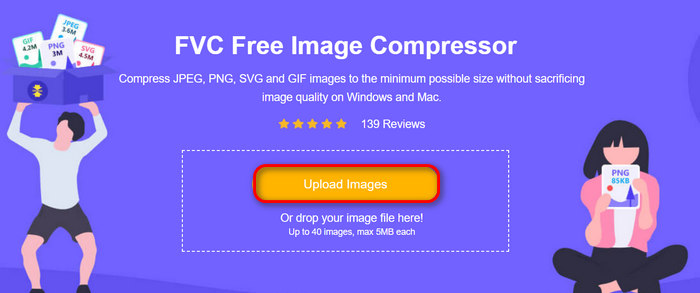
步骤 2:然后点击 Upload Images 以导入你想为网页(或邮件)压缩的图片。请注意,一旦你选中图片并点击打开,该工具会自动开始压缩你的照片。
步骤 3:图片压缩完成后,你可以查看压缩后的文件大小进行预览。最后,点击 Download All 将图片保存到本地。
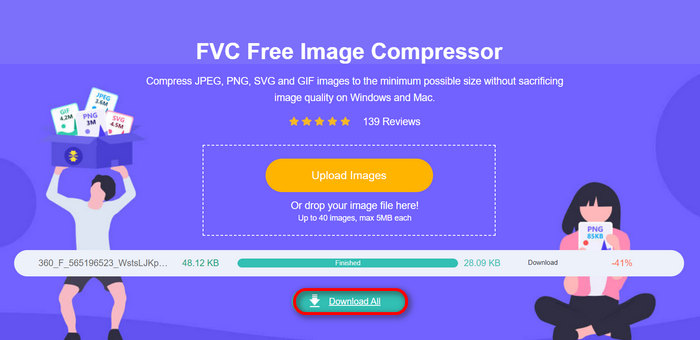
这种方法确实可以帮助您压缩照片以用于电子邮件,而无需经历复杂的步骤和订阅费用。此外,其用户友好且直观的界面使其成为任何级别用户的理想工具。因此,如果您想优化照片以用于电子邮件,请立即尝试此方法。
第 4 部分。将电子邮件的照片调整为指定大小
如果您想将电子邮件中的照片调整为指定大小,则可以尝试 IMGonline 工具。此图像压缩工具允许您将图像调整为您选择的大小。操作方法如下:
步骤 1:在其网站上,点击 Choose File 按钮,添加你想要压缩的照片。

步骤 2:然后设置 JPEG 文件压缩参数。根据需要,以 KB 或 MB 为单位输入目标大小。

步骤 3:在 Size Reducing in Megapixel 菜单中,选择你希望压缩照片的程度,或对照片压缩比例进行限制。
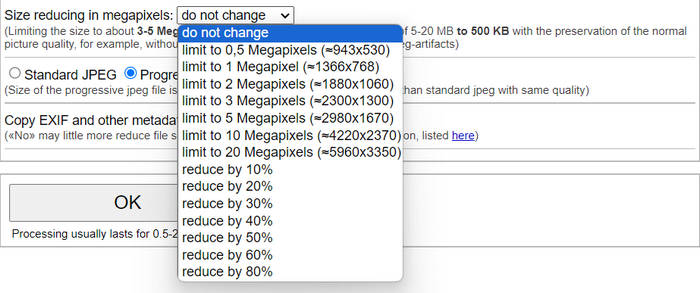
步骤 4:之后,在 Standard JPG 与 Progressive JPG 之间做出选择。

步骤 5:完成设置后,点击 OK 按钮即可。
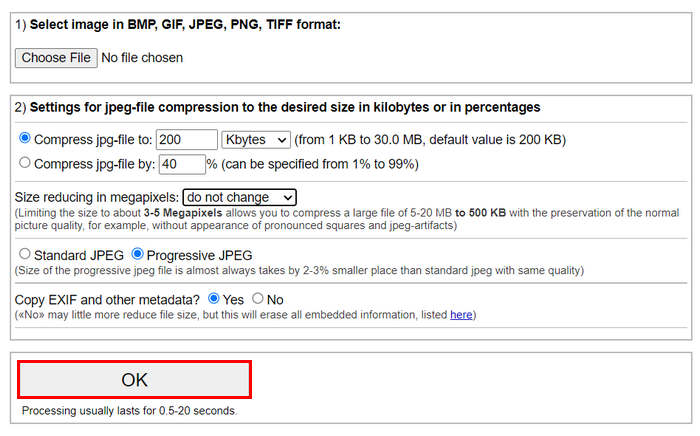
在选择标准 JPG 和渐进式 JPG 时,请记住渐进式 jpeg 文件的大小总是比具有相同质量的标准 jpeg 小 2-3%。
第 5 部分。有关压缩电子邮件照片的常见问题
我应该将照片调整为多大尺寸以用于电子邮件?
至于通过电子邮件发送照片的理想尺寸,虽然没有限制,但通常建议将照片大小调整为最大 1024x768 像素。此外,将图像大小保持在 1MB 以下有助于避免附件限制问题,并使收件人更容易下载和查看图像。
如何压缩 Gmail 的图片?
压缩适用于 Gmail 的图片有多种方式,其中最简单的方法之一是使用诸如 FVC 免费图片压缩工具等在线压缩工具。要使用该工具,你只需上传图像文件,它就会自动为你进行压缩。
哪种图像类型最适合电子邮件?
最适合用于电子邮件的图片格式是 JPEG 和 PNG。JPEG 因其良好的压缩率以及在文件大小与图像质量之间的平衡而被广泛采用,非常适合用于色彩丰富的照片和图片。PNG 则更适合需要透明背景,或包含文字、标志、边缘清晰的图形类图片,因为它在这些元素上能保持更高的品质,只是相较于 JPEG,文件体积通常会更大一些。
结论
掌握如何为电子邮件压缩照片非常重要,这样才能避免上传缓慢、邮件发送失败以及附件超出大小限制等问题。通过参考并实践本文中详尽介绍的各类方法,你可以确保自己的照片附件体积适中、发送快速、接收顺畅。
您还在等什么?立即使用这 3 种简单方法开始优化您的电子邮件附件。
-
 过度压缩的照片:以下是如何轻松修复它们
 想知道图像过度压缩时该怎么办?阅读本文,了解此图像问题发生的原因,并了解 2 种解决方法。
-
 将图像大小调整为 100KB:高效压缩的 3 种最佳方法
 正在寻找一种可以帮助您将图片大小调整为 100KB 的工具?阅读本文,了解 3 种方法,了解如何将图片缩小到所需的文件大小。
-
 如何在 Word 中压缩图片(Windows 和 Mac)
 想知道如何利用 Word 进行图像压缩?本指南将教您如何在 Word 中压缩图像以实现无缝压缩。
