


 视频转换大师
 屏幕录影大师
 视频修复
视频修复
 安全下载
安全下载您不能错过的在线和离线照片放大应用程序
调整图像尺寸存在一定风险,因为当你把图像放大时,可能会导致画质下降。有些人想通过调整照片尺寸来获得更好的画质。一张图片是由成千上万个像素组成的,当你试图放大它时,就可能因为尺寸增大、像素被放大到肉眼可见,从而破坏图像质量。所以,如果你想放大图片但又不想损失画质,那么下面这些工具就非常适合你。想了解最好的图片放大工具,请仔细阅读这篇文章。

第 1 部分。 最佳在线照片放大镜
使用在线照片放大机是最佳选择,因为您可以节省设备空间。只要您的互联网速度很快,在线工具就不需要在您的设备上下载任何内容。此外,大多数在线应用程序都可以免费访问。话虽如此,这里是在线排名前三的最佳图像调整器。
FVC 免费图像超分
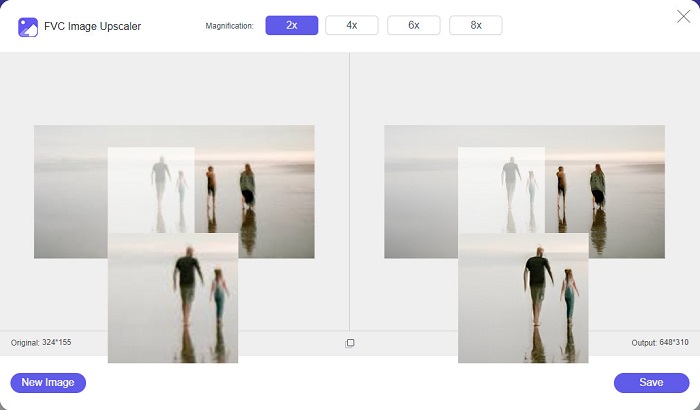
FVC Free Image Upscaler 是本篇中推荐的首个优秀在线图片缩放工具。这个在线应用完全免费且使用安全。你可以将图片放大 2 倍、4 倍、6 倍或 8 倍,而不会损失图像质量。此外,它几乎支持所有常见图片格式,如 PNG、JPG、JPEG 和 BMP。更出色的是,它采用 AI(人工智能)技术,可自动检测图片中的模糊区域并进行增强。并且,你可以在包括 Google、Firefox、Safari 在内的所有主流浏览器上访问它。FVC Free Image Upscaler 对新手非常友好,如果你是初学者,这款工具可能是你的最佳选择。
优点
- 它无损地放大您的图像。
- 它有一个快速的升级过程。
- 它允许您修复丢失的像素、颜色纹理等。
- 您可以在 Windows 或 Mac 设备上使用它。
缺点
- 它是一个依赖互联网的工具。
照片放大网
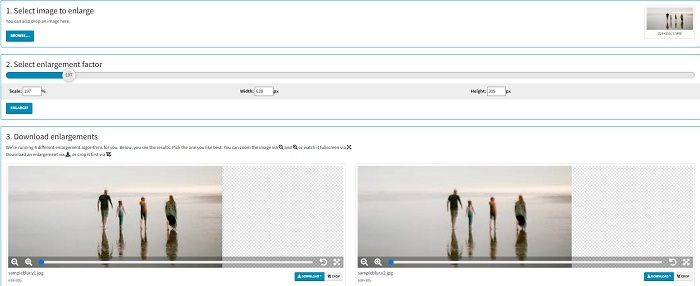
Photo Enlarger.com 是一款在线图片放大工具,由于界面简单,受到很多新手用户的喜爱。该在线图片缩放工具允许你通过选择放大倍数来放大图片。此外,你还可以调整图像的缩放比例以及宽度和高度的百分比。Photo Enlarger.com 会给出四个不同分辨率和放大倍数的结果,你也可以轻松选择并下载这些图片。
此外,您可以裁剪放大的图像输出以删除图像中不必要的部分。但是,它包含许多讨厌的广告,在您放大图像时可能会令人不安。尽管如此,它是放大图像的有效工具。
优点
- 它支持最常见的图像格式,如 PNG 和 JPG。
- 它是免费且安全的。
- 您可以在几乎所有网络浏览器上使用它,包括 Google 和 Firefox。
缺点
- 它依赖于互联网。
- 它有很多广告。
图片放大网
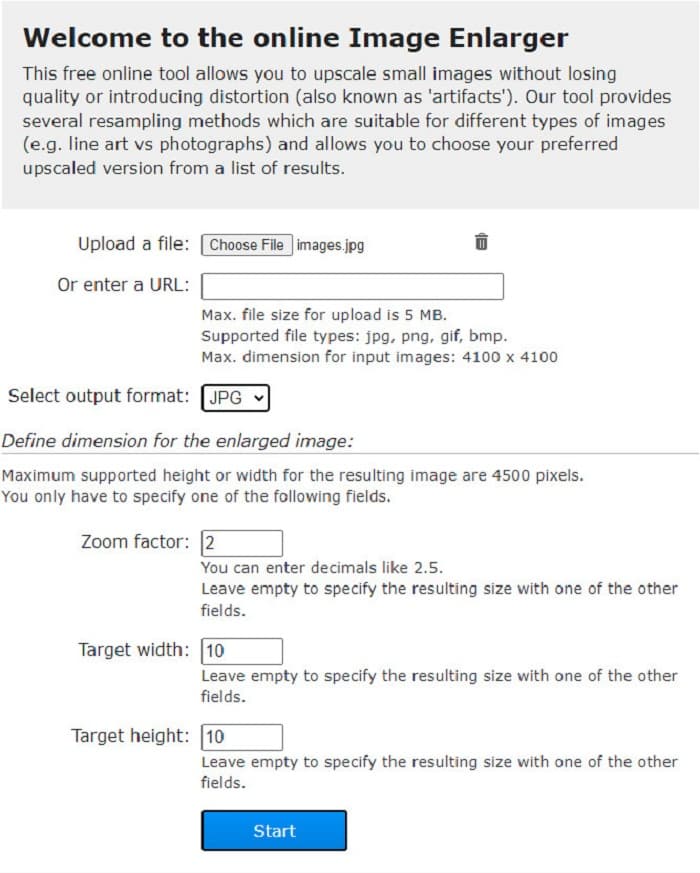
另一款可用于放大图片的免费在线图片扩展工具是 Image Enlarger.com。这个在线图片缩放工具允许你调节图片的缩放倍数、宽度和高度。此外,它拥有直观的用户界面,是一款非常易用的工具。同时,它支持大多数常见图片格式,如 PNG 和 JPG。Image Enlarger.com 支持的最大宽度和高度可达 4500 像素。此外,它还提供多种重采样(重取样)方法,以适配不同类型的图像。该在线工具的缺点是,当你的网络连接较慢时,放大图片会比较困难。
优点
- 它是一种使用安全的工具。
- 它可以免费使用。
缺点
- 它包含可能分散您注意力的广告。
- 您无法预览图像输出。
第 2 部分。 离线最佳照片放大镜
人们有时更喜欢使用图像放大软件而不是常规图像编辑器,因为当您使用标准图像编辑器放大图像时,它可能会破坏其质量。这就是为什么我们在市场上寻找最好的离线图像放大机并从中选出最好的。我们将展示的这些照片放大机可在 Windows 或 Mac 设备上下载。这里是前三名最强大的离线照片调整器,不用多说。
Smilla 放大镜
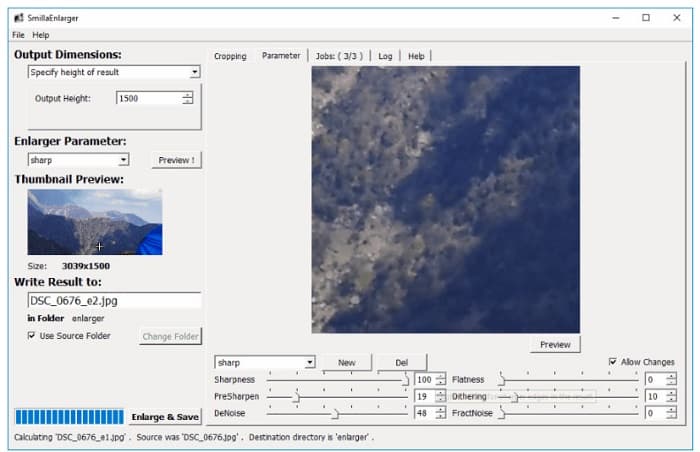
Smilla Enlarger 是一款离线图片放大软件,可以让你轻松调整图像尺寸。这款软件是免费的开源应用,可在 Windows 电脑上使用。此外,你可以利用其裁剪功能来放大它所支持的任意图片。你还可以设置图像尺寸和放大参数,以控制图片的锐度和噪点。所有这些选项都能帮助你获得想要的放大效果。
此外,它支持几乎所有的图像格式,例如 PNG、JPEG、JPG 和 WebP 格式。此外,您可以使用此工具查看输出,因为它使您能够预览图像。此应用程序的缺点是您必须先购买该应用程序,然后才能访问其其他独特功能。
优点
- 它是一个用户友好的工具。
- 它可以在 Windows 计算机上免费下载。
- 它具有增强配置文件以增强您的图像。
缺点
- 有时,它的上传过程很慢。
重新着色图像放大
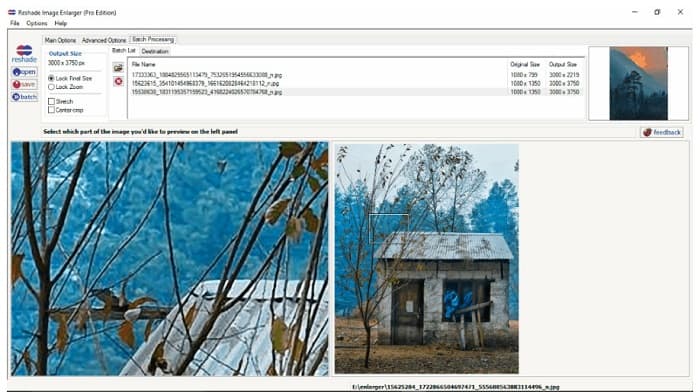
Reshade Image Enlarger 是一款可以下载到本地使用的图片放大应用,如果你想放大或增强图像,可以选择它。Reshade Image Enlarger 也是一款 AI 图片放大工具,因为它会利用 AI 技术自动增强你的图片。此外,这个工具可以通过自定义你所需要的宽度和高度来放大图像,并支持裁剪、降噪、减少伪影等功能。更出色的是,它的高级选项允许你控制输出图片的 JPEG 压缩、处理精度以及平滑渐变效果。若要使用其批量处理功能,请转到 Batch Processing(批处理)选项卡。
优点
- 您可以在所有媒体平台上下载它,包括 Windows 和 Mac。
- 它有一个批量放大过程。
- 它具有高级功能可供使用。
缺点
- 它有一个难以操作的用户界面。
更清晰的缩放
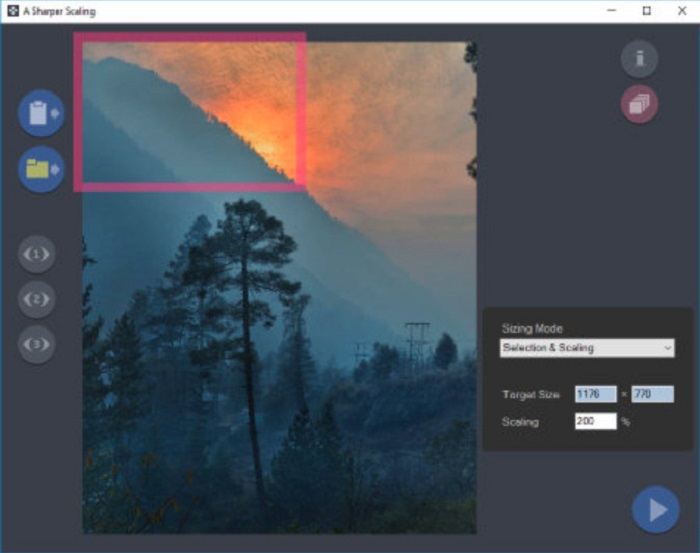
另一款值得一试的图片放大软件是 A Sharper Scaling。如果你想调整图片尺寸,这款桌面软件非常好用。尽管它比前文介绍的一些离线工具略微专业一些,但仍然可以输出很好的效果。此外,A Sharper Scaling 能放大图像的局部并进行锐化,而不会引入额外噪点,让你的图片看起来更清晰锐利。更令人印象深刻的是,它还支持快速批量放大图片而不损失画质。而且它的界面也很易用,对新手用户也很友好。因此,如果你想快速调整图片尺寸,A Sharper Scaling 一定能帮到你。
优点
- 您可以选择放大图像的模式。
- 它可以同时放大许多图像
- 它支持标准文件格式,如 PNG、JPG 和 JPEG。
缺点
- 它有一些编辑选项可供使用。
- 它的出口过程很慢。
克尼森成像仪
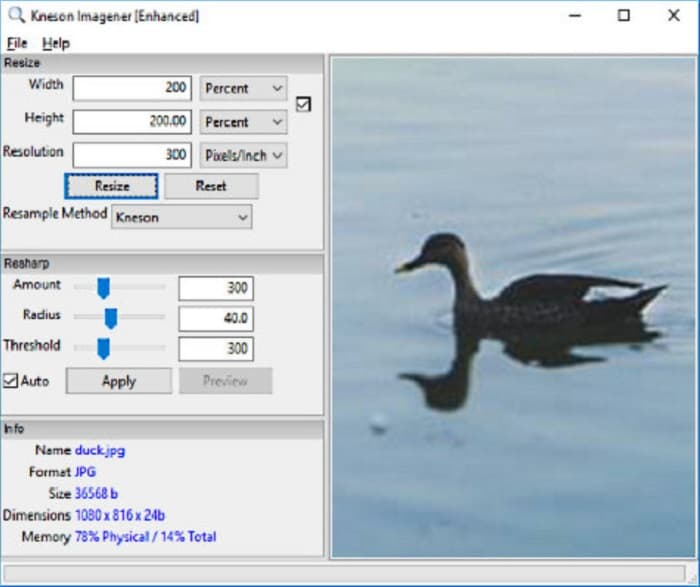
Kneson Imagener 也是 PC 上非常优秀的图片放大工具之一。这款出色的应用几乎可以在所有主流平台上免费下载。此外,它允许你按照百分比、像素、英寸或厘米来放大图片。你还可以通过更改图像分辨率来提升图像质量。如果你想减小图片尺寸以节省设备空间,也可以使用这款工具。
此外,以下是可用于放大图像的可用重采样方法:Normal、Bilinear、Bicubic、Kenson 和 Kenson Progressive。但请注意,如果您想下载此软件应用程序,您必须在其网站上注册一个有效的电子邮件 ID 以获取新闻通讯。之后,您将在您的电子邮件中获得一个下载链接,您可以在其中完整下载该应用程序。
优点
- 它具有裁剪功能。
- 您可以调整图像的锐化量、半径和阈值。
- 它有一个简单的用户界面。
缺点
- 您需要注册工作电子邮件才能下载它。
相关内容:
最佳图片缩放应用推荐(在线、离线、Android 与 iPhone)
第 3 部分。关于照片放大应用程序的常见问题解答
我可以减小图像的大小吗?
是的。通过调整图像的分辨率、像素和格式。图像的分辨率、像素和格式决定了它的大小。因此,如果要压缩图像的大小,请使用照片压缩器工具。
我可以在 Adobe Photoshop 中放大我的照片吗?
Adobe Photoshop 是许多专业人士的理想选择,因为您可以无损地放大图像并获得出色的质量。然而,很多人使用这个工具放大照片有困难,因为它的界面很难操作。
Kapwing Photo Resizer 是一款出色的放大图像应用程序吗?
Kapwing Photo Resizer 是许多人推荐的免费在线图像放大器。它也是一个很棒的应用程序,可以无损地增强或放大您的图像。
结论
以上这些图片放大工具都是你在互联网上能找到的表现非常出色的图像放大方案。同时,我们可以保证,上述应用都安全可靠,且文中的功能描述与实际情况相符。但如果你更偏好免费且在线的工具,我们推荐使用最佳在线图片放大器——FVC Free Image Upscaler。
-
 线上线下老照片修复【简单步骤】
 想要恢复旧照片?使用这些工具,您将了解旧照片恢复过程。阅读这篇文章以了解最直接的方法。
-
 如何在线和在 Adobe Photoshop 上修复图片质量
 如果您的图像质量较低,则需要修复照片的分辨率。如果您想了解如何修复图片质量,请完整阅读本文。
-
 您必须使用的所有 Web 浏览器的 7 大像素增强器
 如果你想知道最好的像素增强器,你最好看看这篇文章。本文列出了适用于所有 Web 浏览器的七种最佳照片像素增强器。
