视频转换大师 大盒

多合一视频工具箱,能够以超快的速度将视频/音频转换为 1000 多种格式。

免费下载

Login Security安全下载

免费下载

Login Security安全下载

如何在 Lightroom Mobile 中删除水印的简单方法

Putting a watermark on your photo is great, especially if you want to secure your photo. However, sometimes you only want to keep the photo, but the watermarks become annoying. This post will show you several applications with simple methods you can use to remove watermarks from your images. Also, you will learn how to remove watermarks in Lightroom mobile. If you want to learn this kind of discussion, read this guidepost and learn more important details.

在 Lightroom 中从照片中删除水印

第 1 部分:如何在导出前禁用 Lightroom 移动应用程序的水印功能

Lightroom mobile 可以可靠地从图像中删除令人不安的对象,例如水印、徽标、签名等。您只需轻点几下即可将其删除。这个用户友好的软件是为每一位用户设计的,尤其是非专业用户。如果您想发现在 Lightroom 移动应用程序中删除水印的最简单方法,请按以下步骤操作。请遵循以下简单指南。

Step 1: Download and install the Lightroom application on your mobile phone. Launch it and open the timeline.

Lightroom 移动应用程序

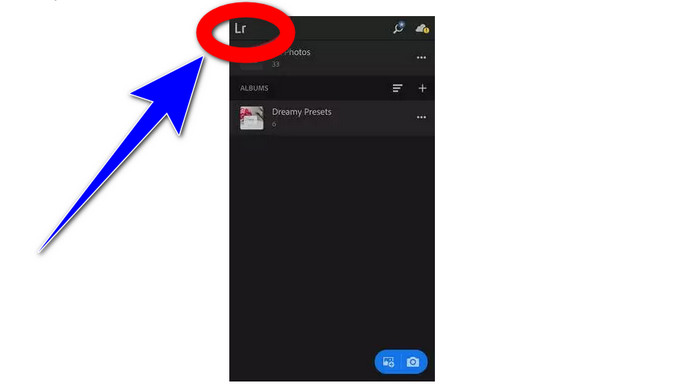
Step 2: To the upper-left corner of your screen, tap the Lr icon.

点击 Lr 图标

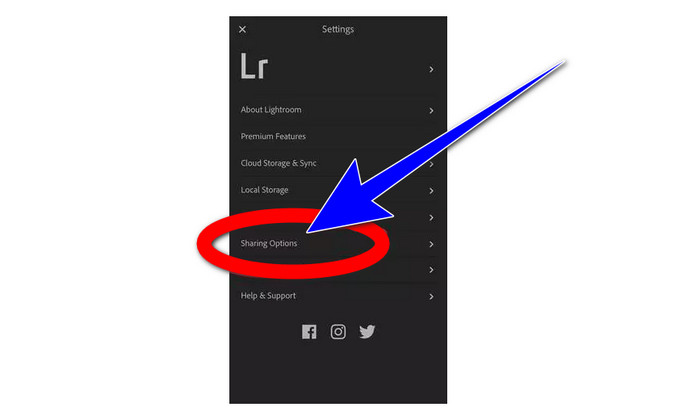
Step 3: For the next step, proceed to the sharing options, and click it.

单击共享选项

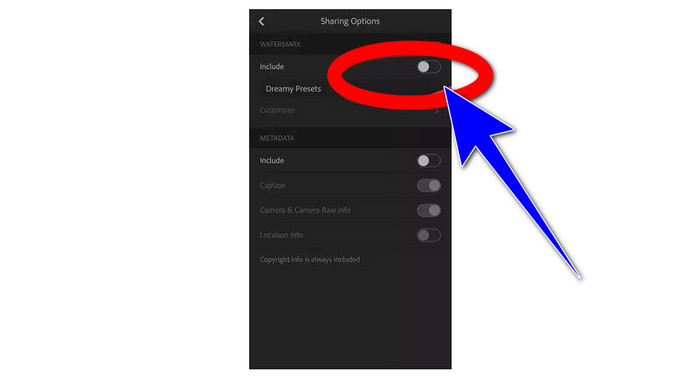
Step 4: After clicking the sharing options, turn off the Dreamy Prest option to turn off the watermark. Click this option and turn it off.

关闭水印

第 2 部分:如何在没有 lightroom 的情况下从照片中删除水印

Aside from Lightroom mobile, you can remove watermarks from your images using FVC Free Watermark Remover. It is one of the great watermark removers you can use on the internet. It may also remove other annoying elements from your photos, such as logos, captions, stickers, stamps, signatures, and more, besides watermarks. You can also save your photo in the same format as the original after removing the watermark. Various remover tools, including Lasso, Brush, and Polygonal, make removing watermarks simple. Also, this watermark remover offers a Cropping tool, which you can use if the watermark area is at the edge or corner of your photo. In addition to that, this watermark remover is absolutely free. You don’t need to purchase a subscription, like other remover tools.

此外,它具有简单的界面和去除水印的程序,适合初学者。最后,您的文件保证隐私,您是唯一可以查看您的作品的人。请按照以下详细步骤使用 FVC Free Watermark Remover 从图像中删除水印。

Step 1: Visit the website of FVC Free Watermark Remover. Upload your photo by clicking the Upload Image button.

免费在线水印去除器 Lightroom

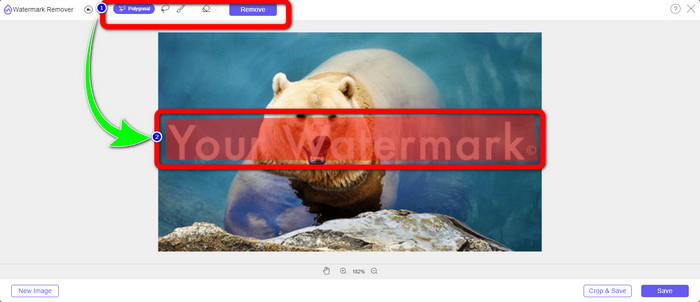
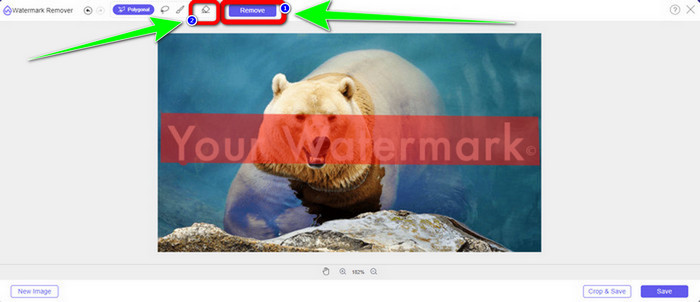
Step 2: After uploading your photo, highlight the watermarks using watermark remover tools. As you can see, the watermark area is in the middle of the photo, which means you can’t use the cropping tool. This way, we will use the Polygonal tool, one of the watermark-removing tools.

水印去除工具亮点

Step 3: If you want to re-select the highlighting area, use the Erase button. If you are done highlighting the watermarks from your photo, click the Remove button and wait for the removal process.

单击删除按钮 Lightroom

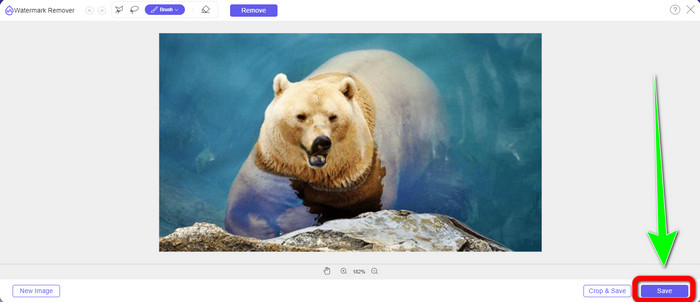
Step 4: When you have already removed the watermarks, you can click the Save button and download your photo on your desktop.

单击保存按钮 Lightroom

使用 WatermarkRemover.io

If you want to use another online tool to remove watermarks from your images, you can use WatermarkRemover.io. This online software is capable of removing any unnecessary objects from your photos, such as logos, texts, stamps, and more. Also, you can eliminate multiple watermarks from your photos. It also has a straightforward interface and basic ways suitable for new users. This online tool supports different image formats, like PNG, JPG, WEBP, and JPEG. However, it has limitations when using the free version. You can only upload up to 50 images, and it only has 25Gb storage. You must purchase a subscription if you want to upload more images and get more storage, which is a little pricey. If you want to erase disturbing elements from your images using WatermarkRemover.io, follow the simple steps below.

Step 1: Go to the website of WatermarRemover.io. Click the Upload Image button to add your photo with a watermark you want to remove.

去除水印 IO

Step 2: After adding your photo, it will automatically remove the watermarks. Click the Download Image button to save the photo on your desktop.

下载图像按钮 保存

在线使用Apowersoft去水印

Apowersoft Video Watermark Remover Online is one of the useful tools if you're looking for another online solution to remove watermarks from your photos. You may simply erase watermarks from your photos with this online tool. Additionally, it is a straightforward and user-friendly application, making it suitable for beginners who wish to get rid of watermarks. Additionally, Apowersoft excels at more than just erasing watermarks from photos. Additionally, you may remove the watermarks from your videos, which is reasonably practical for users. Since it is an online program, you don't need to install it on your computer. Your file will be automatically deleted after you remove and save your output, so you don’t have to worry about your file. However, You must have a fast internet connection if you want this tool to perform well. Also, the removal process takes too long, which is time-consuming for users. Follow the steps below to remove watermarks using Apowersoft Online Watermark Remover.

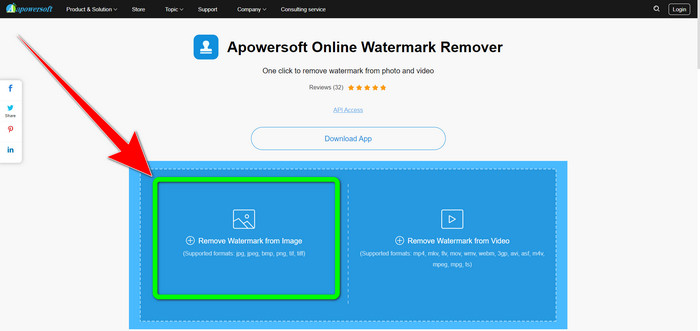
Step 1: Go to the website of Apowersoft Online Video Watermark Remover. Click the Remove Watermark from Image button to upload your photo with a watermark.

Apowersoft 去水印

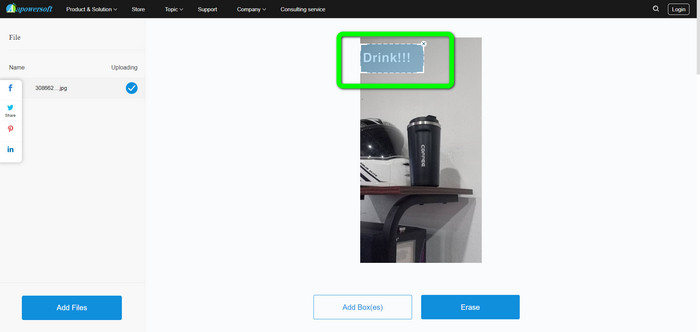
Step 2: You will see a square-shaped element after uploading your photo. Drag it to cover the watermarks from your image.

覆盖水印

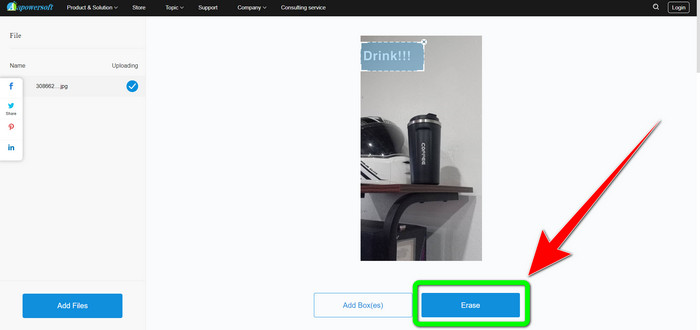
Step 3: When you are done covering the watermark, click the Erase button to remove it. Wait for the removal process and download your final photo without a watermark.

擦除水印

第 3 部分:有关在 Lightroom 中从照片中删除水印的常见问题解答

如何去除图片边缘的水印?

If the watermark is in the edge or corner of your picture, you can easily remove it using the cropping tool. You can see the cropping tool on the upper part toolbar of your photo. But if you don’t want to cut any part of your photo, you can use a watermark remover application like FVC Free Watermark Remover. This tool can help remove irritating elements from your photos, such as watermarks, logos, signatures, and more.

水印有版权吗?

有关其他信息,水印本身不是版权。水印可能会提醒人们不要窃取您的照片,因为您的作品在制作时已经受到版权保护。

我可以从屏幕截图中删除水印吗?

是的你可以。使用 FVC Free Watermark Remover、WatermarkRemover.io、Apowersoft Online Watermark Remover、Inpaint 等水印去除工具可以轻松去除屏幕截图中的水印。

徽标和水印有什么区别?

水印是徽标的更流线型、半透明版本,这是它们的主要区别。它通常放置在您的图像上,以防止其他人将其用作自己的图像,并且通常只有一种颜色,白色或黑色。

Lightroom中有橡皮擦吗?

就在这里。此选项使我们能够更正和删除我们无意中涂抹的笔触。您只需单击“橡皮擦”即可使用它。就像使用画笔工具一样,通常会检查要删除的区域。

结论

This article shows you the best way to remove watermarks in Lightroom mobile. In addition, we introduced various methods you can try to remove watermarks aside from using the Lightroom application. If you prefer simple ways to instantly remove watermarks and any unnecessary elements from your photos, use FVC Free Watermark Remover.

优秀的

评分:4.9 / 5(基于 330 票)