


 视频转换大师
 屏幕录影大师
 视频修复
视频修复
 安全下载
安全下载如何使用 3 种有效方法去除 Lunapic 中的水印 [免费使用]
对于初学者来说,如果要选择一款图像编辑器,可以在网页上使用 Lunapic 来编辑图片。事实上,这个工具可以利用其中的两个实用功能对图片中的水印进行添加或去除。下面我们会具体说明可以对图片使用的技巧,并介绍如何去除水印。请耐心阅读本文,了解下面步骤中讲到的如何在 Lunapic 中去除水印。

第 1 部分。您必须知道的使用 Lunapic 从图像中去除水印的 2 种技术
Lunapic 使用两种不同的方式去除图像上的水印;裁剪和对象删除。但是哪种方式更有效,哪种方式效果较差?在继续执行这些步骤之前,让我们先讨论它们。
第一种方法。裁剪图像上的水印
它提供的裁剪功能并没有什么特别之处,这意味着它按照名称所指的方式裁剪图像。如果水印在侧面,您可以使用此功能。裁剪水印并保存没有水印的图像部分。如果您对此感兴趣,可以按照我们添加的步骤进行操作。
步骤 1. 在浏览器中搜索并打开 Lunapic 官方网站,点击 Upload(上传),在弹出的文件夹中选择图片,然后点击Open(打开)上传。
步骤 2. 点击顶部菜单中的 Edit(编辑),然后选择 Crop Image(裁剪图片) 来使用其裁剪功能。
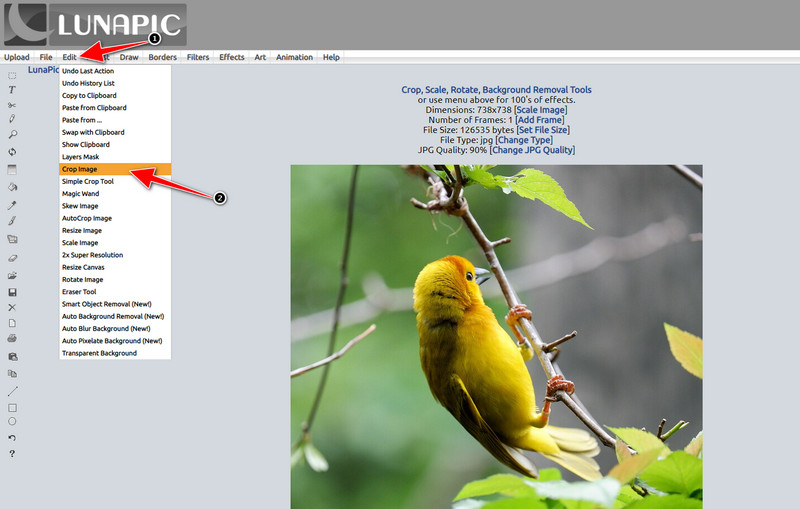
步骤 3. 点击工具栏上的下拉按钮,从中选择你想使用的裁剪工具。调整裁剪区域,并确保水印没有被包含在裁剪框内。
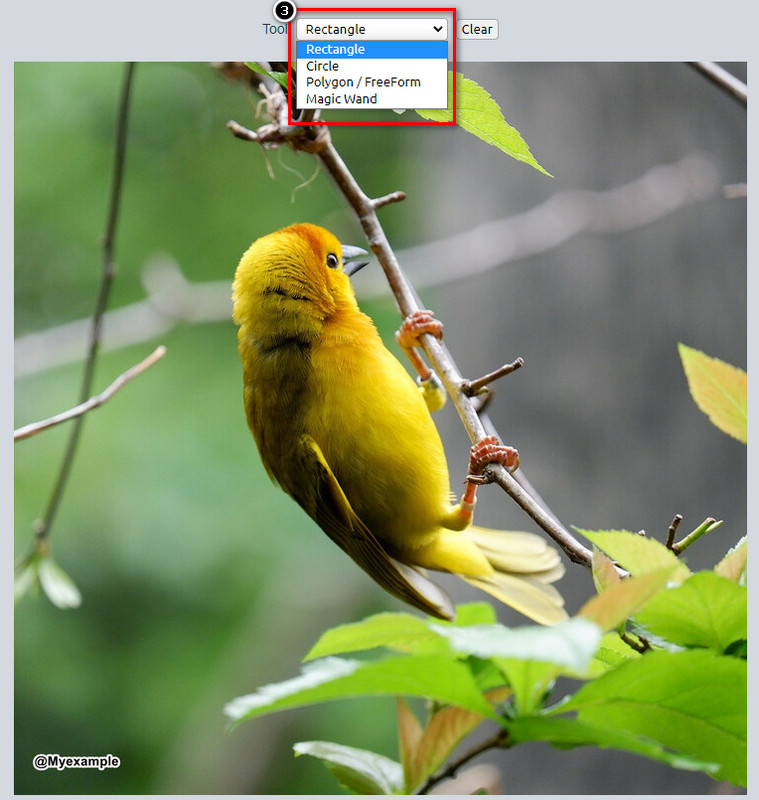
步骤 4. 点击 Crop(裁剪) 按钮后,你会看到导出后的效果预览。如果对结果满意,点击 Save(保存) 将裁剪后的图片下载到本地。
第二种方法。使用对象去除去除图像上的水印
与裁剪不同,对象移除更多的是在不改变图像尺寸的情况下移除图像上的对象。在此功能中,您需要突出显示水印;然后,您可以使用该工具将其删除。是不是很神奇?如果您对使用它感到惊讶,下面的步骤将提供使用 Lunapic 清除水印的完整方法。
步骤 1. 重复在裁剪功能中第一步的操作,再次导入带有水印的图片。
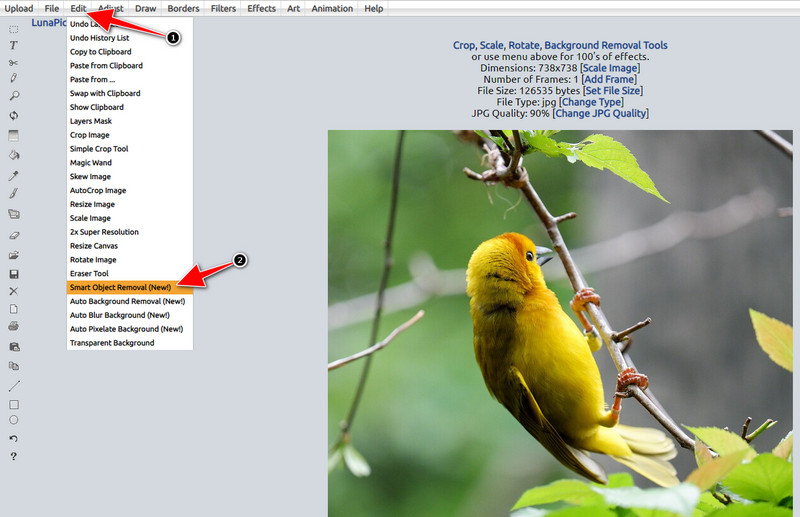
步骤 2. 打开 Edit(编辑),但这一次选择 Smart Object Removal(智能对象移除),使用该功能来去除水印。
步骤 3. 使用提供的画笔工具涂抹并选中水印区域;你也可以根据需要调整画笔大小。
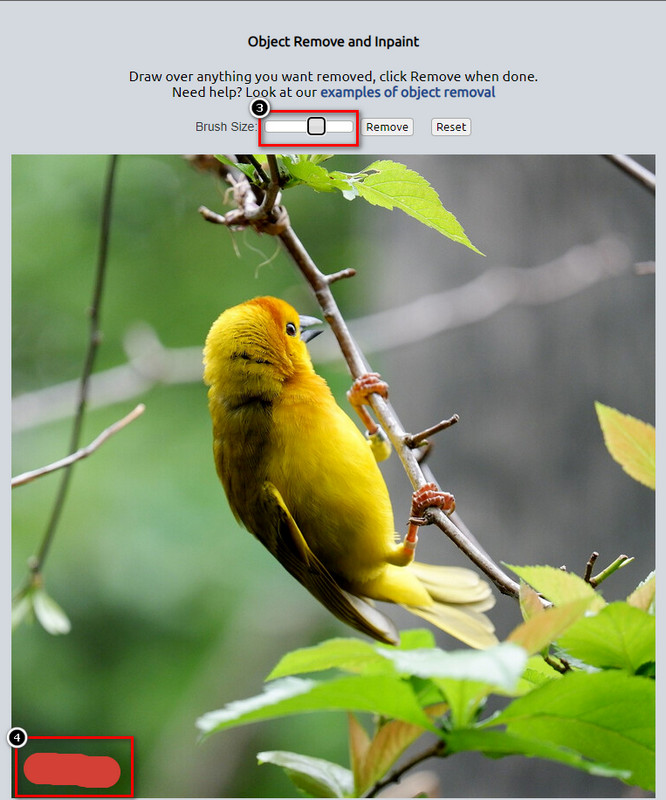
步骤 4. 点击 Remove(移除) 按钮,就可以擦除水印,并在导出前查看图片效果。
步骤 5. 点击 Save(保存),将处理完成的图片下载到本地。
第 2 部分。 Lunapic 的最佳替代方案,一键免费删除水印
如果你需要 Lunapic 的水印去除替代方案,可以使用 FVC Free Watermark Remover。与 Lunapic 类似,这款工具也可以直接在网页上使用,无需注册、下载安装,也没有网页广告。你可以不限次数地使用该在线工具,而且自上线以来,其去除效果一直表现出色,目前已经帮助了数以百万计的用户。如果你需要从图片中移除对象,可以按照下面的步骤进行操作。
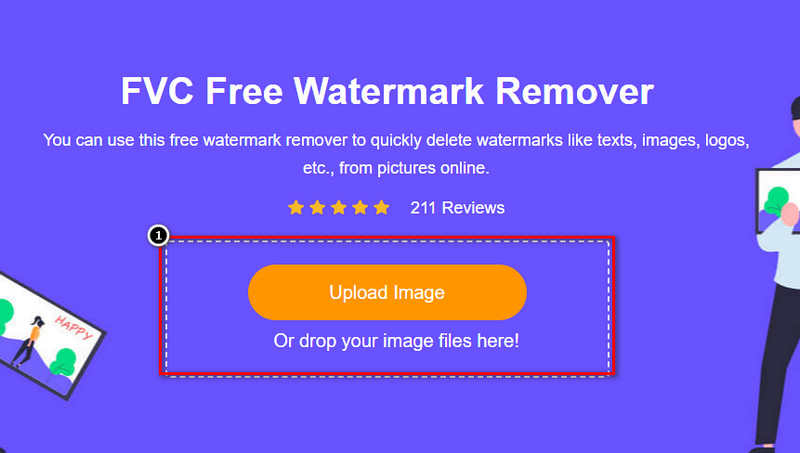
步骤 1. 点击此链接打开其官方网站,它会在你当前使用的浏览器中直接打开一个新标签页,你就能看到这个水印去除工具的界面。
步骤 2. 点击 Upload Photo(上传照片),即可从本地导入带有水印或其他想要移除物体的图片。
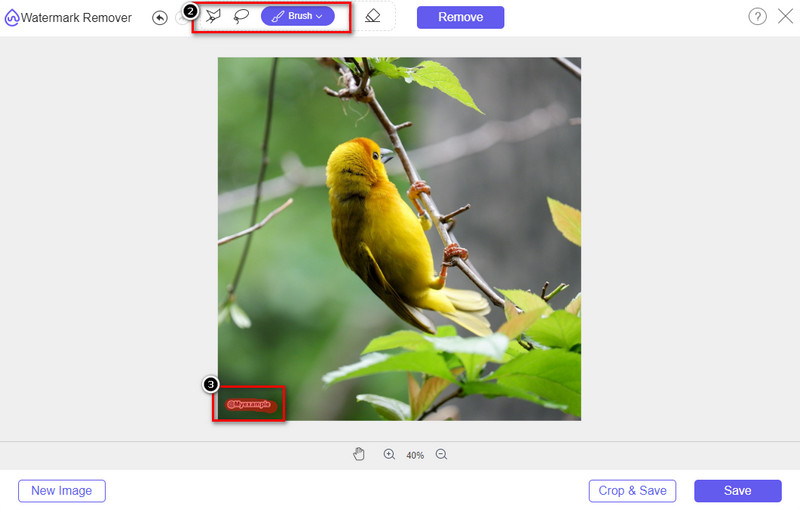
步骤 3. 工具有三种不同选区方式可用于圈出图片中的水印。任选一种,然后用该工具在图片上标记出水印区域。
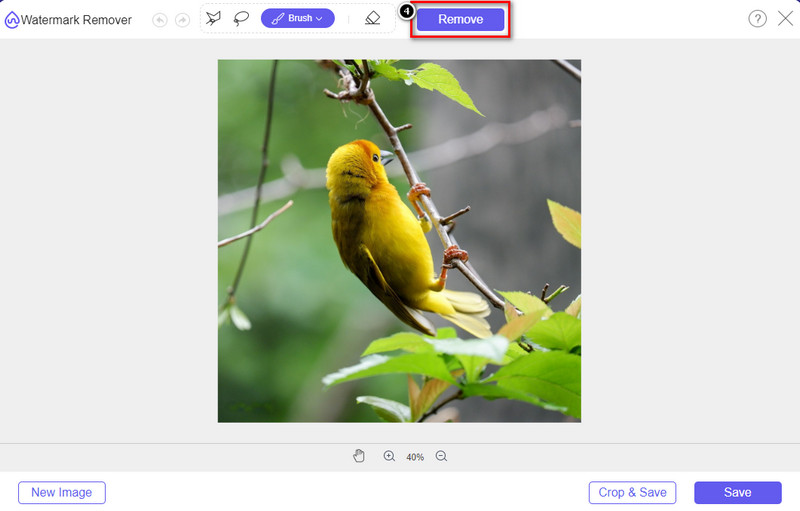
步骤 4. 点击 Remove(移除) 按钮,删除在第 3 步中标记的对象。所有被标记的内容都会从图片中移除。
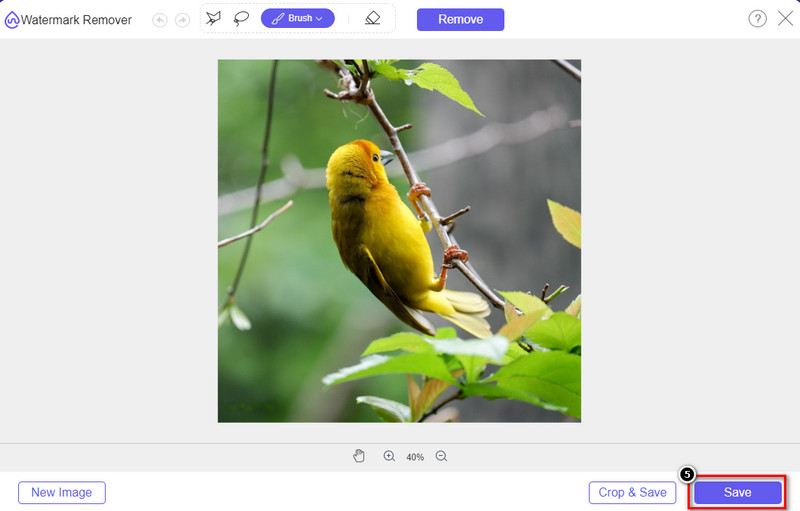
步骤 5. 点击 Save(保存) 按钮下载处理完成的图片,然后在弹出的文件夹中找到这张图片。
延伸阅读:
第 3 部分。关于如何在 Lunapic 中删除水印的常见问题解答
Lunapic 会在编辑后的图像上添加水印吗?
尽管此在线编辑器可以在网络上免费访问,但它不会在您在此处编辑的图像上嵌入产品水印。您无需订阅即可使用它提供的高级工具。享受无任何限制地使用该工具!访问其官方网站以查看和使用可用于编辑图像的工具。
我可以在 Lunapic 上添加水印吗?
当然,您可以将您的区别添加到您创建的图像中,以使其他人难以复制图像。通过打开网站,点击上传添加您要编辑的图片,点击工具栏左侧的T图标,将您要添加的文字水印添加到您上传的图片中。
Lunapic 有背景去除器吗?
是的,Lunapic 支持一种人工智能技术,可以检测图像的背景并立即有效地将其移除。该功能的名称是自动背景去除。打开工具,点击编辑;您将看到我们正在谈论的可以帮助您删除图像背景的功能。此外,如果您想使用它,它还支持添加模糊背景。
Lunapic 有哪些可用的效果?
Lunapic 在效果方面支持各种选择,您可以使用这些选择添加图像、图像、渐变、蒙版、卡通、故障等等,您可以将其应用于图像。
结论
通过我们在本文中添加的教程,使用 Lunapic 从图像中删除水印非常容易。您可以按照我们添加到此博客的步骤来裁剪或删除您保存在本地驱动器上的图像上的水印。即使您没有足够的去除水印的经验,您也可以立即掌握该工具。但是,如果您想体验自动去除水印的新高度,那么您可以使用我们在本文中添加的替代方案。通过单击其名称访问其官方网站,看看我们错过了该工具的哪些功能。如果您喜欢阅读此博客,请给我们评分 5 星。
-
 轻松删除 Picsart 过滤器水印的提示和技巧
 要删除 Picsart 过滤器水印,您需要一个工具。继续阅读本文以获得水印去除剂。
-
 如何在线将低分辨率图像转换为高分辨率图像
 如果您想学习如何在线将低分辨率图像转换为高分辨率图像,那么本文适合您。完整阅读以了解如何操作。
-
 如何去除防拍水印的简单方法
 按照这些简单的方法删除防拍水印。使用这些神奇的水印去除剂轻松从图像中去除防拍水印。
