


 视频转换大师
 屏幕录影大师
 视频修复
视频修复2 转换器用于在不降低质量的情况下将 DV 转换为 MOV
DV 文件是每台摄像机上最常见的文件类型,因为它能存储最适合编辑和观看的视频。你也许会想,是否可以在 iMovie 中使用这种格式进行编辑,或者在 QuickTime 中播放。但你无法直接使用这种原始文件,因为它是不受支持且已经过时的版本。不过无需担心,你可以在 Mac 上将 DV 文件转换为 MOV 等受支持的格式。继续阅读本文,我们将深入了解为什么你需要在 Mac 上将 DV 转换为 MOV。

第 1 部分。使用强大的离线转换器在 Mac 上将 DV 文件转换为 MOV
FVC Video Converter Ultimate 是一款出色的工具,你可以用它在 Mac 和 PC 上将 DV 转换为 MOV。毫无疑问,这款转换器可以轻松帮助你将文件转换为新格式,毫不费力。此外,一些用户需要快速将文件转换为新格式,而这款工具正好可以帮助你高效完成。除了转换功能之外,你还可以在其中进行裁剪、合并、剪切等多种编辑操作。所以,如果你想体验这款终极工具的转换能力,请按照以下演示步骤来操作。
如何使用实用的 FVC Video Converter Ultimate 将 DV 文件转换为 MOV:
步骤 1. 在你的 Mac 或 PC 上下载这款 DV 转换器,按照安装流程进行操作,然后点击“Start Now”启动软件。
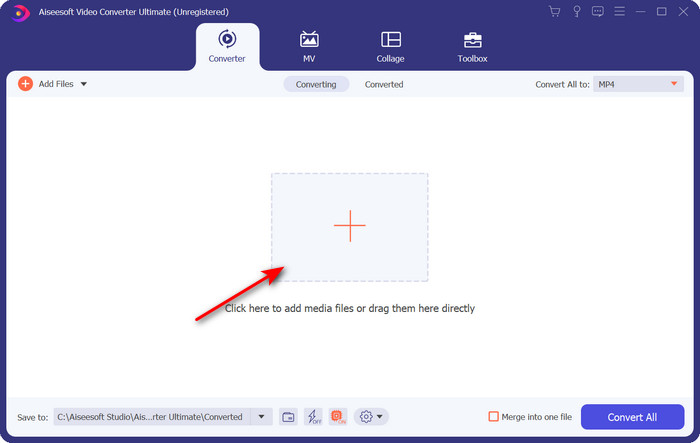
步骤 2. 启动后,点击“+”按钮上传你想转换的文件;弹出文件夹窗口后,找到该文件,然后点击Open。
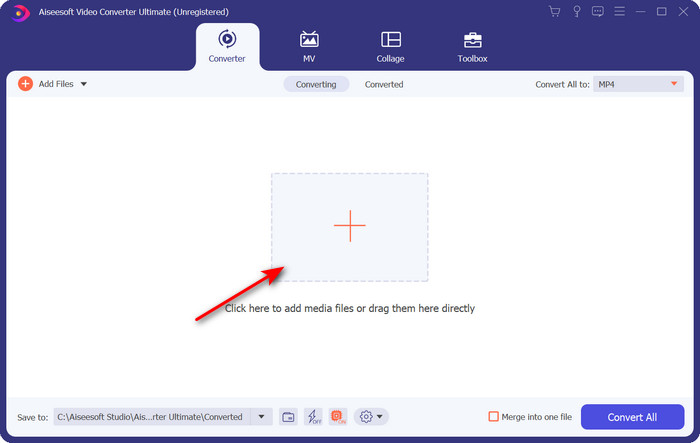
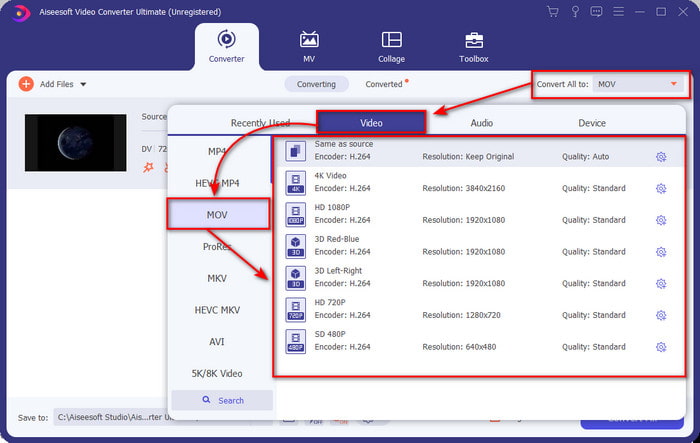
步骤 3. 要选择格式,点击下拉按钮,选择MOV 格式以及你希望的分辨率。输出的质量可以设置为较高,但文件大小会比原始文件大很多。
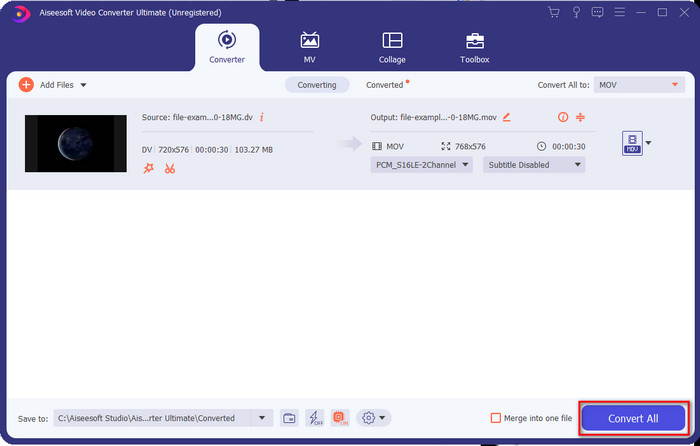
步骤 4. 点击Convert All 开始将 DV 转换为 MOV,并一次性下载转换后的文件。
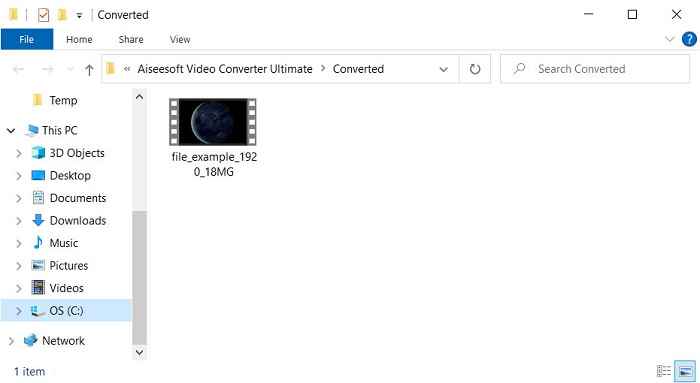
步骤 5. 转换后文件的位置会显示出来;此时你就可以在 Mac 上放心观看或编辑该文件,而不用担心无法打开。
第 2 部分。使用在线转换器免费将 DV 转换为 MOV
想在浏览器中转换视频?那你就必须使用 FVC Free Video Converter Online 来免费将 DV 转换为 MOV。你还可以像在 FVC Video Converter Ultimate 中一样,除了转换功能之外,调整分辨率、比特率和帧率。尽管这是一个免费在线工具,但它的功能和上面的离线转换器仍有明显差距。不过,如果你只是想免费进行简单的转换,这会是你首选的在线转换器。长话短说,下面就来看看如何使用它的步骤。
如何使用有用的 FVC 免费在线视频转换器将 DV 文件转换为 MOV;” /]步骤 1. 要打开这款在线工具,请点击此链接,然后会打开一个新的浏览器页面。
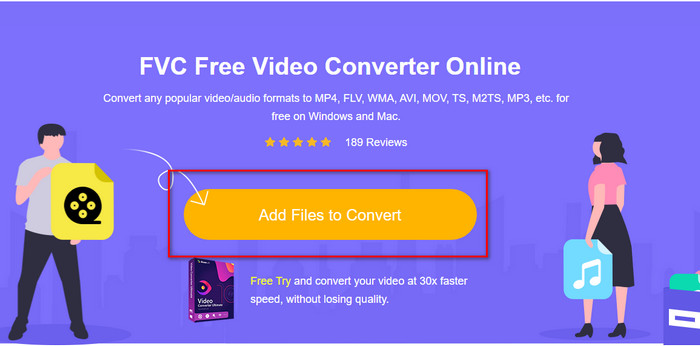
步骤 2. 点击Add Files to Convert 以运行在线转换器,然后在弹出的文件夹中选择你想要转换的 .dv 文件。
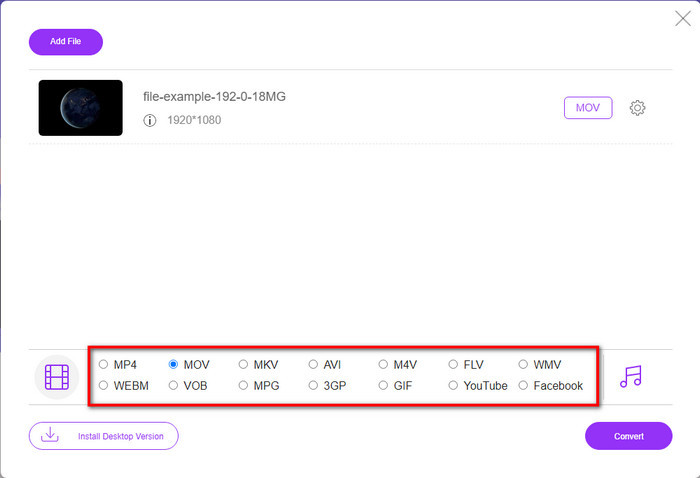
步骤 3. 在下方列表中选取MOV 格式或其他你想要的格式。
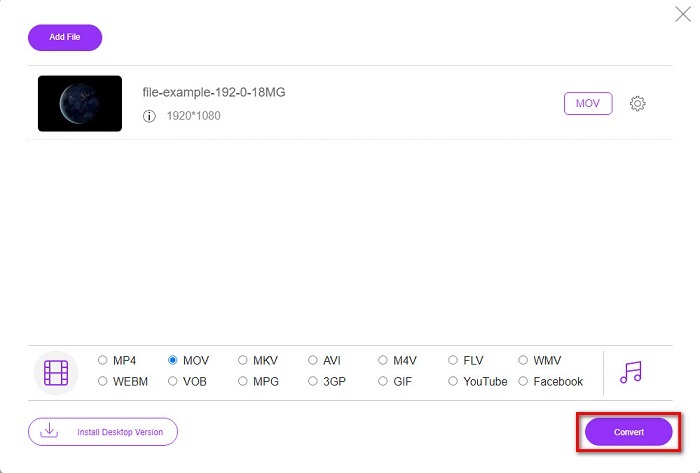
步骤 4. 点击Convert 开始转换,并等待过程完成。
步骤 5. 完成后,屏幕上会弹出一个包含已转换文件的新文件夹。
第 3 部分。 DV 与 MOV
DV 格式非常适合保存视频和音频,因为它使用与 MPEG 相同的算法。但这与 MPEG 有很大不同,因为它不依赖于压缩先前的帧速率。因此,它不依赖于帧内压缩,而是使用独立压缩来更快地编辑播放。因此,DV 文件于 1995 年末作为所有摄像机的标准视频格式推出。但是今天,我们将看到更少的基于磁带的摄像机,因为我们现在使用硬盘驱动器、SSD 和存储卡来存储记录。
另一方面,MOV 格式由 Apple 开发,用于存储可在所有编辑器中使用或与媒体播放器一起播放的高质量媒体文件。这种格式获得了很多尊重,因为它可以包含集体媒体元素,并且每个元素都可以收集视频、音频和文本的数据。与 DV 相同,此格式提供的压缩基于算法。
最重要的是,你不能直接在 Mac 应用程序上上传 DV 文件,因为这种格式已经过时了。现在有比 .dv 更好的格式。但如果您的视频是这种格式,您可以使用 DV 到 MOV 转换器并将文件转换为在 Quicktime 上播放或在 iMovie 上编辑。
第 4 部分。 有关 DV 到 MOV 转换的常见问题解答
为什么我不能在 Mac 上播放 DV 文件?
在这种情况下,许多原因可能会有所不同,尤其是 DV 文件,它们与几乎所有操作系统的兼容性都较差。但是我们列出了两个可能的原因您不能,第一个是您使用的媒体播放器不支持这种格式。由于兼容性原因及其转换解决方案,这是大多数格式中最常见的问题。另一个是您的 .dv 文件可能已损坏或损坏。由于它已损坏或损坏,文件将无法播放。
DV 文件仍然是理想的格式吗?
以前,它是录制和编辑媒体文件的理想选择,但今天这种格式并不是最好的。主要原因是有比.dv更好的格式,另一个是兼容性的原因。
如何压缩DV文件?
虽然 DV 文件已经经过压缩,但如果视频时长过长,其文件体积(MB)仍然会很大。因此,为了更方便传输并节省空间,对文件进行压缩是必要的。若想了解如何压缩你的 DV 文件或其他媒体文件,请阅读这篇文章,学习如何在不损失质量的情况下压缩视频。
结论
简要回顾一下,DV 文件曾经是录制音视频的最佳格式之一,但如今已经有了更先进的继任者。此外,这种格式的兼容性远不如 MOV,尤其是在 Mac 上进行视频编辑或播放时。由于这种格式已经过时,你应当考虑借助上述工具在线或离线进行转换。总体而言,FVC Free Video Converter Online 是我们在网上发现的最佳免费工具之一。除了免费之外,这款在线工具的表现也明显优于许多同类网页工具。当然,我们也必须为这款出色的转换器——FVC Video Converter Ultimate——留出一席之地。它无需多作介绍,就能毫无疑问地帮助你解决各种转换难题。现在,选择哪一款更适合你,就完全取决于你自己了。
-
 如何使用简单的步骤和工具将 AVI 转换为 MOV
 您想知道如何将 AVI 转换为可播放的 MOV 吗?您必须按照本文了解如何操作以及成功转换的提示。
-
 免费将 DivX 转换为 MOV 的 4 种方法 [在线和离线]
 您是否在为 DivX 的局限性而苦恼,或者您是否没有媒体播放器来访问这种格式的视频?如果要将其转换为 MOV 格式,请继续阅读本文以填补空白。
-
 免费 M4V 到 MOV 转换器 – 如何将 M4V 转换为 MOV
 如果您的媒体播放器'不支持 M4V,您是否曾经为在 iPhone 上看电影而苦恼?本文的主要主题是将其转换为 MOV 视频文件。
